


About Sword Smash
The hardest part of Sword Smash is not the sword. It is the mouse. The game hides your pointer the moment it starts, so the first thing most people do, clicking on the training dummy right in front of them, turns the camera and nothing else. We spent two full sessions of about ten minutes each staring at the same task, Hit the dummy 0/5, before we noticed the small label in the bottom right corner: ALT show the mouse.
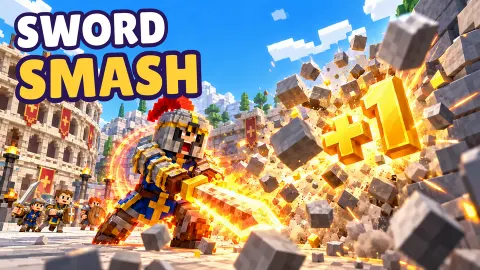
Once you know that, the game opens up. Sword Smash is a strength simulator, a kind of clicker that has become popular on Roblox: every swing makes you a little stronger, stronger players break bigger things, and breaking things pays for better gear. Here it is built from blocks in a snowy town square outside a Roman colosseum, with pumpkin-headed dummies in purple capes lined up as targets.
It is a new release from CDS Games, the studio behind the keyboard runner Escape the Giant Cat. It came out in October 2026, in English and Spanish.
We got through the first of seven tasks and stood at the walls for the second. What follows about the opening is what we saw. Anything about weapons, worlds or the Arena comes from the game's own description, and we say so when it does.
The dummy row is the whole game in miniature
Lined up beside the colosseum are four dummies with a number over each one, from x1 to x10. That number is a multiplier on what each hit earns you.
The catch is printed in red underneath each one. The x2 needs 400 strength, the x5 needs 6K, and the x10 needs 60K.
That row explains the shape of Sword Smash before you have played a minute of it. You start at the bottom, where hits are cheap and slow. Each step up asks for many times more strength than the last, which is the usual curve of an incremental game: progress feels quick at first, then each new target asks for patience. The walls work the same way. You need strength for one to break, and the dummies are where that strength comes from.
The game puts it all in one square rather than behind menus. The dummies, the gate marked STAGE 1, the ARENA with its ENTER sign and the reward chest are all a few steps apart, so you can see from the start what you are working toward.
Who else is in the square
The top left corner counts the people around you, 6 players here in most of our session. Characters with names over their heads walk about the square, each with a strength figure next to the name, from about 1.3K to 174K. Seeing someone at 174K while you sit at 8 is the clearest picture of how far the game goes.
We cannot tell you whether they are other people online or characters the game runs for company. They never spoke, never attacked and never stood in our way. For your own run it makes little difference: you train on your own dummy, and your strength is yours.
What the game promises beyond the walls
According to the game's own description, gold buys better weapons, from a wooden sword up to a katana and a giant claymore, and trophies unlock new armor. There are fire, ice and lightning auras, a rebirth that trades your progress for a bigger multiplier, and six worlds to travel through: Castle, Rome, Samurai, Pirates, Desert and Vikings.
The Arena is the part that changes the game. The description says you enter it to fight waves of warriors in first person, slashing left or right and holding a block. We had its ENTER sign in view for most of our session but did not go in, so we cannot say how hard those fights are or how much strength they ask for.
Who Sword Smash is for
It suits players who like watching a number climb and do not mind starting small. The first task is short once you know about Alt, and the controls come down to walking and one button. Players who know Roblox strength simulators will recognise the shape straight away.
It is not a sword-fighting game in its first minutes. There is no opponent and no timing to learn until the Arena, and the early hours are about repetition. If you want swordplay from the first second, look further down the list.
More from CDS Games, and other games about getting stronger
Escape the Giant Cat is the other CDS Games title, a running game where every key you step on adds speed. Deep Mine: +1 Strength is the closest relative in idea: each block you dig makes your miner one point stronger. For a sword that is all action, Epic Sword Battle! Fight in the Ragdoll Arena! goes straight to the duels, and Smash and Break is pure block destruction. The rest are in our clicker games.
Screenshots
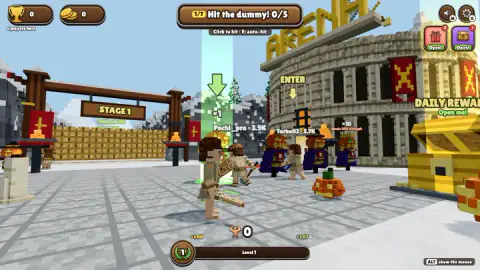
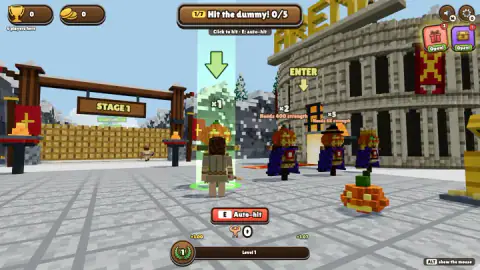
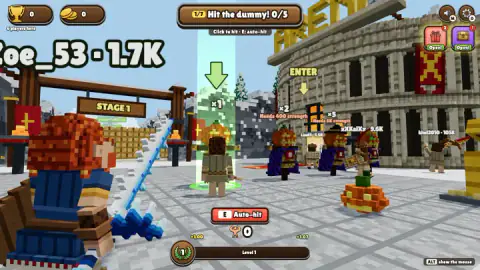
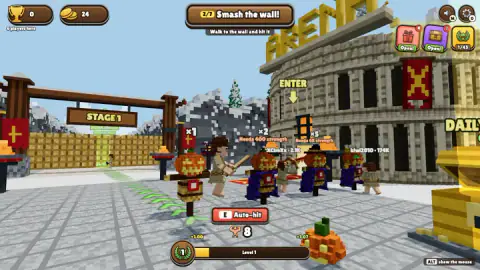
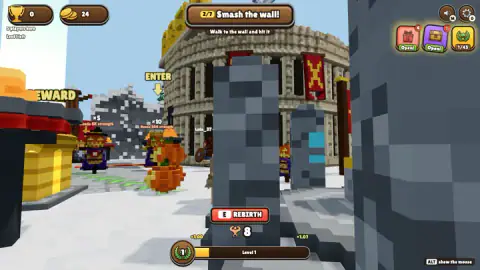
Taken by opening the game ourselves and letting it run — not supplied by the publisher, and not the same picture every other site shows.
How to play Sword Smash
- Find the x1 dummy. It stands inside a green beam of light with a big arrow over it, right where you start. The task bar at the top reads 1/7 Hit the dummy 0/5.
- Press E or click Auto-hit. Standing next to the dummy brings up a red E Auto-hit button under your character. If you want to click it, press Alt first so the pointer appears.
- Watch your strength. The number next to the flexed arm at the bottom is your strength. Clearing the first task took ours from zero to 8, and our coins from zero to 24.
- Go and smash the wall. Task two reads Smash the wall, Walk to the wall and hit it. Green arrows on the ground lead from the dummy toward the STAGE 1 gate.
- Grow into the bigger dummies. Each dummy further down the row is worth more per hit but needs more strength before it will let you train on it.
Tips from our run:
- Alt is the key that matters. Without it, every click spins the camera. The game does print Click to hit under the task, which is true only once the pointer is back.
- Let the button do the hitting. Clicking straight at the dummy did nothing for us across two sessions. The Auto-hit button, or the E key the game names next to it, cleared the first task.
- Leave the gifts for later. The gift and chest buttons in the top right flash Open, and a golden Daily Reward chest sits in the square. The task list does not ask for any of them, so they can wait until the first walls are down.
- Read the button before you press it. By the grey stone blocks, the same red E button switched to REBIRTH. If you do not want to reset, step away first.
Controls
| Alt | Shows the mouse pointer, which the game hides; you need it to click the on-screen buttons |
|---|---|
| E or the red Auto-hit button | Hits the dummy or wall next to you automatically |
| W A S D | Walk around the square, according to the game's own instructions |
| Mouse | Turns the camera while the pointer is hidden |
| M / O | Sound on and off / options (the keys are printed on the two buttons in the top right) |
Features
- You start with no strength and no coins, in front of a training dummy marked x1 in a green beam of light
- Four dummies stand in a row: x1 is free, x2 needs 400 strength, x5 needs 6K and x10 needs 60K
- A seven-step task list at the top guides you: Hit the dummy first, then Smash the wall
- The mouse pointer is hidden by default, and the only hint is a small ALT show the mouse label in the corner
- Clearing the first task left us with 8 strength and 24 coins
- Other characters wander the square with their strength printed over their heads, from about 1K to 174K
- A Roman-style colosseum marked ARENA and a golden Daily Reward chest wait in the same square
Game details
- Developer
- CDS Games
- Release date
- October 2026
- Added here
- October 2026
- Technology
- HTML5 (WebGL 3D)
- Platforms
- Browser (desktop, keyboard and mouse), Browser (mobile & tablet, touch, landscape)
- Classification
- Action , Adventure , Clicker , Fighting , Multiplayer , Shooting , Simulation
- Saved progress
- Saving, when available, is managed by this game. Mava cannot confirm your level.
FAQ
How do you hit the dummy in Sword Smash?
Stand next to the x1 dummy inside the green beam and press E, or click the red Auto-hit button that appears under your character. The game hides the mouse pointer, so press Alt first if you want to click the button. Clicking on the dummy itself only turned our camera and left the counter at 0/5.
Why does clicking do nothing in Sword Smash?
The game captures your mouse to steer the camera, so the pointer disappears and your clicks turn the view instead of pressing anything. The only clue is a small label in the bottom right corner that reads ALT show the mouse. Press Alt, and the pointer comes back so you can use the buttons.
What do the x1, x2, x5 and x10 dummies mean in Sword Smash?
They are training dummies with a multiplier: the higher the number, the more each hit is worth, but each one has a strength requirement. The x2 dummy needs 400 strength, the x5 needs 6K and the x10 needs 60K. At the start only the x1 dummy is open to you.
How do you smash the wall in Sword Smash?
It is the second task in the list, and the game tells you to walk to the wall and hit it, with green arrows on the ground leading away from the dummy. You need enough strength for the wall to break, which is why the first task is all about the dummy. We reached the walls with 8 strength but had not broken one when our session ended.
Who made Sword Smash?
Sword Smash is by CDS Games, the same developer as the running game Escape the Giant Cat. It came out in October 2026, in English and Spanish, and it plays in landscape only.
Are the other players in Sword Smash real people?
The square shows a counter such as 6 players here and characters with names and strength numbers over their heads. In our session they never spoke to us or got in our way, and we could not tell whether they were people online or characters run by the game. Either way, you play your own progression and nobody can take your strength away.
What is rebirth in Sword Smash?
Rebirth is a reset you trade for a bigger multiplier, according to the game's own description. In our run, the red E button changed its label from Auto-hit to REBIRTH when we stood by the grey stone blocks. We did not use it, so we cannot say what it costs.
Can you play Sword Smash on a phone?
Yes. It is listed for PC, Android and iOS in landscape, and the game's instructions describe a stick on the left and HIT, JUMP and USE buttons on a touch screen. We played it on a computer with the keyboard and mouse.