


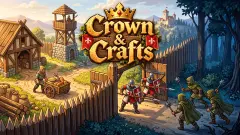





About Your Majesty - Build & Conquer
Most games with "conquer" in the title put a battlefield in front of you. Your Majesty - Build & Conquer puts a clock there instead. You choose a target on a map, read three lines about it, press Attack, and a timer starts counting down next to the camp's name. When it reaches zero you have won or lost. The fighting happens off screen.
So the game is played before the battle, not during it. It is about what you built, what you sold and how many warriors you could afford by the time you pressed the button. Half of it happens in a ruined town seen from above, where each empty plot can become a building. The other half happens on a parchment map of camps, villages and towns.
The game is credited to Ermac Alex. It was published in March 2025.
Now the honest part. Our time with it was short: a single sitting of roughly four minutes, on a desktop computer, clicking with a mouse. That was enough for the tutorial: one farm, the first camp on the map and the start of a second battle. We opened the build menu and the hire panel and read every price on them. We did not build a second building, and we never opened the Market. This page describes the first steps of a long game.
What the town can become
The town starts as a paved square with a handful of red-roofed buildings and about nine plots of rubble and timber. The build menu is the plan for those plots. We saw six cards on it.
| Building | Price to build |
|---|---|
| Farm | already built when we read the menu |
| Lumbermill | 350 gold and 5 gems |
| Blacksmith | 900 gold and 8 gems |
| Workshop | 3,000 gold and 15 gems |
| Alchemist | 8,500 gold and 28 gems |
| Library | 27,000 gold, plus gems we could not read |
The game spells the second one "Lambermill". Look at how the prices climb: each building costs roughly three times the one before it. With 10 gold in hand, the lumbermill alone was 35 times our purse. The road through this menu is long by design.
Every card also asks for blue gems, and here the map matters. The battle reward we read in full included gems. As far as we saw, conquering is where they come from, so the two halves of the game feed each other: the town pays for the army, and the army's wins pay the part of each building that gold cannot.
Once the farm was built, its card changed. In place of Build it offered an Upgrade for 71 gold and a second button, Hire a Manager, for 250. We could afford neither. Each card also carries two lines, a time of 15 seconds and a "Max" figure that falls from 40 on the lumbermill to 5 on the library. We did not get far enough to learn what the Max limits, so we will not guess.
The map is a list of timers
The Kingdoms map is drawn like old parchment, with names under small banners. Each banner carries a number. The first three are a rebel camp, a bandit camp and a group of village rebels. After them come villages and towns: Shioton, Fontan Village, Perovo, ChisTen Town, Ardet Town. We counted 18 banners on one screen, and more names were cut off at the right edge.
Our first battle was against the rebel camp. A countdown appeared under its name; we saw it at 24 seconds and again at 5. Then the camp's banner turned from red to green, and the bandit camp next to it grew a red Attack button. That is how progress looks here. One place falls, and the next one opens.
The battle window gives you two ways in. Attack starts the countdown. Instant attack carries a film icon, which marks it as the version you pay for by watching an advert. We used the plain button both times.
Warriors come in fives
The WARRIORS button opens a panel with one card per type of soldier. Each has a power figure, and each button hires five at once.
| Warrior | Power | Price for five |
|---|---|---|
| Swordman | 10 | 700 gold |
| Archery | 20 | 1,600 gold |
| Heavy Swordman | 30 | 2,500 gold |
| Crossbowman | 40 | 4,700 gold |
| Commander | 50 | 8,000 gold |
The names are the game's own. Notice that the cheap soldiers are the better bargain per point of power: five swordmen cost 70 gold per point, five commanders 160. Whether the stronger types win fights that numbers alone cannot, we did not play long enough to find out.
Every card showed a count of zero when we looked, in the middle of our second battle. We cannot tell you how the first fight was staffed, or whether warriors come home after a win.
A kingdom built on the rules of idle games
The buttons in this game have a history. Games that pay you for waiting are called incremental or idle games, and Wikipedia's entry on them traces the idea back to Progress Quest, from 2002, a game that played itself. The genre became popular after Cookie Clicker in 2013.
The same entry describes the two habits you meet here. One is spending currency on upgrades that automate income, so you click less as you grow; a button called Hire a Manager belongs to that tradition, though we did not buy one to check. The other is the advert offered in exchange for a boost or a skip in time. Instant attack is exactly that trade: the two minutes, or your attention.
What Your Majesty adds to the formula is the map. In most idle games the numbers only go up. Here the gold has somewhere to go, and a battle window tells you what it will buy.
Who it is for
It suits players who like to check in, make three decisions and leave something running. It does not suit anyone who wants to command troops in a fight: there is no battlefield to command. If waiting on timers wears you out, the first lumbermill will tell you soon enough.
More strategy games to try next
My Army Base is another build-up-and-expand game, set in a modern army camp. Grow Empire has you hold a wall and spend the coins on troops. Kingdom Defense lets you buy spearmen, archers and knights and watch them fight. The rest are under strategy games.
Screenshots
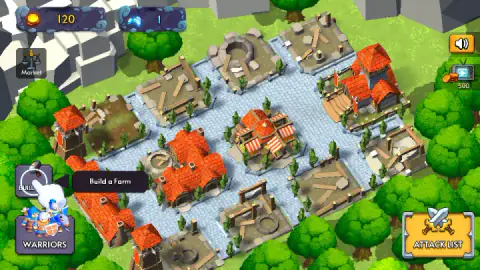
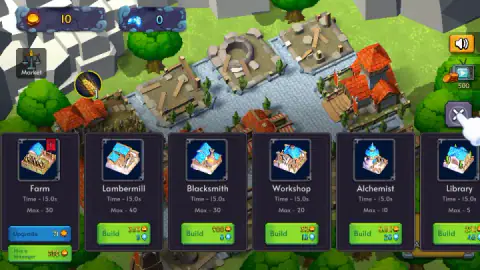
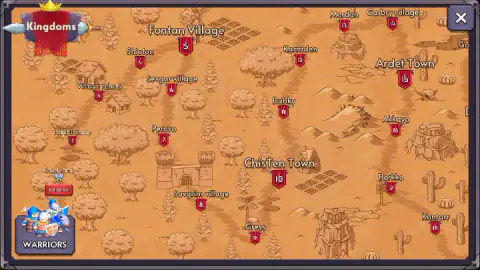
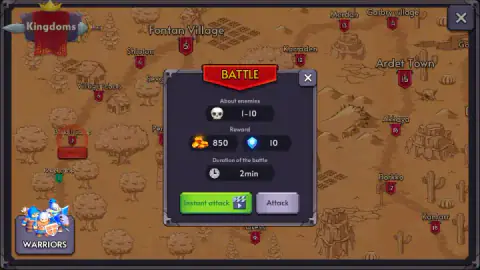
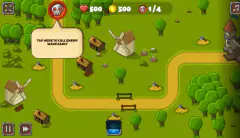
Taken by opening the game ourselves and letting it run — not supplied by the publisher, and not the same picture every other site shows.
How to play Your Majesty - Build & Conquer
- Press the hammer button. It sits at the bottom left of the town and opens a row of building cards.
- Build the farm. The tutorial points at it, and it is the only thing you can afford.
- Click the farm to collect. A wheat icon appears over it when there is something to pick up, and what you collect is sold for gold.
- Press ATTACK LIST. The tutorial leads you from there to the Kingdoms map.
- Click a banner and press Attack. Then wait for the timer under the target's name.
What our session taught us:
- The farm empties your purse. We started with 120 gold and a single blue gem. After the farm stood, the counters read 10 and 0. Nothing else on the menu is within reach for a while, so the first minutes belong to that one building.
- Read the battle window before you press. It lists the number of enemies, the reward and the duration. The second battle we were offered paid 850 gold and 10 gems and took two minutes. That is the whole briefing, and it is enough to decide.
- The map does not show your gold. The two counters sit on the town screen only. On the map, the hire panel shows prices but not what you have, so check your purse before you leave town.
- Close panels with the X. The build menu and the map each cover the screen until you do, and the tutorial waits for you there.
- The keyboard does nothing we could find. Arrow keys and the space bar drew no response. This is a game of clicks.
Controls
| Click the hammer button (bottom left) | Opens the row of building cards, each with a Build or Upgrade button |
|---|---|
| Click a finished building | Collects what it has produced; the tutorial points at the farm for this |
| Click ATTACK LIST (bottom right) | The tutorial sends you here to reach the Kingdoms map |
| Click a banner on the map | Opens the battle window with enemies, reward, duration and the Attack button |
| Click WARRIORS | Opens the hire panel, where each button hires five warriors of one type |
| Click the X (top right) | Closes the open panel or the map |
Features
- A town of ruined plots that you rebuild from a menu of building cards, starting with a farm
- Six buildings seen on the menu, from the farm to a library priced at 27,000 gold
- Two currencies, gold and blue gems, and most buildings ask for both
- A Kingdoms map with numbered banners, 18 of them visible on one screen and more beyond the edge
- Battles that are countdowns, with enemies, reward and duration shown before you commit
- Five warrior types with a power figure each, hired in squads of five
- Made by Ermac Alex
Game details
- Developer
- Ermac Alex
- Release date
- March 2025
- Last updated
- August 10, 2026
- Added here
- May 2025
- Technology
- HTML5 (Unity WebGL)
- Platforms
- Browser (desktop, mouse), Browser (mobile & tablet)
- Classification
- Strategy
- Saved progress
- Saving, when available, is managed by this game. Mava cannot confirm your level.
FAQ
How do you play Your Majesty - Build & Conquer?
You start in a ruined town seen from above. You press the hammer button, build a farm on an empty plot, collect what it produces and turn it into gold. Then you open the Kingdoms map, pick a camp or village and send your warriors against it. Everything is done with clicks.
How do battles work in Your Majesty - Build & Conquer?
You do not fight them yourself. A window shows how many enemies there are, the reward and how long the battle lasts, and after you press Attack a timer counts down beside the target on the map. Our first one ended in a win within half a minute and the camp's banner turned green. The second listed 850 gold, 10 gems and two minutes.
What buildings can you build?
The build menu showed six in our session: Farm, Lumbermill (spelled Lambermill in the game), Blacksmith, Workshop, Alchemist and Library. Prices rise fast, from 350 gold and 5 gems for the lumbermill to 27,000 gold for the library. We built only the farm.
What warriors can you hire?
The hire panel listed Swordman, Archery, Heavy Swordman, Crossbowman and Commander, with power figures from 10 to 50. Each button hires five warriors at once, from 700 gold for swordmen to 8,000 for commanders. A sixth card was cut off at the edge of our screen.
Are there adverts in Your Majesty - Build & Conquer?
The game offers adverts as shortcuts. The battle window has an Instant attack button with a film icon next to the plain Attack button, and the town screen has a television icon with coins and the number 500 under it. We did not press either, and the plain buttons worked without them.
Does Your Majesty - Build & Conquer have an ending?
We cannot say. We played about four minutes, which covered the tutorial, one farm and the first camp on the map. The map showed 18 numbered places on one screen and more names beyond its right edge, so there is far more game than we saw.
Who made Your Majesty - Build & Conquer?
It is credited to Ermac Alex. It was published on 11 March 2025. It is listed for PC, Android and iOS; we played it on a desktop computer with a mouse.