About Castel Wars
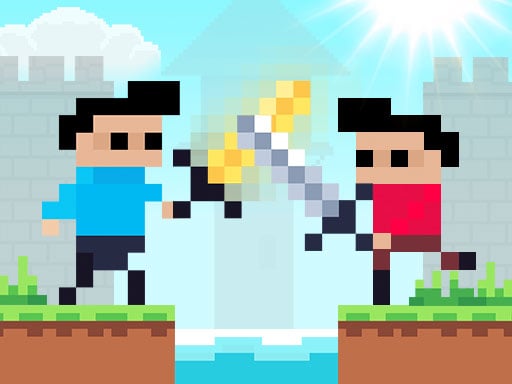
Most castle games hand you a wall and ask you to defend it. Castel Wars hands you a wall, two pixel figures in blue and red, and a key that spawns a solid block out of thin air wherever you happen to be standing. Press it once and there is a white plank beside you. Jump, press it again, and you are a storey higher. The castle you were given stops being the level about ninety seconds in, because both players have been building their own.
That single key is what turns a small arena into a game. There is no ladder, no grapple and no double jump. Every route that is not already carved into the stone has to be made, and every block you make is also a block your opponent can stand on. Build a staircase to the enemy tower and you have built him a bridge to yours. It is the cheapest possible design idea and it carries the whole thing.
The rest is a catapult and a sword. Each tower has one catapult with ten shots, counted on a little board above the battlement that ticks down as you fire, and each player carries a blade that can be swung up close or, by holding the attack key and letting go, thrown across the map. Throwing is the good move and the expensive one, because it leaves you empty-handed until you find another. What refills you is a hero in a hot-air balloon who drifts across the top of the screen dropping crates: swords, catapult ammunition in lots of +5 and +10, trampolines in +3 and +5, and hearts.
It is published by RHM Interactive OÜ, the Tallinn company that runs the two-player portal twoplayergames.org, and it went live at the turn of 1 January 2021 — a date that survives checking, because the Internet Archive holds the game's runtime on the publisher's own server from 31 December 2020. On that portal it currently sits at 4.4 out of 5 from 6,858 votes, which is the publisher's own tally and worth reading as such. What the build itself says about its makers is thinner: the intro is a full-screen animation of the twoplayergames.org wordmark, the project data carries a link back to that site, and no studio is named anywhere. We credit the publisher because that is what is proven.
This is chapter one of a series, and the sequel says so
There are three Castel Wars games and they came out in the same year. This one arrived on 1 January 2021. Castel Wars: Middle Ages followed on 19 April 2021, and Castel Wars: New Era on 13 September 2021 — the distributor's own blurb for that third one opens by calling it "episode 3".
The order is not a guess. Open Middle Ages and its menu carries a small framed panel in the corner labelled CHAPTER 1, showing this game's blue and red fighters crossing swords, wired to a link back to this game on the publisher's portal. The sequel numbers its own predecessor.
What each chapter changed is easy to summarise once you have played them back to back. This one is the catapult game: a symmetrical castle, a balloon dropping crates, weather, and a sword. Middle Ages swaps the catapult for cannons, adds wind that changes direction mid-match, gives the enemies pathfinding, and hands out bows, crossbows, a fire sword and a pair of wings. New Era, which we have not written up yet, moves the whole thing forward to industrial-era weapons and adds a mode called Mayhem. If you want the plain version, start here; the arena is simpler and the rules fit in one screen of tutorial.
Four maps, three clocks and whatever the weather does
The versus level screen is the most generous part of the game and the part nobody screenshots. Four maps, laid out as little grey thumbnails, and none of them locked. A season control next to them rotates through the weather. And a stopwatch steps the match length through 3, 5 and 7 minutes.
Weather is not a filter over the picture. The project keeps separate globals for the season, the weather and whether it is day or night, and it has its own sound and sprite sets for each: rain falls in visible drops with its own loop, there is a snow setting, a sunshine setting, and — going by the audio the project loads — an acid variant that we have not yet triggered in a match. During our rainy round the drops fell across both castles for the whole three minutes.
That combination is why the same four maps hold up. A three-minute match on map 1 in sunshine is a duel; the same map at seven minutes in rain becomes a construction race, because there is time to build properly and both towers end up connected by whatever the two of you improvised. Pixel war games at this scale usually give you one arena and one clock. Getting a stopwatch and a weather dial on the same screen as the map picker is unusual, and it is free.
Zombie mode: same castle, two players, thirty kills
The second menu panel puts blue and red on the same side. The level screen changes with it: four different maps, all of them night-lit in purple and grey, and a difficulty column reading EASY, NORMAL and HARD. The opening card states the rule plainly — "The First 30 Score Wins".
Both players share one castle with a catapult at each end while green zombies walk in from both sides and climb. Under the surface the project has a boss zombie with three difficulty tiers of its own, a jet zombie, and a separate zombie score counter, which is why the mode feels like a wave defence rather than a reskin of the duel. It also changes what blocks are for. In versus a block is a staircase; here it is a wall, and the fastest way to lose is to build a lovely tower with no way down when the ammunition runs out.
Play Castel Wars unblocked
The interesting thing about this game on a school machine is what it downloads, and it is not what you would guess from a screen full of chunky pixels.
Construct 2 has no lazy loading. Everything the project owns arrives before the title screen appears, and we counted it: 189 requests, 126 PNG files and 57 audio files. The artwork is trivial — all 126 sprites together come to 237,314 bytes, about 232 KB, because at a 320×180 design canvas a whole castle is a few hundred pixels. The audio is not: 4,113,513 bytes, just under 4 MB. On this game roughly 88 % of what you wait for is sound, and it arrives whether or not you turn the speaker icon off.
There is one more oddity inside that 232 KB of art. A single file, introgifler-sheet0.png, is 196,301 bytes of it — the animated strip that plays behind the three tutorial tips. The remaining 124 sprites, which is to say the castles, the players, the zombies, the catapult, the balloon, the rain and every menu, add up to 32,474 bytes. The tutorial animation outweighs the entire game it is explaining by six to one.
So the practical advice for a shared classroom connection is: the first load is a single wait of around 4.6 MB and then nothing. No level loads, no hitches, no second download when you switch maps or modes. Once the menu is up, the game is entirely in memory. That is a better shape for a bad connection than most pixel games unblocked lists will give you, and it is worth knowing before you assume a slow start means a broken page.
A word on the filter itself, because it is usually misunderstood. A school or office filter matches addresses, not games. If the page loads, the game is allowed; if the address is refused, nothing about this particular page is the problem and no amount of reloading changes it. Nothing here installs, nothing asks for permission and closing the tab is the entire uninstall. Expect a pre-roll advertisement before the menu, occasionally two, each with a skip button after a few seconds. If the address is blocked, the two answers that get nobody into trouble are to ask a teacher whether it can be allowed, and to play it at home, where it is the same free page.
More games published by RHM Interactive
The rest of this series is Castel Wars: Middle Ages, which trades the catapult for cannons and finally gives the zombies a brain, and Castel Wars: New Era, the third chapter. For more of RHM's pixel two-player work there is Basket Random, which applies the same one-key-does-everything philosophy to a basketball court. If you want more pixel art rather than more castles, Mini Switcher is a retro platformer built on the same kind of tiny canvas, and 12 MiniBattles packs a dozen shared-keyboard rules into one page. More games for two people at one desk live in our multiplayer category.
How to play Castel Wars
- Pick your fight. The menu offers two panels. The top one is blue against red. The bottom one puts both players on the same side against a pair of zombies.
- Set the match up. The level screen has four maps, a season icon that cycles the weather, and a clock that steps through 3, 5 and 7 minutes. The two control cards on the left and right are your reminder: blue is W A S D plus E, red is the arrow keys plus P.
- Clear the tutorial. Three tips type themselves out one at a time — "Kill For Score", "hold and release to throw" and "You can create a block". Any key advances them, and the clock does not start until the last one is gone.
- Build, climb, kill. Score comes from putting the other player down. Blocks are how you reach him; the catapult is how you reach him from your own tower.
- Beat the clock. When it hits zero the result panel shows both scores with a back button and a rematch button. Level scores give you DRAW.
Things worth knowing before the first match:
- A block placed under your own feet lifts you. That is the climbing move, and it is faster than looking for stairs. Jump, place, land, repeat.
- The catapult is finite and the counter is public. Ten shots, and the number above your tower is visible to the other player. Somebody who sees you sitting on 2 knows you cannot answer a tower rush.
- Throwing disarms you. After a thrown sword you have fists until a crate lands or you walk over the blade you threw. Throw when it wins the exchange, not to open one.
- Watch the balloon, not the ground. Bonuses land where the balloon is, not where you are. Reading its path is how you get to the +10 ammunition first.
- The water in the middle is not scenery. The map has a channel between the two castles with its own splash sounds; crossing at ground level is the slow, exposed route, which is exactly why building over it is worth the blocks.
Controls
| A / D (blue player) | Walk left and right along the castle, the ledges and any block you have placed |
|---|---|
| W (blue player) | Jump. Combined with a block placed under your feet it is how you climb |
| S (blue player) | Place a block. It appears next to you in mid-air and stays there as solid ground |
| E (blue player) | Swing your sword. Hold it down and release to throw the weapon instead |
| Arrow keys (red player) | The same four movements for the second player on the same keyboard |
| P (red player) | Attack and throw, mirroring the blue player's E |
| Gamepad | The project carries Construct's gamepad plugin, a controller-selector sprite and per-player pad variables. We could not test it with a physical controller |
Features
- Two modes on one keyboard - blue against red, or both players together against a zombie siege
- Four hand-built maps per mode, chosen from a level screen that also sets the season and the clock
- Match length is yours - the timer cycles through 3, 5 and 7 minutes before the round starts
- Ten catapult shots per tower, counted on a board above the battlement and spent one at a time
- A hero drifts overhead in a hot-air balloon dropping bonuses - swords, catapult ammunition in +5 and +10, trampolines in +3 and +5, and health
- Live weather - rain, snow and sunshine are picked per match and fall over the arena while you fight
- Zombie mode runs to thirty kills across three difficulties, easy, normal and hard
- 126 sprites weighing 232 KB in total, on a 320x180 pixel canvas
Game details
- Developer
- RHM Interactive
- Release date
- January 2021
- Last updated
- November 12, 2021
- Added here
- December 2022
- Technology
- HTML5 (Construct 2, 320×180 logical canvas, pixel art, landscape)
- Platforms
- Browser (desktop), Chromebook
- Classification
- Action , Multiplayer
FAQ
How do you play Castel Wars with 2 players?
Both players share one keyboard. The blue player uses W, A, S and D to move and jump and E to attack; the red player uses the arrow keys and P. There is no menu step for this - the versus mode is two players by design, and the level screen shows both control cards side by side before you start.
What are the controls for Castel Wars?
Blue moves with A and D, jumps with W, places a block with S and attacks with E. Red mirrors that on the arrow keys with P to attack. Holding the attack key and releasing it throws the weapon instead of swinging it, which the in-game tutorial states as: hold and release to throw.
How do you win in Castel Wars?
In versus mode you score by killing the other player before the clock runs out, and the timer is set to 3, 5 or 7 minutes on the level screen. If both scores are level when time expires the result panel reads DRAW. In zombie mode the first side to 30 kills wins.
How many levels does Castel Wars have?
Four maps in versus mode and four more in zombie mode, picked from a level screen rather than unlocked in order. Versus adds a season selector and a match clock, so the same map plays differently in rain, in snow and in sunshine.
Is Castel Wars a sequel or the first game?
It is the first. The series runs Castel Wars, then Castel Wars - Middle Ages, then Castel Wars - New Era. Middle Ages proves the order itself - its menu carries a panel labelled CHAPTER 1 that links back to this game.
Who made Castel Wars?
It is published by RHM Interactive OU, the Estonian company behind the two-player portal twoplayergames.org, and every distributor files it under that name. The build agrees - its intro plays the twoplayergames.org logo and its code carries a link back to that site. No studio is named inside the project, so we credit the publisher and leave the developer open.
Can I play Castel Wars unblocked at school?
It is one HTML5 page with nothing to install, no account and no plugin, so it runs on a school Chromebook as long as the address itself loads. What it does need is patience on the first load - Construct 2 fetches the whole game before the title screen, about 4.6 MB of it.
Does Castel Wars work on a phone?
Not really. Opened with a phone browser the game draws no on-screen buttons at all, and GameMonetize lists it as not mobile ready. It is a keyboard game for two people sitting at one machine. Its sequel, Castel Wars - Middle Ages, does put touch buttons on screen.