

About Musketeers Gunpowder vs Steel
Most browser war games give you one thing to drive: a hero you steer, or an army you click on. Musketeers Gunpowder vs Steel gives you both and keeps them apart. You are a commander with a sword. The men with the guns are a separate body, and they go where you order them, not where you ride.
That split is the whole game. The commander answers to the arrow keys or the mouse. A squad answers to orders with names: the tutorial labels Advance, Stand and Retreat on screen, each with its own key. Ride off without saying anything and you are one rider in a large field. We know, because that is how our first battle ended.
The game is credited to Artem Fedorenko, lists Unity as its engine. It was published in December 2024.
Here is the honest size of our visit: about four minutes at a desktop computer. Roughly two went on the first battle, which we lost. The rest went on the tutorial, which we should have opened first and did not finish. We bought two squads there, cannot vouch that any order of ours was obeyed, and never won a battle.
One commander, one squad, two sets of keys
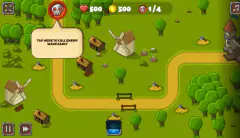
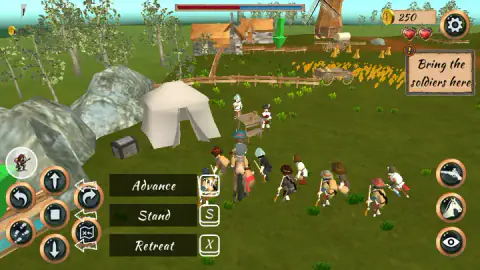
The tutorial starts you on a horse beside a white tent, with a farm, a wheat field and a windmill ahead. A sign says Buy a squad and an arrow points at the card. One click later the purse had dropped from 400 to 250 and about nine men with long guns were standing around the horse.
Then the labels appear. This is everything the game told us on screen, next to what its written instructions add:
| Order | Key | Where we got it |
|---|---|---|
| Advance | W | Tutorial label |
| Stand | S | Tutorial label |
| Retreat | X | Tutorial label |
| Specify direction of travel | C | Tutorial label |
| Look around | Space | Tutorial label |
| Turn squad left / right | Q / E | The game's instructions |
| Squad follows the commander | A | The game's instructions |
| Fire pistol | F | The game's instructions |
| Mount horse | V | The game's instructions |
One mismatch is worth knowing. The instructions give D for pointing the squad at a target, and the tutorial showed us C for setting a direction. We did not get far enough to say whether those are one order or two, so trust the label on your own screen.
The right edge has its own buttons. In the tutorial there were three: a pistol, a horse's head and an eye. In our battle only the eye was there. The eye sits beside the Look around label, and the view does change a great deal: the battle was shown from high above the field, the tutorial from just behind the horse.
The next sign read Bring the soldiers here, with a green arrow hanging over the farm fence. That is the lesson in one line: the squad has to be brought. It does not come along because you rode there.
How we lost the first battle in two minutes
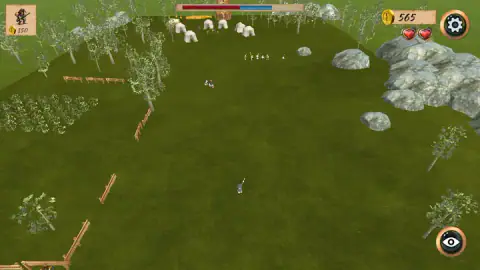
The field is a long strip of grass. A village with fences lies on the left, a spill of grey rocks on the right, and a camp of white tents at the far end. Our commander started near the bottom. Ahead of him stood two rows of soldiers beside two wagons, dressed like the squads we later bought and facing the same way he was. We took them for ours.
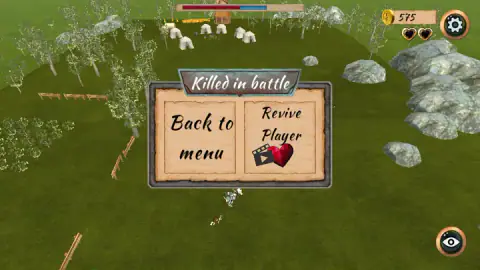
We did not order them anywhere. We held the up arrow and walked the commander toward the tents, past fallen figures on the grass, until a row of pale figures stood in front of the camp. Shortly after that both hearts were black and the panel said Killed in battle.
A bar at the top of the screen is split in two, red on the left and blue on the right. Its blue half was visibly shorter when we died than when we started. The red half had not moved. The game never told us what the bar counts, but watching the blue end is a fair early warning.
We died with 575 coins in the purse. That is the part that stings: enough for three more squads, and we had not bought one.
Why the name fits the 1600s
The game's own description sets it in the 17th century, and the title is a fair summary of that century's battlefield. For most of it, infantry fought in a formation historians call pike and shot: men with firearms and men with long pikes in the same body. Wikipedia's article on the formation says it lasted until the bayonet arrived late in the century.
The reason for the mix was the gun itself. Early firearms, the same article notes, were inaccurate, short-ranged and very slow to load, so the shooters got off a few shots and then sheltered among the pikemen when cavalry or enemy pikes came close. By the 1600s the pike was mainly a defensive tool and battles were increasingly settled by shooting.
That is the logic behind the three named orders. A man who needs time to reload has to be told when to go forward, when to hold and when to fall back; he cannot simply charge. In our session every squad carried guns and the only steel on screen was the commander's sword. We walked that sword at a line of soldiers on its own, and the title told us in advance how that would go.
Who it is for
It suits players who like giving orders more than aiming. There is a pistol on the button list, but the game is built around where a squad stands and when it moves, and around a purse that decides how many squads you get.
It suits less anyone who wants to learn by pressing things. The battle does not explain itself, the keys are spread across the keyboard, and the commander is fragile. Start with the tutorial, and expect to lose a battle or two while the two sets of controls settle into your hands.
More games to try next
For squads sent along routes you draw, there is Line Control. BorderClash is about placing units at the right points of a front, Medieval Battle 2P is a battle simulator from an earlier age of steel, and Grow Empire puts you behind city walls. The rest are under strategy games.
Screenshots
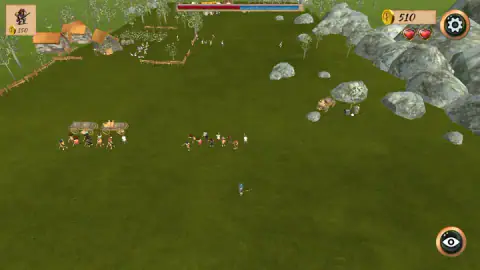
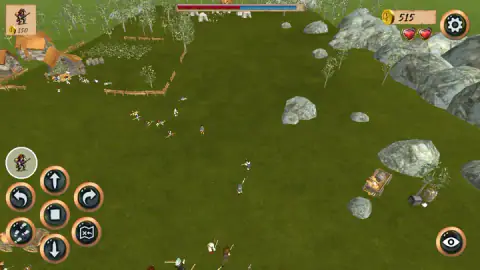
Taken by opening the game ourselves and letting it run — not supplied by the publisher, and not the same picture every other site shows.
How to play Musketeers Gunpowder vs Steel
- Open the tutorial before the first battle. It labels the order keys on screen as you go; the battle we played did not.
- Move the commander. We used the arrow keys. A hint at the start of the battle shows them beside a mouse tracing a figure of eight; the game's instructions give the left mouse button or a joystick.
- Buy a squad. Click the card in the top left corner, the one with a small musketeer and a price. It cost 150 coins each time.
- Give the squad an order. W to advance, S to stand, X to retreat, as the tutorial labels them. The same orders sit on round buttons at the left edge.
- Keep the commander alive. Two hearts in the top right corner are all he has.
What a lost battle and half a tutorial taught us:
- Count your purse in squads. The battle opened with 500 coins, which is three squads and change. The tutorial handed us 400.
- The card goes dim when you cannot pay. With 100 coins left after two purchases, ours faded.
- Coins come in while you fight. Our counter climbed from 500 to 575 over the battle without our buying or selling anything. We cannot tell you what each payment was for.
- The order buttons are not always there. In the battle the round buttons were on screen at one moment and gone at others. In the tutorial they stayed once we owned a squad. We did not pin down what brings them up.
- Reviving costs an advert. The Revive Player button carries a film-clip icon. We took Back to menu instead.
Controls
| Arrow keys | Move the commander; this is what we used. The game's instructions also give the left mouse button or a joystick |
|---|---|
| Click the squad card (top left) | Buys a squad of musketeers for the coin price printed on the card, 150 in our session |
| W / S / X | Squad orders as the tutorial labels them on screen; Advance, Stand and Retreat |
| C | Specify direction of travel, as the tutorial labels it |
| Space | Look around, as the tutorial labels it; the eye button on screen sits beside the same label |
| Q / E / A / F / V | Per the game's instructions; turn the squad left or right, make it follow the commander, fire the pistol, mount the horse. We did not test these |
Features
- Two things to command at once: a commander you steer yourself and squads that move only on orders
- Squads are bought during play from a card in the corner, at 150 coins each in our session
- Named orders with their own keys: Advance, Stand, Retreat and a direction of travel
- A tutorial that hands you a purse, a horse and a farm to practise on
- Two hearts for the commander, and a revive offered in exchange for a video advert
- Made by Artem Fedorenko
Game details
- Developer
- Artem Fedorenko
- Release date
- December 2024
- Last updated
- August 10, 2026
- Added here
- March 2025
- Technology
- HTML5 (Unity WebGL)
- Platforms
- Browser (desktop, keyboard & mouse), Browser (mobile & tablet, touch)
- Saved progress
- Saving, when available, is managed by this game. Mava cannot confirm your level.
FAQ
How do you play Musketeers Gunpowder vs Steel?
You control two things separately. The commander, a rider with a sword, moves with the arrow keys or the mouse. Squads of musketeers are bought from a card in the top left corner and moved with orders: the tutorial labels Advance on W, Stand on S and Retreat on X. A battle is a matter of getting the squads to the fight without losing the commander.
How do you buy a squad in Musketeers Gunpowder vs Steel?
Click the card in the top left corner of the screen, the one with a small musketeer and a coin price. It cost 150 coins each time in our session, and about nine soldiers appeared around the commander after the first purchase. When we were down to 100 coins the card went dim.
What are the controls in Musketeers Gunpowder vs Steel?
The tutorial shows these on screen: W to advance the squad, S to make it stand, X to retreat, C to specify a direction of travel and Space to look around. The game's own instructions add Q and E to turn the squad, A to make it follow the commander, F to fire the pistol and V to mount the horse. We moved the commander with the arrow keys.
What happens when the commander dies in Musketeers Gunpowder vs Steel?
A panel reading Killed in battle comes up with two choices: Back to menu, or Revive Player. The revive button carries a film-clip icon, the usual sign that it plays a video advert first. The commander has two hearts, and both were black when the panel appeared in our battle.
Is there a tutorial in Musketeers Gunpowder vs Steel?
Yes, and it is worth opening before the first battle. It puts you on a horse beside a tent with 400 coins, asks you to buy a squad, then to bring the soldiers to a marked spot, and labels each order key on screen as it goes. We opened it only after losing a battle and did not reach its end.
Does Musketeers Gunpowder vs Steel have pikemen?
We did not see any. Every squad in our session carried long guns, and the only blade on screen was the commander's sword. The session covered one lost battle and part of the tutorial, so other troop types may exist further in.
Who made Musketeers Gunpowder vs Steel?
It is credited to Artem Fedorenko and lists Unity as the engine. It was published in December 2024. It is listed for PC, Android and iOS in landscape; we played it on a desktop computer.