



About Legions: Way of War
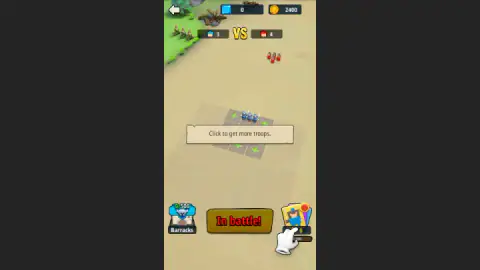
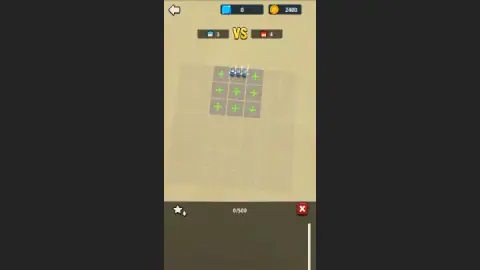
Level 2 of Legions: Way of War lays a note across the middle of the board: "Click to get more troops." Under it are green plus signs on empty squares, so that is where we clicked. Nothing happened. A small white hand had been pointing somewhere else the whole time, at a pile of cards in the bottom right corner.
That is the moment this game stops being a free win, and it is also as far as we got. We won level 1 and never started the battle on level 2. So we can tell you exactly what those two screens ask of you and where we went wrong, but not what the pile deals, how later levels play, or what lies behind the Hero and Territory tabs.
The setup is simple to read. You get a board seven squares by seven, with only nine lit in the middle. Your first squad stands on one of them, and the rest show a plus. A red army waits up the field, and a counter at the top keeps the score in soldiers.
The game comes from CarrotHood and was published in March 2025, with an update in October 2026.
It carried an E10+ rating.
Level 1 is over before you make a decision
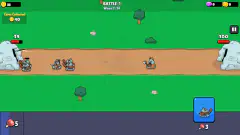
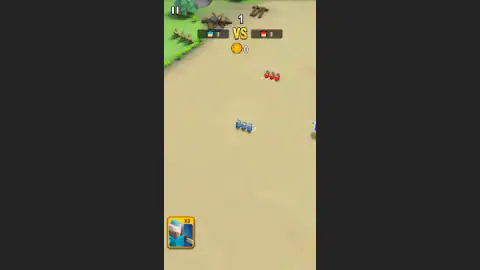
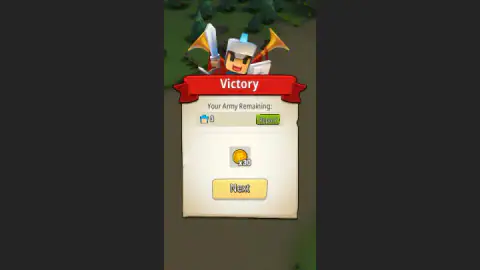
We pressed In battle! once and gave no other order. Three blue soldiers faced three red ones, with the count above them reading 3 against 3. In under half a minute the Victory card was up, with all three of ours alive and 30 coins on offer.
Two things on that battle screen are worth a look, because we left them alone and still won. In the bottom left corner sits a card showing a soldier, marked X3. And early in the fight, a larger blue figure stood at the right edge of the screen, one the counter did not seem to include. We cannot say who he is. If you want to know whether level 1 can be lost, those are the first things to test.
A green Report button also sits beside the army count on the Victory card. We did not open it, so we do not know how much detail it gives about the fight.
Our run hit a snag at this point. Next faded after we pressed it and the card stayed up, so in the end we reloaded the page. It may well have been something on our side and not the game. The reload brought us to a home screen offering Level 2, so the win had counted. The coin counter still read 2,400, the same as before the battle, so the 30 coins had not arrived. If you can, leave the card with Next.
Level 2 is where the game starts asking
The enemy gets one soldier more, and the count now reads 3 against 4. That small change comes with the first sign of what the game wants from you: more troops before the fight, and a button that no longer looks ready.
The card pile has a coin tag reading 0 and a thin bar reading 0/100 under it. It is tempting to read that as a free first draw, but we did not press it and cannot promise. We had 2,400 coins at that moment, if it turns out to cost something.
What we can say for sure is what did not work: the plus signs and Barracks. Our session ended with the Barracks panel still open and the red X untouched, three soldiers on the board and no second battle fought. Start from the pile and you will already be further along than we were.
What the home screen promises
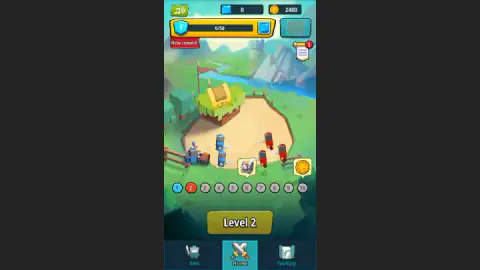
The home screen shows more systems than two levels can explain, and we would rather list them plainly than guess.
- Ten numbered stops run along a row, with a chest shown over stop 6 and a coin over stop 10. Those look like the next prizes to aim for.
- A shield marked 1 with a 0/50 bar and a red New reward tag, which looks like an account level of some kind.
- Blue gems, at zero for us, beside the coins.
- A scroll with a red badge. The line "Complete 1 main level battles." appeared over our Victory card and showed 1/1, so we take this to be a list of small tasks.
- Hero and Territory tabs, on either side of Home.
The game's listing also names archers, cavalry, artillery and heroes among the troops, and the start screen's art shows bowmen. On our two boards we saw only blue and red sword soldiers. Treat the rest as promised, not checked.
Squares and small blocks are an old idea about legions
The name is apt for a game built on a board. A Roman legion of the Republic did not fight as one solid mass. It was divided into small blocks called maniples, set out in three lines with gaps between them, a pattern often described as a chessboard. The point was that each block could move or be relieved without dragging the whole army with it.
Nothing here claims to be Roman, and these are toy-like soldiers on sand. But the question those commanders faced is the one nine lit squares seem to put to you: which block goes where before the two sides meet. Our squad stayed on its first square, so we did not get to see how much position changes a fight. That is the first experiment to run once you have troops to place.
Who it is for
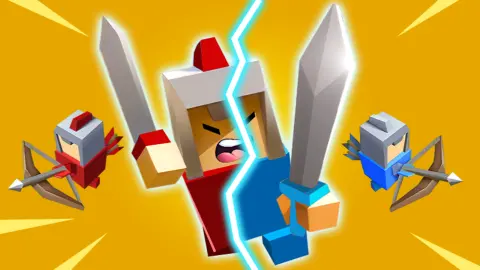
The first battle is short and needs no reading, and we saw no blood: the soldiers are small, blocky figures with swords. A younger player can get through level 1 with one press, and the E10+ rating fits what we saw.
The level 2 note is the harder part, because it is the first real instruction and it disappears at a click. If you like to work things out by poking around the screen, that is no trouble. If you want a fight you can steer from the first second, we did not find that in what we played.
The game fills a narrow upright column in the middle of a wide window, with dark bars on both sides, so a computer gives you no extra battlefield. It is listed for PC and Android, in both landscape and portrait.
Other army games to compare
If you enjoy watching your side fight alone, Draft Arena: Battle Cards has you pick one of three cards each round, and Epic Battle Simulator leaves you to spend coins while two armies clash. For the opposite, Musketeers Gunpowder vs Steel has you order your squads around the field yourself. From the same studio, in a very different mood, there is Mystery of the Old House: Hidden Objects. More in our strategy games.
Screenshots
Taken by opening the game ourselves and letting it run — not supplied by the publisher, and not the same picture every other site shows.
How to play Legions: Way of War
- Press In battle! on the board. The button sits at the bottom of the screen and is bright yellow when ready.
- Watch the fight. It plays out in real time with no orders from you, under a soldier count at the top of the screen.
- Read the Victory card. It shows Your Army Remaining and your coins. Press Next.
- Press the Level button on the home screen. The row of numbered stops above it shows where you are: blue for done, red for current, grey for still to come.
- On level 2, go to the card pile first. That is where the game's hand points. Press it before you click anything else.
Tips from our run:
- Read the note before you click it. Our first click anywhere took away both the note and the hand. After that the only clue left was a small red dot on the card pile.
- Do not take the plus signs for buttons yet. We clicked one on level 2 and the board did not change.
- Barracks is not the way out. We tried it next. A dark panel opened over the lower half of the screen, showing little more than a 0/500 counter, a star button and a red X. Nothing in it helped, and clicks on the squares did nothing while it was open.
- Check the colour of In battle! Bright yellow on level 1 meant go. On level 2 it was dark with red letters, which looks like the game waiting for you. We did not press it in that state.
Controls
| Click the In battle! button | Starts the fight on the board, once the button is lit yellow |
|---|---|
| Click the card pile (bottom right, level 2) | Where the game's white hand points when it says to get more troops. We did not press it, so we cannot say what it deals |
| Click Barracks (bottom left) | Opens a panel over the lower half of the screen with a 0/500 counter, a star button and a red X |
| Click the pause button (top left, during battle) | On screen during the fight. We did not need it |
| Click the back arrow (top left, on the board) | On screen before the battle. We did not press it |
Features
- A board seven squares by seven, with only nine lit in the middle and your first squad standing on one of them
- A soldier count at the top of the screen: 3 against 3 on level 1, 3 against 4 on level 2
- A map row of ten numbered stops, with a chest shown over stop 6 and a coin over stop 10
- Two currencies on screen, coins and blue gems, plus a shield with a 0/50 bar and a New reward tag
- Three tabs on the home screen: Hero, Home and Territory
- A Victory card that counts the soldiers you have left and pays coins: 30 for level 1
Game details
- Developer
- CarrotHood
- Release date
- March 2025
- Last updated
- October 1, 2026
- Added here
- May 2025
- Technology
- HTML5 (Unity WebGL)
- Platforms
- Browser (desktop, mouse), Browser (mobile, touch)
- Classification
- Strategy
- Saved progress
- Saving, when available, is managed by this game. Mava cannot confirm your level.
FAQ
How do you play Legions: Way of War?
Your squad starts on a board of squares and a red army waits further up the field. Press In battle! and the two sides fight in real time. On level 1 that one press was all we did, and we won in under half a minute with all three soldiers alive. Level 2 first asks you to get more troops.
What does Click to get more troops mean in Legions: Way of War?
It is the note on level 2, and it sits over the green plus signs, but a white hand points at the card pile in the bottom right corner. We clicked a plus and nothing changed. The note and hand vanished at our first click, leaving only a red dot on the pile. We never pressed the pile, so we cannot say what it gives.
Why is the In battle button dark on level 2?
On level 2 it turned dark with red letters, where on level 1 it was bright yellow, while the game was asking us to get more troops. It looks switched off until you do what the note says, but we did not press it in that state, so that is a reading of the screen and not something we tested.
Do you control your soldiers during a battle in Legions: Way of War?
We did not have to on level 1. We gave no order after In battle! and the squad still won. An X3 card with a soldier on it sits in the bottom left corner during the fight, along with a pause button, but we did not press the card, so we do not know what it does.
How many levels does Legions: Way of War have?
We do not know the total. The home screen shows a row of ten numbered stops, with a chest over stop 6 and a coin over stop 10, and we cannot say what comes after that. We won level 1 and got as far as the preparation board of level 2.
Is Legions: Way of War really multiplayer?
It is filed under PvP and Multiplayer, but we cannot confirm it. Both boards we saw set us against a red army, with no other player's name on screen. We did not open the Territory tab, which is one place such a mode could live.
Who made Legions: Way of War?
The game is credited to CarrotHood, who also made Mystery of the Old House: Hidden Objects. It was listed in March 2025 and updated in October 2026.
Does Legions: Way of War save your progress?
The level does, at least in the same browser. We reloaded the page on the Victory card of level 1 and came back to a home screen offering Level 2. The coin counter still read 2,400, though, so the 30 coins from that card did not reach it.