


About Real COD Strike
The first thing the game asks is not where you are going. It is what you are carrying.
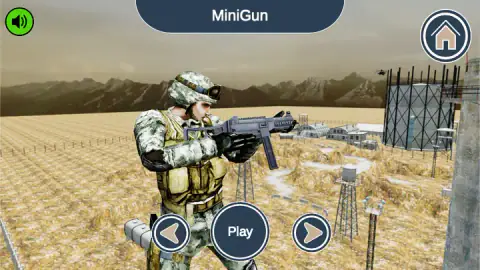
The opening screen stands a soldier in a field of dry stubble, with a weapon name across the top — ours read MiniGun — and three buttons under his boots: an arrow, Play, an arrow. Flick, accept, and a second screen built from the same three buttons asks the same kind of question about the ground you will be fighting on. Two decisions, and you are out there. There is no briefing in between, and no list of objectives.
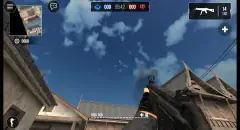
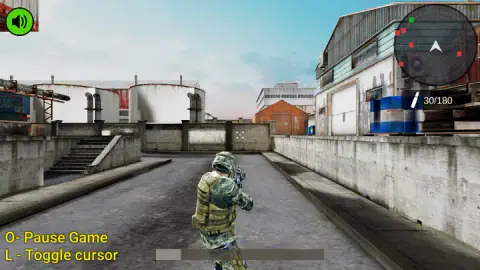
What waits on the other side is a display stripped down to almost nothing. A round radar in the top corner, a bullet icon and two numbers under it, and that is the whole interface: no health bar, no tally of who you have hit, no clock, nothing written anywhere telling you what the mission is. The only instructions the game prints are two lines of yellow text in the bottom corner, O- Pause Game and L - Toggle cursor, and that second line turns out to be the most useful thing on the screen.
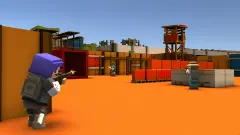
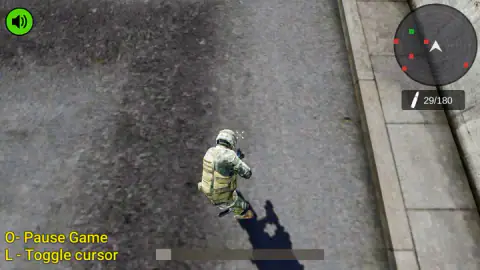
One expectation worth resetting before you start. It is filed under first-person shooting, but the camera we played with sits behind the soldier and slightly above him, so you spend the game watching his shoulders and helmet while the crosshair floats in the middle of the screen. It is the same over-the-shoulder view as Winter Clash 3D, not the view from inside the helmet.
The portal credits the game to Breymantech. It went up in November 2025. Treat that as one source rather than three: there is no studio site to check it against, and no store listing.
Here is what this page is. It is an account of one run of about four minutes, with the weapon the game handed us and the location it offered, played on a desktop with a keyboard and mouse. We walked an industrial yard of concrete walls, storage tanks and blue barrels, read the radar, fired, and finished the session wedged in a corner that would not let us past.
We never saw a victory screen, a defeat screen, a score or a reload, and the game played a single sound for us all session, the one it makes on opening. What we did work out is where your attention is supposed to go, and what the numbers on screen actually mean.
Thirty in the magazine, a hundred and eighty in the pouches
The counter in the corner reads 30/180, and it is the one number in the game that tells you something true about how to play it.
Thirty is the magazine. A hundred and eighty is what you are carrying for it.
Add them and you get two hundred and ten rounds, and that is not a figure somebody picked for the look of it. It is the load armies have long settled on for a soldier carrying an assault rifle — seven magazines, one in the weapon and the rest in the pouches — because it is about as much as a person can carry and still move properly. The game has quietly handed you that, and nothing more.
The consequence is what matters here. With a full load and no visible way to top it up — we never saw the counter refill, and no pickup appeared anywhere — every burst is spent from a fixed budget. Firing at a noise is expensive. Firing at a mark on the radar before you can see what it is, is worse.
So the game that looks like it wants speed rewards the opposite: look first, identify, then shoot. We spent almost nothing in four minutes of walking that yard, and the single round the counter recorded is how we know the left button is the trigger.
The radar is the only thing that knows where anybody is
Look at what the game refuses to tell you. There is no health bar, so you cannot see how much damage you have taken. There is no kill counter, so you cannot see how you are doing. There is no clock, so you do not know whether you are early or late. There is no written objective.
What it gives you instead is one circle in the corner. Inside it, red marks for the people who are not on your side, a green one for somebody who is, and a white wedge in the middle for the direction you are facing. In both of the gameplay moments we kept, that circle held five red marks and one green.
That is enough to play on, and it changes how the yard reads. The concrete walls and container rows are not scenery, they are the reason the radar exists: you almost never see a soldier before the circle does. Turning your wedge towards a red mark and walking slowly is the whole tactic the game supports, and it is why the over-the-shoulder camera helps rather than hurts — you can see round your own body before you commit to a corner.
One thing we could not crack. A long, faint bar runs across the bottom of the screen, lit only at its left end, and it looked identical in every moment we captured. We do not know what it measures, and we would rather say so than guess.
Who this one is not for
This is a military shooter and it does not pretend otherwise: you walk an industrial yard carrying a rifle, and the other soldiers are there to be shot. There is no blood on screen and the camera never goes close, so it is tamer than the genre it belongs to. It is still a game about shooting people, which makes it the wrong pick for a small child.
It also asks for a desk. It is listed for desktop computers, our catalogue has it the same way, and nothing on screen is built for a thumb: the aiming is done by a mouse the game holds on to, so a phone has nowhere to put it.
More shooters we have played through
Masked Forces is the opposite choice in one respect that matters: it puts real people on the other side, in named rooms with team deathmatch and a chat window. Zombies vs Special Forces keeps the lone soldier and the industrial base but tells you what it wants, with three difficulty settings named Walk, Problem and Nightmare. Blocky Guns is the gentler one, a genuine first-person game of blocks and targets with a pistol that never runs dry. And Winter Clash 3D is the closest match for the camera here, with both sides dressed as Santa and a four-minute clock on every round. The rest are in shooting games.
Screenshots
How to play Real COD Strike
- Choose the weapon first. The arrows either side of the Play button flick through what is available, and the name of the one you are looking at sits across the top of the screen. Play accepts it.
- Then accept the ground. The next screen uses the same three buttons for the location, with a Choose button in the middle instead of Play. Taking the one it offers you is one click.
- Expect an ad break. The game's listing puts one between that choice and your first step on the ground. It passes; nothing is lost.
- Click once to give the game your mouse. If a grey sign reading "Click to keep playing" appears across the top, the game has lost your pointer and is waiting. A single click anywhere empty puts you straight back in.
- Walk with W, aim with the mouse, fire with the left button. Where the crosshair is, is where the round goes, and the counter in the corner is your receipt: it ticks down by one each time.
What the run taught us:
- Press L before you reach for anything else on your desk. The game keeps your mouse pointer while you play, which is why the pointer vanishes. That one key hands it back without stopping the game by accident.
- Read the radar before you round a wall, not after. It is the only thing on screen that knows where anybody is.
- Walls stop you, they do not slide you along. Our run ended against an inside corner that swallowed every press of W. If forward stops working, back off a step and turn before you walk again.
- Pause is two buttons and nothing else. The panel behind O offers starting the map again or going home. There are no settings in there, no volume, no way back to a weapon screen.
- Do not count on the extras in the write-up. The game's own description promises explosive missions, squad-based action, customisable gear and abilities you earn for a run of kills. We met none of it in our session, and nothing on screen mentioned any of it.
Controls
| Left and right arrows on the opening screen | Flick through the weapons. The name of the one you are looking at is printed across the top |
|---|---|
| Play | Takes the weapon you are looking at. A second screen with the same three buttons then asks for the location, and Choose accepts it |
| W, A, S, D | Walk. Holding W is what moved us; walls and corners stop you dead rather than sliding you along |
| Mouse | Turns you and aims. The crosshair sits in the middle of the screen, so where you look is where you shoot |
| Left mouse button | Fires. The counter in the corner is the proof: it dropped by a round the moment we clicked |
| L | Hands the mouse pointer back to you, or takes it again. The game prints this hint in the corner, and it is the one worth remembering |
| O | Pauses. The panel that opens has two buttons, one to start the map again and one to go home |
| Shift and Space | The publisher's instructions list them for running and jumping. We never got either to show on screen, so treat them as its claim rather than ours |
Features
- A weapon screen before the mission screen: the gun is the first thing the game asks you about, and its name is printed above the soldier's head
- A display stripped to two things, a round radar and an ammunition counter — no health bar, no kill tally, no clock, no written objective
- Thirty rounds in the magazine and a hundred and eighty in reserve, which is exactly a rifleman's standard load
- A radar that showed us five red marks and a single green one, with a white wedge for the way you are facing
- A camera that rides behind and above the soldier's shoulder, so you can see the wall you are about to walk into
- The game takes your mouse pointer to aim and gives it straight back when you press L, which is the hint it prints in the corner
- Published by Breymantech
Game details
- Developer
- Breymantech
- Release date
- November 2025
- Last updated
- August 10, 2026
- Added here
- September 2025
- Technology
- HTML5 (3D)
- Platforms
- Browser (desktop, keyboard & mouse)
- Saved progress
- Saving, when available, is managed by this game. Mava cannot confirm your level.
FAQ
How do you play Real COD Strike?
You pick a weapon on the opening screen, confirm a location on the screen after it, and then walk an industrial map with WASD while the mouse turns you and the left button fires. The crosshair sits in the middle of the screen and the radar in the corner shows you where the other soldiers are. Everything you need to read is in those two corners.
What does 30/180 mean in Real COD Strike?
Thirty is what is in the magazine and a hundred and eighty is what you are carrying for it, so two hundred and ten rounds in total. We watched the first number drop by one the moment we clicked, which is how we know the left mouse button is the trigger. Nothing on screen tells you how to reload, and we never saw the counter refill.
Is Real COD Strike a first-person shooter?
It is listed as one, but the camera we played with sits behind the soldier and a little above him, so you see his shoulders and helmet the whole time. The crosshair still floats in the centre of the screen and you still aim with the mouse. If you want the genuine article from the inside of the helmet, Blocky Guns on this site is a first-person game.
What do the red and green dots on the radar mean?
Red is somebody who is not on your side and green is somebody who is, and the white wedge in the middle is you, pointing the way you are facing. In both of the gameplay moments we kept, the radar held five red marks and one green one. With no health bar and no kill counter anywhere, that circle is the only warning the game gives you.
Why does Real COD Strike stop with a sign saying Click to keep playing?
Because the game takes your mouse pointer in order to aim with it, and the moment the page loses that pointer the action halts and a grey sign appears across the top. One click puts you back in. If you want the pointer back on purpose, press L, which is the hint the game prints in the bottom corner.
Does Real COD Strike work on a phone?
It is listed for desktop computers and our own catalogue has it the same way, and there is no touch layout on screen: aiming is done by moving a mouse that the game holds on to. We played it on a desktop with a keyboard and mouse and did not test it on a phone, so we cannot tell you what happens if you try.
Who made Real COD Strike?
The game is credited to Breymantech and was published on 23 November 2025 and last updated in August. That portal is the only source we have: we found no studio site, no store listing and no independent review.
Is Real COD Strike suitable for young children?
No. It is a game about shooting at soldiers, and although there is no blood or gore on screen and no close-up violence, that is still what you spend the whole time doing. For a younger player who wants the same kind of target practice without any of that, the Blocky Guns stages are a better fit.