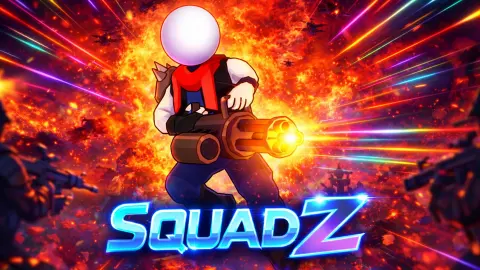







About SquadZ
Most top-down shooters give you two jobs, one hand to walk and one to aim. SquadZ takes the second job away. Your hero picks a target on his own, a red ring appears on the floor beneath it, and the shots go there. What is left for you is the part that decides the fight: where you stand.
That sounds easy, and the first level we saw was not. SquadZ dropped us into Area 2-1, a cramped crystal mine full of armed enemies, with no Area 1-1 in front of it, no stars and no coins. We played it on a desktop for about four minutes and lost every run. This page says what those runs showed, and where our view ends.
The game is by John Hany. SquadZ was released in January 2026, last updated in August.
What the red ring is telling you
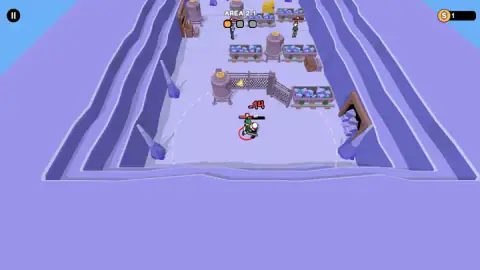
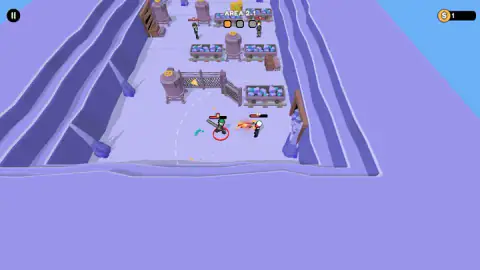
The two clearest pictures from our session are of the same enemy, a squat figure with a club and a small badge reading 2. Each time, he stands inside a red circle, and each time our hero is the one firing. In one picture the shot is in mid-air, a burst of orange flame heading left from our hero's double barrel straight into the ring.
The ring sits under the fighter being shot, and that is the useful part. It tells you who your hero has decided to deal with. If that is the club-wielder walking into your face, fine. If it is someone across the room while a closer enemy hits you, you need to move until the choice changes.
Around the fight there is a second, much larger circle, a dashed white line on the floor. We read it as your hero's reach, the distance inside which he will open fire. That is our reading, not something the game spelled out.
The badge on the enemy is the other clue. A small number over a health bar usually marks a level. We only met 2s, so we cannot say what a 5 would do to you.
Why the lobby says 84
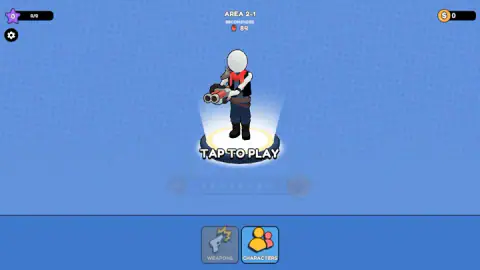
The lobby is the screen you will see most often, and it is busier than it first looks. Under the area name sits the word RECOMENDED, spelled that way in the game, a red fist and a number. For Area 2-1 that number is 84.
It reads as a power check. Your squad has a strength figure built from its heroes and weapons, and 84 is what the game suggests you bring. Below the hero, the bar holds two buttons, WEAPONS and CHARACTERS, and those are where that strength would come from. The CHARACTERS button is the bright one. WEAPONS looked greyed out on our screen, which may mean it opens later.
We did not open either. With no coins to spend, there was nothing to buy. That matters for how you read our defeats. We walked into a level that asks for 84 with whatever the game hands you at the start, and lost. Whether a few upgrades turn that around is the first thing we would test next.
The top corners hold the rest: a purple star with a 0/0 count on the left, a gear for settings below it, and a coin counter on the right. Inside the level the coin counter read 1 in every picture we took, against 0 in the lobby.
The mine, room by room
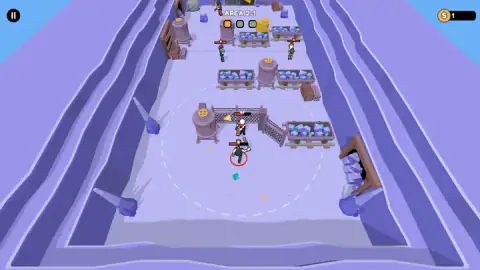
Area 2-1 is a long purple cave seen from above. Spikes of blue crystal grow from the walls, and the floor is crowded with mine carts heaped with crystals, squat water tanks with yellow valve wheels, crates and a pair of yellow barrels. A chain-link fence with an open gate and a yellow warning sign cuts across the middle. On the right wall there is a wooden mine doorway.
The layout shapes the fight. The carts sit on rails in rows, which leaves narrow lanes between them, and in our pictures most enemies waited up at the far end, past the fence. The fights we did have took place on the open floor below it, where there is nothing to hide behind.
Shooting while you stand still, and where the idea comes from
Games where the hero picks his own targets became a recognised style on phones after Archero, released by Habby in 2019. In Archero the rule is strict: the archer attacks automatically, but only when standing still. Moving cancels the shot, so every fight is a rhythm of dodge, stop, fire, dodge again.
SquadZ belongs to that family, with guns instead of a bow. What we cannot tell you is whether it keeps Archero's rule about standing still. In our runs the hero fired, and he also moved, but our pictures do not show both at the same instant. If you find your hero going quiet whenever you walk, that is the old rule at work, and the answer is short steps with pauses in between.
Who it is for, and what we did not see
SquadZ suits someone who wants a shooter without having to aim, and who enjoys the slow build of a squad through upgrades. The art is chunky and cartoonish, with no gore in anything we saw: shots land as small red numbers. Children who can handle a defeat or three will follow the screens without reading much.
It is not a first-person shooter, whatever the tags on some listings suggest. The camera stays high above the room the whole time.
We saw one area, one stage of it, and a string of defeats. We did not see a win, a second stage, a new area, the inside of the WEAPONS or CHARACTERS screens, or what the stars count. We did not play on a phone.
More shooters where the gun does the aiming
From the same developer, Farm Defenders puts a farmer behind a fence and lets him shoot by himself. Space Survivor is a top-down horde shooter where you only steer. Tiny Arena clears walled rooms one at a time with a tiny hero. For a top-down shooter where you aim yourself, try Zombie Space Episode II. The rest are under shooting games.
Screenshots
Taken by opening the game ourselves and letting it run — not supplied by the publisher, and not the same picture every other site shows.
How to play SquadZ
- On the lobby screen, read the area name and the recommended figure beneath it. Area 2-1 asks for 84.
- Tap or click anywhere when the screen says TAP TO PLAY.
- Move your hero around the level. The listing names W, A, S, D or the arrow keys on a computer, and a joystick on phones.
- Let the hero shoot. The enemy he is firing at stands in a red ring.
- Clear a stage to light the next of the three dots under the area name.
What our runs taught us:
- There is no fire button, so stop looking for one. We never aimed and our hero still fired, a bright muzzle flash straight at the ringed enemy.
- Watch your own number. Our hero went into one fight with 69 over his head. In another run it was down to 27 while the clubber beside him was still standing.
- Fights happen in the open. Every hit we saw was traded in the clear floor between the fence and the carts, not behind cover.
- A defeat sends you back to the lobby. After each one we were on the same screen, same area, same recommended figure, with the coin counter back at zero.
Controls
| Click or tap the screen on TAP TO PLAY | Starts the area shown above the hero |
|---|---|
| W, A, S, D or the arrow keys | Moves the hero, according to the listing; on phones it names an on-screen joystick |
| No key | Shooting; in our runs the hero fired at the enemy under the red ring while we gave no aim input |
| Pause button, top left | Pauses the level |
| Gear, top left of the lobby | Settings; we did not open it |
| WEAPONS and CHARACTERS | Lobby buttons for your gear and your heroes; we opened neither |
Features
- A top-down 3D level set inside a purple crystal mine, with mine carts, water tanks, crates and a fenced gate
- A red ring on the floor under the enemy your hero is shooting, and a wide dashed circle around the fight
- Three stage dots under the area name, which light up one by one as you progress through an area
- A recommended power figure on the lobby screen, 84 for Area 2-1, shown beside a red fist icon
- Health numbers over every fighter, and red damage figures that pop up when shots land
- A coin counter, a star counter and separate WEAPONS and CHARACTERS screens in the lobby
Game details
- Developer
- John Hany
- Release date
- January 2026
- Last updated
- August 10, 2026
- Added here
- October 2025
- Technology
- HTML5 (3D)
- Platforms
- Browser (desktop)
- Classification
- 3D , Action , Multiplayer , Shooting
- Saved progress
- Saving, when available, is managed by this game. Mava cannot confirm your level.
FAQ
How do you play SquadZ?
Tap the screen when it says TAP TO PLAY and your hero drops into a top-down level. You move, and the shooting takes care of itself. A red ring appears under the enemy your hero is firing at, so the job is to get into range of the right enemy and stay alive while the health numbers count down.
Do you have to aim in SquadZ?
Not in our runs. Our hero fired at the enemy under the red ring while we gave no aiming input at all. Your part is moving, which decides who is in range and who reaches you first.
What does RECOMENDED 84 mean in SquadZ?
The lobby shows a recommended figure under the area name, beside a red fist icon. For Area 2-1 it was 84. It reads as the power your squad should have for that area, which you raise in the WEAPONS and CHARACTERS screens.
What are the three dots under the area name in SquadZ?
They are the stages of the area. When we played Area 2-1 the first dot was orange and the other two grey. We did not light the second one, so we cannot say what changes from stage to stage.
Why does SquadZ start on Area 2-1?
Our session opened straight on Area 2-1, with zero stars and zero coins, rather than on an Area 1-1. We do not know whether this is how every new player starts. It does mean the first fight is not a gentle one, and we lost each run we played.
What are the controls for SquadZ on PC?
The listing gives W, A, S, D or the arrow keys to move on a computer, and an on-screen joystick on phones. Starting a level is a click or tap on the TAP TO PLAY screen. There is no fire button, because the hero shoots on his own.
Who made SquadZ?
The game's listing credits John Hany. SquadZ was released in January 2026 and last updated in August 2026.