

About Zombie Space Episode II
Most browser shooters hand you a gun first and explain later, if they explain at all. Zombie Space Episode II does it the other way round. Before we were allowed to stand in its first corridor we had been through a tutorial room, a mode menu, a level menu, a typed-out briefing and a panel of key bindings. The shooting comes last.
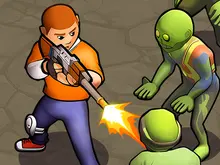
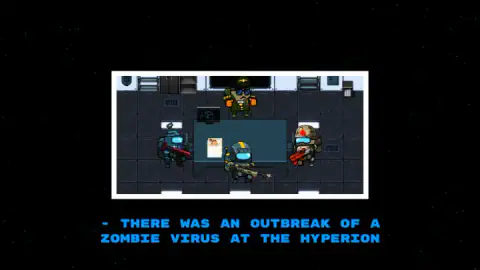
Once you are in, it is a top-down shooter: you look at a space station from above, steer one small armoured soldier through its rooms and point a crosshair at whatever is in the way. The story is told in a few lines. A zombie virus has broken out at a place called the Hyperion, and an officer in sunglasses sends a squad of three to deal with it.
What sets it apart is on the second menu. Next to 1 PLAYER there is a 2 PLAYERS button, and the game has a complete second set of keys ready on the same keyboard.
The game is credited to PlatonovII. It was published in October 2024 and was updated in August 2026.
One warning before the details. Our session lasted about four minutes, and most of that went on the way in. We spent less than a minute inside Mission 1. This page tells you what that road looks like and what the first room shows, and it says plainly where our knowledge stops.
The shooting starts five screens in
Here is the road in the order we met it.
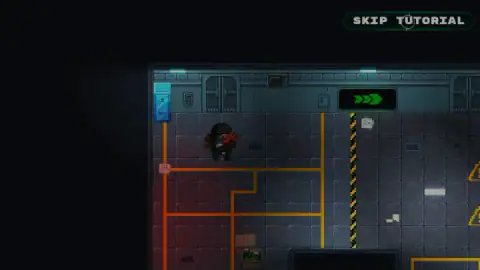
First, the tutorial room. A soldier in a black helmet stands in a dim corridor with orange lines on the floor and a green arrow sign on the wall. We pressed SKIP TUTORIAL at once, so we cannot tell you what it teaches.
Then the title, START, and the mode menu. Then the level menu, where only a 1 was on offer. After that the screen goes black with stars and the story is typed out one letter at a time in blue capitals. Under a picture of a briefing room, the line that matters reads: "- THERE WAS AN OUTBREAK OF A ZOMBIE VIRUS AT THE HYPERION". The briefing ran for about 45 seconds. We clicked and pressed keys during it and never saw a way to skip it.
One more thing happened before the mission. A notice from the game's listing told us an advertisement had been skipped and offered a button to continue. That was a notice, not an advert, and we did not see an advert in this session. Players on another day may.
Two players, one keyboard: read the brackets
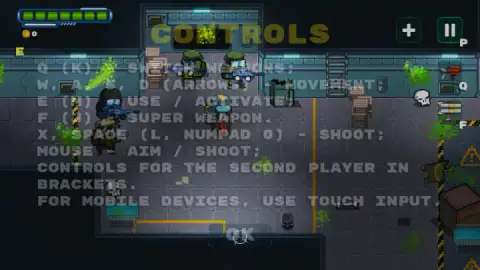
The controls panel ends with a sentence that is easy to miss: "CONTROLS FOR THE SECOND PLAYER IN BRACKETS." Every line of the panel is really two lines. The left hand of the keyboard belongs to player one and the right hand to player two.
That changes how you read it. In a one-player game you might expect the arrow keys to be a spare way to move. Here they are written in brackets, which makes them the second player's legs. The same goes for shooting: X or Space for one soldier, L or the 0 key on the number pad for the other.
Two practical things follow. Many laptops have no number pad, so on those player two shoots with L and nothing else. And the mouse is listed once, with no bracket, so only one of you can aim with it.
There is also a hardware limit worth knowing about, and it is not this game's fault. A keyboard does not always register every key when many are held down together. Engineers call the limit rollover, and on cheaper keyboards some combinations simply do not arrive. Two people holding a direction and a fire key each means four keys at once, sometimes six. If a soldier stops responding in a crowded moment, try letting go of one key before blaming the game.
What the first room showed us, and what it did not
When the controls panel closed we were in a wide corridor with grey floor plates. Our soldier, the one with the blue visor and the yellow stripe from the briefing, stood in the middle holding a red weapon.
The screen furniture is easy to read. Top left is a health bar of seven green segments with a thin white bar under it, and a coin counter at 0. Top right are a plus button and the pause button. Down the right edge sit the current weapon and a rack of rockets, which is the super weapon.
Around us stood four armed figures. Two wore green berets and had green skin, which in a game about a virus is not a good sign. There was green splatter on the walls, and skulls and a bone on the floor. A broken green cabinet stood by the wall, and stacks of crates beside the doorway.
Now the honest part. We pressed the fire keys several times in that room and cannot confirm that a single shot left the gun: we heard nothing and saw nothing fall. Nobody hurt us either. The health bar still showed seven segments when we stopped, and the coins still read 0. So we cannot tell you whether those four figures attack, how many hits a zombie takes, what a box contains, what coins buy or how Mission 1 ends. The provider says characters and weapons can be upgraded. We saw the coin counter and two plus buttons, and nothing of a shop behind them.
Who it suits
The second player is the reason to choose this over another zombie shooter. A sofa, one keyboard and a friend is a setup few browser games still cater for, and this one prints the keys for it on the screen. Playing alone, expect a slow start. From the title to the first step in Mission 1 took us about three minutes, the briefing included.
It is a cartoon, with round soldiers and green slime where another game would use blood. But there are skulls on the floor and it is filed under scary games. For young children that is worth a look over the shoulder first.
More zombie shooters on Mava Games
From the same developer, according to the game's listing, we also have Noob Legends Dungeon Adventures, a 2D platform game with zombies and drones. For another shooter seen from above with co-op in its name, try Elska - dog vs zombies. Madness Online takes the same view into an online survival world, and Rise of the Dead puts you at street level with a pistol. The rest are under shooting games.
Screenshots
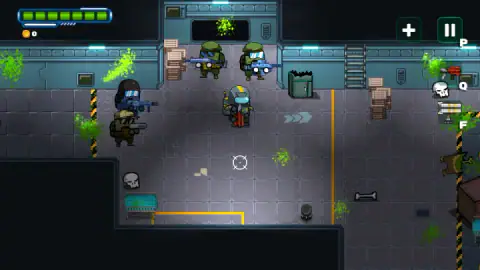
Taken by opening the game ourselves and letting it run — not supplied by the publisher, and not the same picture every other site shows.
How to play Zombie Space Episode II
- Skip or play the tutorial. The game opens in a training room with a SKIP TUTORIAL button in the top right corner.
- Press START and pick a mode. The GAME MODE menu has two buttons, 1 PLAYER and 2 PLAYERS.
- Choose level 1. The next screen stacks three buttons: a mortarboard, a number 1 and an X.
- Sit through the briefing, then read the controls. Mission 1 begins with a CONTROLS panel over the action. Press OK to close it.
- Move, aim and shoot. W, A, S and D move the soldier. X, Space or the mouse shoot. The provider gives the goal as destroying every zombie and monster, and adds that new weapons are found in boxes.
Tips from our run
- Read the controls panel properly the one time you see it. We did not find it again afterwards, and it is the only place the second player's keys are written down.
- The letters on the screen are reminders. P sits beside the pause button, Q beside the weapon icon and F beside the super weapon icon.
- Your pointer becomes a crosshair, and it is small. Find it before you start walking.
- Pale arrows on the floor of the first room point to the right. So does the green arrow sign in the tutorial room.
- The mortarboard button on the level menu looks like the way back into the tutorial. We did not press it, so take that as a guess.
Controls
| W, A, S, D | Move (player two uses the arrow keys) |
|---|---|
| X or Space | Shoot (player two uses L or 0 on the number pad) |
| Mouse | Aim and shoot; the pointer turns into a crosshair |
| Q | Switch weapons (player two uses K) |
| E | Use or activate (player two uses M) |
| F | Super weapon (player two uses J) |
| Touch | Phones and tablets play by touch, according to the same panel (not tried by us) |
Features
- A top-down shooter set on a space station, with a 1 PLAYER and a 2 PLAYERS mode on the same menu
- Two full sets of keys on one keyboard, listed by the game itself with the second player's keys in brackets
- Mouse aiming with a crosshair pointer, next to keyboard-only shooting on X or Space
- A health bar of seven green segments and a coin counter that starts at 0
- Key letters printed on the screen beside the weapon, super weapon and pause icons
- A tutorial room that can be skipped from its first second, and a typed-out story briefing before Mission 1
- Made by PlatonovII
Game details
- Developer
- PlatonovII
- Release date
- October 2024
- Last updated
- August 10, 2026
- Added here
- March 2025
- Technology
- HTML5 (2D, top-down)
- Platforms
- Browser (desktop, keyboard and mouse), Browser (mobile & tablet, touch)
- Classification
- Action , Multiplayer , Shooting , 2 Player
- Saved progress
- Saving, when available, is managed by this game. Mava cannot confirm your level.
FAQ
How do you play Zombie Space Episode II?
Press START, choose 1 PLAYER or 2 PLAYERS and pick level 1. You move a soldier around a space station seen from above with W, A, S and D, shoot with X, Space or the mouse, switch weapons with Q, use things with E and fire the super weapon with F. The provider gives the goal as destroying all zombies and monsters.
What are the controls for the second player in Zombie Space Episode II?
The game lists them in brackets on its controls panel. Player two moves with the arrow keys, shoots with L or 0 on the number pad, switches weapons with K, uses things with M and fires the super weapon with J. Player one keeps W, A, S, D, X or Space, Q, E and F.
Can two people play Zombie Space Episode II on one computer?
Yes. The GAME MODE menu offers 1 PLAYER and 2 PLAYERS, and the second player has a full set of keys on the right-hand side of the same keyboard. We played the one-player mode only, so we cannot describe how the screen behaves with two soldiers on it.
Can you skip the tutorial in Zombie Space Episode II?
Yes. The game opens in a tutorial room with a SKIP TUTORIAL button in the top right corner, and it works straight away. The story briefing that plays before the first mission is a different matter: we found no button to skip it and it ran for about three quarters of a minute.
Who made Zombie Space Episode II?
It is credited to a developer called PlatonovII. It was published on 23 October 2024 and last updated on 10 August 2026.
Does Zombie Space Episode II work on a phone?
The game's own controls panel says mobile devices use touch input, and it is listed for PC and Android in landscape. We played on a computer with keyboard and mouse, so we cannot tell you how the touch controls are laid out.
Is there a Zombie Space Episode I?
We could not find one. The developer's page listed three games when we looked in October 2026, and no first episode was among them. Episode II explains its own story in a short briefing, so nothing seems to be missing if you start here.