

About Zombie Terminator
Most zombie shooters test whether you can aim. Zombie Terminator takes the trigger away. Your blocky character fires at whatever comes close and reloads without asking, so the only thing left for you is where to stand.
For the first two missions, that barely matters. On the third, it seems to be the whole game, and we did not solve it.
Here is how far we got. We played one session of about ten minutes on a computer with the mouse, and only about a hundred seconds of that was fighting. We won missions 1 and 2 and lost mission 3 twice. Most of the rest went on a stuck victory screen, explained below. We spent nothing at the base, so this page cannot tell you how the upgrades feel.
The game is credited to wavegame. It went up on the portal in May and was last updated in October.
Nineteen clicks on Next Level did nothing
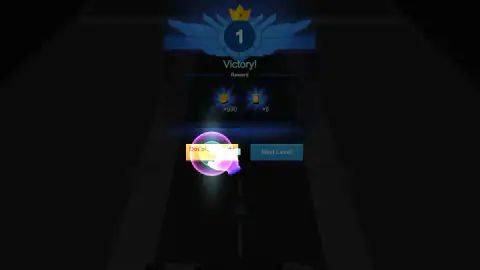
The first Victory screen is the oddest moment in the game. For a second or two, Double rewards and Next Level both look ready. Then the screen dims, a pink hand slides onto the yellow button, and Next Level goes dark.
Nineteen clicks on Next Level did nothing. We kept at it for nearly two minutes, and the screen sat there for over three more while we tried to work out why.
The yellow button is labelled Free on this screen, with no video icon. We pressed it once and reloaded the page. We arrived at the base with mission 2 highlighted, so progress had been saved. Because of that reload, we did not see what the button does on its own, so the best advice we have is to follow the hand on this screen.
Our coin total then read 1.2k, about twice the 590 on offer, so we think the doubling went through.
The same hand does not always block you. On the Fail! screen it points at Upgrade equipment, yet Challenge again stays lit and worked first time. On the second Victory screen, Double rewards has a video icon and sits above Get! and Next Level. We pressed Next Level and went straight on to mission 3.
Hunter mode nearly plays itself
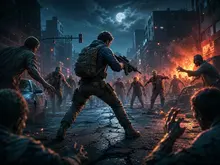
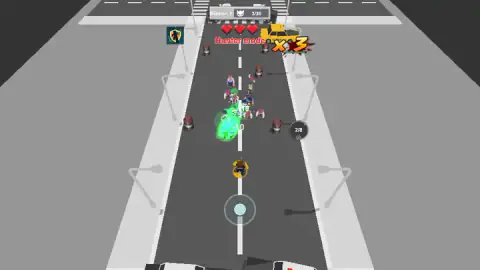
Mission 1 is a grey street with police cars behind you and a queue of zombies ahead. We dragged forward once and the counter ran from 0 to 36 in about twenty seconds.
The next mission moves to a coloured street, between Fruits Corner and Best Shoe Mart, and asks for 25 kills. That took about half a minute and cost us one heart.
At one point the count leapt from 9 to 23 in under seven seconds while flames burst across the left of the road. We do not know what set them off. The oil drums along the kerb are our first suspect, but we did not see one go up.
During that mission a banner read Forward bullets, 1 more forward bullets, and a small icon joined the column at top left. Yellow specks also scatter where zombies fall. We walked over none of it on purpose, so we cannot tell you which pickups matter.
A red ×8 or ×23 beside the counter tracks your chain of kills, with a small bar under it. It dropped back to ×1 after a lull. We did not see that it paid anything extra.
Defense mode ends the free ride
Mission 3 swaps the kill counter for a clock, starting at 30 seconds, and the instruction becomes Stop zombies, don't let them come near. A striped barricade drops across the road ahead of you, with a squat gun emplacement on a mat to each side. Purple patches cover the street beyond it, and the crowd walks through them.
Both attempts went the same way. The barricade held until about 17 on the clock. Then its centre section opened, right where we were standing, and zombies came through in a stream.
Hearts then went quickly. A gold ring and the word Invincible appeared after a hit, yet in one attempt the next heart fell about a second and a half later, so that protection looks brief. Our character also slid backwards towards the police cars while we were not dragging the joystick, which we take to be the hits pushing it back.
We died with 9 seconds left the first time and 10 the second. In our captures the two emplacements show no visible shots, so we cannot say whether they fire by default or need paying for.
Two things we would try next. One is moving away from the centre before the barricade opens, since we never did. The other is spending first: the game itself points to Upgrade equipment on the Fail! screen, and we walked in with the starting pistol and all our coins unspent.
The revive panel pauses the clock while you decide. Free revive has a video icon and we left it alone. The other button asks for 10 gems, and with none in hand it just says Gem shortage! Quit takes you to the Fail! screen.
The base: what we saw and did not touch
Between missions you stand in the street above a grid of twelve slots, holding one pistol. Around it are a locked Skill panel, a Weapon panel, a Shop, a bin, and buttons for Bonus and Sign in. A crate on a parachute hangs over the road, and a gift has a countdown of nearly a full day.
The row at the bottom offers Damage×2, Gold×100 and Gold×2, and an orange button reads Free Auto synthetic. Together with the grid, that reads to us like a game where matching guns combine into better ones. That is a guess from the labels, because we pressed none of them.
The energy bar read 40/30 when we saw it, so it can run over its limit. The lightning icon on it matches the ×5 on both reward screens. We never saw whether starting a mission costs energy.
What we did not reach
- A win in mission 3, or anything after it. The row at the top shows a 4, and we do not know how far it goes.
- Any upgrade or purchase, so nothing about other weapons, the skill, or how far your coins go.
- Bosses or new enemy types. The game's listing promises stronger enemies; we saw only a mixed crowd, including pale blue and red-clad zombies.
- The keyboard. The listing gives arrows, Space and Shift. We only tried the up arrow behind the barricade, where nothing could move forward anyway.
- A phone. The joystick looks built for one and the game is marked for touch, but we used a computer.
Who it is for, and more from wavegame
It suits someone who wants zombies falling in rows with almost no learning curve, and who does not mind a base full of timers. If you want to do your own aiming, this is not it.
From the same studio, Zombie Monster Survivors also fires for you, adding skill cards at each level. Drago Warrior Tower Defense has one hero shooting upward at a long folded dragon, and Party Games Mini Shooter Battle is a race to 15 kills in a shrinking arena.
More in our shooting games.
Screenshots
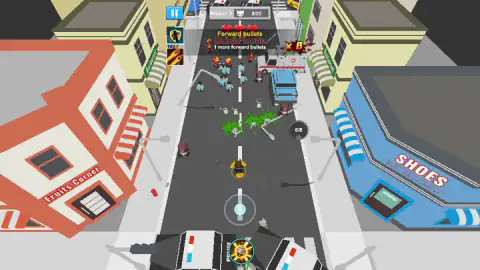
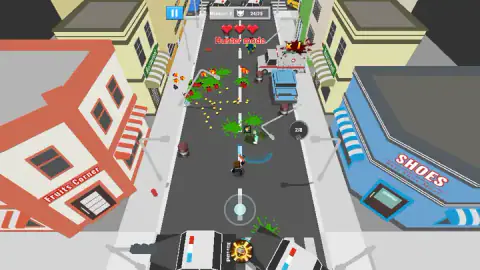
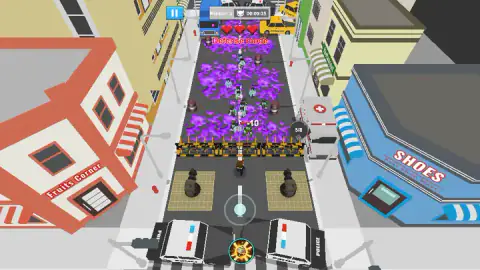
Taken by opening the game ourselves and letting it run — not supplied by the publisher, and not the same picture every other site shows.
How to play Zombie Terminator
- Hold and drag the joystick. It sits low in the middle of the screen, and a mouse drag works. You walk; the gun looks after itself.
- Watch the top of the screen. It shows either a kill counter, such as 0/36, or a countdown.
- Keep an eye on your three hearts. Each one lost shows -1 by your character and flashes the screen edges red.
- Collect your reward. A win pays coins and energy, then offers the next mission.
- Use the base between missions. Start Battle launches whichever number is highlighted in the row at the top.
Tips from our run:
- On the first win, press the yellow button. See the next section. It may save you the minutes it cost us.
- Do not bother looking for a fire key. Our one tap of Space changed nothing we could see.
- Do not worry about the empty magazine. The ring beside the road counts eight shots, then shows a tiny reload timer and fills again by itself.
- Do not stand and wait in mission 3. That is what we did, in effect, and it lost twice.
Controls
| Drag the on-screen joystick (mouse works) | Walks your character; shooting takes care of itself |
|---|---|
| Click Start Battle | Starts the highlighted mission from the base |
| Click the blue pause button, top left | Shown from mission 2 onward; we did not press it |
| Click the round button, bottom centre | Also appears from mission 2; we pressed it several times and could not tie any effect to it |
| Arrow keys, Space, Shift | Move, fire and boost according to the game's listing; we could not confirm them |
Features
- A character that shoots without being told to, reloading an eight-round pistol on its own
- Two kinds of mission so far: Hunter mode counts kills, Defense mode runs a 30-second clock
- Three hearts per attempt, with a short-lived Invincible ring after a hit
- A barricade and two gun emplacements in Defense mode, with the street filling up with purple patches beyond
- Rewards of coins and energy after each win, with progress kept after a page reload
- A base screen with a weapon grid, a locked skill, a shop and timed offers
- A revive offer on defeat that takes a video or 10 gems
Game details
- Developer
- wavegame
- Release date
- May 2026
- Last updated
- October 29, 2026
- Added here
- April 2026
- Technology
- HTML5
- Platforms
- Browser (desktop, mouse), Browser (mobile & tablet)
- Saved progress
- Saving, when available, is managed by this game. Mava cannot confirm your level.
FAQ
How do you play Zombie Terminator?
You hold the on-screen joystick and drag to walk, and your character fires at nearby zombies without any button. Hunter missions end when the kill counter is full, such as 36 of 36 on the first one. Defense missions end when a 30-second clock runs out. You have three hearts per attempt.
Does Zombie Terminator shoot automatically?
Yes, as far as we played. After one drag and one tap of Space, the first mission's counter ran all the way to 36 of 36 while the ammo counter kept falling and refilling. Your job is where you stand, not when you fire.
Why does Next Level not work after the first mission of Zombie Terminator?
It did not work for us while a pink hand was pointing at the yellow Double rewards button, which is marked Free on that first screen. Nineteen clicks on the dimmed Next Level changed nothing. We pressed the yellow button once, reloaded the page and arrived at the base with mission 2 ready. On the second victory screen, Next Level worked normally.
How do you beat mission 3 in Zombie Terminator?
We cannot say from experience, because we lost it twice with nine or ten seconds left. You have to survive a 30-second clock behind a barricade, and both times the middle of the barricade opened at about 17 seconds on the clock and our three hearts went soon after. With the coins from the first two wins unspent, we would try the Weapon panel at the base before going back.
What happens when you die in Zombie Terminator?
Losing your last heart opens a Do you want to revive? panel and pauses the clock. Free revive carries a video icon, a second button costs 10 gems, and Quit takes you to the Fail! screen. There, Challenge again restarts the mission from a full clock and three hearts, and Upgrade equipment is the other choice.
What is the difference between Hunter mode and Defense mode in Zombie Terminator?
Hunter mode gives you a kill target, 36 on mission 1 and 25 on mission 2, on an open road. Defense mode replaces the counter with a countdown from 30 seconds and tells you to stop zombies coming near. In our run, Hunter missions cost one heart in total, and Defense cost all three, twice.
Who made Zombie Terminator?
The game is credited to wavegame. Zombie Terminator was published on 26 May 2026 and updated on 29 October 2026.