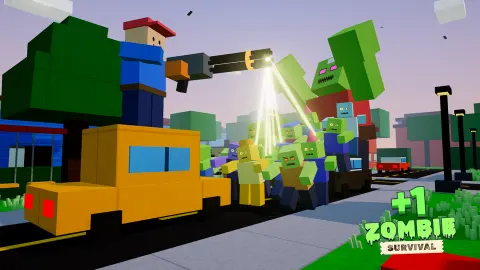


About +1 Zombie Survival
Most zombie shooters keep score in kills. +1 Zombie Survival keeps score in seconds. A green counter in the top-left corner reads +1/s, and it ticks up whether you are fighting, building or standing still in a field reading the instructions. According to the game, that number is your power, and every shot gets stronger as it grows.
That changes what a bad night means. In most survival games a lost round costs you everything you built up. Here the clock has been paying you all along, so the question is less whether you can win tonight and more how long you can stay alive while the counter climbs. The game's own pitch is ten nights in each of five towns, eleven weapons ending with a black hole gun, and bosses, with a rebirth option that turns progress into permanent multipliers.
It is made by Enrik, a developer who also made the calm paint-a-room game Color the Room. It was published on 27 October 2026.
Our ten minutes with it never left the Training Ground, the tutorial that comes before the first town. We never met a zombie. What follows is what that tutorial shows you, and where we describe nights, towns or bosses, that comes from the game's own description rather than from our play.
A clock that pays you: what the +1 actually does
The counter is the whole idea, and it is easy to miss how it behaves. It does not stop for the tutorial. We arrived in the training field with a little over 200 power and left with close to 700, without firing more than one round.
It also survives a reload. Twice in our session the page reloaded, and both times the counter picked up from the number it had reached, while the tutorial went back to its first step. So the power you build is yours, and it carries into the next sitting. This is the same pattern as an idle game, where progress keeps accumulating with little input, bolted onto a shooter.
The practical consequence is that time spent alive is never wasted. A slow, careful night still leaves you stronger for the next one, which is a gentler deal than most horde shooters offer.
Doors, traps and the old idea of the loophole
Build mode is where the second half of the game lives, and the training ground already shows the price list. A door costs 20 coins and a spike trap 30; the Tab key opens the rest. The card for the door is blunt about what it is for: it blocks the way, you open and close it with E, and zombies have to break it down.
That is a time trade. A door does not kill anything. It buys you the seconds the horde spends hitting it, and in this game seconds are literally power.
The game's description adds one more trick: break walls with the pickaxe to cut loopholes. The word is old. In castles and forts a loophole was a narrow slit in a thick wall, often wider on the inside than the outside, so a defender could aim through it while showing almost nothing to the other side. Holing up in a furnished room, sealing the door and shooting through a hole you knocked in the wall is the same plan, scaled down to a suburban house. We did not get far enough to try it, but the tools for it are all on the bar from the first minute.
What the towns are said to hold
Everything in this section comes from the game's own description, not from our session. There are five towns, starting with Sunny Suburbs and ending with a Neon Lab, and ten nights in each. Every house, shop and mall has furnished rooms you can go into, and zombies arrive from every street.
There are parked cars you can get into with E and drive into the horde, steering with the usual keys. The game makes one exception clear: you cannot ram a boss. Beating bosses and choosing to rebirth gives permanent multipliers, the classic trade of starting over in exchange for growing faster the next time.
The loading screen hints at the game's sense of humour. Its tips come from Radio Rick on 101.1 FM, a radio host who talks you through survival between loads.
Who it is for, and what we did not see
It suits players who like the slow build of an idle game but want a gun in their hand while it happens, and anyone who enjoys turning a house into a fort. The blocky look keeps the zombies cartoonish rather than gory, though it is still a shooter about killing the undead, so younger children may want a grown-up to judge.
To repeat the limits plainly: in a ten-minute session on a computer we finished three tutorial steps out of a bar of more than a dozen. We saw no zombie, no night, no town, no boss and no car on the move, never earned a coin and never placed a piece. The touch layout for phones and tablets is described by the game; we did not test it.
More games by Enrik, and more zombie defence
Enrik's other games in our catalogue are much calmer. Color the Room has you paint a 3D witch's hut with colours and textures, and Sunny Farm: Animal Simulator is a chicken farm with eggs to sell.
For the zombie side, Zombies vs Special Forces is a third-person shooter set in an industrial base, and Zombie Horde: Build & Survive is all about buying barricades and turrets before each wave. There are more aim-and-fire games in our shooting games.
Screenshots
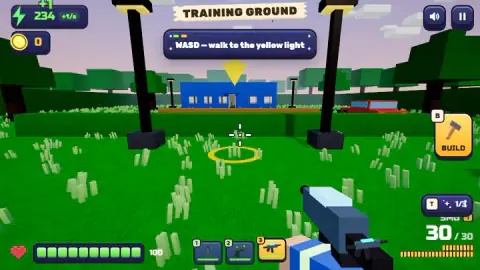
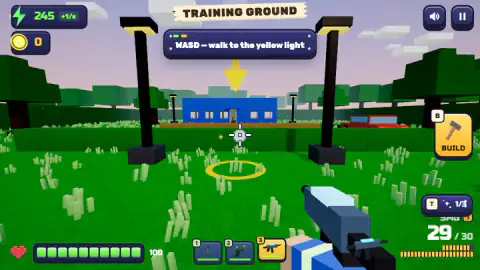
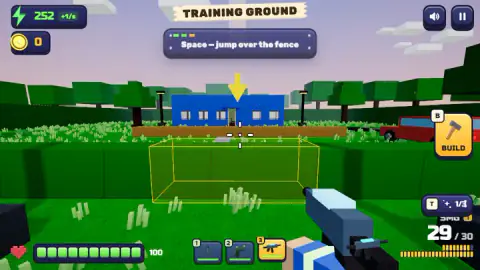
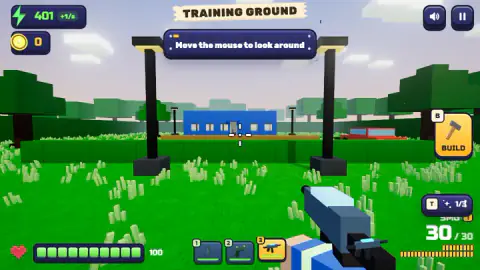
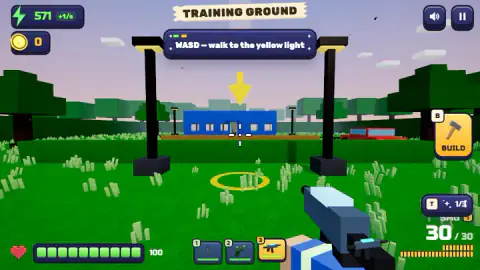
Taken by opening the game ourselves and letting it run — not supplied by the publisher, and not the same picture every other site shows.
How to play +1 Zombie Survival
- Look around with the mouse. The first instruction asks for nothing else, and the step ticks off once you have.
- Walk with WASD to the yellow light, a glowing ring on the grass with a big yellow arrow hanging over it.
- Press Space to jump the low wooden fence in front of the blue house. The panel at the top always names the next step, and a row of small boxes above it fills in as you go.
- Once you are out in a town, the game says you start each night yourself (G on a keyboard), and it ends when the whole horde is gone. Hole up in a room, put a door in the doorway, set traps and shoot.
Tips from our session
- Read the panel, not the scenery. The training field has a parked red car, street lamps and a house, and none of them matter until the panel says so. We spent minutes pressing other keys at the fence when the panel was asking for Space all along.
- Your weapon bar starts with a pickaxe, a pistol and a submachine gun with a 30-round magazine, on the number keys. The pickaxe is not only for emergencies: the game says it breaks walls, which is how you make firing holes.
- Pressing B turns the BUILD button green and swaps the weapon bar for a building bar. A yellow box on the ground shows where the piece will go before you click.
- Do not panic about health. A tip on the loading screen says it comes back on its own five seconds after the last hit.
Controls
| Mouse | Look around |
|---|---|
| WASD | Walk |
| Space | Jump |
| B | Open and close build mode |
| Click, 1-0 or mouse wheel, X (in build mode) | Place a piece, choose a piece, remove a piece |
| E | Open or close a door you have placed |
| Left click, right click, Shift, R | Shoot, aim, sprint, reload, according to the game's own instructions |
| G, F, U, Esc | Start the night, repair, upgrade, pause, according to the game's own instructions |
| Left stick, drag on the right, fire button (phones and tablets) | The touch layout described by the game; we did not try it |
Features
- A power counter in the top-left corner rises by one every second, and the game says that power makes every shot stronger
- The power you have built up stays when you reload the page; in our session it carried on from the same number twice
- A training ground teaches the controls one step at a time, with a yellow light on the ground showing where to go
- Build mode sells defences for coins: a door costs 20 and a spike trap 30, and zombies have to break a door down to get through
- You start with a pickaxe, a pistol and a submachine gun holding 30 rounds; the game lists 11 weapons in total
- Health refills on its own five seconds after the last hit, according to a tip on the loading screen
- The game describes five towns with ten nights each, bosses, drivable cars and a rebirth that grants permanent multipliers
Game details
- Developer
- Enrik
- Release date
- October 2026
- Last updated
- October 28, 2026
- Added here
- October 2026
- Technology
- HTML5 (WebGL 3D)
- Platforms
- Browser (desktop, mouse & keyboard), Browser (mobile & tablet, touch)
- Saved progress
- Saving, when available, is managed by this game. Mava cannot confirm your level.
FAQ
What does the +1 mean in +1 Zombie Survival?
It is your power. A counter in the top-left corner goes up by one every second, shown as +1/s, and the game says that power makes every shot stronger. It keeps counting while you walk through the tutorial, before you have fired at anything.
Is +1 Zombie Survival progress saved?
The power counter is. When we reloaded the page twice during one session, it carried on from the number it had reached instead of going back to zero. The tutorial, on the other hand, started again from its first step.
How do you build a door in +1 Zombie Survival?
Press B to open build mode. The bar at the bottom shows a door for 20 coins and a spike trap for 30, with Tab opening the rest. Click to place a piece, use 1 to 0 or the mouse wheel to choose one, X to remove it, and right click or B to leave. Once a door is placed, E opens and closes it.
How do you get past the training ground in +1 Zombie Survival?
Follow the instruction in the panel at the top: look around with the mouse, walk to the yellow light with WASD, then press Space to jump the low fence in front of the blue house. A progress bar above the instruction shows how many steps are left. We only got as far as the fence in our session.
Who made +1 Zombie Survival?
It is by Enrik, the credited developer, who also made Color the Room and Sunny Farm: Animal Simulator. It was published on 27 October 2026 and supports 19 languages.
Does health regenerate in +1 Zombie Survival?
Yes. A tip from the in-game radio host, Radio Rick, on the loading screen says health comes back five seconds after the last bite. The health bar starts at 100.
Can you play +1 Zombie Survival on a phone?
The game describes a touch layout with a left stick to move, dragging on the right to look and a fire button, and the game's listing gives Android and iOS. We played it on a computer with keyboard and mouse, so we have not tested the touch controls.