




About Zombie Horde: Build & Survive
Most defence games put a shop in a corner of the screen and let you drop towers with the mouse. Zombie Horde: Build & Survive has no shop to open. The things you can buy are painted on the grass as dashed squares, and the only way to pay is to walk your character onto one and stand there. Clicking it does nothing.
That one decision shapes the whole game. Your builder and your gunman are the same small figure, so every purchase is also a walk, and where you end up standing when the wave starts is part of the plan.
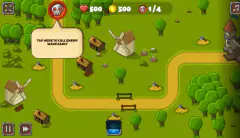
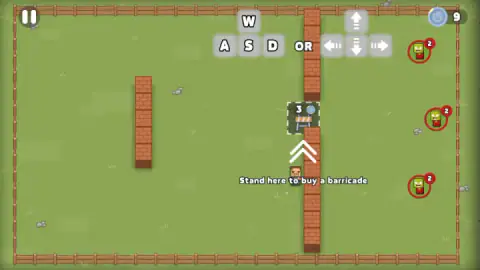
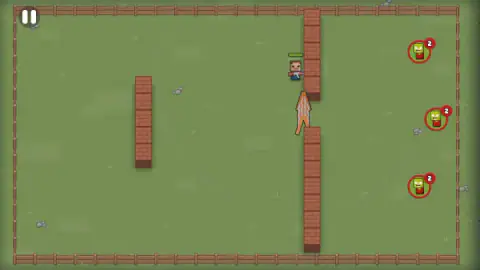
The field fits on one screen: a meadow inside a wooden fence, seen from above. A long brick wall runs from the top fence to the bottom one, with a single gap in the middle. You are on the left of it. The zombies wait on the right, each inside a red ring.
The game is credited to Vlad Wise. It was published in April 2025.
Here is the honest size of our visit. We played for about four minutes on a desktop computer and had two tries at the first stage. The first ended in defeat within half a minute of the fight starting. The second got through wave 1 and reached the building phase of wave 2, where we failed to buy the turret on offer and ran out of time. So this page can explain how a stage starts, how buying works and what losing looks like. It cannot tell you what a turret does or what the last three waves hold.
Nine coins, and what they buy
The purse opens at 9 coins. The first barricade costs 3, which leaves 6. The FIGHT button carries a small "+2" beneath it, and when we came through the first wave the purse read 8. Six plus two: the number under the button looks like the pay for the wave you are about to start.
Before wave 2 a new square appeared with a bullet icon, the price 5 and the label "Buy Turret". With 8 coins we could afford it and still keep 3 back, the price of a barricade. We cannot tell you whether that is a good split, because we never got the turret built.
Two things stand out in those prices. First, the game does not let you see the whole shop at once: on each wave we saw exactly one square. Second, you cannot buy from a safe distance. The barricade square is in the gap itself, the one place the zombies are heading for, and the turret square is in open ground.
The game's description also promises traps and more than one weapon. We saw neither in our two waves.
Why our first try ended in thirty seconds
We bought the barricade, pressed FIGHT, and then wandered up along the wall to the top of the field. About thirty seconds later the screen went dark behind a red DEFEAT.
The card has a Reward line, which showed a coin and a zero, and two buttons: a blue Home and a red Replay. Behind it you can still make out the field, and a knot of zombies bunched at the top of the wall on our side, where we had been standing. We cannot say whether they broke the barricade or how they got there. What we can say is that leaving the gap did not help.
Replay sent us back to wave 1. The barricade was gone and had to be bought again. The second time the wave was over in about twenty seconds, and the barricade was still in place when wave 2 was announced. We pressed no fire key in either try; the game's instructions list none, only movement.
One detail from the waiting zombies: each ring carries a number badge. On wave 1 all three read 2. On wave 2 two green zombies read 4, and a third, wearing a blue cap, read 1. We did not work out whether the number is a head count or a strength rating, but it does change from wave to wave, and it is on screen before you commit to a purchase.
A barricade was once a row of barrels
The word comes from the French barrique, a barrel. Wikipedia's article on the barricade places its first famous use in Paris on 12 May 1588, the Day of the Barricades, when supporters of the Duke of Guise filled barrels with stone and earth and stretched chains across the street corners to shut out the troops of King Henri III. A barricade, in other words, is not a wall. It is whatever you can drag into a gap in a hurry.
That is what the game sells you for 3 coins. The brick wall is already there and is not yours to build; your barricade is a patch pushed into its one opening.
The rhythm of build, then fight, then build again has a pedigree too. Rampart, an arcade game from Atari Games in 1990, alternated a building phase, in which you repaired castle walls, with a combat phase. Wikipedia calls it a precursor of the tower defence genre that became popular in the 2000s. Zombie Horde: Build & Survive follows the same beat with a FIGHT button between the two halves, and adds the twist that the builder has to walk to each job.
Who it is for
It suits players who like tower defence but want to be on the field, not above it. A wave is short: ours lasted between twenty and thirty seconds, win or lose.
It is not a twin-stick shooter, and on a computer it is not a mouse game. If the first minute feels broken, it is almost certainly one of two things: you are clicking a square instead of standing on it, or you have not pressed FIGHT.
More games to try next
We not survive is the closest relative: one defender, a base and waves of zombies. Tower Defense and Kingdom Defender - Tower Defense are the classic form, with towers placed from above. AOD - Art Of Defense moves the genre to a wasteland with role-playing touches. Build Your Zombie Horde swaps sides and puts you in charge of the undead. The rest are under strategy games.
Screenshots
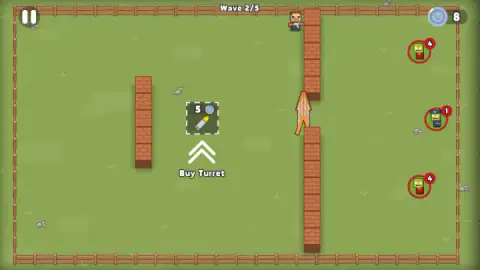
Taken by opening the game ourselves and letting it run — not supplied by the publisher, and not the same picture every other site shows.
How to play Zombie Horde: Build & Survive
- Move with W, A, S, D or the arrow keys. The game draws both sets of keys at the top of the screen on the first wave.
- Walk onto the dashed square. On wave 1 it sits in the gap of the long wall, with a barricade icon, the price and the line "Stand here to buy a barricade".
- Wait for the purchase. The purse in the top right corner drops and the barricade fills the gap.
- Press the yellow FIGHT! button in the bottom right corner. Nothing attacks until you do.
- Survive the wave. When it is over, the counter at the top moves on and a new square appears.
What two tries taught us:
- The mouse does not move you. On a desktop computer we dragged across the field several times and the character stayed put. The game's instructions keep dragging for phones and keys for computers.
- Stand on the square, not next to it. We spent over a minute beside and below the barricade square before a short step put us on it. The white chevrons under a square point at it; they are not the direction to walk.
- There is no hurry while building. The zombies do not leave their rings until FIGHT is pressed. Take the time to read where the next square is.
- Find the square before you move. On wave 2 the turret square lay to the left of where we stood, out in the open between the two walls. We kept pressing up and right, into a corner, and never reached it.
- Watch the bar over your head. Once the fight starts, a green bar appears above the character. It is not there during the building phase.
Controls
| W, A, S, D or the arrow keys | Move the character around the field |
|---|---|
| Walk onto a dashed square and stay on it | Buys what the square shows (a barricade for 3 coins, a turret for 5) if you have the coins |
| Yellow FIGHT! button (bottom right) | Starts the wave once you have finished building |
| Pause button (top left) | Pauses the game; we did not open it |
| Replay on the DEFEAT card | Starts the stage again from the first wave; Home sits next to it |
Features
- A stage of five waves, counted at the top of the screen as Wave 2/5
- A building phase before each wave: the zombies wait on their side until you start the fight
- Shopping done on foot: you buy by standing on a dashed square, with no menu and no clicking
- A purse of 9 coins at the start, a barricade for 3 and a turret for 5
- Zombies shown in advance inside red rings, each with a number badge
- A DEFEAT card that pays nothing if you fall in the first wave
- Made by Vlad Wise
Game details
- Developer
- Vlad Wise
- Release date
- April 2025
- Last updated
- August 10, 2026
- Added here
- May 2025
- Technology
- HTML5
- Platforms
- Browser (desktop, keyboard), Browser (mobile & tablet, touch)
- Saved progress
- Saving, when available, is managed by this game. Mava cannot confirm your level.
FAQ
How do you play Zombie Horde: Build & Survive?
You move one armed character around a fenced field with W, A, S, D or the arrow keys. Before each wave you spend coins on defences by walking onto the dashed squares on the ground, then you press the yellow FIGHT! button and the zombies come in from the right. The stage we played has five waves.
How do you buy a barricade in Zombie Horde: Build & Survive?
Walk the character onto the dashed square that shows the barricade and its price, and stay there. Clicking the square or dragging the mouse over it did nothing for us on a desktop computer. The first barricade costs 3 coins out of a starting purse of 9 and closes the gap in the long brick wall.
Why do the zombies not attack in Zombie Horde: Build & Survive?
Because the wave has not been started. The zombies stand on the right inside red rings until you press the yellow FIGHT! button in the bottom right corner. In our session that button appeared only after the barricade had been bought, so if you see no button, look for a dashed square you have not stepped on yet.
How many waves are there in Zombie Horde: Build & Survive?
The stage we played counts five: after the first wave the top of the screen read Wave 2/5. We survived one wave and did not fight the second, so we cannot say what waves three to five bring, or whether other stages follow.
How much does a turret cost in Zombie Horde: Build & Survive?
Five coins. The Buy Turret square appeared before the second wave, in the open ground between the two brick walls, when our purse read 8. We did not manage to stand on it before our session ended, so we cannot describe how the turret behaves.
What happens when you lose in Zombie Horde: Build & Survive?
A DEFEAT card appears with a Reward line and two buttons, Home and Replay. We lost during the first wave and the reward was 0 coins. Replay started the stage again from the first wave, and the barricade had to be bought a second time.
Who made Zombie Horde: Build & Survive?
It is credited to a developer listed as Vlad Wise. It was published in April 2025 and last updated in August 2026. It is listed for PC, Android and iOS in landscape; we played it on a desktop computer.
Can you play Zombie Horde: Build & Survive on a phone?
It is listed for Android and iOS, and the game's instructions say that on mobile you drag a finger across the screen to move the character. We only played it on a desktop computer with the keyboard, so we cannot vouch for how it handles on a touch screen.