

About Build Your Zombie Horde
Most zombie games hand you a weapon and a street full of the dead. Build Your Zombie Horde gives you the dead and takes the weapon away. You are the one sending zombies into a house, and the people inside, a gang of bandits in flat caps, sunglasses and moustaches, are the ones who have to cope.
The other thing it takes away is control. Once a zombie is on the floor you do not steer it. It picks a bandit, walks over and starts swinging, and all you can do is decide when the next one arrives. That is what the publisher means by calling it an autobattler: your job is supply, not combat.
The supply is the game. A blue energy bar at the bottom of the screen pays for each zombie, and two counters at the top, a drop of blood and a pink brain, collect what the fighting earns. Everything else on the screen is a way of turning those two numbers into a bigger horde.
Build Your Zombie Horde is by Vlad Wise. It was published in October 2025.
What we played: four minutes in the Bandit Hideout
We will be exact about how far we got. Our session lasted about four minutes, and it opened with the first location, Bandit's Hut, already marked as complete: a two-room brick house with three bandits standing in it and a tutorial hand pointing at the Locations button under the words "Forward, to the new location!".
The Locations panel showed Level 0 on the left, Level 1 on the right and a green button with a price. We paid it, and our blood dropped from 450 to 300. The move between locations is also where an ad break sits; ours passed with a short notice and no video.
Level 1, Bandit Hideout, is a different size of problem. The hut had three bandits. The hideout had about twenty, spread over a bedroom, a tiled bathroom with a bathtub, a long room with a sofa and a hallway with a wooden crate. We spent the rest of the session there, sending zombies in and watching fights break out in the bedroom, in the far corner and at the front door. The furniture takes part: the sofa ended up knocked sideways and the crate was shoved across the hallway.
The bandits talk back. Small speech bubbles pop up over their heads with emoji in them, and one showed a laughing face next to a zombie's head, which is a gang making fun of your horde in the middle of losing to it.
We did not clear the hideout. When we stopped, bandits were still standing in three rooms, so we cannot tell you what the end of a level pays or what Level 2 is called.
Where the blood goes: five upgrades with their names hidden
The Upgrades panel has three tabs: Blood, Brains and Zombies. We opened the first two.
The Blood tab is a list of five rows, and every one of them is a mystery box. The icon is a question mark, the name is "???" and so is the description. What you can read is the price and a counter that suggests how many times each can be bought.
| Row | Price in blood | Counter |
|---|---|---|
| 1 | 100 | 0/40 |
| 2 | 200 | 0/40 |
| 3 | 500 | 0/40 |
| 4 | 1K | 0/20 |
| 5 | 2.5K | 0/20 |
Two things follow from that table. The first row is cheap enough to buy within a minute of arriving, and we should have: we sat on a full meter and bought nothing, which is the one clear mistake of our run. And the last row costs more than the meter can hold. Something has to raise that 1K ceiling before the fifth upgrade is even possible, and our guess is that one of the cheaper rows does it. We did not buy any, so it stays a guess.
Brains are the slow currency, and they buy new zombies
The Brains tab is where the horde gets its variety. The first row is the zombie you already have, the Shambler, stamped "UNLOCKED!" and described in the game's own words as "Slow and dim. Hits point-blank!". Below it are four more hidden rows, and the cheapest of them costs 300 brains.
Now compare that with what we earned. Our blood more than tripled during the session. Our brains went from 9 to 14. At that pace the second zombie is a long way off, and the game is plainly built for sessions much longer than ours, or for later locations that pay better. Either way, blood is the currency you spend every few minutes and brains are the one you save.
Why zombies want brains at all: a 1985 joke that stuck
A game that pays you in brains is leaning on an idea most people think is as old as zombies. It is not. In George A. Romero's Night of the Living Dead, the 1968 film credited with the modern zombie, the creatures are never called zombies. The script calls them ghouls, and they eat human flesh of any kind.
Brains arrived seventeen years later, in Dan O'Bannon's horror comedy The Return of the Living Dead. That film is credited with introducing zombies that go for the brain in particular, and it even gives them a reason: being dead hurts, and brains ease the pain.
Build Your Zombie Horde splits the difference neatly. Blood, the common currency, is the Romero side: any body will do. Brains, the rare one, is the 1985 side, and it is the only thing that makes a new kind of zombie.
Who it suits
Someone who likes watching a number go up and deciding what to do with it, more than someone who wants to aim and dodge. There is nothing to dodge. If a fight is going badly, your only answer is another zombie, a little sooner.
More strategy and zombie games on Mava Games
For another game where you pay for troops and then watch them march, Age of Tanks Warriors: TD War does it along a single lane, and Epic Empire: Tower Defense puts you on the defending side of the wall. If you would rather be the one facing the zombies, Animals vs Zombies has a character that fights them automatically and Zombie Space Episode II is a top-down shooter on a space station. More are filed under strategy games.
Screenshots
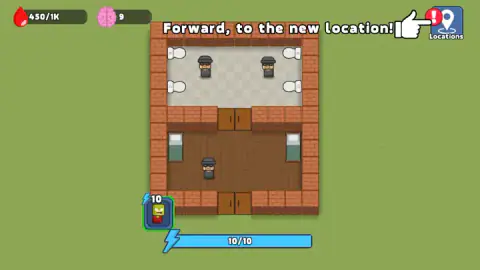
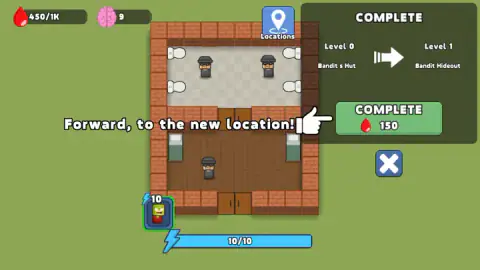
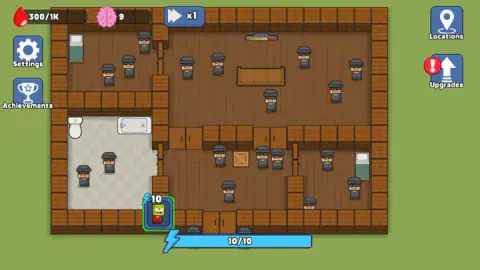
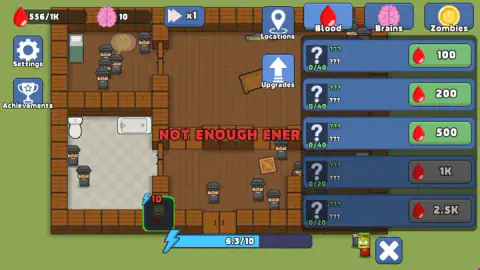
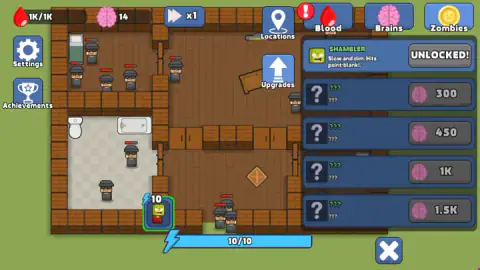
Taken by opening the game ourselves and letting it run — not supplied by the publisher, and not the same picture every other site shows.
How to play Build Your Zombie Horde
- Look at the card at the bottom left: a green zombie in a red shirt with a lightning bolt and a number. That number is what one zombie costs in energy.
- Click or tap the battlefield to summon. The game's instructions say anywhere on the screen will do.
- Watch the fight. Zombies and bandits both carry a small health bar, and the blood counter climbs while they trade blows.
- When the bar is blue again, summon another. If you are early, red letters across the screen say "NOT ENOUGH ENERGY".
- Spend what you earn: Upgrades for a stronger horde, Locations to move on.
Things we would have liked to know first:
- The bar holds exactly one zombie. At the start it reads 10/10 and the Shambler costs 10. One summon drains it to nothing, so you cannot flood a room. You feed it one body at a time.
- Energy comes back quickly. In our run an empty bar was full again in well under half a minute. The limit is real but short, and clicking faster does nothing.
- The blood meter has a ceiling. Ours read 1K/1K and stopped. Blood earned after that point is lost, so spend before you hit the top.
- A red exclamation mark means there is something to buy or somewhere to go. It sat on Upgrades for most of our session, and on Locations before that.
Controls
| Click / Tap | Summon a zombie on the battlefield, if the energy bar is full enough |
|---|---|
| Hold and move | Move the camera, according to the game's instructions |
| Pinch with two fingers | Zoom in or out on a touch screen, according to the game's instructions |
| P | Pause on a computer, according to the game's instructions |
Features
- Zombies that fight on their own once summoned, against bandits who have a health bar each
- An energy bar that holds 10 and a first zombie that costs 10, so every summon is a decision
- Two currencies, blood and brains, with a blood meter that stops at 1K at the start
- Locations opened one after another, from Bandit's Hut to Bandit Hideout and on
- Five blood upgrades and four more zombie types, all hidden behind question marks until you buy them
- A fast-forward button, a settings screen and an achievements list
- Made by Vlad Wise, in English, for landscape screens
Game details
- Developer
- Vlad Wise
- Release date
- October 2025
- Last updated
- August 10, 2026
- Added here
- August 2025
- Technology
- HTML5 (2D)
- Platforms
- Browser (desktop, mouse), Browser (mobile & tablet, touch)
- Classification
- Strategy
- Saved progress
- Saving, when available, is managed by this game. Mava cannot confirm your level.
FAQ
How do you play Build Your Zombie Horde?
You click or tap the battlefield to summon a zombie, and the zombie does the rest: it walks to the nearest bandits and fights them without any further orders. Each summon uses energy, which refills by itself. Fights pay blood and brains, which you spend on upgrades, new zombie types and the move to the next location.
Why does Build Your Zombie Horde say NOT ENOUGH ENERGY?
Because the energy bar has not refilled yet. The first zombie costs 10 energy and the bar holds 10, so one summon empties it. Wait for the blue bar at the bottom to fill again; in our run that took well under half a minute.
What are blood and brains for in Build Your Zombie Horde?
Blood pays for the five upgrades on the Blood tab, priced from 100 to 2.5K, and for moving on to a new location, which cost us 150. Brains unlock new kinds of zombie on the Brains tab, where the cheapest one costs 300. We earned blood far faster than brains.
What zombies are there in Build Your Zombie Horde?
You start with the Shambler, which the game describes as "Slow and dim. Hits point-blank!". The Brains tab shows four more types, hidden behind question marks, at 300, 450, 1K and 1.5K brains. We did not earn enough to unlock any of them, so we cannot say what they are.
How do you get to the next location in Build Your Zombie Horde?
Open Locations at the top right. The panel shows the level you are on, the next one and a green button with a price in blood. Going from Level 0, Bandit's Hut, to Level 1, Bandit Hideout, cost 150 blood in our run.
Who made Build Your Zombie Horde?
It is by Vlad Wise. The game was published in October 2025 and was last updated in August 2026.
Can you play Build Your Zombie Horde on a phone?
It is listed for PC, Android and iOS as a landscape game, and the game's instructions describe touch controls: tap to summon, hold and move for the camera, pinch to zoom. We played on a computer with a mouse and did not test a phone.