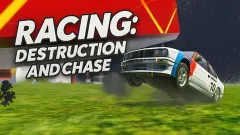


About Zombie defence
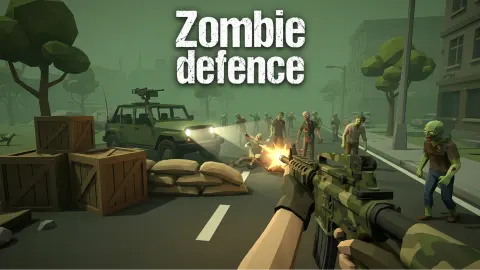
Most zombie shooters ask one question: how long can you stay alive? Zombie defence asks two, and the second one is harder. Next to your health bar, at the top of the screen, sits a blue bar with a little off-road car drawn beside it. That is the armoured car parked behind you, and the zombies want it as much as they want you.
The car's bar is three times the size of yours, 300 points against 100. It is tempting to read that as a comfort. In our first run it was the bar that fell furthest.
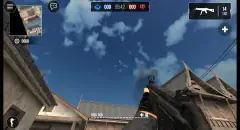
You play in first person, with a rifle, a crosshair and a round minimap in the corner. The level starts beside the car in a wood full of green fog, and the dead walk in from every direction. There is a clock, and it counts up.
We played two runs of the first level. Neither lasted 45 seconds, we fired three shots in all, and we did not kill a single zombie. So this page is strong on how the game opens and how it punishes a slow start, and has nothing first-hand on the shop.
The game is credited to Nivikantavo GD. It has been available since August 2026.
Two bars, and the bigger one emptied faster
These are the readings from the top of the screen at the moments we stopped to note them.
| Run | Clock | Your health | Car | Rounds left |
|---|---|---|---|---|
| First | 00:14 | 100 / 100 | 300 / 300 | 30 |
| First | 00:41 | 30 / 100 | 80 / 300 | 28 |
| Second | 00:25 | 90 / 100 | 300 / 300 | 29 |
Look at the first run. In under half a minute the car lost 220 points and we lost 70. The car has the bigger bar, but it also cannot step back, and more than one zombie can stand against it at the same time. Three times the health is not three times the safety.
Our first run stopped at 00:44:76 and the second at 00:37:23. Both ended on a panel whose heading means "Level completed", with the survival time and the best time under it. With no skulls and both bars falling, we read that panel as the end of the run and not as a win. We did not catch which bar reached zero either time.
That is the honest shape of the game's first minute: stand still and it is over before the clock reaches 45.
The minimap is the only early warning you get
The round map in the top right corner is easy to ignore, because the fog makes you want to stare into the trees. It deserves more of your attention than the trees do.
A blue arrow in the middle is you. A green icon beside it is the car. Every red dot is a zombie. Early in our first run there were two dots, both on the rim of the circle. Near its end there were about a dozen, and most of them were stacked on the green icon.
In between, we were looking the wrong way. The view in front of us showed crates, a tarpaulin and a timber shed, and for a long while nothing else. The zombies that did the damage came from behind and from the sides. One of them was at arm's length on our left before we saw it on the screen at all.
So the dots are the plan. Turn towards the side where they are thickest, and deal with the ones nearest the green icon first: those are the ones already costing you points.
Skulls pay for everything, and we earned none
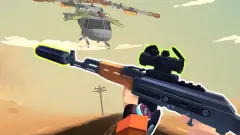
A skull with a number sits in the top left corner. One tutorial page explains it: the skulls you collect open new weapons and powers, and also improve the car's armour. The picture on that page shows a skull floating above the road, seen over the sights of a rifle, which suggests they are picked up where a zombie falls.
Ours read zero from start to finish. That is why we can say the shop exists, under GUNS & POWERS on the main menu, and cannot say what anything in it costs. The counter in the bottom left corner showed one extra item under the ammunition, a 1 that we take to be a grenade. We did not throw it.
The link between the two halves is clear even from outside the shop. Skulls come from shooting; armour for the car comes from skulls. A player who shoots well gets a car that lasts longer, and a longer run means more skulls.
Four maps on the menu, and a tutorial we read in Russian
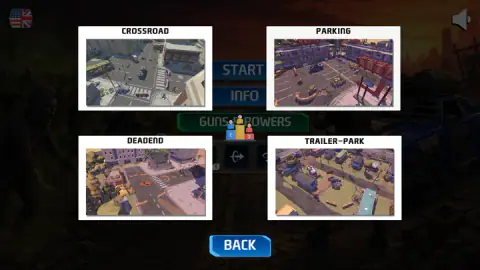
A panel on the main menu shows four maps with a picture each: Crossroad, Parking, Deadend and Trailer-Park. Three are streets and car parks, the fourth a field of caravans. We played only the first level the game gave us.
One thing surprised us. The main menu was in English, with a flag button in the top left corner. From the tutorial onwards, everything we were shown was in Russian: the five tutorial pages, the "Car attacked" warning, the pause menu. We have translated what we quote here. We did not press the flag, so we cannot say whether it would have changed that.
Who it is for
Players who like a first-person shooter with a job to do besides surviving. Guarding the car turns every zombie into a choice, the one walking at you or the one already at the vehicle, and the minimap gives you what you need to make it.
It is not gentle at the start. There is no slow first wave to practise on, and the tutorial is something you read, not something you play. Expect to lose the first few runs in under a minute, as we did. And if you want to know how deep the shop goes, or what the later maps are like, we cannot tell you yet.
More zombies, and more things to defend
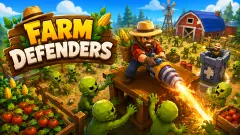
Rise of the Dead is the closest relative here, a first-person shooter against waves that come from every angle. Farm Defenders gives you a farm to protect by night and to work by day. Zombie Horde: Build & Survive adds turrets, barricades and traps to the shooting, and Zombie Derby puts you inside the car and points it at the horde. The rest are under shooting games.
Screenshots
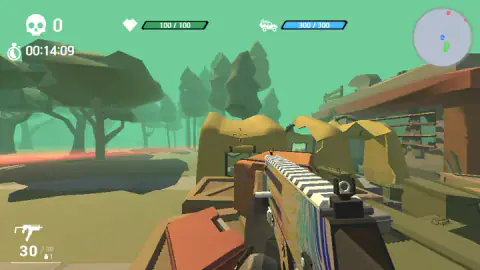
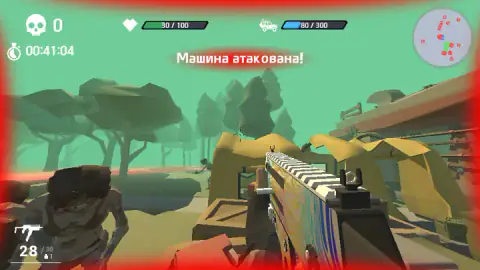
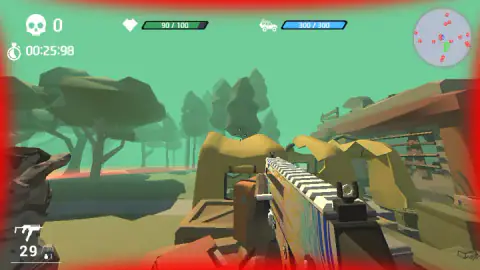
Taken by opening the game ourselves and letting it run — not supplied by the publisher, and not the same picture every other site shows.
How to play Zombie defence
- On the main menu, press START. The other two buttons are INFO and GUNS & POWERS.
- Start the first level and read the tutorial. It is five pages, each with a picture, and you turn them with the button on the right.
- The level begins at once. Move with W, A, S, D, look with the mouse and fire with the left button. One click is one round.
- Watch both bars. The heart is you; the car icon is the vehicle. The stated goal is to protect both from waves of zombies.
- When a run ends, a panel gives your survival time and your best time, with buttons to restart or go back to the menu.
What two short runs taught us:
- Do not wait for the zombies to show up. For the first 14 seconds we saw none at all. By the time two were in front of us, the minimap was already full.
- The warning is late. The red "Car attacked" line appears once zombies are on the car. In our run it first showed about 19 seconds in, and from there the bar only went down.
- One click, one bullet. The magazine holds 30 rounds. Two clicks left us on 28, so single clicks are single shots. We did not test whether holding the button keeps firing.
- Click once after a restart. The game asked for a click to take the mouse back before it would let us look around.
- The pause menu froze the clock for us. It also holds a mouse sensitivity slider and a controls page, which is the place to check the keys.
Controls
| Mouse | Look around and aim the crosshair |
|---|---|
| Left click | Fires one shot; each of our clicks took one round off the counter |
| W, A, S, D | Move, as listed in the game's instructions |
| Right click | Aim, as listed; we did not try it |
| R / G | Reload and throw a grenade, as listed; we did not try them |
| 1 to 6 or the mouse wheel | Switch weapon, as listed; we only ever carried the starting rifle |
| Shift / Space / E | Run, jump and push zombies away, as listed; we did not try them |
| Tab | Pause menu, as listed; the menu has a sensitivity slider and a controls page |
Features
- Two bars to keep alive at once, 100 points of health for you and 300 for the car
- A round minimap that marks you, the car and every zombie as a red dot
- A red "Car attacked" warning across the screen when zombies reach the vehicle
- A skull counter that pays for new weapons, powers and car armour
- Four named maps on the menu, Crossroad, Parking, Deadend and Trailer-Park
- A clock that counts hundredths of a second and a best survival time on the end panel
- A pause menu with a mouse sensitivity slider
Game details
- Developer
- Nivikantavo GD
- Release date
- August 2026
- Added here
- July 2026
- Technology
- HTML5 (3D)
- Platforms
- Browser (desktop)
- Saved progress
- Saving, when available, is managed by this game. Mava cannot confirm your level.
FAQ
How do you play Zombie defence?
You stand next to an armoured car in first person and shoot the zombies that walk in from every side. There are two bars at the top of the screen, one for your health and one for the car, and the tutorial states the goal as protecting both from waves of zombies. Aim with the mouse and fire with the left button.
What happens when zombies attack the car in Zombie defence?
A red warning meaning "Car attacked" appears across the top of the screen and the blue car bar starts to fall. In our first run the car went from a full 300 to 80 in well under a minute, and our own health fell with it. The warning does not say where the zombies are; the minimap does.
What are the skulls for in Zombie defence?
The tutorial says the skulls you collect open new weapons and powers and improve the car's armour. A counter with a skull icon sits in the top left corner of the screen. Ours stayed at zero in both runs, so we never got to spend any and cannot give prices.
How many maps does Zombie defence have?
A panel on the main menu shows four, each with its own picture, named Crossroad, Parking, Deadend and Trailer-Park. We played only the first level the game offered and did not get far enough to say how the others open.
What do the red dots on the minimap mean in Zombie defence?
Each red dot is a zombie. The blue arrow in the middle is you and the green icon beside it is the car. Early in our first run there were two dots on the rim of the circle; near its end there were about a dozen, most of them pressed against the car.
Can you play Zombie defence on a phone?
It is listed for PC, Android and iOS, in landscape. We played on a desktop with a mouse and keyboard only, so the phone version is the listing's word and not something we tested.
Who made Zombie defence?
The game's listing credits Nivikantavo GD. The game was published on 24 August 2026.