








About Echolocation Shooter
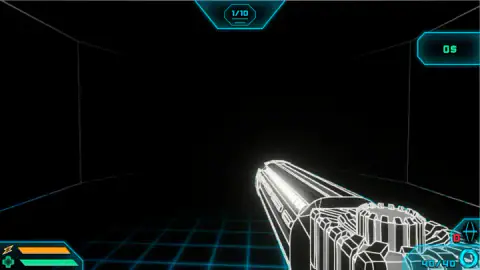
Most first-person shooters spend their effort on light: muzzle flashes, sunsets, torches you can see from across the map. Echolocation Shooter takes nearly all of it away. The room is black, the walls are a few white lines, and the only steady thing on the screen is the gun in your hand.
The idea is in the name. Bats and dolphins find their way by making a sound and listening for what bounces back. Here the sound is something you fire, and what bounces back is the room, drawn for a moment in neon. The game splits seeing and shooting between the two mouse buttons, and that split is the whole game.
We played Echolocation Shooter on a computer in October 2026, with a keyboard and a mouse, for about four minutes. That was enough to learn how to get in, what the screen tells you and how disorienting the dark is. It was not enough to meet an enemy or leave the first level, and this page says so wherever it matters.
The game is by Shout Games. It was published in October 2025.
Left click to see, right click to shoot
Most shooters give the mouse one job: aim, then fire. This one gives it two. The left button sends out the soundwave and also interacts with things in the level. The right button raises the weapon and fires. The game's store text sums it up as shooting to see, but the controls tell a slightly different story: seeing has its own button.
That changes how you move. In a normal shooter you walk and look at the same time. Here you send a pulse, read the room while it lasts, and then move through a picture you are now remembering. Every step after the light fades is taken on trust.
Late in our session, three left clicks brought up a new prompt in the middle of the screen: a mouse with its left button lit, a burst of blue sparks beside it, and a ring reading 1.00. The game does not say what the number counts. It appeared only after we had clicked, which suggests the left button had started doing something we could not see yet.
How real echolocation works
Echolocation is not a game invention. Many bats hunt in total darkness by sending out short, high calls and listening to the echoes. The time an echo takes to come back tells them how far away a wall or an insect is. Dolphins do the same thing underwater with clicks.
Some blind people have learned a version of it too, making sharp clicks with the tongue and listening to how the sound returns from buildings, cars and doorways. Sound in air travels at roughly 343 metres a second, so an echo from a wall about 17 metres away comes back in around a tenth of a second. The brain can learn to read that tiny delay.
Echolocation Shooter keeps the core of the idea and makes it visible. A real bat hears the room. You see it, as glowing outlines that appear after you send the pulse and are gone soon after. That is also why the first level feels slow at first: you are not lost because the level is large, you are lost because you have not yet sent enough sound into it.
What the screen tells you
The display is small and sits in the corners, so most of the screen stays dark. At the top is the level counter, starting at 1/10. At the top right is your money, starting at 0$. The game's instructions say you upgrade your gear as you go, and this is presumably where that money shows up.
At the bottom left are two bars, one marked with a lightning bolt and one with a cross. At the bottom right is the ammunition, 40/40, and next to it a red number beside a diamond-shaped icon that read 0 for us.
In our whole session none of these numbers moved. We never fired, never earned money and never left level 1. That is worth knowing before you start: the opening level asks you to find your way first, and the shooting comes later.
What we did not see
We did not meet a single enemy, so we cannot describe the neon monsters the store text promises, how they move or how much damage they do. We never fired a shot, switched weapons or threw a grenade. We did not reach the shop or any upgrade screen, and we did not see what the bottom bars do when they drop. The phone version, with its on-screen buttons, stayed untried: our session was on a computer.
The counter reads 1/10, while the store text speaks of endless waves. Both may be true, with ten stages and waves inside each one, but we have not seen enough to say.
Who it is for
Echolocation Shooter is for players who like being uneasy more than being fast: people who enjoy creeping through a dark place and piecing the map together from glimpses. The art is clean neon on black, with no blood in anything we saw.
Anyone who wants to start firing in the first ten seconds will find the opening frustrating. It is also not a game for a quick look with the sound off, since the whole idea is built around sound.
More first-person games in the dark
For a dungeon shooter where you can see what you are fighting, try Rift of Hell - Demons War. IT LURKS keeps the first-person view and the dread, but swaps the gun for a bedroom at night. For a shooter against other players, there is Hazmob FPS: Online Shooter. Browse the rest of the shooting games.
Screenshots
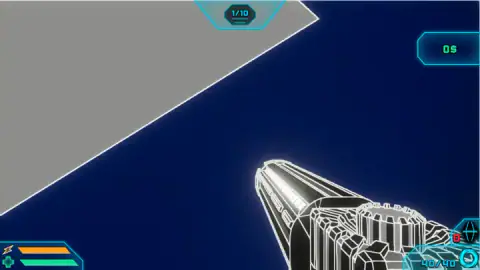
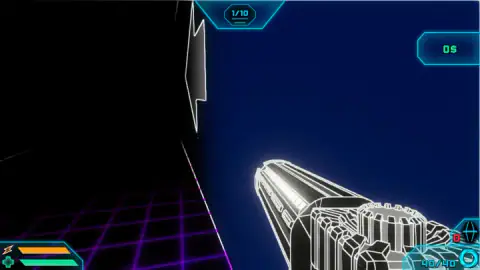
Taken by opening the game ourselves and letting it run — not supplied by the publisher, and not the same picture every other site shows.
How to play Echolocation Shooter
- Click in the middle of the screen to start. A short sound plays. Press Enter, then click once more, lower down, to reach the first level.
- Move with W, A, S, D or the arrow keys. The game's instructions add Space to jump and Shift to dodge.
- Click the left mouse button to send out a soundwave. It shows the room around you for a moment.
- Click the right mouse button to raise the gun and fire.
- Clear the level. The counter at the top starts at 1/10.
What our session taught us:
- Expect almost nothing on the first screen. The opening room is black with faint white edges, and no enemy or sign tells you where to go. That is the starting state, not a loading problem.
- Do not trust the shape of a wall. Large flat grey planes fill half the screen at times, and in the dark it is hard to tell a wall in front of you from a ramp or a platform. We spent close to half a minute facing the same grey wall before turning away.
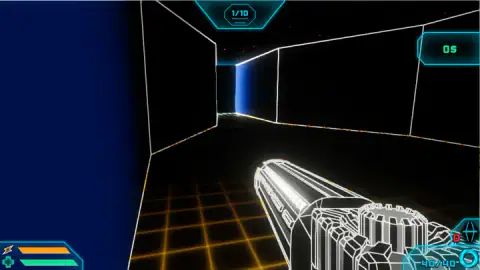
- Watch the floor colour. The grid under your feet changed from cyan to orange to purple as we moved between rooms. It is the clearest sign that you have actually gone somewhere.
- Keep left and right clicks apart in your head. Left is for eyes, right is for the gun.
Controls
| Left mouse button | Sends out a soundwave that lights up the surroundings, and interacts with the level, according to the game's own instructions |
|---|---|
| Right mouse button | Raises and fires the weapon, according to the game's own instructions |
| W, A, S, D or the arrow keys | Move |
| Space | Jump, according to the game's own instructions |
| Shift | Dodge, according to the game's own instructions |
| 1, 2 or the mouse wheel | Switch weapon, according to the game's own instructions |
| 3 | Throw a grenade, according to the game's own instructions |
| P | Opens the menu, according to the game's own instructions |
Features
- A first-person level drawn almost entirely in black, with walls shown only as thin white edges
- Floor grids that change colour from room to room, cyan, orange and purple in the rooms we crossed
- A level counter at the top that starts at 1/10
- A money counter that starts at 0$, for the gear upgrades the game's instructions mention
- A gun with 40 rounds, shown as 40/40 in the bottom right corner
- Two bars in the bottom left, one marked with a lightning bolt and one with a cross
- Separate mouse buttons for seeing and for shooting
Game details
- Developer
- Shout Games
- Release date
- October 2025
- Last updated
- August 10, 2026
- Added here
- August 2025
- Technology
- HTML5 (WebGL, 3D)
- Platforms
- Browser (desktop), Browser (mobile & tablet, touch)
- Saved progress
- Saving, when available, is managed by this game. Mava cannot confirm your level.
FAQ
How do you play Echolocation Shooter?
Click the screen, press Enter and click once more to reach the first level. Move with W, A, S, D or the arrow keys, left-click to send out a soundwave that shows the room for a moment, and right-click to fire. The counter at the top starts at level 1 of 10.
Why is the screen black in Echolocation Shooter?
It is meant to be. The level is dark and only thin white edges of the walls are visible at first. The game's instructions put a soundwave on the left mouse button, and that pulse is how you see the room around you.
What is the difference between left click and right click in Echolocation Shooter?
The left button is for seeing and touching the level: it sends out the soundwave and interacts with objects. The right button raises the weapon and fires. Keeping the two apart matters, because pressing the wrong one in a dark room leaves you blind or wastes a shot.
How many levels does Echolocation Shooter have?
The counter at the top of the screen reads 1/10 at the start, which points to ten stages. The game's store text also speaks of endless waves of enemies. We stayed on the first level in our session, so we have not seen what happens after the tenth.
Who made Echolocation Shooter?
Shout Games, according to its page. It was published in October 2025 and was last updated in August 2026.
Is Echolocation Shooter scary?
It is dark and quiet rather than gory. In our first level there were no enemies in sight, only black rooms, neon floor grids and white outlines. The store text promises neon monsters further in, which we did not reach.
Can you play Echolocation Shooter on a phone?
It is listed for Android and iOS in landscape, and the game's instructions say the phone version uses on-screen buttons. We played only on a computer with a keyboard and mouse, so we have not tried the touch layout.