


About Hazmob FPS: Online Shooter
Most browser shooters are about you and your gun. Hazmob FPS: Online Shooter is about a number at the top left of the screen. That number belongs to your team. It goes up by one each time a rival falls. It also goes up for the other team each time you fall.
We played it twice, seven weeks apart. The second time we stayed for a whole match, from the loadout screen to the rewards. So this page can tell you how a match really ends. It did not end the way the game's own rule says.
The game is made by Hazmob, a studio that makes team shooters for phones. This browser version came out in August 2025.
The goal says 30, but the clock decides
Before the match, the game shows a short rule: two teams score points for kills, and the first team to reach the goal wins. The goal is the 30 in the circle next to the score.
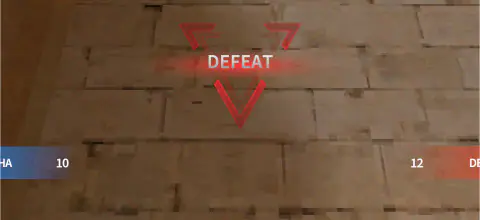
That is not how our match ended. The clock started at 03:59. The score went 0 to 3, then 6 to 5, then 10 to 10. At 00:00 it was 10 to 12, and the screen said DEFEAT. Neither team got halfway to 30.
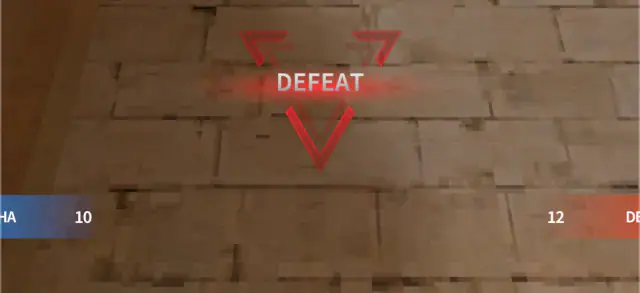
Our first match, in October, looked the same. With under a minute left the score was 8 to 15.
So think of the 30 as a ceiling. The clock is what really ends the match. That changes what you should do near the end:
- If the word under the clock is Winning and time is short, stay in cover. A point you give away can tie the match.
- If it says Losing, you need kills before 00:00. Waiting will not save you.
Your team score is only kills
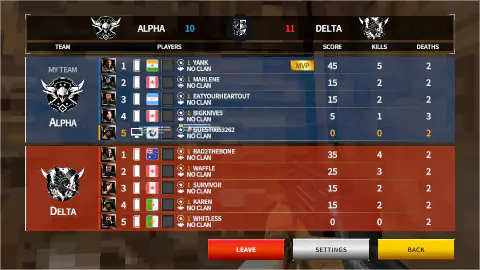
Press P at any time to open the team table. It lists all ten players, with their kills and deaths.
Add up the kills of one team and you get its score. In the middle of our match, Alpha had 10 kills and a score of 10. Delta had 11 kills and a score of 11. At the end, Delta's 12 points matched the 12 deaths on our side. Two of those deaths were ours.
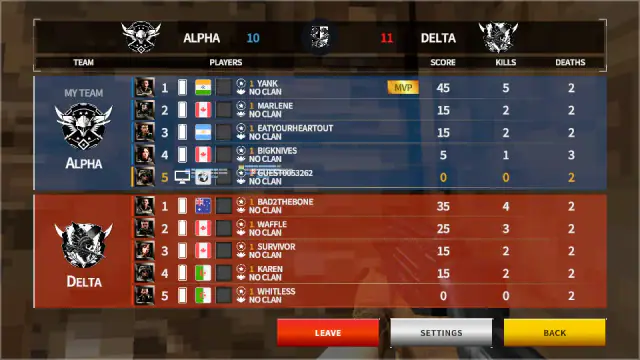
That is the rule to remember. Every time you fall, the other team scores. A player with no kills and no deaths has not hurt the team. A player with no kills and four deaths has given away four points.
The table also has LEAVE, SETTINGS and BACK. Press BACK to close it.
What you carry into a fight
The loadout screen comes up before you join the fight. It is worth a look, because it explains the buttons you will see later.
- Slot 1 is an Uzi Pro. It holds 30 rounds.
- Slot 2 is a Glock 19 pistol, and slot 3 is a knife.
- Q and E are a Molotov and an MK2 grenade.
- X is the operator skill, a flamethrower.
- Slots 4, 5 and 6 are scorestrikes: a UAV, a counter UAV and a rocket strike.
Under slots 4 to 6 you see 400, 600 and 650. The game calls these slots scorestrikes, so the numbers look like the points each one needs. The best player in our match ended with 190, and we never saw one used. So in a short match, do not plan on them.
X fills by itself as the match goes on. In our match it went from 5% at the start to 84% with seven seconds left. It never filled.
You start with no helmet and no vest, and the five perk slots are locked.
A yellow card sometimes says TAP HERE To Take Weapon, with a G in the corner. Both times, ours offered an Uzi Pro. That is the gun you already have in slot 1.
When you fall
A screen says KILLED YOU WITH THEIR and shows the gun that got you. In our case it was an Uzi Pro, the same gun we had. The player who got us had 1104 health and 85 armour. We had 1000 health. Their loadout also said NO VEST, so we cannot tell where that armour came from.
The screen also shows their full loadout. There is a CHANGE LOADOUT button and a BATTLE button. We were back on the sand a few seconds later.
The rivals, the map and the rewards
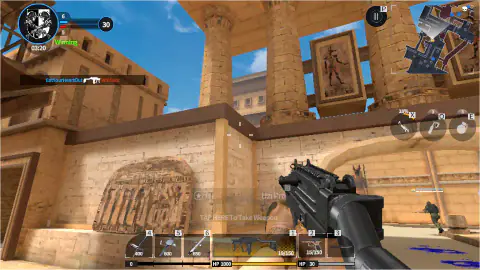
The map we played both times is EGYPT. It has sandstone houses, tall columns, palm trees and channels of bright blue water. The open sand is easy to see across. Crates, low walls and doorways are where you can hide.
Every player had a flag and level 1. One name, Whitless, was on the other team in both of our matches. We could not tell if the rivals were people or run by the game, so we do not say either.
After the result, a podium shows the best players. Then come the full table and your rewards. We had no kills, and the reward screen showed 0 cash, 0 gold and 0 XP. Back in the menu, a TUTORIAL REWARDS box gave us 2,000 cash and 20 gold for that first match. The menu also counts a KILLER CHEST at 0 of 25.
More shooters like this
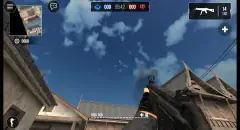
Special Ops: GO is another first-person shooter from Hazmob. Armed Forces.io and Masked Forces are first-person team shooters too. Winter Clash 3D is a lighter team shooter on a short clock. You will find more in the shooting category and in our war games.
Screenshots
How to play Hazmob FPS: Online Shooter
- Press QUICK BATTLE in the main menu. The game picks a match and shows both teams. Ours was TEAM DEATH MATCH on a map called EGYPT, five against five.
- Look at the loadout screen. It shows the guns and gear you will carry. Press BATTLE to go in.
- Walk with W A S D. Look with the mouse. Shoot with the left mouse button.
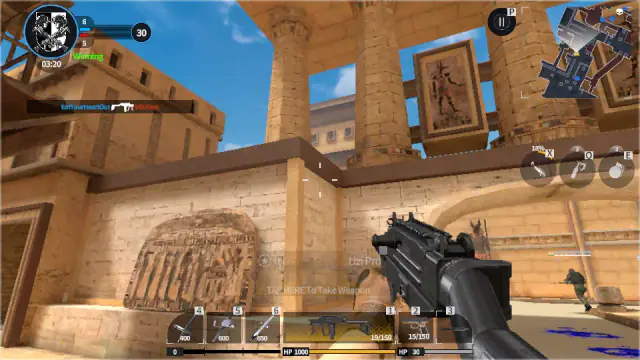
- Watch the top left. Your team's score is on the blue bar. The other team is on the red bar. Under the clock, a word says if you are Winning, Tied or Losing.
- When the clock hits 00:00, the team that is ahead wins.
Tips from our matches:
- Do not give points away. Each time you fall, the other team gets one. Hide behind crates or a wall when your health is low.
- Press R after a burst. One long burst used 11 of our 30 rounds. R filled the gun again.
- Press P to see who is doing well. The table shows each player's kills and deaths.
- Do not wait for X. It took the whole match and still did not fill.
Controls
| W A S D | Walk |
|---|---|
| Move the mouse | Look around |
| Left mouse button | Shoot |
| R | Reload. It filled our gun back to 30. |
| P | Open the team table. It shows kills and deaths. BACK closes it. |
| 1, 2, 3 | The main gun, the pistol and the knife, from the game's list. We did not switch. |
| X, Q, E and 4, 5, 6 | Special skill, Molotov, grenade and the three score rewards, by their icons. We did not use them. |
| G | The game's list says it takes a gun from the ground. We did not press it. |
| Right mouse or V · Space · Shift · C | Aim, jump, run and crouch, from the game's own list. We did not test these. |
Features
- Five-a-side team matches on a four-minute clock, with the score always at the top left
- Each kill adds one point to the team, and each of your falls adds one to the other side
- A word under the clock tells you if your team is winning, tied or losing
- A loadout screen before each fight, with a gun, a pistol, a knife, a grenade and a Molotov
- A table on P with every player's kills and deaths
- A screen after you fall that shows the gun that got you
- Made by Hazmob, a studio that also makes team shooters for phones
Game details
- Developer
- Hazmob
- Release date
- August 2025
- Last updated
- August 19, 2026
- Added here
- July 2025
- Technology
- HTML5 (WebGL, 3D)
- Platforms
- Browser (desktop, keyboard & mouse)
- Classification
- 3D , Action , Arcade , Multiplayer , Shooting
- Saved progress
- Saving, when available, is managed by this game. Mava cannot confirm your level.
FAQ
How do you win a match in Hazmob FPS Online Shooter?
The match starts a four-minute clock and sets a goal of 30 points. Each kill adds one point to your team. In our full match neither team got close to 30, so the clock ended it. The team that was ahead at 00:00 won, 12 to 10.
How long is a match in Hazmob FPS?
About four minutes. In our match the clock read 03:59 when we came in and the result came up at 00:00. Then you see a table, your rewards, and the main menu.
What happens when you die in Hazmob FPS?
A screen shows the player who got you and the gun they used. It also shows their health and their loadout. The other team gets one point. The screen also has a BATTLE button. We were back on the sand a few seconds later.
What do the 400, 600 and 650 mean in Hazmob FPS?
They sit under slots 4, 5 and 6. The loadout screen calls those slots scorestrikes. They are a UAV, a counter UAV and a rocket strike. The best player in our match ended on 190 points, and we never saw one used.
What is the X skill in Hazmob FPS?
X is your operator skill. The loadout screen names it Flamethrower. It fills by itself as the match goes on. In our full match it went from 5% to 84% and never filled, so it is not something to wait for.
Do you earn coins in Hazmob FPS if you lose?
It depends on what you do in the match. We lost with no kills, and the reward screen showed 0 cash, 0 gold and 0 XP. After that first match the game gave us a tutorial reward of 2,000 cash and 20 gold.
Are the other players in Hazmob FPS real people?
We could not tell. Every name had a flag and level 1. One name, Whitless, was on the other team in both of our matches, seven weeks apart. We do not claim either way.
Who made Hazmob FPS Online Shooter?
Hazmob, a studio that makes online shooters for phones and the browser. This browser version came out on 31 August 2025 and was last updated in August 2026. We played only the browser version.