





About Mom I Can Fly
Every flying game in a browser trains the same reflex. Hold the button down and you climb, let go and you drop. Mom I Can Fly parks a card on the right-hand side of the screen that never goes away, and the card says the opposite in two words: RELEASE FLY. Letting go is the thing that lifts you. The card does not say what holding does, and working that out is most of the first level.
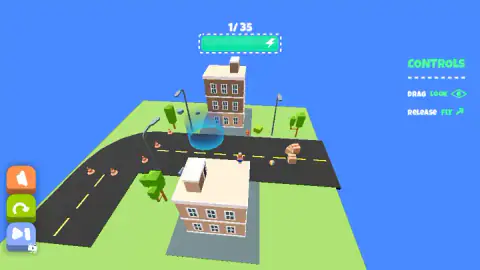
The other line on the card is DRAG LOOK, and it is carrying more weight than it appears to. There is no steering here. We pressed the arrow keys and the space bar over and over and the kid ignored all of them, so the drag is the only thing in the game you can point. Above all of it a counter reads 1/ 35, with a green bar and a lightning bolt underneath. Somewhere down in the street there is a disc of blue light with a beam standing over it. That is where you are going.
The game is credited to mutgames. This one went up in December 2025 and was last touched in August 2026.
We could not find a studio website anywhere, and no other portal carries the game, so that credit rests on a single source — worth knowing before you read it as settled.
Here is what this page is built from. We played for about four minutes on a desktop with a mouse, came in at the first level, and watched the counter climb as far as the third before we stopped. We never reached the end of the thirty-five, never saw a level-complete screen, and never took the advert the blue button offered us. Everything below either happened on our screen or is something the game itself wrote there.
Looking is the only aiming you get
Take the keyboard out of a flying game and a question appears: what is the player actually pointing? This one answers with the camera, and then leaves the answer slightly ambiguous on purpose. The card calls the drag looking, not steering. So either the flight follows the view, or the view is just a view and everything about where you end up is decided by the timing of a press and a release. Four minutes was not enough for us to settle which, and we would rather say that than pretend.
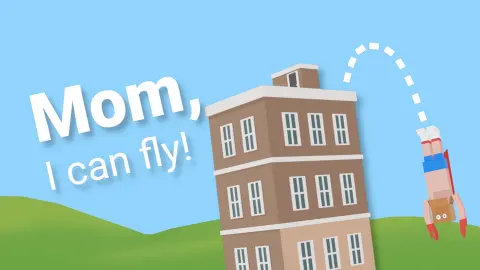
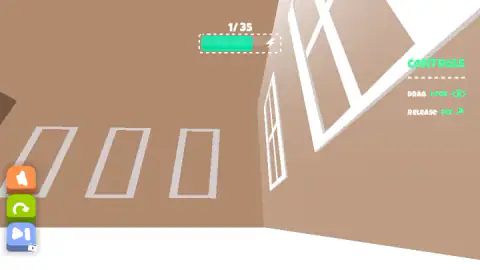
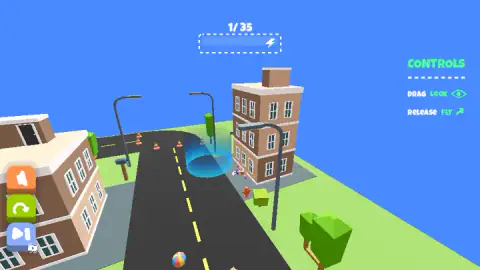
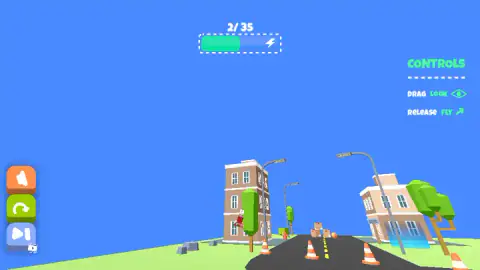
What is not ambiguous is how much rope you are given. The camera is not fenced in at all. Roll it far enough and the horizon tilts and keeps tilting, until a three-storey block is leaning hard to the left over perfectly flat grass. Pull back and you can get high enough that the city shrinks into a strip along the bottom of the screen and the rest is empty blue. Push forward near a building and the camera goes straight through the brickwork, which is the most disorienting thing in the game: brown wall, two window outlines, the counter still reading the same level, and no way to tell which way is down.
That freedom is the difficulty, and it is an honest one. Locking the camera to one angle would make the game easier and would throw away the thing it is built on: a kid looking around at a city from above.
A full bar, and then nothing
We read the energy bar five times across two levels, and the sequence tells you most of what it does. Full and bright green at the top of the first level. About half, moments later, with the camera buried in brickwork. Flat empty, still on that same level, with the kid standing in the road. Then green again, though not to the brim, at the top of the second. Then empty once more.
What it does not do is kill you. Both times we ran it down to nothing there was no sound, no card and no restart — the kid was simply on the ground again and the level carried on. So this is not a health bar and it is not a clock on your life. It is a budget for the one thing you came here to do. Being in the air is the expense; being on the ground is free and gets you nowhere.
That changes the feel of the game. There is no pressure to hurry, because standing still costs nothing. The pressure is to spend well: a drag that buries you in a wall is expensive here in a way it never is in a game with a clock.
The circle of light in the road
Most games about flight want distance, or speed, or survival. This one wants an address. The disc of blue light in the street, with its beam standing over it, is the only object in the level that is not decoration, and the whole flight exists to put you on it.
That is also a real sport, and a stranger one than it sounds. In parachuting it is called accuracy landing, and the entire event is the last second of the jump. The target is a disc about two centimetres across sitting in the middle of a pressure-sensitive mat. The mat registers the very first point of contact — in practice, a heel — and reads out how far from dead centre that heel was, in rings of one centimetre, out to sixteen. Land past the edge of the mat and a judge comes over with a tape measure.
Think about what that does to everything above the ground. The exit, the canopy, the long approach: none of it is the point any more, all of it is preparation. The jumper is not trying to get somewhere, they are trying to put one foot in one place.
That is the shape of a level here, scaled up to the size of a city block. The sky is generous and most of it costs you nothing. The buildings are soft, flat-coloured and forgiving. And then at the end of all that room there is one small circle that you either reach or you do not. We never got to see what the game does at the moment of arrival — the counter moved on while we were still working out which way was up — so that moment is a gap in this page rather than a description we have earned.
More games by mutgames
The studio's closest thing to a sibling on this site is We Are In A Simulation Simulator, where the thing you are flying towards is replaced by a crowd you have to copy. Their Foot Bomb, a football game with a lit explosive where the ball should be, lives on the soccer shelf rather than this one.
For flight itself, Paper Flight 2 is the nearest relative we have — one launch, no engine, and most of the outcome decided before you have really started. Jumper Jam takes the same hunger for height and turns it into a climb with no ceiling. Skate Hooligans puts you back in a flat-colour city at street level, where the cones and kerbs you were flying over become the things that stop you. And Geometry Rash is the one-input version of the same bargain: act on the right instant or start the level again. The rest are on the arcade shelf.
Screenshots
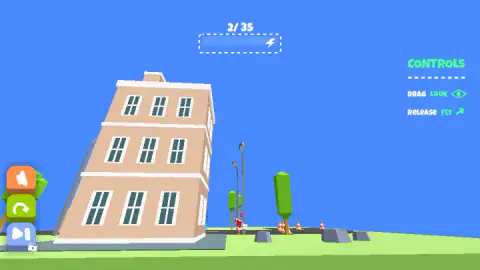
How to play Mom I Can Fly
- Clear the tutorial card. The game opens on a flat blue screen carrying two lines — DRAG TO LOOK and RELEASE TO FLY — above a wide green OK button. Press it and you are standing in the road.
- Let go. That is the instruction, and it is not a figure of speech. Releasing is the input that gains height.
- Drag to aim. The view swings with your hand. It is the only thing in the game you get to point, so point it deliberately rather than flailing.
- Watch the bar at the top. It starts a level green and full and comes down while you are in the air. Nothing else on screen is counting.
- Look for the blue disc in the street. On a road full of lamps, cones, bins and clutter, it is the one object that glows.
What the run taught us:
- The keyboard is dead. Arrow keys, space bar, pressed repeatedly and held. Nothing happened. There is no hidden second control scheme to discover.
- The camera will go inside a wall. Drag too far while you are close to a building and the screen fills with flat brown brick and a couple of white window frames. You are still in the air; you simply have no idea where.
- Nothing tells you that you failed. In four minutes we never heard a losing sound and never saw a game-over card. The only feedback that you have got it wrong is the counter at the top refusing to move.
- The green arrow is your undo. Bottom left, under the orange speaker. It puts the level back the way it started, and it costs nothing to use.
- The blue button is an advert. Pressing it raised a card reading WATCH AD ? with a green tick and a red cross. The cross makes it go away.
Controls
| Release the mouse button (or lift your finger) | Climbs. This is the game's own instruction, printed on screen as RELEASE FLY |
|---|---|
| Drag | Swings the camera. The game calls this looking, not steering |
| Hold the button down | The card on screen does not say. What it does not do is take you up |
| Green circular arrow (bottom left) | Restarts the level |
| Orange speaker (bottom left) | Sound |
| Blue double-arrow (bottom left) | Raised a WATCH AD ? card with a green tick and a red cross |
| Arrow keys and space bar | Nothing we could find. We pressed all of them, repeatedly, and the kid did not react |
Features
- Thirty-five levels, counted on screen: the number above the energy bar reads 1/ 35 on the first one
- Two gestures in the whole game, and a card on the right names them both: drag to look, release to fly
- No keyboard: the arrow keys and the space bar did nothing at all in our run
- An energy bar with a lightning bolt in it that drains while you are airborne and does not kill you when it empties
- A target you can spot from the sky: a disc of blue light in the street with a shaft of light standing over it
- A flat-colour city of three-storey blocks, street lamps, traffic lights, cones, cardboard boxes and a beach ball
- Made by mutgames
Game details
- Developer
- mutgames
- Release date
- December 2025
- Last updated
- August 10, 2026
- Added here
- October 2025
- Technology
- HTML5 (WebGL 3D)
- Platforms
- Browser (desktop, mouse), Browser (mobile & tablet, touch)
- Classification
- Arcade
- Saved progress
- Saving, when available, is managed by this game. Mava cannot confirm your level.
FAQ
How do you play Mom I Can Fly?
With two gestures and no keys. The card fixed to the right of the screen names both of them: drag to look around, and release to fly. Letting go is what gains height, which is the reverse of what most browser flying games teach you. The level is over when you reach the glowing blue disc down in the street.
What are the controls in Mom I Can Fly?
A mouse button or a fingertip, and nothing else. Dragging swings the camera; releasing sends the kid up. The game never explains what holding the button down does, and we could not get it to climb while we held. The arrow keys and the space bar do nothing: we pressed them repeatedly and the kid did not move.
How many levels does Mom I Can Fly have?
Thirty-five. The counter sits above the energy bar at the top of the screen and reads 1/ 35 on the first level, so the total is not a guess. We reached the third and stopped there, which means we cannot tell you what waits at the end of them or whether the last ones look anything like the first.
What is the energy bar for in Mom I Can Fly?
It is the budget for the only thing you came to do. The bar sits under the level counter with a lightning bolt in it, starts a level green and full, and comes down while you are in the air. Emptying it is not fatal: both times we ran it to nothing there was no sound, no card and no restart, just the kid back on the ground.
What is the blue circle in the road in Mom I Can Fly?
It is the one thing in the level that is not scenery. A disc of blue light sits in the middle of the street with a shaft of light standing over it, bright enough to pick out from high in the sky. In a city of lamps, cones, bins and parked clutter it is the only object that glows, which is the game's way of telling you where you are going.
Are there ads in Mom I Can Fly?
Yes, and the game asks first. The blue button at the bottom left, the one with a small video badge in its corner, raised a card reading WATCH AD ? with a green tick and a red cross. The cross sends it away. We did not take the offer, so what the game hands over in return is something this page cannot tell you.
Who made Mom I Can Fly?
A studio called mutgames, according to the game's listing, where its page carries six games including Foot Bomb, Fake Ninjas and Do You Copy?. The game was published in December 2025 and last updated in August 2026. We could not find a website for the studio anywhere, so that credit rests on a single source.
Does Mom I Can Fly work on a phone?
It is built for one. It is listed for Android and iOS alongside PC and described as a portrait game, and the controls are gestures rather than keys, which is the giveaway. Played in a wide desktop window it filled the frame anyway, with the CONTROLS card pushed out into the right-hand margin.