






About Sponge Strike: Clean & Smash
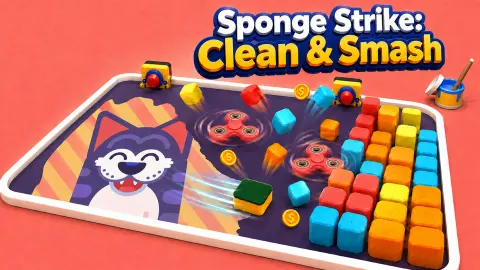
Every cleaning game asks you to scrub. You hold a button, rub the dirt in little circles and watch a percentage climb. Sponge Strike: Clean & Smash does not let you scrub at all. You get one gesture, the pull of a slingshot, and the sponge does the cleaning on its own as it flies across the screen.
The board is a phone lying on a pink desk next to three crayons, an eraser and a banana. Its screen is covered in a dark grey coat. Underneath, there is a picture, and the only thing that can reveal it is a small green kitchen sponge with a yellow underside, which wipes clean every strip it slides over. The game is in where you send it.
It was made by GAD Games Studio and was published on 15 September 2026.
We played it for about four minutes. Levels 1 and 2 took us roughly a minute each, and we uncovered most of level 3 before our time ran out.
A phone screen with a picture under the grime
The trick is the same one a scratch card uses: an opaque coat printed over a picture you cannot see until something rubs it away. Here the coin is a sponge, and you are throwing it.
Each level hides a different picture, and you only learn what it is as it appears. Level 1 was a green cactus that winks at you and, once enough of it is clean, says HI in a blue speech bubble. Level 2 hid a heart inside a yellow sunburst with a little face drawn on it in letters, U 3 U. Level 3 was a smiling orange with a leaf on its head, sitting on pink and white stripes.
That is why the first shot of a level is the best moment in the game. You have no idea what is under there, and one good line across the screen shows you half of it.
The words above the board change as you go. We saw COOL and GODLIKE after good shots, among others.
What stands in the sponge's way
The grime is the target. Everything else on the board is an obstacle.
On level 1 the obstacles are small cyan cubes, set in a ring around a red fidget spinner in the middle of the screen. The sponge bounces off them, which is what bends a straight shot into an angle. Level 2 adds a gadget fixed to each side wall, red and yellow, facing each other across the board. We did not find out what they do. Level 3 puts the fidget spinner at the top, yellow blocks on both side walls, pink markers at the top and bottom edges, and spells HI in cyan cubes across the middle of the screen.
The game's description says later levels bring bombs, buttons and moving obstacles that spin when you hit them, and coins lying on the board to collect. We did not get that far, so we cannot tell you how they play.
Coins, sponges and the house that fills up
A level ends with a red banner, LEVEL 1 COMPLETED! on the first, and a blue house in the middle with a percentage in it. It read 10% after level 1 and 15% after level 2. We did not find what fills that house up or what happens at 100%.
Under the house there are two buttons. The green one offers extra coins for watching a video, 78 after level 1 and 84 after level 2. The blue one, Continue, takes you on. We pressed Continue both times.
Our coins stood at 0 on the first card, 526 when level 2 started and 554 when level 3 began.
Those coins go to the shop. When level 3 starts, a green SHOP button appears under the board with a red exclamation mark on it. Inside, a screen called Sponges shows a grid of 12 slots. Only the first one, the green starter sponge, is open. The others are question marks, and a button unlocks one at random for 100 coins.
With 554 coins we could have opened five, but we did not, so we cannot say whether a new sponge plays differently or only looks different.
Who it is for
Sponge Strike suits anyone who likes a short, tidy goal and a satisfying reveal. There is no clock that we saw and nothing chases you, so a younger player can take each shot slowly, and the reward for a good one is right there on the screen.
It is not a cleaning simulator. You never pick up a tool, and the crayons, eraser and banana around the phone are scenery, not things you can use. It is closer to a pinball shot than to housework: one pull, one release, and the walls do the rest. It is listed for phones and tablets as well as computers, but we played with a mouse and did not test touch.
More games with sponges, scratching and cleaning
Paint Sponges Puzzle also has a sponge leaving a trail, but on a grid you plan move by move. Scratch Raw Stone Gem Master is about scratching something away to see what is underneath, this time a rough stone. Perfect ASMR Cleaning is the slow, tool-by-tool kind of cleaning game that Sponge Strike skips. The rest are in our puzzle games.
Screenshots
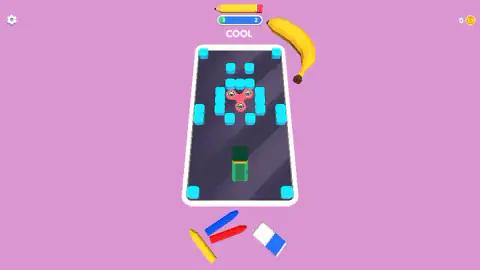
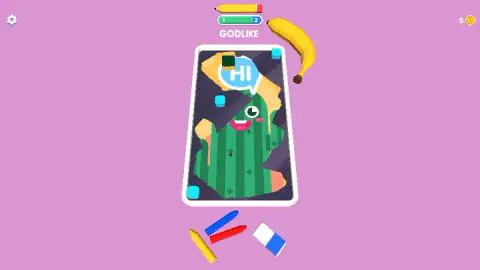
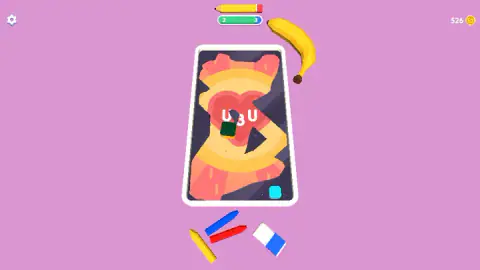

Taken by opening the game ourselves and letting it run — not supplied by the publisher, and not the same picture every other site shows.
How to play Sponge Strike: Clean & Smash
- Find the sponge. It is the dark green square, and on the first levels a hand and the words PULL & RELEASE show you what to do with it.
- Click and hold it, then drag the other way from where you want it to go. The further you pull, the harder it shoots.
- Let go. The sponge flies, bounces off the walls and blocks, and leaves a clean stripe of picture behind it.
- Keep launching from wherever it stops until the bar at the top is full. That ends the level.
Tips from our run
- Aim along the long side of the phone. Our very first pull went straight down, and the sponge shot up the board and uncovered a big slice of the cactus on level 1 in one go.
- Hit blocks hard. A fast sponge shatters them instead of stopping, and on level 3 the cubes on the left came apart in a spray of cyan pieces.
- Watch the bar, not the board. It tells you how close you are, and it moves more on a long shot through dark areas than on a short one over ground you have already cleaned.
- The game's instructions say a second click stops the sponge as it slows down. That lets you park it where the next shot is easiest. We did not test it on purpose.
- The video button on the result card is optional. We skipped it every time and still moved on.
Controls
| Click and hold the sponge, drag backwards, release | Launches the sponge the other way: the further you pull, the harder it goes |
|---|---|
| Click while the sponge is moving | Stops it early, according to the game's instructions (we did not test this on purpose) |
| Gear icon (top left) | Opens the settings |
| SHOP button (under the board) | Opens the Sponges screen, where coins unlock new sponges |
Features
- Each level is a phone screen covered in dark grime, with a picture hidden underneath
- The sponge cleans whatever it slides over, so every shot leaves a clean stripe behind it
- Blocks on the board shatter when the sponge hits them at speed
- A bar at the top fills as the picture shows through; full bar, level over
- The pictures we uncovered were a winking cactus, a heart and a smiling orange
- The Sponges shop has 12 slots, and a random unlock costs 100 coins
- Made by GAD Games Studio
Game details
- Developer
- GAD Games Studio
- Release date
- September 2026
- Last updated
- September 25, 2026
- Added here
- September 2026
- Technology
- HTML5
- Platforms
- Browser (desktop, mouse), Browser (mobile & tablet, touch)
- Saved progress
- Saving, when available, is managed by this game. Mava cannot confirm your level.
FAQ
How do you play Sponge Strike Clean and Smash?
Click and hold the sponge, drag backwards to aim and set the power, and let go. The sponge shoots across the board and wipes the dark grime off everything it passes over. When enough of the hidden picture is showing, the level ends.
How do you win a level in Sponge Strike?
Uncover the picture under the grime. A bar at the top of the screen, between the current level number and the next, fills as more of the picture shows, and when it is full the level is complete.
What are the blocks for in Sponge Strike Clean and Smash?
They are obstacles. The sponge bounces off them or smashes them into pieces, which changes its path across the board. On the first levels they are small cyan cubes, and on level 3 they spell out the word HI.
How many coins do you get per level in Sponge Strike?
On the first two levels the result card offered an extra 78 and then 84 coins for watching a video, which we skipped. Our total went from 526 coins at the start of level 2 to 554 at the start of level 3 without it. The coins buy new sponges in the shop.
How do you unlock new sponges in Sponge Strike?
Open the shop from the button under the board. It shows a grid of 12 sponges, all hidden except the green starter, and a button that unlocks a random one for 100 coins. We had enough coins after two levels but did not spend them.
Is Sponge Strike Clean and Smash hard?
Not at the start. Level 1 took us about a minute and level 2 about the same. The game's description promises bombs, buttons and moving obstacles later on, which we did not reach in our run.
Who made Sponge Strike Clean and Smash?
It was made by GAD Games Studio and published on 15 September 2026, with an update on 25 September.
Can you play Sponge Strike on a phone?
It is listed for PC, Android and iOS, in portrait and landscape. The game's instructions say you touch, drag back and release on mobile. We played with a mouse on a computer and did not test touch.