


About Weird Pet Shop
Most anomaly games are about fear: a night shift, a camera feed, something wrong in the corner of the room. Weird Pet Shop takes the same idea, look closely and catch what does not belong, and puts it on the counter of a cosy shop in daylight. The catch is that you are also the one selling the pets. Every animal that passes your inspection still has to be groomed and haggled over.
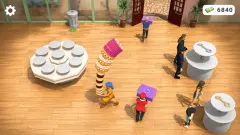
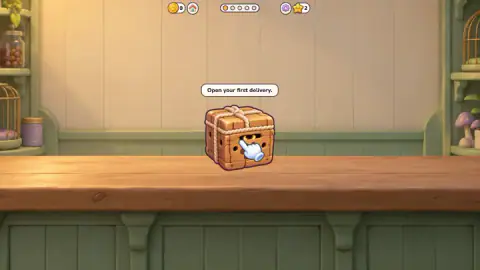
A shift starts with a wooden box on the counter, eyes glowing through the slats. Tap it and a pet comes out. You compare it with the Guide, answer Looks normal or Anomaly!, and a normal pet moves on to grooming and then to a chat with a buyer. Five dots across the top of the screen track the deliveries of the shift.
The developer is listed as Nas Games and the release as November 2026. We found no guides or reviews of it anywhere else.
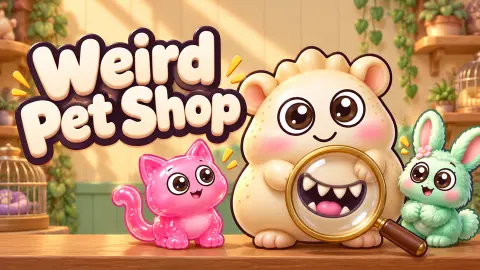
Our session lasted ten minutes, on a computer with a mouse. We took three deliveries of the first shift: a Jelly Cat we sold, a three-eyed Sleepy Capybara we flagged, and a Mint Bunny we sold. The fourth box was on the counter when we stopped. We never finished a shift and never saw the night shift the game describes, so this page covers the shop counter only.
The clock is short and the Guide is long
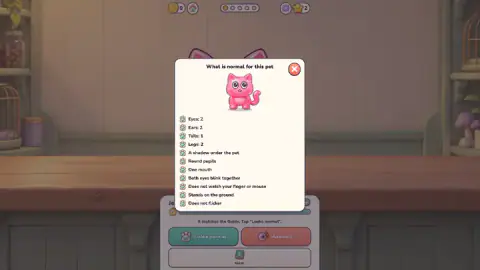
The Guide is a card titled "What is normal for this pet". It shows a small picture of the animal and a checklist: two eyes, two ears, one tail, one mouth, round pupils, a shadow under the pet. The last lines are about behaviour, not looks: both eyes blink together, it does not watch your finger or mouse, it stands on the ground, it does not flicker.
That list was identical for the cat and the bunny. Only the picture changes. So the Guide is worth reading carefully once, and after that you need the picture more than the list. Some of the checks only work if you watch the pet for a moment, or move the pointer past it to see if its eyes follow.
The trouble is time. The bar under the pet's name is a clock, and it is short. On the Mint Bunny it went from almost full to less than half in about 13 seconds, which puts a full bar at roughly 25. We opened the Guide five times on that bunny. The bar was already empty after the first look, and we answered more than two minutes later.
It cost us. Our Looks normal on the Jelly Cat, given with the bar still full, paid 10 coins. The same verdict on the bunny paid nothing, even though it matched its Guide picture down to the flower on its ear. When we later caught an anomaly, the reward screen named a speed bonus of exactly 10 coins, so that looks like what we lost.
The first two pets are a tutorial and their bars stayed full. The third pet, with the message "You are on your own now", is where the clock really starts.
What an anomaly pays
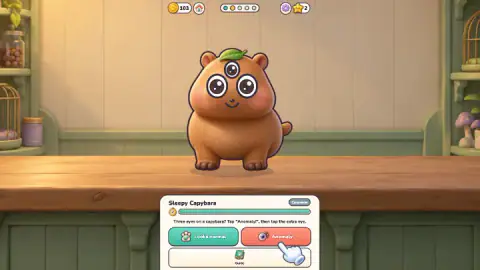
The second delivery was a Sleepy Capybara with a third eye in the middle of its forehead. Flagging it takes two taps: Anomaly!, then the strange spot on the pet.
The reward screen read "Anomaly caught! +50" and "Speed bonus +10". The capybara was not sold. The next box arrived straight away, with no grooming and no chat.
That makes flagging a decent deal rather than a lost sale. Our two sales in the shift brought 93 and 83 coins after grooming and haggling. A caught anomaly brought 60 in two taps. So there is no reason to wave a doubtful pet through for fear of losing the money.
We never let an anomaly slip past, and never flagged a healthy pet by mistake, so we cannot tell you what either one costs. The game's own description says a missed anomaly comes back to bother you at night.
Grooming and the haggle
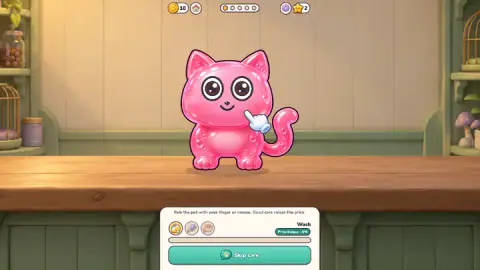
After a Looks normal, a care panel opens with three tools; we only used the first, Wash. The instruction is to rub the pet, and it means rub. A still press on the Jelly Cat did nothing. A short stroke across its cheek raised the Price bonus from 0% to 3% and turned Skip care into To the chat. We skipped care on the bunny, and it stayed at 0%.
Then the buyer writes. Every one we met had a voice of their own. Captain Bristle, a pirate, offered "93 in gold, and it sails at dawn" for the cat. Mila Live, a streamer, called the bunny "so aesthetic", offered 83 and signed off with plans for an unboxing.
Her offer came with three buttons: Accept 83, Stay at 110 and Ask for more. Your own price is on the middle button, and her opening offer was about a quarter below it. The game warns that greedy shopkeepers lose the buyer. We took the safe line both times, so the Stay and Ask buttons are untested, but now you know roughly what accepting leaves on the table.
Who it is for, and what we did not reach
It suits players who like spot-the-difference puzzles but want a reason to hurry, and anyone who enjoyed the anomaly games without wanting the jump scares. Everything we saw was bright and friendly. The oddest thing on the counter was a three-eyed capybara, which is more funny than frightening.
The game says there is a lot more than we saw. Its description mentions two dozen species up to legendary dragons, fifteen kinds of anomaly and night shifts spent watching the cages. The main menu also has Upgrades, Achievements, Quests, a Collection and a leaderboard. In ten minutes we met three common pets and one anomaly, and we did not open any of those menus.
More games like Weird Pet Shop
If the anomaly hunt is what you like, Shawarma Kiosk Anomaly Game puts you behind a food kiosk on a night shift, serving zombie customers, and Animal Clinic (Anomaly) hides the oddities among patients at a vet. For the gentler side of pet care, try Magic Pet Salon. If running the till is the part you enjoy, Shop Cashier Simulator 3D is all about it. For more games where you plan your next move, see the strategy games.
Screenshots
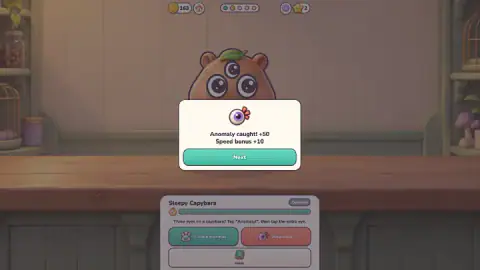
Taken by opening the game ourselves and letting it run — not supplied by the publisher, and not the same picture every other site shows.
How to play Weird Pet Shop
- Tap Start shift, then tap the box on the counter to open the delivery.
- Look at the pet and, if you are unsure, tap Guide to see what a healthy one looks like. Then tap Looks normal or Anomaly!
- After Anomaly!, tap the odd detail on the pet itself, such as the extra eye.
- For a normal pet, drag across it to groom it, then tap To the chat, or Skip care if you are in a hurry.
- Answer the buyer: accept the offer, stay at your price or ask for more. Then open the next box.
Tips from our session:
- Learn the Guide once. It was the same eleven lines for both pets we checked it on, so reopening it for each new animal only burns the clock.
- Read the bar under the pet's name. It is the clock, and it runs out fast.
- When you groom, keep the pointer moving. A press on one spot did nothing for us; a short stroke across the cat counted.
- Look at the Stay button before you accept. It shows your own price, which tells you how far below it the buyer has opened.
Controls
| Mouse click / tap | Open the delivery box, answer "Looks normal" or "Anomaly!", open the Guide and pick your reply in the chat |
|---|---|
| Click on the pet | After "Anomaly!", mark the odd detail, such as an extra eye |
| Drag across the pet | Care for it; the drag has to move, a still press did nothing in our session |
Features
- A delivery box on the counter with a new pet inside, five deliveries to a shift
- A Guide with an eleven-point checklist, identical for the two pets we checked, from eye count to whether it blinks with both eyes
- A short clock under each pet's name; a fast verdict earns a speed bonus
- A caught anomaly pays 50 coins plus the speed bonus, and that pet is never sold
- Grooming that raises the price: one short rub was worth +3%
- A chat with each buyer, who opens below your price and leaves if you push too hard
- Buyers with their own voice, from a pirate captain to a streamer planning an unboxing
Game details
- Developer
- Nas Games
- Release date
- November 2026
- Added here
- November 2026
- Technology
- HTML5 (2D)
- Platforms
- Browser (desktop), Browser (mobile & tablet, touch)
- Classification
- Adventure , Casual , Puzzle , Simulation , Strategy
- Saved progress
- Saving, when available, is managed by this game. Mava cannot confirm your level.
FAQ
How do you play Weird Pet Shop?
Tap the delivery box, look at the pet and compare it with the Guide. If it matches, tap Looks normal, groom it by rubbing it, then sell it to the buyer in the chat. If something is wrong, tap Anomaly! and then tap the odd detail on the pet.
How long do you have to check each pet in Weird Pet Shop?
Not long. In our session the clock bar under the Mint Bunny lost more than half its length in about 13 seconds, so a full bar lasts roughly 25 seconds. The first two pets of the tutorial kept a full bar; the third, the first one you judge alone, is where the clock really starts.
What happens if the clock runs out?
The pet stays on the counter and you can still decide. What you seem to lose is the speed bonus. Our Looks normal on the Jelly Cat, given with its bar still full, paid 10 coins, while the same verdict on the Mint Bunny, given after we let the clock empty while reading the Guide, paid nothing.
Do you lose money by flagging an anomaly in Weird Pet Shop?
No. Catching the three-eyed capybara paid 50 coins plus a 10-coin speed bonus. That pet goes away unsold and the next box arrives, so you skip the grooming and the haggle. Our two sales in the same shift brought 93 and 83 coins.
Should you accept the buyer's first offer?
It is the safe choice, but it is below your price. Mila Live offered 83 coins when the Stay button read 110, about a quarter less. The game warns that buyers leave if you are too greedy; we accepted both offers and did not test Stay or Ask for more.
Does grooming the pet matter?
Yes, a little at a time. One short stroke across the Jelly Cat raised the price bonus from 0% to 3%. The rub has to move across the pet: pressing on one spot did nothing. Skipping care left the Mint Bunny at 0%.
Is Weird Pet Shop a horror game?
Not in what we played. The shop is warm and bright and the pets are cute, and the oddities we met were things like a capybara with a third eye. The game also describes a night shift spent watching the cages, which we did not reach.
Who made Weird Pet Shop?
The developer is listed as Nas Games and the release as November 2026. We found no other guides or reviews of the game.