







About My SweetStreet Shop
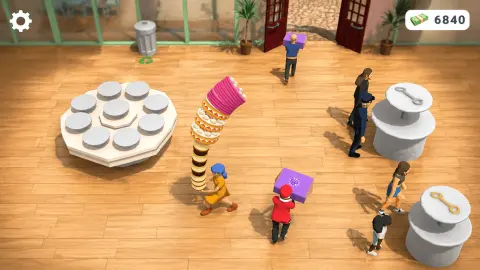
The picture the game uses to sell itself shows a shop with a tower of stacked sweets taller than the shopkeeper, customers queuing with purple boxes and 6,840 in the till. The shop we ran for ten minutes had a bare wooden floor, one counter and a till that stayed at 400 from first capture to last. Both are the same game. This page is about the distance between them, and about what the first minutes actually look like before you have earned anything.
My SweetStreet Shop is a management game seen from above. You are a small shopkeeper in a yellow dress and a blue hat, and the shop around you is a box of glass walls with green frames, a plank floor and a dark red arched double door with a potted palm on each side. The game's own instructions describe the loop: pick up sweets, carry them to counters and to the customers waiting for them, collect the money they leave, and spend it on upgrades, new stations, helpers and a bigger shop.
We can vouch for the shop and the shopkeeper. We cannot vouch for the loop, because in one session on a computer we never served a customer. Part of that is on us, and part of it is a settings panel that sat over the game for several minutes and sent us back to the loading screen twice. So where this page says what the game promises, it says so, and where it says what we saw, we saw it.
The studio is Bugi Games, whose name fills the loading screen above a Made with Unity mark. The game's listing gives seven games under that name, dates this one May 2026.
The shop you start in is almost empty
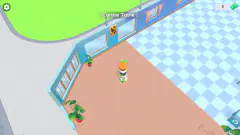
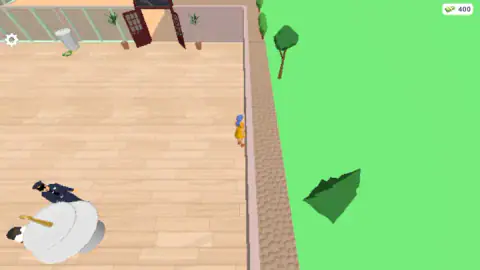
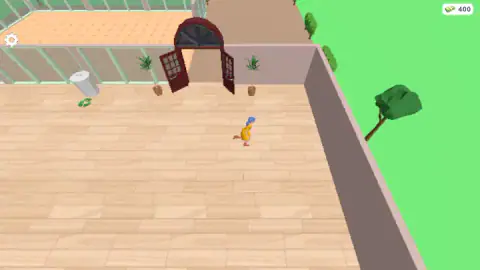
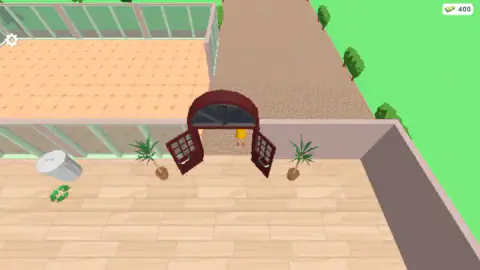
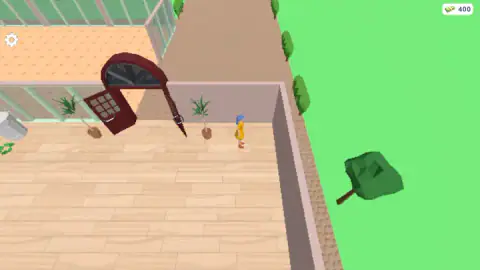
The first room is bigger than it needs to be for what is in it. Light wooden planks run wall to wall, the glass walls let you see a second room behind them with terracotta tiles, and the arched door opens onto a grey cobbled path with green grass and low-poly trees on both sides. A grey bin with a recycling mark sits by the left wall. It stood upright in our first capture and leaned in every later one, so we assume we knocked it over running past, which would mean the shop has a little physics in it.
The one thing that looked like work was that round counter in the corner. The figure at it never moved in the seconds we saw it, and we cannot tell you whether it was a customer waiting or a helper already hired. Everything else that makes the game a game, the sweets, the stations, the queue, was missing from the room we were in or had not been bought yet.
That matters for your expectations. Shop games of this kind usually start you with one counter and let the money buy the rest, and the preview image is where this one ends up, not where it begins.
What the game's own preview promises
The loading screen carries the studio's picture of a working shop, and it is the best guide we have to what comes later. A hexagonal white display stand holds a dozen round trays. A striped tower of stacked sweets in pink, orange and brown rises above the shopkeeper's head. Two round counters with golden spoons, the same kind we saw in the corner, stand along the right wall with people at them. Customers in red and in dark clothes carry purple boxes, and a figure by the door is walking in with another one.
Read as a diagram of the loop, it tells you three things. Goods are set out on counters and stands, not sold from a till. Customers leave carrying a box, so the handover is the sale. And the money counter reads 6,840 in that picture, against the 400 you begin with, so the shop expects you to multiply your starting cash many times over before it looks like that.
We did not reach any of it, so treat the paragraph above as a reading of the picture rather than a report.
The graphics menu is a real trade-off
The gear in the top left opens a plain panel: Sound and Music with tick boxes, and a Graphics dropdown that opens on Medium and offers Low, Medium, High and Ultra. It looks like decoration. It is not.
The loading screen says the game is made with Unity, and in Unity a quality level is a bundle of rendering decisions made at once. According to Unity's own manual, a level sets how shadows are drawn and how far they reach, how sharp textures stay, whether edges are smoothed with anti-aliasing, how soon distant objects drop to simpler versions, and how many particles the engine is allowed to spend. Moving the dropdown one step moves all of those together.
For a shop this small and this low-poly, Medium is a sensible default and High will look much the same. The setting that earns its place is Low, for an old laptop or a tablet where the shopkeeper starts to stutter. Our advice is to choose it once, before you start running around, because of what happened to us next.
Where our ten minutes went
We opened the panel about a minute and a half in, and it did not leave. Clicks on the red X, on the tick boxes and on the dropdown changed the dropdown, which we saw switch to High, but not the panel. Whether our clicks were landing a few pixels off the X or the panel was ignoring them, we cannot say. After several minutes we reloaded the page, played for a few seconds, and found ourselves reloading again.
So the honest summary is that the counter stayed at 400 from first capture to last, nobody was served, and we saw one room of a shop that is clearly meant to grow. We cannot tell you how many customers come at once, what a helper costs, what the first upgrade is, or how big the shop gets. What we can tell you is what the room looks like, how the character moves, what the settings do, and what the preview says is waiting.
More from Bugi Games, and shops like this one
Bugi Games' other two games in our catalogue are nothing like this one: Jelly Merge: Dooper is a sliding puzzle with cubes, and Same Room Same Day is psychological horror. If it is the shop you want, My Bakery runs the same idea with ovens and a cafe to decorate, and Shop Cashier Simulator 3D puts you behind the till instead of on the floor. The rest are in our strategy games.
Screenshots
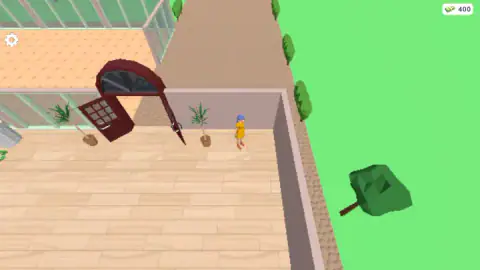
Taken by opening the game ourselves and letting it run — not supplied by the publisher, and not the same picture every other site shows.
How to play My SweetStreet Shop
- Wait for the splash. A dark screen with the Bugi Games name comes first, and then the shop appears with your shopkeeper already inside and the money counter in the top right corner.
- Move with WASD or the arrows. Our character crossed the floor, ran to the right-hand wall and stepped out through the arched door on these keys. On a phone the game says a floating joystick replaces them.
- Find the counters. In our first capture a round white counter with a golden spoon on top stood in the lower left corner of the shop, with a figure in dark clothes beside it. The game's preview shows two more of them plus a display stand full of round trays.
- Carry sweets to counters and customers. This is the game's description, not ours. Customers in the preview hold purple boxes with a heart on the side, which suggests that a sale is a box handed over.
- Spend what you earn. Upgrades, new stations, helpers and expansion, according to the game. We never spent a coin, so we cannot tell you what the first one costs.
Tips from our run:
- Leave the gear alone while playing. The settings panel stayed up for minutes after we opened it, and reloading was the only way we got the shop back.
- Do not go looking outside. The door is open and the path is real, but nothing out there could be picked up, and no customer appeared while we stood on it.
- If the screen goes black after a reload, wait. Ours stayed dark for about half a minute and then showed the loading screen again.
- Set Graphics before you start. The dropdown opens on Medium; see below for why that matters.
Controls
| W A S D or arrow keys | Move your shopkeeper around the shop. In our run she crossed the floor and stepped out of the door on these keys |
|---|---|
| Floating joystick | The same movement on a phone, according to the game's own instructions. We did not try it |
| Gear icon, top left | Opens the settings panel over the game. Sound and Music have tick boxes, Graphics has a dropdown |
| Red X on the panel | Closes settings. It did not close for us on the first clicks, so set things once and leave the panel alone |
Features
- A small 3D shop seen from above: wooden floor, glass walls, a dark red arched door with a potted palm either side
- You run as a shopkeeper in a yellow dress and blue hat, and the camera follows her out of the door and back
- A money counter sits top right and starts at 400; in our session it never moved
- Round counters with a golden spoon on top, with a figure standing at one from the first second
- A settings panel with Sound, Music and four graphics tiers: Low, Medium, High and Ultra
- The game's own preview shows a far busier shop, with a candy tower, customers carrying boxes and 6,840 in the till
- Made by Bugi Games, the studio behind Jelly Merge: Dooper and Same Room Same Day
Game details
- Developer
- Bugi Games
- Release date
- May 2026
- Last updated
- October 29, 2026
- Added here
- March 2026
- Technology
- HTML5 (Unity WebGL)
- Platforms
- Browser (desktop, keyboard), Browser (mobile & tablet, touch)
- Classification
- Cooking , Simulation , Strategy
- Saved progress
- Saving, when available, is managed by this game. Mava cannot confirm your level.
FAQ
How do you play My SweetStreet Shop?
You move a shopkeeper around a small 3D candy and pastry store with WASD or the arrow keys. The game's instructions say you pick up sweets, deliver them to counters and waiting customers, collect the money they leave and spend it on upgrades, new stations, helpers and a bigger shop. In our own session we only got as far as running around the first room, so we can describe the shop but not the serving loop.
What are the controls in My SweetStreet Shop?
On a computer, WASD or the arrow keys move your character; in our run she ran across the floor and out through the door on them. On a phone the game says a floating joystick does the same job. There is a gear icon in the top left that opens a settings panel with Sound, Music and a Graphics dropdown, closed by a red X.
Who made My SweetStreet Shop?
Bugi Games. Their name appears on the loading screen above a Made with Unity mark, and the game's listing gives them as the developer with seven games in total, including Jelly Merge: Dooper and Same Room Same Day. The game was published in May 2026.
How do you make money in My SweetStreet Shop?
According to the game's own instructions, by delivering sweets to counters and customers and picking up what they pay. We cannot confirm the amounts: our counter started at 400 and stayed at 400 for the whole session, because we never served anyone. The game's preview image shows a shop with 6,840 in the till, so the number clearly grows once the loop is running.
Can you play My SweetStreet Shop on a phone?
It is listed for Android and iOS as well as PC, with a floating joystick for movement and marked as a portrait game. We played it wide on a computer with the keyboard and did not try touch, so we cannot say how the counters and the money display sit on a tall screen.
Why is the settings panel stuck in My SweetStreet Shop?
In our session the panel opened from the gear in the top left and stayed over the game for several minutes while we clicked its red X, its tick boxes and its Graphics dropdown. We eventually reloaded the page. We cannot tell whether our clicks missed the X or the panel ignored them, so our advice is to set Sound, Music and Graphics once, early, and not to open it while you are playing.
Which graphics setting should you pick in My SweetStreet Shop?
The Graphics dropdown offers Low, Medium, High and Ultra and opens on Medium. The game shows a Made with Unity mark, and in Unity a quality level bundles shadows, texture detail, anti-aliasing and how far away objects lose detail. The shop is small and low-poly, so Medium is fine on most machines; drop to Low if the character stutters.
Is there anything outside the shop in My SweetStreet Shop?
Not that we found. A grey cobbled path runs from the arched door across green grass with a few low-poly trees, and our character could stand in the doorway on it. We saw no customer arrive along it and nothing to pick up out there, so the path seems to be where customers come from rather than a place to go.