







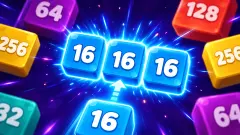



About Jelly Merge: Dooper
Nothing on this board stops where you want it to. You pick a direction, every cube on the screen sets off at the same instant, and each one keeps going until a wall, a bend or another cube gets in its way. Look at any moment of our session and you will find the pieces jammed into the ends of corridors. Not once did we catch one sitting halfway along a straight.
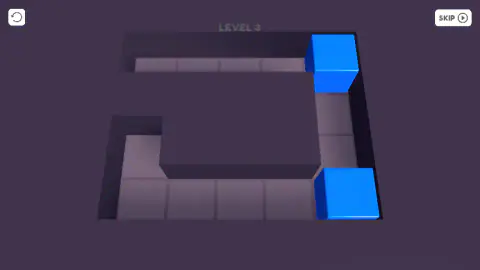
The boards are narrow paths rather than grids, and that is the part that catches people out. Level 3 is thirteen squares bent into a Z: a row of four tiles along the top ending in a blue cube, two tiles dropping down the right-hand side, a row of four back along the bottom ending in a second blue cube, and one odd square poking up at the far left. Two cubes, one of them your target and the other your ammunition. The level ends when they are one cube.
So the only thing you decide is the direction. The board decides everything else. On a corridor with a bend in it, a move that looks obvious can send a cube around the corner and leave it three tiles past where you needed it, with no way at all to bring it back one square. There is no nudging anything in this game.
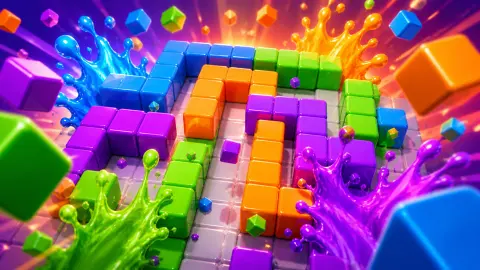
Bugi Games made it, one of seven of theirs, and it was published in May 2026. We played levels 3. The cubes are blue on the first and orange on the second, and despite the name there is nothing jelly-like about them: they are solid blocks with a bevelled top edge, lit like plastic.
Nothing ever stops where you aimed it
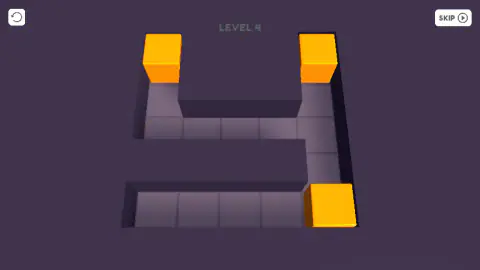
The clearest proof of the rule is a single picture from level 4, caught just after an upward move. Three orange cubes, and each one is as high as its own corridor will let it go: two parked at the very top of the two vertical arms, the third left alone at the bottom because the square above it is empty space rather than floor.
That is the whole mechanic in one frame. A move is not "put this cube there". A move is "everybody goes north until they cannot". The cube you were thinking about obeys, and so does every other cube on the board, including the one you had carefully placed two moves ago.
Which is why the thinking changes shape. In most puzzle games you ask where you want a piece to end up. Here you ask which of four commands does the least damage, and in what order. A board with two pieces has a small answer; a board with three has a surprisingly large one, because every command you issue to fix one cube is also issued to the others.
The rule came out of one weekend in March 2014
"Slide everything, merge what matches" has an author and a date, which is unusual for a puzzle rule.
2048 was written by Gabriele Cirulli, a nineteen-year-old Italian web developer, over a single weekend. He put it online on 9 March 2014, free and open source, and within a week more than four million people had played it. It was his own remake of 1024, by Veewo Studio, which was itself a remake of Threes, an iPhone game from about a month earlier. The rule all three share is the one in front of you: tiles slide as far as they can in the direction you choose, and two of a kind that collide become one.
What Jelly Merge: Dooper does with that inheritance is throw away the randomness. In 2048 the board is a four-by-four square and a new tile appears in a random empty space after every single move, which is why the game is a slow losing fight against a filling grid. Here the path is fixed, the number of cubes is fixed, and nothing new ever arrives.
That one subtraction changes the genre. 2048 is about surviving; this is about solving. There is a correct sequence of moves and you can take all afternoon finding it, because the board will wait. The flip side is just as real: there is also an incorrect sequence, and since no new piece is coming to bail you out, a board you have broken stays broken until you press the restart arrow.
What the screen never tells you
The game's own description promises a better score for finishing in fewer moves. We never found the score, and we never found anything counting the moves either. Across every moment of our session the playing screen carried three things and nothing else: the restart arrow in one corner, the level number in faint grey capitals across the top, and SKIP in the other corner. No stars, no coins, no medals, no best-so-far.
SKIP is there from the instant the board appears, which is its own small mystery. We clicked it more times than we would like to admit, and nothing we could see ever changed. Whether it jumps a level, costs something, or only becomes live once a board reaches a certain state, we genuinely do not know.
That leaves the level number as the only record the game keeps in front of you. It suits a puzzle with no timer: nothing on screen makes you hurry, and nothing judges you for taking eleven moves over a four-move board.
Three cubes became two, and we never saw it happen
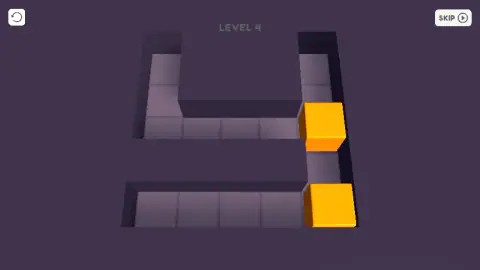
Level 4 began our acquaintance with three orange cubes on it. Partway through, there were two. We cannot show you the moment, because it fell between two of our captures, and nothing announced itself: no sound, no flash, no counter to tick. What we can tell you is that the count dropped by one, which is exactly what merging looks like, and that merging is what the game says the cubes are for.
Level 3 is the other half of the honesty. We never moved either blue cube on it. Several minutes of dragging across that board, and the last picture we have of level 3 is identical to the first — same two cubes, same two squares. Then one long diagonal drag took us to level 4, where the cubes moved on almost every attempt. We cannot explain the difference, and we would rather say so than invent a reason.
The keyboard was no help either way. We tried the arrow keys on both levels and nothing on the board responded. Every move we made that worked, we made by dragging.
More puzzles where the whole board moves at once
Merge 2048 is the same rule in the square grid it was born in, random spawns and all, if you want to feel what the fixed path takes away. Slide the Blocks: Build the Pictures keeps the idea that pieces cannot pass through one another and asks you to assemble an image with it; Brick Slide is the version where fitting them together is the goal rather than merging them. Bugi Games' other two games in our catalogue go nowhere near a puzzle board: My SweetStreet Shop is a sweet-shop counter to run, and Same Room Same Day is psychological horror. The rest are in puzzle games.
Screenshots
How to play Jelly Merge: Dooper
- Swipe up, down, left or right. On a desktop that means holding the mouse button and dragging across the board.
- Every cube on the board moves on that one command, each sliding as far as the path allows before a wall, a bend or another cube stops it.
- Two cubes that run into each other become one.
- Keep going until a single cube is left. The level number at the top of the screen then ticks up and a new path appears.
- The only other controls are a circular restart arrow in the top-left corner and a SKIP button in the top-right.
What we worked out the slow way:
- Make the swipe long. Short drags got nothing out of the board for us. The one that finally carried us from one level to the next ran most of the way across the screen on the diagonal.
- Aim at corners, not at squares. Because nothing can stop mid-corridor, the only places a cube can actually come to rest are the dead ends and the bends. Count those before your first move and the level stops being a maze and becomes a short list.
- Find the square that is not part of the route. Level 3 has one tile poking up above the left end of the bottom row. It is a pocket, not a through route, and a board with a pocket in it is a board with somewhere to lose a cube.
- Two cubes in the same column are not necessarily one move apart. They certainly look it. We spent most of our session on level 3 with both blue cubes sitting exactly where they started.
- You are not on the clock. No timer, no move counter, no score. A level costs you nothing but patience, so there is no reason to swipe before you have worked it out.
Controls
| Swipe up, down, left or right | The control the game's own instructions name. On a desktop it means pressing the mouse button and dragging across the board |
|---|---|
| A long drag | What worked for us. Short drags got nothing out of the board; the one that finally carried us from one level to the next ran most of the way across the screen |
| Any direction you choose | Moves every cube on the board at once, each one sliding until a wall, a bend or another cube stops it |
| The arrow keys | Nothing moved while we pressed them. Every move we made that worked, we made by dragging |
| The circular arrow, top left | A restart icon. We left it alone all session, so what it resets is the game's word rather than ours |
| SKIP, top right | Sits there from the moment the board appears. We clicked it repeatedly and nothing we could see ever changed |
Features
- One command moves everything: there is no way to nudge a single cube one square, and no way to choose how far it travels
- Boards are narrow paths rather than grids — level 3 is thirteen squares bent into a Z, with a one-tile pocket off the bottom row
- Cubes stop only at walls, bends and other cubes, so the corners are the only positions you can actually aim for
- No timer, no move counter, no score and no stars anywhere on the playing screen: a level costs you nothing but patience
- The pieces change colour from level to level — blue on level 3, orange on level 4 — and are solid bevelled blocks rather than anything jelly-like
- Nothing is random: the path is fixed and no new piece ever appears, so every board has a right answer and a wrong one
- Listed for desktop, mobile and tablet, with a swipe as the control the game's own instructions describe
Game details
- Developer
- Bugi Games
- Release date
- May 2026
- Last updated
- October 23, 2026
- Added here
- March 2026
- Technology
- HTML5 (3D)
- Platforms
- Browser (desktop), Browser (mobile & tablet, touch)
- Classification
- Puzzle
- Saved progress
- Saving, when available, is managed by this game. Mava cannot confirm your level.
FAQ
How do you play Jelly Merge: Dooper?
You swipe in one of four directions, and every cube on the board moves on that single command. Each one slides as far as the path lets it and stops against a wall, a bend or another cube. Two cubes that run into each other become one, and the level is done when a single cube is left.
Can you move one cube at a time in Jelly Merge: Dooper?
No, and that is the whole puzzle. There is no way to pick up a cube, no way to move one square, and no way to decide how far a piece travels. You choose a direction for the entire board and the walls decide the rest, so a level is really a question about what order to give the commands in.
Does the game count your moves?
Not where you can see it. The game's own description promises a better score for finishing in fewer moves, but the playing screen carries only three things: a restart arrow, the level number and a SKIP button. We saw no counter, no score and no stars at any point in our session.
How many levels does Jelly Merge: Dooper have?
We do not know. We played levels 3 and 4 and the game simply loaded the next number at the top of the screen. The boards grew between the two — level 3 is a single bent path with two cubes on it, level 4 is a wider layout with two arms and three cubes.
What does the SKIP button do?
We cannot tell you honestly. It sits in the top-right corner the whole time you are playing and we clicked it more than once with no visible result. Whether it jumps the level, costs something or only works once a board is in a certain state, we never found out.
Who made Jelly Merge: Dooper?
This one was published in May 2026 and was last updated in August 2026. Their other titles are nothing like it: a demolition derby, a basketball game and a horror title among them.
Are the pieces really jellies?
Not to look at. Despite the name, what sits on the board are solid cubes with a bevelled top edge, lit like plastic, bright blue on one level and orange on the next. Nothing wobbles, stretches or splits. The word in the title describes the merging, not the material.
Is Jelly Merge: Dooper free, and does it work on a phone?
It is free and runs in the browser on this page with nothing to install. It is listed for desktop, mobile and tablet, and a swipe is the control its own instructions describe, which points at a touchscreen as the thing it was built around. We played it with a mouse on a desktop, so how it feels under a finger is its claim rather than ours.