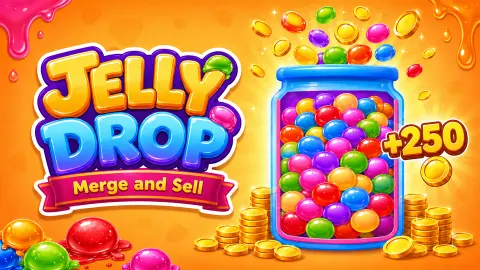










About Jelly Drop: Merge & Sell
Most merge games keep score for you: drop, match, watch the number climb. Jelly Drop: Merge & Sell makes you do the shopping and the selling yourself. You buy jellies with coins, you watch them merge in a jar, and nothing turns back into money until you pick up the right jelly and carry it to the till.
That right jelly is the one with a $ mark. It took us a while to see why it matters, and the rest of the game hangs on it.
The screen is a tall glass jar on an orange background, with a counter inside that reads 0/50 at the start. Below it sit two buttons: a blue one marked X1 and 10, and an orange one marked 200. Coins and red gems sit at the top right. A dashed circle with a small cart and a down arrow, drawn inside the top right of the jar, is the sell zone.
First, the limits of this page. All of it comes from a single ten-minute sitting at a computer, mouse in hand. We made one sale, then got stuck with a nearly full jar and two $ jellies we failed to drop in the right place. Nothing below goes beyond that sitting. The game is credited to DudaGames and has been available from August 2026.
Only the $ jellies sell
The tutorial is short and easy to miss. After a few purchases a line appears at the top of the jar, "Drag the $ jelly to the sell zone", with a hand pointing at it. We followed it, and our coins jumped from 70 to 114, and the jar emptied by more than half.
Then we tried the same with an ordinary group of orange jellies. It rose to the circle, fell back to the bottom of the jar, and the coins stayed at 114. Later a plain red group did the same.
So in our session a full jar did not sell itself, and a plain group earned nothing. At 50 of 50 nothing happened on its own. The only thing that turned jellies into coins in our session was a $ jelly dropped on the circle.
Merging makes room, and room is what runs out
Each purchase adds ten jellies and the jar holds 50. That arithmetic is the whole squeeze.
Merging helps in two ways. Two orange groups met near the top of a full jar, and moments later the jar held one big red jelly with a $ on it and the counter went from 50 to 45. A red $ jelly that took in another red group turned teal. Both times the colour went up a step, and the first merge freed five places.
The catch is the blue button. At 45 of 50 it answered with Not enough space, and our coins did not move. It seems to need room for a whole group of ten, though we only saw it refuse at that one level. If the jar is that full and you cannot get a $ jelly into the sell zone, you are stuck until you do, which is where our session ended.
So plan the order. Buy, let a pair merge, sell the $ jelly while there is still room, then buy again.
What the orange 200 button and the side bar do
We never found out what the orange button buys. It shows 200 and a small square icon. Pressed with 94 coins, the game said Not enough money. A single sale paid us 44 coins, so you will need a few good sales before you can try it.
The game's description lists four upgrades: jelly level, sale income, jar capacity and progress speed. We did not see any of them, and we did not open the cart or gear icons at the top left, so we cannot say where they live.
The narrow bar beside the jar runs from 0 to 100. After our one sale it moved to 15 and stayed there. We sold nothing else, so we do not know what happens when it fills.
Who it is for, and more to play
It suits someone who likes a slow loop of buy, wait, merge and sell, and enjoys watching jellies wobble into each other. There is no timer and no way to lose that we saw, only a jar that gets too full. It is not a puzzle with levels, and in our session it did not move fast.
For a drop-and-merge jar with fruit instead of jelly, try Fruit Merge: Juicy Drop Game. If the selling part is what you like, The Flowers Merge and Sell Bouquets turns merged flowers into coins. For merging that builds an idle business, Merge Plane does it with an airline.
More in our clicker games.
Screenshots
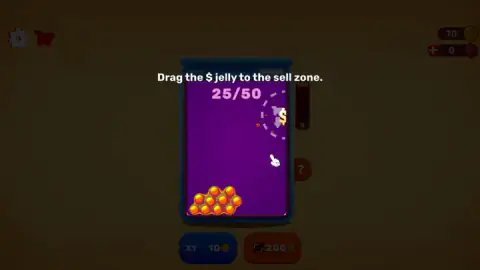
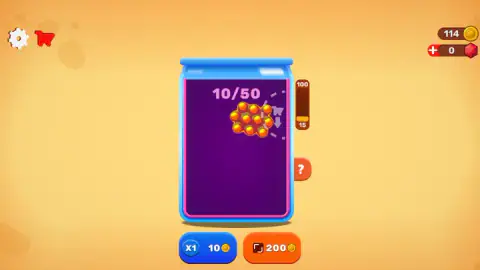
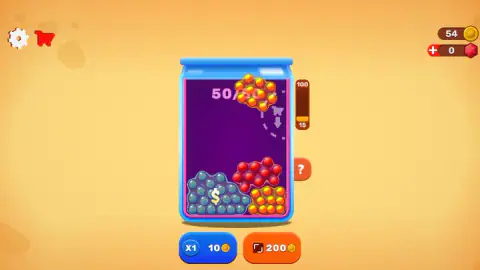
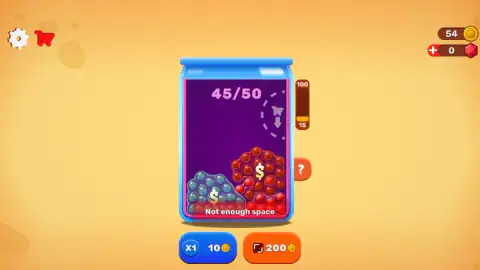
Taken by opening the game ourselves and letting it run — not supplied by the publisher, and not the same picture every other site shows.
How to play Jelly Drop: Merge & Sell
- Click the blue X1 button. A group of ten jellies falls into the jar and 10 coins leave your purse. You start with 100.
- Keep buying. When two groups of the same colour touch, they merge into one bigger jelly of a new colour, marked with $.
- Drag the $ jelly up to the dashed circle at the top right of the jar. It sells, the coins go up and the jar empties by that much.
- Spend the coins on more jellies and repeat. The orange 200 button needs 200 coins.
Tips from our session:
- Only drag jellies with a $ on them. The plain groups we dragged to the sell zone fell back and paid nothing.
- Sell before the jar fills. At 45 of the 50 places our blue button stopped buying.
- Check the coin counter after each drop. Our later drags of two $ jellies left them in the jar, and the coins did not move.
- You can close the game. Our jar, coins and jellies were still there after a reload.
Controls
| Click the blue X1 button | Buy one group of ten jellies for 10 coins; it drops into the jar from the top |
|---|---|
| Drag a jelly | Move it inside the jar; drop a $ jelly on the dashed circle at the top right to sell it |
| Click the orange 200 button | Costs 200 coins; we never had enough, so we do not know what it buys |
Features
- A jar with room for 50, counted at the top as you fill it
- A blue button that buys a group of ten jellies for 10 coins, starting from 100 coins
- Groups of the same colour merge into one bigger jelly of the next colour, and take up less room
- Merged jellies carry a $ mark, and in our session only those sold when we dragged them to the sell zone
- A Not enough space warning that stopped our purchases with the jar at 45 of 50
- Progress that stayed in place after we reloaded the page
Game details
- Developer
- DudaGames
- Release date
- August 2026
- Added here
- July 2026
- Technology
- HTML5
- Platforms
- Browser (desktop), Browser (mobile & tablet, touch)
- Saved progress
- Saving, when available, is managed by this game. Mava cannot confirm your level.
FAQ
How do you play Jelly Drop: Merge & Sell?
Click the blue X1 button to buy a group of ten jellies for 10 coins; it falls into the jar. Groups of the same colour merge into a bigger jelly with a $ mark. Drag that $ jelly to the dashed circle at the top right of the jar to sell it for coins, then buy more.
How do you sell jellies in Jelly Drop: Merge & Sell?
You drag a jelly marked with $ onto the sell zone, the dashed circle with a cart icon inside the top right of the jar. In our session ordinary groups without the mark came back when we dropped them there and paid nothing. A full jar did not sell itself either.
What does Not enough space mean in Jelly Drop: Merge & Sell?
Each purchase adds ten jellies to the 50-place jar. At 40 of 50 the game still sold us a group; at 45 of 50 it refused with Not enough space, and our coins did not change. To make room, merge groups or sell a $ jelly.
How much do jellies sell for in Jelly Drop: Merge & Sell?
We made one sale: the first $ jelly, shown by the tutorial, raised our coins from 70 to 114. Each group costs 10 coins, so one sale paid for four more. We did not sell a higher colour, so we cannot give you its price.
What is the orange 200 button in Jelly Drop: Merge & Sell?
It costs 200 coins. When we pressed it with 94 coins the game said Not enough money, and we never reached 200 in our session, so we cannot tell you what it does. The game's listing gives four upgrades: jelly level, sale income, jar capacity and progress speed.
Does Jelly Drop: Merge & Sell save your progress?
In our session it did. We reloaded the page with the jar at 45 of 50 and 54 coins, and after the start screen the same jar, the same coins and the same two $ jellies were waiting. We only tried this in one browser on one computer.
Who made Jelly Drop: Merge & Sell?
The game is credited to DudaGames and has been available from August 2026 and was last updated in October 2026. We found no reviews or guides beyond the game listings themselves.