


About Merge Emoji Arena
Merge games usually teach you that the next fusion is always the right move. Merge Emoji Arena prints numbers on its own screen that say otherwise, and it took us most of a session to read them properly.
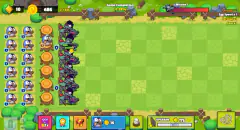
The whole game sits on one screen. On the left, an Evolution Tree lists the levels. In the middle, a Merge Board of nine cells holds the units you buy. On the right, a Battle Area has three lanes, each with a slot facing an enemy. Once you drag a unit into a lane, it fights without you.
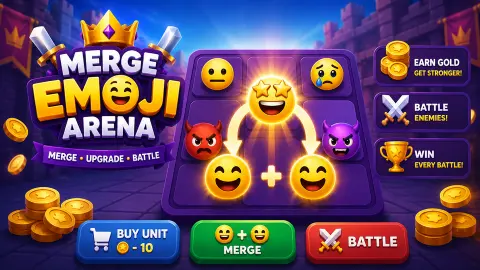
The units are the joke. Your cheapest soldier is a sobbing face, the one with two streams of tears. Merge a pair and you get a crying face with a single tear; merge those and you get a plain frown. Your army improves by becoming slightly less miserable. The loading art shows grinning and star-eyed faces further on, though we did not get that far.
We should be clear about how far we did get. In about ten minutes we stayed on Stage 1, killed one snail and built up to Level 3, with most of that time lost to a mistake the next sections explain.
Merge Emoji Arena is by gvfirmeza. It came out in June 2026.
Two sobbing faces in two lanes out-damage one merged unit
The tree tells you what each level does, and the shop tells you what it costs. Put them side by side and the merge looks less like a free upgrade:
| Level | Face | Level 1 units needed | Gold | Damage per second |
|---|---|---|---|---|
| 1 | Sobbing | 1 | 10 | 5 |
| 2 | Crying | 2 | 20 | 7 |
| 3 | Frowning | 4 | 40 | 10 |
The cost doubles at each step and the damage does not. Split a pair across two lanes and you deal 10 a second; merge the same pair and you deal 7, in one lane.
So why merge at all? Because lanes are the scarce thing. There are only three slots, and once they are full, the only way to add damage is to put something stronger in them. That is the real decision in this game: spread out first, concentrate later. We did it backwards, and our Level 3 ended the session still sitting on the board. We worked this out from the on-screen figures and did not get to test it in the other two lanes.
A unit fights only the enemy in its own lane
The first stage opens with three snails, the weakest at 30 health in the top lane. The tutorial has you put your first merged unit there, and within seconds that snail is a gravestone and your gold has jumped by 16.
Then nothing happens, and this is the part worth knowing. The unit stays facing the grave. It does not move on to the next lane, the other snails do not walk over, and no new enemy appeared in that lane in the rest of our session. The other two snails kept their full 36 and 42 health until the end. We went nine minutes without earning a coin; every later change in our gold was a purchase.
The game listing promises that deployed emoji keep fighting and farming gold on their own. They may well do so once the stage is moving. With one lane cleared and two lanes empty, they do not. If your gold has frozen, look at the Battle Area before you do anything else.
It also makes the opening gentle. In our ten minutes nothing hit back, nothing advanced on us and no game-over screen appeared, so you can stop and think at any point.
The ad offer is worth more than everything we earned
A gold-framed offer sits in the top bar, tagged AD, with an X beside it. Early on it read 2x Gold (5m), which by its label doubles your gold for five minutes. Later it changed to +200 Gold.
We took neither. For scale, our gold rose by 16 around our only kill, and 200 gold would buy five Level 3 units. Doubling is worth little while your income is zero, so the flat reward looks like the better offer when you are stuck.
Ad breaks also interrupt play on their own: we saw the ad screen during the tutorial and again about a minute in. Reloading is safe. Both times we did it, the gold, the board, the deployed unit and the grave were as we had left them.
The first emoji fit in 12 by 12 pixels
Emoji have a known author. Shigetaka Kurita drew the original set of 176 in the late 1990s for NTT DoCoMo, for the i-mode mobile internet service in Japan, each one on that same tiny grid. The Museum of Modern Art in New York added that set to its collection in 2016.
That tiny grid is why emoji became a language of simple shapes that read instantly at any size, and this game depends on it. The Merge Board has no names on its units, only a small level tag, and you pick your next drag by telling a sob from a tear at a glance.
The bottom rung is well chosen too. In the Unicode Consortium figures for 2021, the Loudly Crying Face ranked fifth among all emoji worldwide, so the unit you buy most often is one you have probably sent to somebody.
What we did not get to see
We did not reach Stage 2 or the red monster at the end of the bar, so we cannot tell you what it does or how long a run lasts. The tree shows six rows clearly and the top of a seventh, with the unknown ones reading ??? DPS; we do not know how many levels there are. The listing mentions endless waves and bosses, and we saw neither. We did not open the book and gear buttons at the top right, and we never tried swapping a deployed unit for a stronger one.
Similar games
For the same buy-and-merge loop with a much longer ladder, Merge Cats Idle Army lists 100 cat levels. Fleet Merge turns the idea into a starship auto-battler where your dock is your formation. If you came for the faces, Emoji Sort is a pattern puzzle built from them. There is more in our clicker games.
Screenshots
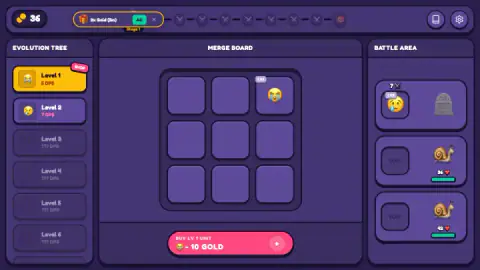
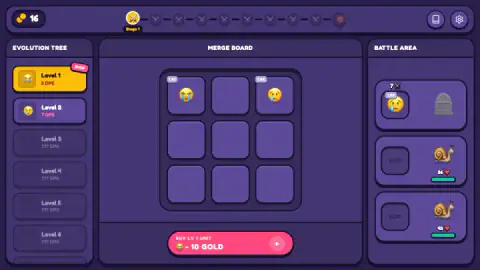
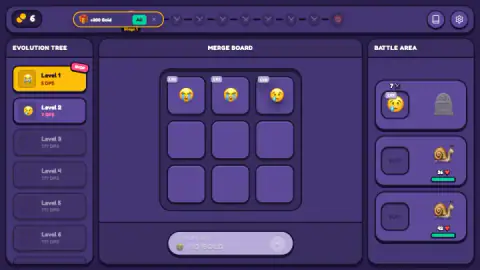
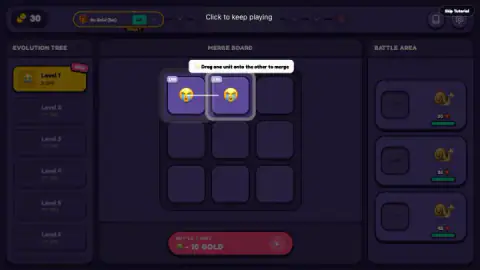
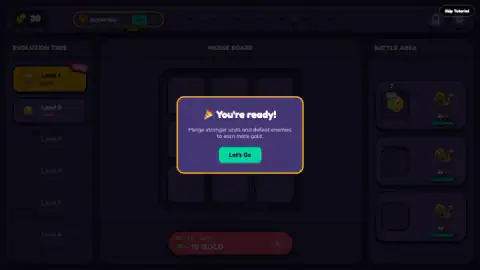
Taken by opening the game ourselves and letting it run — not supplied by the publisher, and not the same picture every other site shows.
How to play Merge Emoji Arena
- Buy a unit. The pink button under the board reads BUY LV 1 UNIT, 10 GOLD. You start with 50 gold, and the unit lands in a free cell.
- Merge a matching pair. Drag one unit onto another of the same level. The result takes one cell, and its level appears in the tree with its damage per second, or DPS.
- Send a unit to battle. Drag it into a SLOT in the Battle Area. It starts hitting the enemy in that lane by itself.
- Spend what you earn. Enemies pay out gold, and gold buys more Level 1 units. The first snail took our total from 30 to 46.
- Clear the stage. A bar along the top shows ten markers, starting at Stage 1 and ending in a red monster face.
Tips from our run:
- Fill every lane before you merge further. This was our mistake. We spent nearly all our gold on the board while two snails sat facing empty slots.
- Keep 10 gold back. At 6 gold the buy button turned grey, and with no enemy being hit, no more gold was coming.
- The tutorial can be skipped, with a button at the top right, but it teaches all three moves in under a minute and gives you your first kill.
Controls
| Click or tap the pink button | Buys one Level 1 unit for 10 gold and places it on the merge board |
|---|---|
| Drag a unit onto a matching unit | Merges the two into one unit of the next level |
| Drag a unit to an empty cell | Moves it around the merge board |
| Drag a unit to a SLOT | Sends it into that lane of the battle area, where it fights by itself |
Features
- Three panels on one screen: the Evolution Tree on the left, a 3x3 Merge Board in the middle and three lanes in the Battle Area on the right
- Units climb a ladder of moods: Level 1 is a sobbing face, Level 2 a crying face, Level 3 a frowning face
- Damage per second is printed on every unlocked level: 5, then 7, then 10 across the first three
- A unit fights only the enemy in its own lane and leaves a grave behind when it wins
- Stage 1 opens with three snails of 30, 36 and 42 health
- Your gold, board and deployed units were all still there after we reloaded the game twice
- Optional ad offers sit in the top bar, including a +200 Gold reward
Game details
- Developer
- gvfirmeza
- Release date
- June 2026
- Last updated
- October 1, 2026
- Added here
- May 2026
- Technology
- HTML5
- Platforms
- Browser (desktop, mouse), Browser (mobile & tablet, touch, landscape)
- Saved progress
- Saving, when available, is managed by this game. Mava cannot confirm your level.
FAQ
How do you play Merge Emoji Arena?
Press the pink button to buy a Level 1 unit for 10 gold, then drag one unit onto a matching one to merge them into the next level. Drag a unit into a slot in the Battle Area and it starts attacking the enemy in that lane by itself. Defeating enemies brings in gold, which pays for more units.
Why did my gold stop going up in Merge Emoji Arena?
Most likely your deployed unit has already killed the enemy in its lane. A unit attacks only its own lane, so once a grave stands there it has nothing left to hit. In our game the gold did not rise once in about nine minutes while two snails waited in lanes with empty slots. Put a unit in each lane.
Should you merge or deploy first in Merge Emoji Arena?
Going by the numbers the game shows, deploy first. Two Level 1 units in two lanes deal 10 damage a second between them, while the Level 2 you get from merging that same pair deals 7. Merging starts to pay when all three lanes are full and you need more damage per slot. We worked this out from the on-screen figures and did not get to test it.
How much does each level cost in Merge Emoji Arena?
The shop sells only Level 1 units, at 10 gold each. A Level 2 takes two of them, so it costs 20 gold, and a Level 3 takes four, so it costs 40. Those were the only three levels we reached, at 5, 7 and 10 damage per second.
Do you lose your progress if you reload Merge Emoji Arena?
It did not happen to us. We reloaded twice during our session, and each time the gold, the units on the board, the unit in battle and the grave in its lane were still there. We played in a single browser on a computer, so we cannot say whether progress moves to another device.
Can you lose in Merge Emoji Arena?
Not in what we played. During about ten minutes on Stage 1 the snails stayed in place, our unit was never hurt and no game-over screen appeared. Later stages may behave differently; we did not reach them.
Who made Merge Emoji Arena and when did it come out?
It is by gvfirmeza. It came out in June 2026 and was last updated in October 2026. When we checked, and it is in English only.
Can you play Merge Emoji Arena on a phone?
It is listed for Android and iOS as well as PC, in landscape. All three panels share one wide screen, so landscape is the layout to expect. We played with a mouse and have not tried dragging units with a finger.