





About Slasty: Candy Tower
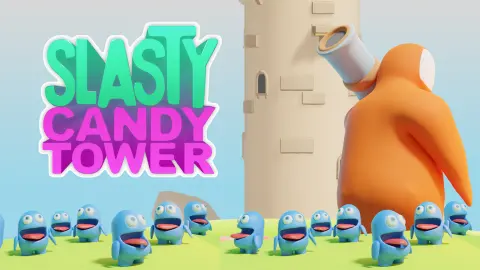
Most one-tap shooters put you at the bottom and the target above. Slasty: Candy Tower turns that upside down. Your cannon sits on the roof of a tall grey tower, the targets are below you on little stone balconies, and the balconies will not keep still. You never aim. You only choose the moment to let go.
The shooter is a round orange creature with a cannon on its shoulder. The targets are chewbricks, small blue monsters with their mouths wide open, waiting to be fed. A click or a tap drops a candy down the face of the tower. If a chewbrick is passing underneath when it arrives, it gets fed and the counter at the top jumps by 10. If not, the candy is gone, and you have a limited supply.
The game is by FairGoose, the developer listed for it. It was published in February 2025.
The download is small, about 3 MB, so on most connections the first tower is a few seconds away.
Fifty chewbricks between you and the next tower
The main menu scrolls sideways along a row of towers, each with a short line of backstory. Knight Tower is a sandstone keep that shelters chewbricks. Watch Tower is an abandoned grey lookout on the kingdom's border. Jump Hop, which looks inflated, is said to have been built that way on a whimsical king's orders, and Sunny Village sits near the northern border. A fifth tower was cut off at the edge of the screen.
The locked ones tell you exactly what they want. Jump Hop asked us to feed chewbricks at Watch Tower, and Sunny Village wants 130 more at Jump Hop.
Over our session the counter under Jump Hop went from 50 to 46, one for each chewbrick we fed on Watch Tower.
That is the real progress system. Points and high scores are for bragging; the remaining count is what opens new towers. The game's description says each tower brings its own platforms and style, and the shapes on the map back that up, but we only played Watch Tower.
Candies, coins and energy: three counters, three prices
Three numbers decide how long you can keep playing, and each has its own way to top it up.
Candies are your ammunition for a single run. The red counter in the top left falls as you shoot. At zero, a Get 5 Candies card appears with two buttons: one carries a video icon, the other costs 20 coins.
Coins come in slowly while you play. In one Watch Tower run the coin counter went from nothing to 3, and our menu total rose to 8 by the end of the session. Unlocking Watch Tower had paid a one-off reward on top.
Energy pays for each run. The bar at the top of the menu reads out of 20; ours started above the cap at 30 and dropped by one each time we started or retried a run.
A Get Energy card sells 10 energy for 15 coins or offers a smaller top-up for a video. With free play only, you will run dry if you retry a lot in one sitting.
Why you have to shoot before the target arrives
Clay-pigeon shooters have a word for this problem: lead. A clay crossing in front of them moves while the shot is on its way, so they aim ahead of it, at the place it is going to be. Aim straight at the clay and the shot arrives where it used to be.
Slasty: Candy Tower takes the aiming away and leaves only the lead. The candy always falls down the same strip, so the distance is fixed and the only variable is time. A chewbrick on a balcony far below needs a longer head start than one just under the roof, because the candy has further to fall. The trick is to fire at the empty spot a chewbrick is about to fill, not at the chewbrick.
How far our ten minutes at the Watch Tower went
Our session opened on the end of an earlier Knight Tower run: stage 4, 120 points, a new high score and Watch Tower unlocked. Everything after that was Watch Tower, played with a mouse on a desktop.
It did not go far. We never cleared its first stage. Our best run there scored 30, three chewbricks fed, and the menu recorded a high score of 30 at stage 1. When the candies ran out, the orange hero jumped off the roof and landed at the foot of the tower among the waiting chewbricks.
We did not open Quests, Wardrobe or Shop, watch any video, or buy candies or energy. We did not see what changes in later stages, whether the balconies speed up as the description promises, or what Jump Hop plays like. We did not play on a phone, although the game is listed for touch screens.
One button, a moving target and a slow unlock: who that suits
Slasty: Candy Tower suits players who like a single button and a target that moves. There is nothing to read once you are in, and younger players will understand it at once. It is not a game to binge: the energy bar sets the pace, and the unlock counters reward coming back over several sittings.
If timing a single shot at something that turns is what you enjoy, Blade Hit does it with knives and a spinning log. Knife Tower also has you shooting into a tall tower, and Tower Colour Crash gives you a turning tower and a limited number of balls. For more candy and hungry creatures, try Candy for capybara. There are more quick pick-up games in casual games.
Screenshots
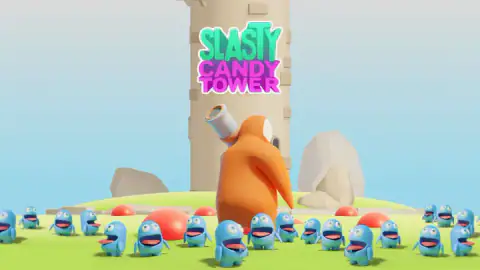
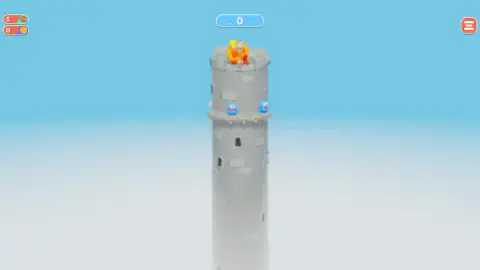
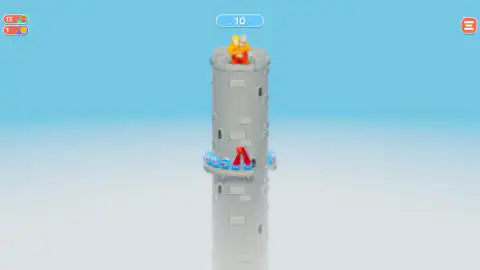
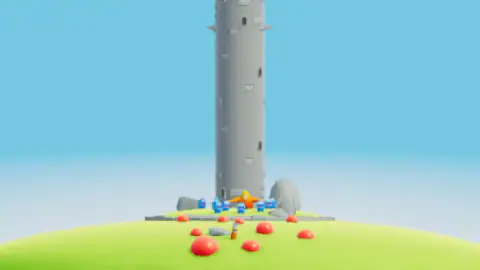
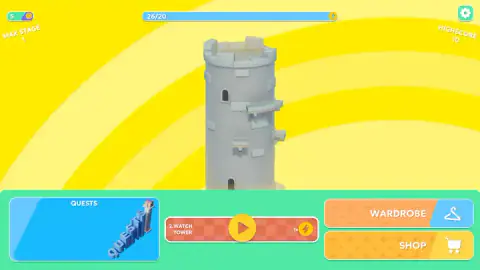
Taken by opening the game ourselves and letting it run — not supplied by the publisher, and not the same picture every other site shows.
How to play Slasty: Candy Tower
- Press Let's Play, then the yellow play button in the middle of the menu. The banner next to it names the tower you are about to climb, and the small lightning icon is the energy it costs.
- Read the line that appears before the run, such as "Feed 50 chewbricks to unlock next level". That is your long-term goal for this tower.
- Watch the balconies turning round the tower below your cannon. Click the left mouse button or tap the screen to fire a candy.
- Each fed chewbrick adds 10 points. Keep an eye on the red candy counter in the top left: when it reaches zero, the run is over.
- Close the Get 5 Candies card if you do not want more, and the stage card shows your points. The round green button under it starts again for one energy.
Tips from our session
- Look at the front of the tower, not the cannon. Every candy we caught on screen came down the middle of the tower's face. The question is never where to shoot, only when a chewbrick will reach that strip.
- Fire early. The candy takes a moment to fall, and the balcony keeps moving while it does. A chewbrick that is already in the middle when you click will have moved on by the time the candy gets there.
- Do not chase a balcony that has just gone past. It comes back round. A wasted candy costs more than a second of waiting.
- Losing still counts. The number of chewbricks needed to unlock the next tower goes down with every one you feed, even in a run that ends badly.
Controls
| Left mouse button or tap | Fires a candy from the cannon on top of the tower |
|---|---|
| Space bar | Listed by the game's own instructions as a second fire button; we played with the mouse and did not confirm it |
| Menu button (top right) | Pauses the run and opens graphics, sound and language settings, Resume and Quit |
| Play button on the yellow menu | Starts the selected tower and spends one point of energy |
Features
- One input: a click or a tap sends a candy down the front of the tower onto a turning balcony
- Blue chewbricks waiting on balconies that move round the tower, worth 10 points each when a candy lands on one
- A candy counter in the top left that runs down as you shoot, with a card offering 5 more for a video or 20 coins
- A row of towers to unlock in order: Knight Tower, Watch Tower, Jump Hop, Sunny Village and more beyond
- Each locked tower shows how many chewbricks you still have to feed on the one before it
- An energy bar that pays for every run, plus Quests, Wardrobe and Shop buttons on the main menu
- Progress, coins and unlocks that survived a page reload in our session
Game details
- Developer
- FairGoose
- Release date
- February 2025
- Last updated
- August 10, 2026
- Added here
- April 2025
- Technology
- HTML5 (Unity WebGL)
- Platforms
- Browser (desktop, mouse), Browser (mobile & tablet, touch)
- Classification
- Shooting
- Saved progress
- Saving, when available, is managed by this game. Mava cannot confirm your level.
FAQ
How do you play Slasty: Candy Tower?
Click the left mouse button or tap the screen to fire a candy from the cannon on top of the tower. The candy drops down the front of the tower, and if a blue chewbrick on one of the turning balconies is under it, the chewbrick is fed and you score 10 points. The run ends when your candies run out.
What are chewbricks in Slasty: Candy Tower?
Chewbricks are the small blue creatures with open mouths that crowd the foot of the tower and stand on its balconies. They are the targets: each one you hit with a candy counts as fed. Feeding enough of them is also how you unlock the next tower.
How do you unlock new towers in Slasty: Candy Tower?
By feeding chewbricks on the tower before it. The tower map showed Jump Hop locked with a note to feed 50 chewbricks at Watch Tower, and Sunny Village asking for 130 at Jump Hop. The counter only goes down, so every run adds to it even if you lose.
Can you use the space bar in Slasty: Candy Tower?
The game's own instructions say you can shoot by tapping the screen or pressing the space bar. We played with the mouse and could not confirm the space bar in our session, so if it does nothing for you, click or tap instead.
What happens when you run out of candies?
A card titled Get 5 Candies appears, with one button showing a video icon and another costing 20 coins. If you close it, the orange hero drops off the tower to the grass below and a stage card shows your points, with a retry button that costs one energy.
What is energy for in Slasty: Candy Tower?
Every run costs one point of energy, shown on the bar at the top of the menu. Ours started at 30 out of 20 and went down by one each time we started or retried. A Get Energy card sells 10 energy for 15 coins or offers 5 for a video.
Does Slasty: Candy Tower save your progress?
Yes. After our session reloaded, the coins, the unlocked Watch Tower and the count of chewbricks still needed for Jump Hop were all where we had left them.
Who made Slasty: Candy Tower?
Slasty: Candy Tower is by FairGoose, the developer listed for it, and its logo appears while the game loads. It was published in February 2025 and was last updated in August 2026.