


About Keyboard Escape Classic
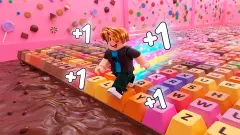
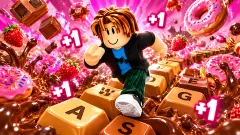
The number in the top-left corner of Keyboard Escape Classic is not a score and not a timer. It is labelled Speed, and there is exactly one way to raise it: walk. Each step on the giant keys that pave the floor adds one, a small +1 floats up over your runner's head, and the total pours into a Level bar just below.
For the first two minutes that is all the game asks, and it is oddly hard to stop. We left the pink hub with the counter at zero, held W, and watched it pass fifty before anything stood in the way. Then a raised slab of keys appeared, and the game stopped paying.
Our run lasted a little over ten minutes, and that needs saying up front: for most of it the counter read 85 while we stood at the foot of that first slab. We never finished the first of the ten stages the banner promises. What follows is the opening in detail, with the parts we did not reach marked as such.
Keyboard Escape Classic is by Foxi Games, the studio that also made ASMR Keyboard Escape Classic, and it was published on 26 October 2026. It is an obby, the players' word for a 3D obstacle course run with a blocky figure.
The floor is a keyboard, turned on its side
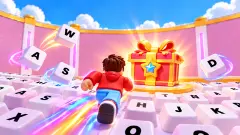
Look down as you walk and the letters make sense. Each row of keys across your path is one column of a real keyboard: the 1 key with Q, A and Z beside it, then 2 with W, S and X, then 3 with E, D and C. The pattern runs twice across the width of the field, so there are always two copies of each column side by side.
That means walking straight ahead is the same as running a finger across a keyboard from left to right. You pass R, F and V, then T, G and B, then Y, H and N. When the raised slabs begin, each one starts the sequence again from the 1 key.
There is one thing the game straightens out. On the keyboard in front of you, the keys under the 1 do not sit in a straight line: each row is shifted a little to the right of the one above, a habit usually traced back to typewriters, whose keys pulled levers that needed room to pass each other. On this floor the columns are squared off into neat rows, which is why they read so cleanly from behind your runner.
Why the counter stopped at 85
The climb is quick. Speed was already moving while we were still in the hub, and it reached 15 as the banner switched to Candy Steps. Half a minute later the Level bar hit its first target of 56, and its next one became 176.
Speed reached 85 a little over two minutes in, at the foot of the first slab. In front of us the course rose in steps: a block of keys about chest-high to the runner, then another behind it, then a third with two red posts on top. Every block was paved with the same keyboard columns, starting at 1.
We walked into the front of the first block several times and stopped dead each time. Our one jump lifted the runner onto its front edge, arms out, but the next view had us back on the lower keys and the counter still at 85. For the rest of the session nothing we did added a single point.
So we can tell you what the first stage looks like, but not what it takes to clear it. The chat lines in the corner mention hammers, falling tiles and slippery ice. We met none of them.
The buttons we left alone
The screen promises far more than the first stage showed us. Down the left edge sit seven buttons: Rebirth, Trails, Auras, Shop, Teleport, Daily and Wheel, with red dots on the last two. Next to the counter, a badge reads x1 beside "+1 per step". The game's instructions say a Rebirth, once you reach the right level, gives a permanent multiplier, and that x1 is presumably the number it would raise. We never pressed it.
On the right, a Max Speed bar ends in an infinity sign, and the yellow button reads x2 Speed with +60 s underneath. The Daily Gift card lays out a seven-day calendar. The first day pays 40, marked with the same trophy as the Wins counter, and the amounts grow each day, with treasure chests mixed in. The last day holds an exclusive skin called Royal Gift, and a second button on the card offers to double the day's reward for watching an ad.
The chat in the corner
The panel in the bottom-right corner never stopped scrolling. Lines arrive under names like MousseMax, CaramelKat, ClackAttack and EnterRaccoon, all built from sweets or keyboards, along with notices such as "CocoaSprint joined" and "LicoriceFox left". The talk is about the course: how many stages there are, how to jump, whether the hammers are scary.
In the hub a runner tagged FudgeFlash crossed in front of us with a speech bubble reading "my keyboard stuck", the same words that appeared in the chat. We saw no box to type our own messages into, and from playing alone we cannot tell you who is behind the names.
Not to be confused with its namesake
Foxi Games has two games with almost the same title, and they are not the same game. In ASMR Keyboard Escape Classic you start in a market square called Candy Park, carry three hearts and a candy counter, and the first test is a wall with two doorways, Fork and Spikes. Keyboard Escape Classic has no hearts on screen at all. It measures you by Speed, levels and stages instead, and its first obstacle is a staircase of keys rather than a choice of doors.
Who it suits
Keyboard Escape Classic suits players who like watching a number climb, and younger players who will enjoy the sweets, the confetti and the joke of running across a keyboard. The first two minutes need nothing but the W key. After that, it needs jumps, and the game does not show you how.
If the stall at the first slab sounds frustrating, Keyboard Escape: +1 Speed | Sweets and +1 Speed Keyboard Escape build on the same one-point-per-step idea, and Keyboard Rush adds Wins that open new lanes. Foxi Games' other keyboard run is ASMR Keyboard Escape Classic. There are more in our arcade games.
Screenshots
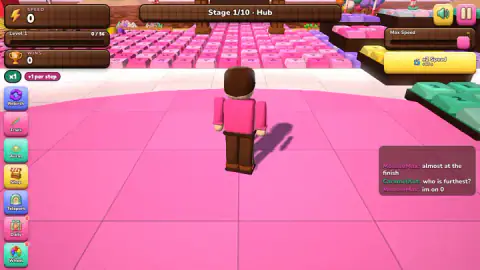
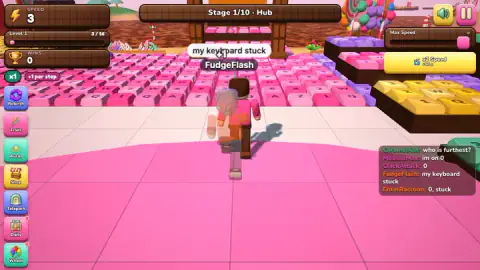
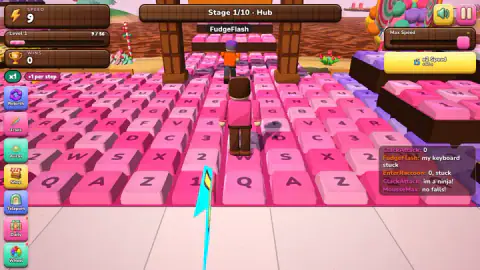
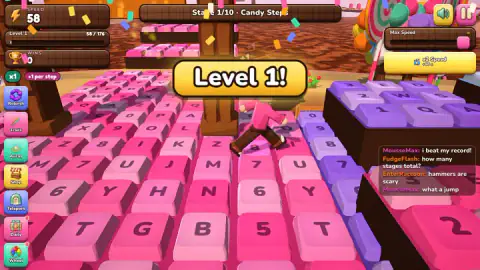
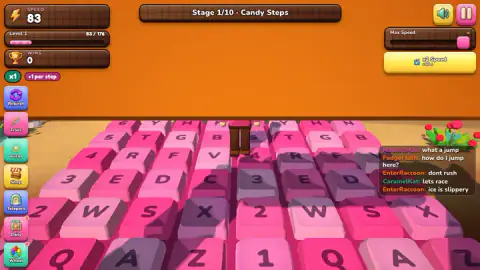
Taken by opening the game ourselves and letting it run — not supplied by the publisher, and not the same picture every other site shows.
How to play Keyboard Escape Classic
- Close the Daily Gift card. It opens over the hub as soon as the game loads. The red X in its top-right corner closes it; Claim takes the day's reward.
- Hold W and walk out of the hub. The pink plaza ends in a field of keycaps. Once you are on them, the banner at the top changes from Hub to Candy Steps.
- Keep stepping. Every step adds one to Speed. When the Level bar under it fills, a "Level 1!" banner drops with confetti and the bar sets a bigger target.
- Jump with Space where the keys rise into slabs. Walking into a slab just stops you at its edge.
- Bank your progress. The game's instructions say each stage ends in a Safe Zone with a yellow Wins pad. We never reached one, and our Wins counter stayed at zero.
Tips from our session
- New ground pays, old ground does not. Our counter climbed fast across the open field and then froze. For eight minutes we moved around the same handful of keys at the foot of the slab, and Speed did not rise once.
- Jump while moving. Our single jump came from a standstill. It put us on the front edge of the slab, and a moment later we were back where we started.
- If a strip at the top says "Click to keep playing", click the game. The keyboard is not reaching it until you do.
- The x2 Speed button probably costs an ad. It carries a small video icon, and we left it alone. Once during our run a card covered the game with "Oops! No ads available right now" and a Continue playing button.
Controls
| W (hold) | Walks the runner forward across the keys; we used it for almost the whole session |
|---|---|
| A S D | Left, back and right, according to the game's instructions; one press of A changed nothing we could see |
| Arrow keys | An alternative to W A S D, according to the game's instructions; we did not use them |
| Space | Jump. Our one jump lifted the runner onto the front of the first raised slab of keys |
| E | Opens a stand when you are next to it, according to the game's instructions; not tried |
| Red X on the Daily Gift card | Closes the card that opens over the hub, without claiming the day's reward |
| Touch (phone and tablet) | Left stick, jump button and a swipe on the right half to turn the camera, according to the game's instructions; not tested by us |
Features
- A floor of giant pink keycaps laid out in real keyboard columns: 1, Q, A and Z in one row, then 2, W, S and X in the next
- A Speed counter in the top-left corner that climbs by one per step, with a small +1 floating over the runner
- A Level bar under the counter: it fills at 56, a "Level 1!" banner drops with confetti, and the next target is 176
- A stage banner reading Stage 1/10, which switches from Hub to Candy Steps once you are out on the keys
- A Daily Gift calendar of seven days, ending in an exclusive skin called Royal Gift
- Seven buttons down the left edge: Rebirth, Trails, Auras, Shop, Teleport, Daily and Wheel
- A chat panel in the bottom-right corner, full of candy-named runners asking about stages, jumps and hammers
Game details
- Developer
- Foxi Games
- Release date
- October 2026
- Last updated
- October 27, 2026
- Added here
- October 2026
- Technology
- HTML5 (3D)
- Platforms
- Browser (desktop, keyboard), Browser (mobile & tablet, touch)
- Saved progress
- Saving, when available, is managed by this game. Mava cannot confirm your level.
FAQ
How do you play Keyboard Escape Classic?
Hold W to walk your runner off the pink hub and onto a field of giant keyboard keys. Every step adds one to the Speed counter in the top-left corner, and the game's instructions say the aim is to reach each Safe Zone and step on its yellow Wins pad. Space jumps, which you need for the raised slabs of keys that rise out of the first stage.
How does speed work in Keyboard Escape Classic?
Each step adds one point of Speed, shown as a +1 over your runner's head. The same number fills a Level bar: in our session it hit its first target at 56, showed a "Level 1!" banner and set a new target of 176. Walking back over keys near where we had already been did not raise it: the counter sat at 85 for the last eight minutes of our run.
How do you get past the raised steps in Candy Steps?
With a jump, but we have to be honest: we did not manage it. The first stretch of Candy Steps runs into a stack of raised slabs, each paved with keys, and walking into the first one just stops you at its edge. One Space press lifted us onto its front, but we ended up back at the foot. Taking a run-up before jumping is the obvious thing to try.
How many stages does Keyboard Escape Classic have?
The banner at the top of the screen reads Stage 1/10, so ten. We only saw the first: the hub, and the key field the game calls Candy Steps. The game's description lists themed stages such as a chocolate tsunami and a licorice maze, but we did not reach any of them.
Is Keyboard Escape Classic the same game as ASMR Keyboard Escape Classic?
No. Both are by Foxi Games and both are 3D runs across giant keyboard keys, but they work differently. ASMR Keyboard Escape Classic gives you three hearts, a candy counter and a wall with two doors to choose from. Keyboard Escape Classic has no hearts on screen; it counts Speed per step, fills a Level bar and splits the course into ten stages.
Are the other players in the Keyboard Escape Classic chat real?
We cannot tell you. A chat panel in the bottom-right corner shows lines from names like MousseMax, FudgeFlash and EnterRaccoon, plus notices when someone joins or leaves, and a runner tagged FudgeFlash ran past us in the hub. We saw no box to type our own messages into.
Who made Keyboard Escape Classic?
It is by Foxi Games, the studio that also made ASMR Keyboard Escape Classic. It was published on 26 October 2026 and was updated the following day.
Can you play Keyboard Escape Classic on a phone?
It is listed for phones and tablets, and the game's instructions describe a left-hand stick, a jump button and a swipe on the right half of the screen to turn the camera. We played it on a computer only, so we have not checked how it handles on a touch screen.