


About Keyboard Rush
Most obstacle courses measure you in one way: did you make the jump or not. Keyboard Rush keeps a second score running underneath. Every key you put your foot on is worth a point, the points pile up as Speed, and the pile decides how fast you are allowed to run. You do not get faster by playing better. You get faster by taking more steps.
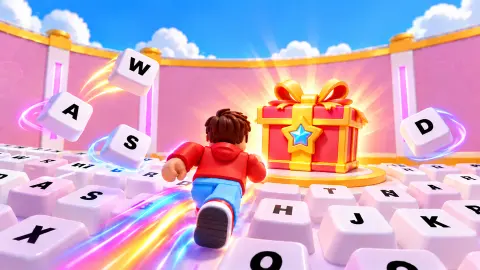
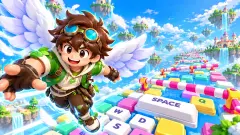
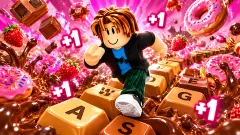
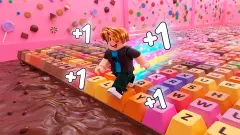
The course is a wide floor of giant white keyboard keys, each printed with a letter, laid out like a playground. Low walls, blocks and narrow ledges turn it into what players call an obby, short for obstacle course. Around you, other runners with names like DragonPro and LunaStar wander the same keys. A trophy near the start glows under a sign reading x3 WIN BOOST!, and a padlocked gate at the far end waits for later.
We will be straight about our run. In about ten minutes on a computer we gained one level, and our runner finished on Level 2 with a Speed of 72 and no wins at all. The trophy counter in the corner never moved. This page explains what we learned on the way, because the game does not explain much of it itself.
Keyboard Rush is by Emotgame, according to the game's listing, and it was published on 25 October 2026.
Two speeds, and only one of them moves you
The number in the middle of the screen is called Speed, but it behaves like a step counter. On Level 1 it read 6 when the bar read 6 / 40, and 32 when the bar read 32 / 40. The two moved together every time.
Your real pace is a separate value, and it only changes at a level-up. When we filled the first bar, the game showed it rising from 4.0 to 6.0. That is half as fast again, and it is the only reward in the game that changes how running feels.
The bars get longer as you go: the first level needs 40 points, the second 100. Small pop-ups by the shoe icon showed bigger values per step as we went on, and we could not tie each one to a rule. Either way, the longer you run, the more each step is worth. That loop is the reason the game exists.
Where the Wins go
| What | Price | What it does |
|---|---|---|
| +2/step lane | 3 Wins | Doubles the points per step |
| Spark Trail | 100 Wins | x1.5 trail multiplier |
| Slime Slick | 900 Wins | x2 |
| Butterfly Drift | 2.4K Wins | x3 |
| Neon Streak | 7K Wins | x5 |
The shop has three tabs: Trails (12), Auras (12) and Skins (18). We only opened Trails. The bottom of the screen lists three multipliers, Trail, Aura and Rebirth, all at 1X for us, so each tab appears to feed one of them.
The jump in prices tells you the game expects a long stay. The first trail costs 100 Wins and the best one we saw costs 70 times that. On the wall beside the course, a tall scale headed WINS runs from 0 to 250; we never found out what it pays, because we never had a Win to test it with.
Rebirth: an old idea with a new name
The Rebirth button, key R, sits on the left of the screen from the first second. We did not press it, and the game did not tell us what it costs. But the name points to a design idea that is older than the game.
It is the prestige reset. You give up your progress in exchange for a permanent bonus that makes the next run faster. Cookie Clicker, the browser game by the French programmer Julien Thiennot released in August 2013, made it famous: players "ascend", lose all their cookies and gain prestige levels, each worth a permanent 1% more cookies. Clicker Heroes later brought the same idea to phones.
Keyboard Rush wears that idea on its sleeve. The Rebirth Multiplier sits next to the trail and aura ones on the screen, and a station marked Rebirth near the start offers an E Interact prompt. In games built this way, the reset is not a failure. It is how you go faster than the last time.
World 2 is a long way off
At the end of the first course stands a gate with a large padlock. Walk up to it and a sign appears: WORLD 2: PHARAOH'S PYRAMIDS · Requires Level 25, followed by your own level. Ours read 1, and later 2.
Level 2 needed 100 points, more than twice Level 1. If the bars keep growing, Level 25 is many sessions away. The good news is that the game keeps your place. We reloaded after about four minutes and came straight back on Level 2 with the same Speed. Ad breaks are light: the one slot we hit was skipped, and a Continue playing button put us straight back on the keys.
Who Keyboard Rush is for
It suits younger players and anyone who likes watching a number go up. There is nothing to read, no timer, and the game keeps your level between visits. The look, blocky runners on a pastel playground, will be familiar to anyone who plays obbies.
It is not a typing game, despite the name, and it is not a tight platformer. The challenge is patience rather than precision: most of the game is a slow climb of numbers.
If you want the same step-counting idea in another setting, +1 Speed Keyboard Escape and Keyboard Escape: +1 Speed | Sweets both put you on a keyboard floor. Ninja Obby Speed Run is a sharper obstacle course. Emotgame's Cow Rescue is a calm screw puzzle by the same studio. More are in adventure games.
Screenshots
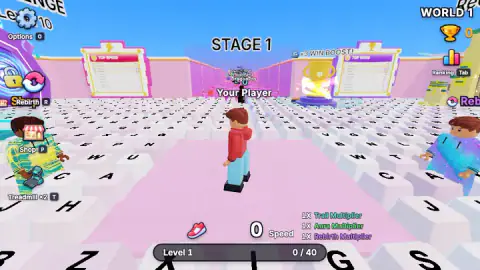
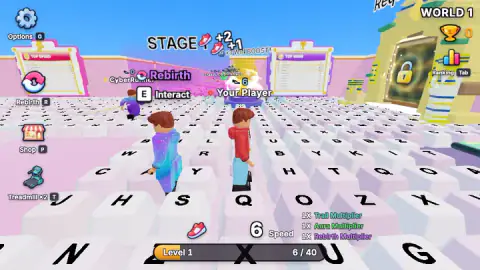
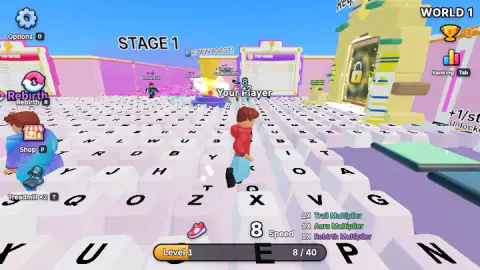
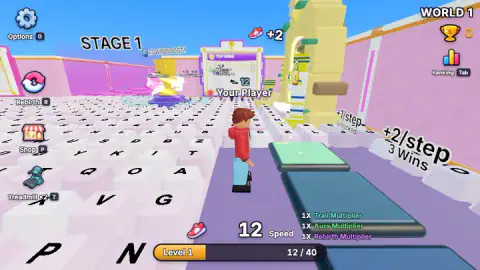
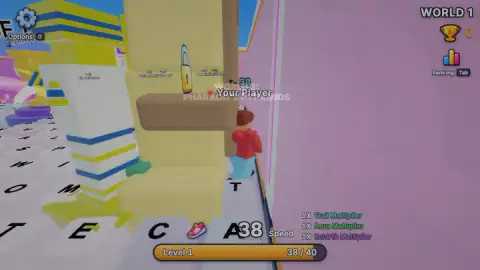
Taken by opening the game ourselves and letting it run — not supplied by the publisher, and not the same picture every other site shows.
How to play Keyboard Rush
- Start running. After the "Let's Play!" screen you land on STAGE 1 of WORLD 1. Hold the arrow keys to run across the keys. Holding works far better than tapping.
- Watch the Speed counter climb. Each step adds to the number by the shoe icon at the bottom. The Level bar under it fills with the same points.
- Level up. Fill the bar and the game announces LEVEL UP / SPEED INCREASED! Your running pace goes up, and the next bar is longer.
- Get through the course and earn Wins. The game's instructions say reaching the finish completes the level. Wins are the currency for everything else.
- Spend Wins. Open the Shop with P, or step onto lanes that pay more per step once you have enough Wins.
Tips from our session:
- The keys are not a real keyboard. Letters sit in no order you would recognise: Q next to O, Z next to X, then V and G. Do not try to read them as a route. They are decoration and footholds.
- Ignore the wins lane at first. Beside the course a raised purple strip carries signs for +1/step and +2/step · 3 Wins. Run along it with no Wins and a banner says You need 3 more Wins. It costs you nothing, but it gets you nothing either.
- Close pop-ups straight away. The World 2 sign and the shop both cover the screen and stop you moving. The pink X in the top corner closes them.
- Look for the "Click to keep playing" banner. It appeared several times at the top of the screen. A click puts you back where you were.
- If you stop moving, change direction. We spent minutes standing on a key marked Y in front of a pink wall, pressing forward into it, and the counter stopped with us. Pushing harder into a wall earns nothing.
Controls
| Arrow keys | Run across the keys; hold them down rather than tapping |
|---|---|
| P | Open the Shop (trails, auras, skins) |
| R | Rebirth (we did not use it) |
| T | Treadmill x2 (we did not use it) |
| E | Interact, shown when you stand next to a station |
| Tab / O | Ranking / Options |
Features
- A 3D obstacle run on a floor of giant keyboard keys, each one printed with a letter
- Every step adds to a Speed counter, and the same points fill the level bar: 40 for Level 1, 100 for Level 2
- Each level-up raises your actual running pace; ours went from 4.0 to 6.0 at Level 2
- Wins are the currency: a +2 per step lane asks for 3 of them, and the first trail costs 100
- A shop with 12 trails, 12 auras and 18 skins, with trail multipliers from x1.5 to x5
- World 2, Pharaoh's Pyramids, stays locked until Level 25
- Progress is kept: after a reload we were back on the same level with the same Speed
Game details
- Developer
- Emotgame
- Release date
- October 2026
- Last updated
- October 27, 2026
- Added here
- October 2026
- Technology
- HTML5 (WebGL 3D)
- Platforms
- Browser (desktop, keyboard), Browser (mobile & tablet, touch)
- Saved progress
- Saving, when available, is managed by this game. Mava cannot confirm your level.
FAQ
How do you play Keyboard Rush?
Hold the arrow keys to run your blocky character across a course made of giant keyboard keys, and jump the gaps between them. Every step raises the Speed counter at the bottom of the screen, and the same points fill your level bar. Reaching the end of a stage is what earns Wins, the game's currency.
What does Speed mean in Keyboard Rush?
The big Speed number is really a step count: it went up by one for each key we stepped on, and the level bar beneath it moved by exactly the same amount. Your real running pace only changes when you level up. At Level 2 the game told us it had risen from 4.0 to 6.0.
How do you get Wins in Keyboard Rush?
According to the game's instructions, by reaching the finish of a level. We did not get there in our ten minutes, so our trophy counter stayed at 0 all session. A trophy near the start is marked x3 WIN BOOST, which suggests Wins are multiplied there.
What does 'You need 3 more Wins' mean in Keyboard Rush?
It appears when you run along the raised lane marked +2/step. That lane doubles what each step is worth, and it opens only once you have 3 Wins. With none yet, the game just shows the message and you keep earning at the normal rate.
How do you unlock World 2 in Keyboard Rush?
World 2, called Pharaoh's Pyramids, needs Level 25. A padlocked gate and a sign showing your current level stand at the end of the first course. We reached Level 2, so we did not see it.
What can you buy in the Keyboard Rush shop?
Trails, auras and skins, paid for with Wins. Trails add a multiplier: the cheapest, Spark Trail, costs 100 Wins, and the dearest we saw, Neon Streak, multiplies by five. The shop has separate tabs for trails, auras and skins.
Does Keyboard Rush save your progress?
Yes, in our session it did. We reloaded the game after about four minutes and came back on Level 2 with the same Speed and the same progress on the bar.
Who made Keyboard Rush?
The developer is listed as Emotgame. Keyboard Rush was published on 25 October 2026 and is free to play in the browser.