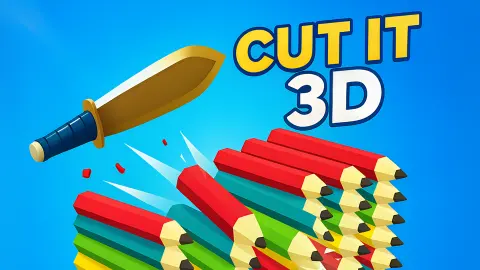



About Cut It 3D
The start screen of Cut It 3D carries a small mistake that tells you how much reading the game expects of you. In big blue letters it says "CLICK TO TO START". Nobody stopped to fix the doubled word, and it hardly matters, because the whole instruction is the first one: click.
Behind the sign, a kitchen knife stands point-down in a platform. Click, and it jumps into the air and turns end over end towards the right. Click again and it does it again. Between the knife and the far end of the level stand two bananas, several stacks of brown planks, a grey pipe lying on its side and a black anvil on a pillar.
Our session was short: roughly four minutes at a desktop, mouse only, and none of it past Level 1. We cut through planks, we saw the "YOU LOSE!" card twice, and we did not reach the end of the level. This page says what those minutes showed and where they stopped.
The game's listing credits the game to Foxi Games. It has been available since August 2025.
Twelve clicks to the anvil: the knife moves when you do
Most one-button games are a fight against a scrolling screen. This one is not, and it took us two runs to notice.
In both runs, four clicks after the start the knife was just past the first stack of planks, with the pipe ahead. Four more and the pipe was behind it. Twelve clicks took us to the anvil both times, although the two runs were minutes apart and we were not counting.
So the course is measured in hops. Each click buys the same short stretch of ground, and the level is a fixed number of them. That changes how to think about it. You are not reacting to things rushing at you. You are choosing when to spend the next hop, and you can look at what is ahead for as long as you like first.
It also means a run is slow by the standards of the genre. Two minutes of play took us about twenty clicks and carried us a few hops beyond the anvil, into the tall stack that stands after it.
What the knife cut, and what it left hanging
The planks are the part of the game that works as advertised. They are stacked flat, a dozen or more high, on a pale blue pillar. When the knife goes through the stack, the planks in its path are gone.
What surprised us is what happens to the rest. In a real pile, the planks above the cut would drop. Here they stay where they were. After our first pass, three planks hung in the air with a clear gap under them and a single plank still sitting on the pillar. Further on, the whole upper part of a tall stack was left floating behind the knife with nothing beneath it.
On the second attempt we took more out of that first stack: two planks were left hanging and not three. So how much you cut depends on how the knife meets the stack, and it is not all or nothing.
Once, we caught the knife in the middle of a stack. The planks around it had been knocked out of line, small coloured chips showed beside the blade, and a column of white "+1" marks was rising beside the blade, each one fainter than the one below.
We cannot tell you that the knife cuts anything else. The pipe was whole and behind us after we passed it, which means we went over it. We have no picture of a banana or the anvil after the knife had been there.
The loss card said SCORE 0, and we cannot tell you why
The run with the "+1" marks is the same run that ended on the card. White letters, "YOU LOSE!". A yellow box in the top right corner, "SCORE 0". One blue button, AGAIN.
That is a contradiction, and we are not going to smooth it over. We watched points appear and were then told we had none. It may be that the score is only counted when you finish a level. It may count something other than planks. We do not know, and the game does not explain it.
We also cannot tell you what ended the run. The card arrived between one click and the next, and it gives no reason. The level has steps down between its platforms and things the knife did not cut, and the listing says the knife must be kept in the air. Which of those caught us, we did not see.
Why a thrown knife spins, and what throwers do about it
A knife thrown by the handle does not fly like a dart. It turns end over end around its balance point, and it keeps turning at a steady rate until it hits something. Whether the point or the handle arrives first is a matter of how many half turns fit into the flight.
Knife throwers deal with this in a plain way. They do not try to change the spin in mid-air, because they cannot. They change the distance. A step forward or back adds or removes part of a turn, and a thrower who holds the blade and not the handle starts half a turn ahead. Getting a knife to stick is mostly a matter of standing in the right place.
Cut It 3D takes that problem and turns it round. You cannot step forward or back, because every hop covers the same ground. What you choose is the moment of the next throw, and so the angle the knife has when it reaches the next thing in its way. The listing says a blade cuts and a handle bounces. We saw the blade cut, we did not see a bounce, and we did see that the angle matters: the same stack lost more planks on one pass than on the other.
Who it is for
Someone who wants a slow, thoughtful one-button game and not a twitchy one. Nothing rushes you, the level repeats, and each attempt teaches you a little more of it.
It is not for a player who wants to know the rules up front. The game explains nothing, the score puzzled us, and a loss comes without a reason. If that sounds irritating, it will be.
The knife is a kitchen knife and the things it meets are planks, fruit and metal. There are no people or animals on the course.
More games with a blade or a single click
Slice & Soar is the closest thing we have: a blade that flies along a walkway and cuts fruit on the way. Knife Smash is the fairground version of knife throwing, where the knife has to stick in a spinning target, and Knife Tower has you throwing knives into a tower of blocks. Rolling Balls 3D carries the same developer's name. The rest are under arcade games.
Screenshots
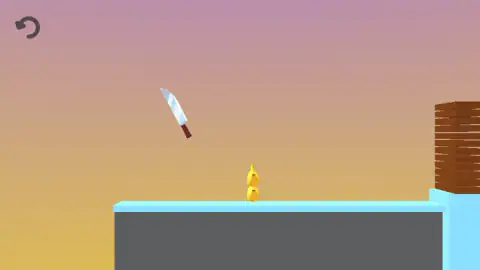
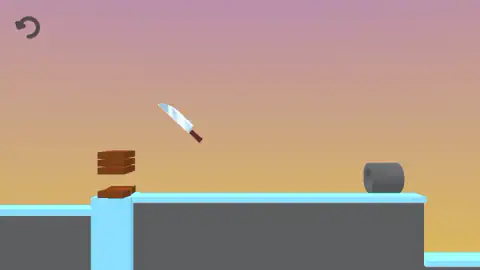
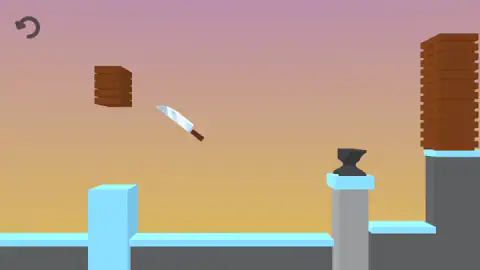
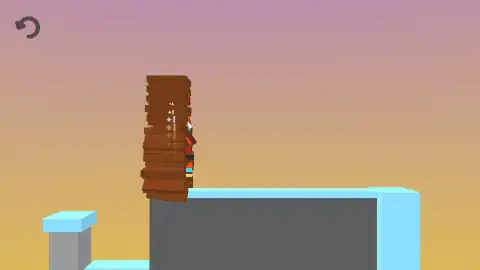
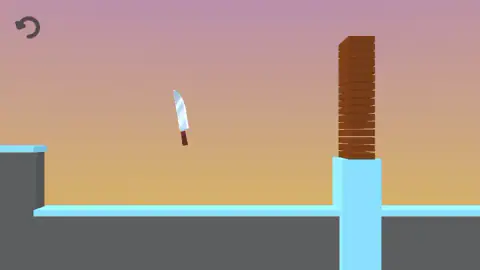
Taken by opening the game ourselves and letting it run — not supplied by the publisher, and not the same picture every other site shows.
How to play Cut It 3D
- Click anywhere on the start screen. The sign, the level name and the score box all disappear, and the knife is in the air.
- Click again to send the knife on another spinning hop. It always travels to the right.
- Hop through the plank stacks. The blade takes planks out as it passes and white "+1" marks rise from the stack.
- Keep going past the pipe and the anvil towards the taller stacks beyond them.
- If the "YOU LOSE!" card appears, press AGAIN. You are back at the start of the same level.
What two runs taught us:
- Where you click does not matter. We clicked on the knife, on the planks, in the middle of the screen and at the far left edge. The knife did the same thing every time.
- There is no hurry. Our clicks were about six seconds apart, and one run lasted two minutes like that. Nothing on screen counts down.
- The score box leaves when you start. During a run the only thing on screen besides the level is a round arrow in the top left corner. You find out your score on the loss card and not before.
- Level 1 never changes. Two bananas first, then planks, then the pipe, then a tall stack, then the anvil. It was the same on each attempt, so what you learn carries over.
- The keyboard did nothing for us. We tried a letter key and got no response.
Controls
| Left click anywhere on the screen | Throws the knife up and forward with a spin; where you click made no difference in our runs |
|---|---|
| Click on the start screen | Starts Level 1 from the "CLICK TO TO START" sign |
| AGAIN on the "YOU LOSE!" card | Returns to the start screen of the same level |
| Round arrow, top left | The only button on screen during a run; it carries the usual start-again icon and we did not press it |
Features
- One control, a click that sends a kitchen knife spinning forward in a short hop
- A side-on course of grey platforms with pale blue tops, set against a pink-to-orange sky
- Tall stacks of brown planks that the knife cuts through, one plank at a time
- White "+1" marks that rise from a stack while the blade is inside it
- Bananas, a grey pipe and a black anvil on a pillar along the first level
- A first level that is laid out the same way on every attempt
- A "YOU LOSE!" card with your score in a yellow box and a single AGAIN button
Game details
- Developer
- Foxi Games
- Release date
- August 2025
- Added here
- June 2025
- Technology
- HTML5
- Platforms
- Browser (desktop)
- Saved progress
- Saving, when available, is managed by this game. Mava cannot confirm your level.
FAQ
What is Cut It 3D?
It is a one-click 3D arcade game credited to Foxi Games. A kitchen knife crosses a course of floating platforms from left to right, and each click throws it up and forward with a spin. Stacks of planks, bananas, a pipe and an anvil stand in the way, and the blade cuts through what it can.
How do you play Cut It 3D?
Click once on the start screen, then click again each time you want the knife to hop forward. There is nothing to aim, because the knife goes the same way wherever you click. The run goes on until a "YOU LOSE!" card appears, and the AGAIN button on it starts the level over.
Do you have to click fast in Cut It 3D?
No. Our clicks were about six seconds apart and one run still lasted two minutes. Progress went by the number of clicks and not by the clock, since twelve clicks took us to the same anvil in two separate runs.
How does the score work in Cut It 3D?
We can only give you half an answer. While the knife was inside a stack of planks, white "+1" marks rose from it, one after another. Yet the card at the end of that same run read "SCORE 0". We do not know what the score counts, and it may only be paid out when a level is finished.
How many levels does Cut It 3D have?
We do not know. Every run we played was on Level 1 and none of them reached its end, so we saw no win screen and no second level. Level 1 has the same layout each time, which makes it something you can learn.
Why did I lose in Cut It 3D?
The game does not say. The "YOU LOSE!" card shows a score and an AGAIN button and gives no reason. We saw it twice and did not catch the moment that caused it either time, so we will not guess.
Can you play Cut It 3D on a phone?
It is listed for PC, Android and iOS, in landscape. We played on a desktop with a mouse only, so the phone version is the listing's word and not something we tested.
Who made Cut It 3D?
The game's listing credits Foxi Games. The game was published in August 2025. The same name is on Rolling Balls 3D.