




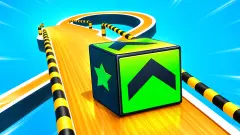


About Chainsaw 3D
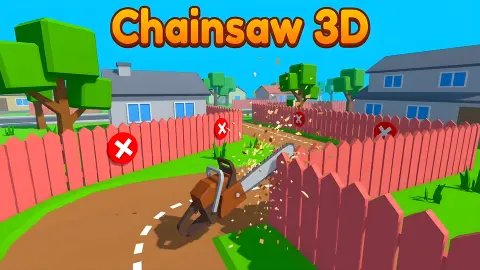
Most cutting games in a browser give you a free hand. Swipe where you like, and whatever comes apart is the reward. Chainsaw 3D takes that decision away before you touch anything: the cut is already drawn. A white dashed line runs the full length of a fence, dipping and rising like a signature, printed on the planks before the saw has even started. Where to cut is not your problem. Whether you can stay on the line is the whole game.
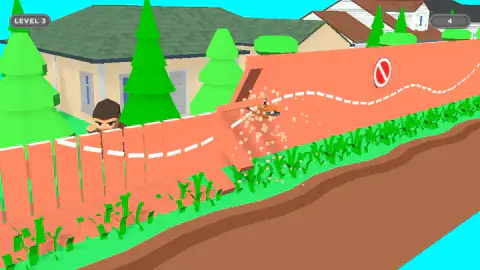
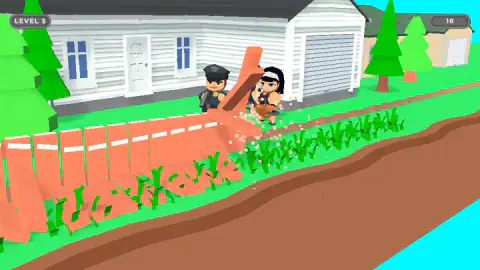
The saw moves forward by itself. The only thing you decide is how high it rides: push the mouse up and the blade lifts, pull it down and it drops. Sawdust fountains out of the contact point, and the stretch of fence above the cut leans, tips and falls into the grass and the crop row behind it. One input, one direction of travel, and a line to hold.
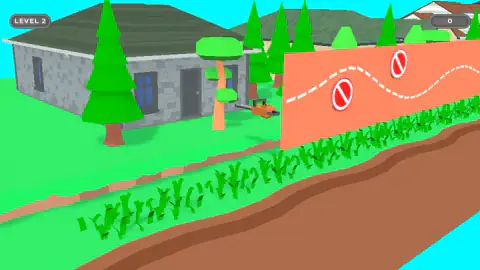
And it is always a fence. In the seven levels we saw, nothing we cut was a tree or a log — it was a neighbour's garden fence, painted salmon orange, standing between a clapboard house and a strip of green crops. The houses change. The trees change. The people watching over the fence change, though a policeman turns up in most of them. The fence and the line do not.
The game is credited to Bermuda Games. This one went up in September 2024 and was last updated almost two years later.
We could not find it, or the studio, on any other portal, so that credit rests on a single source.
Here is what this page is built on. We came in at the end of the first level, finished the next five, and were starting the seventh when we stopped — about four minutes in total, on a desktop with a mouse.
We never reached the end, and never found out how many levels there are. Nor did the blade ever touch one of the red signs, so what the punishment for hitting one actually is remains a hole in this page. Everything below either happened on our screen or is something the game itself put on it.
A red circle with nothing inside it
The only obstacle in this game is a sign you have seen a thousand times without ever reading it: a red ring with a diagonal bar across it and plain white space in the middle. No cigarette, no car, no dog, no hand. Nothing.
That emptiness is not the artist being lazy. It is a real, registered sign with a catalogue number — P001, the general prohibition sign, from ISO 7010, the international standard for safety signs. It is the one you reach for when the thing you need to forbid has no picture of its own. And the companion standard, ISO 3864-1, is explicit about the consequence: when no symbol exists for your situation, use the relevant general symbol together with a sign that says in words what is forbidden. The ring is the grammar. The words are the noun.
Chainsaw 3D uses it completely alone, with no text anywhere near it, and it still reads perfectly on the first fence. The reason is the thing that makes the game feel so simple. You have one verb. You can cut, and that is the entire list. So no has only one possible object: not here. A sign engineered to be meaningless without a caption becomes unambiguous the moment the player can only do one thing — and the smaller the game's vocabulary, the louder the empty circle speaks.
It is also why the game needs no tutorial text at all. A nine-year-old who has never heard of a safety standard has still seen that red ring on a door, a packet or a car park barrier, and reads it correctly the first time it appears on a fence.
The number in the corner starts again every level
A grey pill sits in the top-right corner with a number inside it, and nothing on screen says what the number is. We watched it across five consecutive levels, and the behaviour is clear enough to describe even though the label never came.
It starts at nothing. At the opening of every level we reached, with the fence still whole and the saw still parked, the pill read zero.
It climbs while you cut. On the fifth level it read ten with a good third of the fence still standing, then sixteen a few seconds later.
And it does not carry over. The second level finished on thirteen, the green NEXT came up, and the third opened at zero again.
That last reading rules out the thing the pill most looks like. A counter that goes back to zero cannot be a wallet. Whatever it is adding up — planks, metres of line held, something else entirely — it is adding up this level only, and on every level we finished it stopped somewhere in the low teens. We found no shop, no upgrade screen and nothing to spend anything on, though we also never went looking in a menu, so treat that as a gap rather than a verdict.
What happens between the levels
The honest part. Once in our run the screen dimmed and an advert came up over the top of it. Three times the game put up a message of its own instead: a line saying it had skipped the ad that round, and a purple Continue playing button underneath. Either way the break sits between levels and never inside one, which is the right place for it in a game made of short rounds — ours ran about forty seconds each, ad breaks included.
The dimming is worth a word, because it is the only moment the game gives you anything like a loading screen. Behind the veil you can already see the next fence standing, with its line and its signs in place, lit as if at night. It is the same wide view you get at the start of a level, just darker — the last chance to read the line before the camera drops in behind the blade.
One thing we noticed by its absence: in four minutes of cutting we never heard a failure sound. No buzzer, no sting. Whether the game is forgiving or we simply never earned one, we cannot say.
If you liked the line
Fix The Hoof is the closest thing we have to this one: careful trimming against a shape that is already decided, with the same slow satisfaction of a clean edge. ColorTrail 3D takes the other half of the idea — one finger, a path laid out in front of you, and nothing to do but not come off it. If you want the falling rather than the cutting, Smash Master is built around knocking stacked things over and watching them go, and Tower Of ASMR chases the same feeling through sound. The rest of the shelf is in 3D games.
Screenshots
How to play Chainsaw 3D
- Start the level. The saw sits idle on the lawn beside the house and the screen reads TAP TO PLAY! A click or a tap sets it moving.
- Read the line first. The opening frame shows the fence whole, with the dashed line and every sign in place. That view goes the moment the camera starts following the blade, so spend the second it costs.
- Hold the blade on the line. Move the mouse up to raise the saw, down to lower it. The blade cuts whatever it meets, so the shape of the cut is simply the shape of your hand's movement.
- Keep away from the red circles. They are bolted to the planks, usually just above or just below the dashed line.
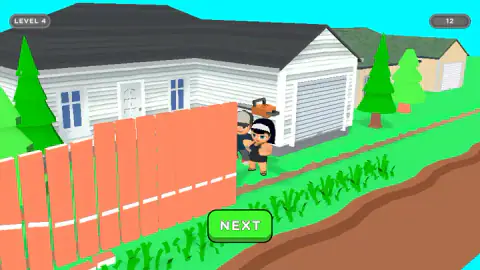
- Press NEXT. When the last of the fence goes over, the neighbours step into the gap and a green NEXT button appears in the lower middle of the screen.
What the run taught us:
- Follow the line and the hazards take care of themselves. In every level we could read end to end, the dashed line went past the red signs rather than through them — over the top of one, under the belly of the next. The signs are not a second problem to solve. They are a punishment for drifting off the first one.
- The keyboard is not part of this. We leaned on all four arrow keys, on Enter and on the space bar, over and over. Nothing on screen answered. It is a pointer game and it is not hiding a second control scheme.
- Small corrections, early. The saw never stops moving forward, so you are always correcting against a line that is already arriving. A gentle lift before the line rises beats a yank at the moment it does.
- Do not chase a cut you have missed. The blade only ever cuts where it is now. Whatever went past uncut is gone, and swinging back for it just takes you further off the line ahead.
Controls
| Mouse, moved up and down | Rotates the chainsaw so the blade rises or drops onto the dashed line |
|---|---|
| Finger, dragged up and down (touchscreen) | The same thing, on a phone or a tablet |
| Click or tap | Starts the level from the TAP TO PLAY screen, and presses NEXT when the fence is down |
| Arrow keys, Enter, Space | Nothing we could see. We pressed all of them, repeatedly, and nothing on screen answered |
Features
- The cut is drawn before you arrive: a white dashed line runs the whole length of the fence, and staying on it is the entire game
- One input and one direction. The saw travels along the fence by itself and you only decide how high it is
- Red prohibition signs bolted to the planks are the only hazard, and in every level we could read end to end the dashed line passed clear of them
- Cut sections tip over into the grass and the crop rows, with sawdust spraying from the blade as it bites
- A new house, a new fence and a new line every level, with the neighbours stepping into the gap when it is done
- The counter in the top-right corner starts at zero on every level: nothing is being saved up between them
- Credited to Bermuda Games
Game details
- Developer
- Bermuda Games
- Release date
- September 2024
- Last updated
- June 29, 2026
- Added here
- March 2025
- Technology
- HTML5 (WebGL)
- Platforms
- Browser (desktop, mouse), Browser (mobile & tablet, touch)
- Saved progress
- Saving, when available, is managed by this game. Mava cannot confirm your level.
FAQ
How do you play Chainsaw 3D?
You steer a chainsaw along a fence. The saw moves forward on its own and the only thing you control is its height: move the mouse up and the blade rises, move it down and it drops. A white dashed line is painted across the fence before the level starts, and your score depends on how closely the cut follows it.
What are the red signs in Chainsaw 3D?
They are hazards fixed to the fence, and they are the only thing in the game you are told to avoid. The symbol is the standard general prohibition sign: a red ring with a diagonal bar and nothing inside it. In every level we could see end to end, the dashed line was routed clear of them, so following the line exactly also means missing the signs.
What does the number in the corner of Chainsaw 3D mean?
Nothing on screen says. It sits in a grey pill in the top-right corner, starts at zero when a level opens and climbs as you cut, reaching the low teens by the time the fence is down. It does not carry over: one level ended on thirteen and the next opened on zero, which rules out it being money.
How many levels does Chainsaw 3D have?
Nobody publishes a number and we did not reach the end. We came in at the end of the first level, finished the next five, and were starting the seventh when we stopped. Each one took roughly forty seconds, ad breaks included, so the total is likely to be high rather than low.
What happens if you hit a sign in Chainsaw 3D?
We cannot tell you, and we would rather say so than guess. Across six finished levels the blade never touched one, we never saw a game over screen and we never heard a failure sound. The honest answer is that the penalty exists somewhere in the design and we did not find it.
Are there ads in Chainsaw 3D?
Yes, between levels, never during one. The screen dims, the next fence shows faintly behind the veil, and either an advert plays or the game puts up a note of its own saying it skipped the ad that round, with a purple Continue playing button underneath. Either way, nothing interrupts a cut in progress.
Can you play Chainsaw 3D on a phone?
It is built for one. It is listed for Android and iOS as well as PC, and lists it in both landscape and portrait. The control translates directly: the finger does what the mouse does, dragging up and down to rotate the saw. We played it on a desktop in a landscape window, so the phone version is their claim rather than our observation.
Who made Chainsaw 3D?
Bermuda Games, according to the game's listing. The game was published in September 2024 and was last updated in June 2026. We could not find the game or the studio anywhere else, so that is a single source and worth saying plainly.