












About Mystical Blade 3D
The name promises a blade and the banner at the bottom of the screen says something more modest: DROP MYSTICAL ITEMS INTO THE POT. For the part of Mystical Blade 3D we played, the banner is the honest one. This is a mixing table. A wizard stands in the corner, a pot glows in the middle, and your job is to feed it.
What you feed it comes in steps. A track of four dots at the top of the screen lights up one by one, and each dot has a name. We saw three: FEATURES, BODY and ELEMENT RING. At each one the table offers five items, and whichever you drop in becomes part of the blade.
It is by Street Lamp Games Private Limited. This one was published in January 2025.
We should say how little we saw. Our session lasted about four minutes and ended on the third step of the first day. We never saw a finished blade, and we never saw the arena fights that the game's description talks about. This page covers the pot and marks the rest as unseen.
Day one has no choices, and that looks deliberate
Count the padlocks and the first day turns out to be a guided tour. Under FEATURES we could use Phoenix, shown as a red feather, while Fish, Scorpion, Unicorn and Robot were locked. Under BODY it was Dragon, with Tiger, Horse, Boar and Gorilla locked. Under ELEMENT RING it was Fire, with Ice, Thunder, Nature and Dark locked.
So the first blade is the same for everyone, at least through the three steps we reached: phoenix features on a dragon body with a ring of fire. The game is teaching the gesture, not asking for a decision.
The decisions are behind the padlocks. Five items at each of three steps make 125 possible mixes before the fourth step is even counted. That is our arithmetic on the items we saw, not a number the game states. How the locks open is something we cannot tell you. The coin counter read 0 from the first screen to the last, and nothing we did earned a coin.
A creature made of parts is a very old idea
The pot does not ask for one animal. It asks for the features of one, the body of another and an element on top, each from its own list. Greek myth has a name for a creature put together that way.
The Chimera appears in book six of Homer's Iliad, described as a lion in front, a serpent behind and a goat in the middle, breathing fire. It was said to live in Lycia, on the south coast of what is now Turkey. The hero Bellerophon killed it from the air, riding the winged horse Pegasus. The word has since come to mean anything assembled from mismatched pieces.
The recipe on day one follows the same pattern closely. There are two creatures and one element, and the element that comes unlocked is fire. Once other items open up, a tiger body with scorpion features and a ring of ice would be the same kind of beast with a different list of parts. The difference from Homer is that here the mismatch is the goal. The game hands you three lists and expects you to cross them.
What we did not see
It is a long list, and you should know it before you start.
We did not reach the fourth dot, so we do not know its name. We did not see the blade that comes out of the pot. The game's description says your creation then fights in an arena, against other players and for a place in a ranking. Nothing like that appeared in our session, so we cannot say how a fight is controlled, how long it lasts or what it pays.
We did not open the gear in the top left corner. We heard one sound, at the very start, and none while mixing. We did not get to a second day. And we played with a mouse in a wide window: the game is listed for phones in both orientations, but we did not test one.
Who it suits
Players who like building something from a menu of parts and seeing what comes out. The table has no clock and no way to lose, and each step is a single drag, so young players can manage it once someone shows them the gesture.
If you came for sword fights because of the name, be warned that the first minutes contain none. What comes after the pot may be different. We cannot promise it either way.
More from Street Lamp Games, and more pots to stir
The studio's other two games are in our catalogue: Fix The Hoof, about cleaning and trimming the hooves of farm animals, and Monster Makeup 3D, about disguising monsters as people. For another pot, Potion Kitchen has you brew to order for customers. For elements that cross into new ones, Merge Elementals: Castle Defense starts from fire, water and earth and puts the results on a castle wall. The rest are under casual games.
Screenshots
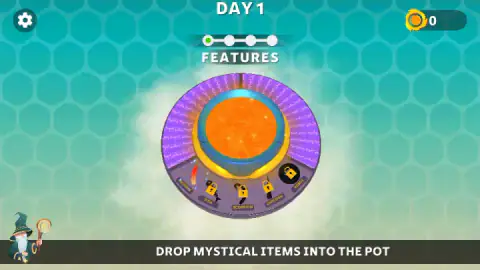
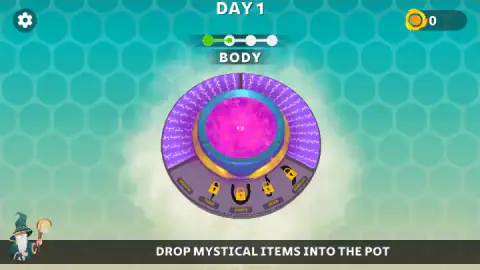
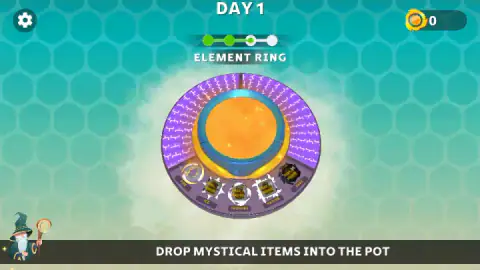
Taken by opening the game ourselves and letting it run — not supplied by the publisher, and not the same picture every other site shows.
How to play Mystical Blade 3D
- Get to DAY 1. After a short loading screen the table appears, with the day number at the top and a coin counter in the top right corner.
- Read the label under the dots. It names the step you are on and tells you what kind of part the pot is waiting for.
- Find the item without a padlock. Five items sit on the front edge of the table, each with its name on a small plate. On day one, one of the five is open at each step.
- Drag it onto the pot. Press on the item, carry it to the liquid and let go. A few seconds later the next dot lights up and the table shows five new items.
- Repeat until the track is full. We did this twice and stopped at the third dot, so we cannot tell you what the fourth step asks for or what happens after it.
What four minutes at the table taught us:
- Clicking is not dropping. This cost us most of our first minute. We clicked the open item five times, once holding the button down, and nothing moved. The first drag did the job.
- The padlocks are final. We spent our last two minutes on the third step clicking one locked item, dragging another and pressing keys. None of it registered. That is how our session ended: busy with the padlocks, with the open item left untouched.
- The table gives no sign that a drop took. The game does not show a tick or a message. Watch the dots and the label instead: when the label changes, the item went in.
- The pot changes colour. Ours was orange for FEATURES, magenta for BODY and amber for ELEMENT RING. It is the quickest way to tell at a glance that you have moved on.
Controls
| Drag the unlocked item onto the pot | Drops it in; in our session the next step opened a few seconds later |
|---|---|
| Click on an item | Did nothing for us, even when held; the game wants a drag |
| Items with a padlock | Did not respond to clicks or drags |
| Gear (top left) | Settings by its icon; we did not open it |
| Keyboard | Space helped us past the opening screens; the A key gave no response during play |
Features
- A track of four steps on day one; we saw three of them, named FEATURES, BODY and ELEMENT RING
- Five items on offer at each step, 15 across the three steps we reached
- One item open per step on day one (Phoenix, Dragon, Fire) and four behind padlocks
- A pot whose liquid changed colour at each step, from orange to magenta to amber
- No clock, no lives and no way to fail in the part we played
- A coin counter that stayed at 0 for our whole session
- Made by Street Lamp Games Private Limited
Game details
- Developer
- Street Lamp Games Private Limited
- Release date
- January 2025
- Last updated
- August 10, 2026
- Added here
- April 2025
- Technology
- HTML5 (WebGL)
- Platforms
- Browser (desktop, mouse), Browser (mobile & tablet)
- Saved progress
- Saving, when available, is managed by this game. Mava cannot confirm your level.
FAQ
How do you play Mystical Blade 3D?
Each day starts at a round table with a pot in the middle and five items on its front edge. Drag the item without a padlock onto the pot and the game moves to the next step. We went through FEATURES and BODY that way and reached ELEMENT RING. A fourth step exists on the progress track, but we did not get to it.
Why does nothing happen when I click the items in Mystical Blade 3D?
Because a click is not enough. We clicked the open item five times on the first step, once holding the button down, and the screen did not change. It moved on only after we dragged the item from the table onto the pot. Items with a padlock did not respond to clicks or drags at all.
Which items are unlocked at the start of Mystical Blade 3D?
One per step. On day one we had Phoenix under FEATURES, Dragon under BODY and Fire under ELEMENT RING. The other twelve items we saw carried padlocks: Fish, Scorpion, Unicorn and Robot; Tiger, Horse, Boar and Gorilla; Ice, Thunder, Nature and Dark.
How do you unlock the other items in Mystical Blade 3D?
We do not know. Our coin counter stayed at 0 for the whole session and no padlock opened. The counter is the only currency shown on screen, so coins are the obvious candidate, but we did not earn any and cannot confirm it.
Are there battles in Mystical Blade 3D?
The game's own description says the finished creation fights in an arena. We did not see that: our session of about four minutes ended on the third step of the first day, before any blade was finished. We cannot tell you how a battle is played or how it is won.
Who made Mystical Blade 3D?
Street Lamp Games Private Limited. The other two are about trimming animal hooves and about putting makeup on monsters. Mystical Blade 3D was published in January 2025 and was last updated in August 2026.
Can you play Mystical Blade 3D on a phone?
It is listed for PC, Android and iOS, in landscape and portrait, and the one gesture we needed is a drag. We played on a computer with the mouse in a wide window and did not test a phone ourselves.