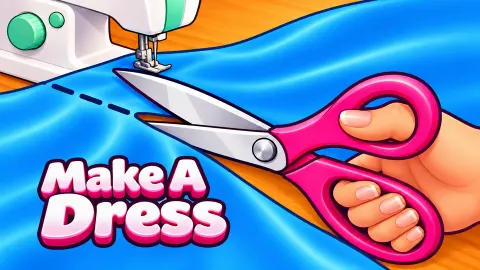




About Make A Dress
Most dress-up games skip straight to the fun part. You get a doll, a wardrobe and a mirror, and the dress already exists. Make A Dress starts much earlier, with a client, a tape measure and a length of cloth that still has creases in it.
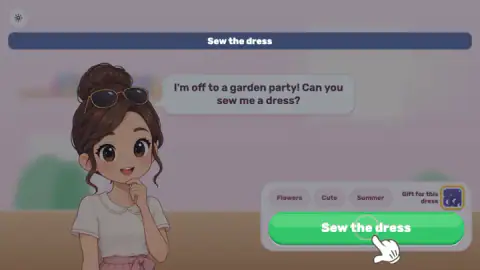
The first client is a girl with sunglasses pushed up into her hair. "I'm off to a garden party," she says, and asks you to sew her a dress. Under her portrait sit three tags, Flowers, Cute and Summer, and a small tile labelled Gift for this dress. The tags are the brief. Everything you choose afterwards is measured against them.
What turns this into a game rather than a picture book is that each step is a small task with its own bar. You pull a tape around a dress form until it reads a number, you dress the form in parts, you pick a print, and then you iron. A hand on screen shows where to start each time.
Make A Dress is by MediumGames, according to the game's listing, and it was published on 25 October 2026. We played it for about ten minutes on a computer and got as far as the ironing twice. We did not finish a dress, and this page says exactly where we stopped and why.
Three tags, one print: how the fabric screen judges you
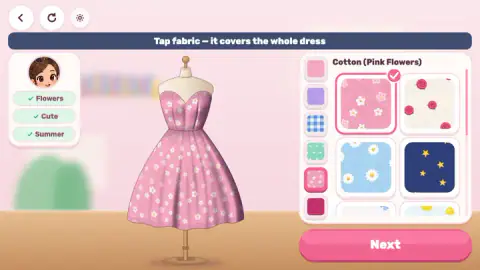
The fabric screen is where the client's wishes stop being decoration. On the right you get swatches sorted into six groups, from plain colours to checks, dots and prints. On the left, her three tags wait unticked.
Tap a swatch and the whole dress on the form changes at once, and the tags update. Our first pick was a pale blue print called Daisies. Daisies ticked Flowers and Summer but left Cute grey. Switching to Cotton (Pink Flowers) ticked all three. That small difference is the whole puzzle of the step: a print can be pretty and still miss one word of the brief.
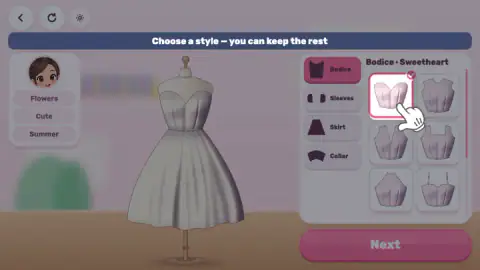
The style screen does not tick anything. We changed nothing there except the default bodice, and the tags stayed as they were until the fabric step.
Why a dressmaker measures three places, and irons before cutting
The order of the steps in Make A Dress is not random. It follows the way people sew real clothes.
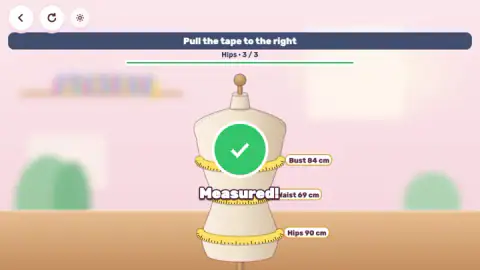
The three bands on the dress form are the three measurements that sewing patterns are sized by. Pattern makers ask for the bust at its fullest point, the waist at the narrowest part of the torso, and the hips at their fullest. The game's dress form shows it: the waist band sits in the narrow middle. Our client's numbers were 84, 69 and 90 cm, so her hips were her largest measurement. Some pattern makers tell you to cut the size that fits your largest measurement and adjust the rest, which is why all three are taken before anyone chooses a style.
Ironing before cutting is real practice too. The University of Florida's 4-H sewing guide tells beginners to press the fabric to remove wrinkles before cutting and laying out pattern pieces, so the pieces come out the right size and shape. Cut through a fold and the piece can come out the wrong shape.
The same guide makes a distinction that the game gets right. Ironing is sliding a hot iron back and forth to remove wrinkles. Pressing is lifting the iron and setting it down on one spot, and it is what sewers do to seams later on. The game's instruction is Sweep over the creases: a slide, not a press. That is ironing, at the right moment, on the right side of the scissors.
Where we got stuck: the Iron bar
Here is the honest part. In both attempts the ironing never finished.
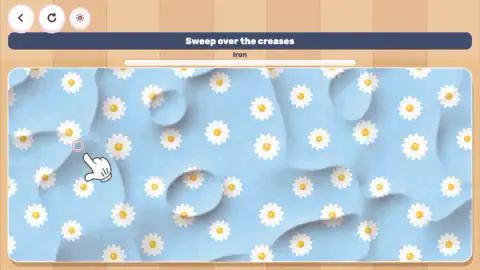
In the first, with the daisy print, the bar under the word Iron stopped a little past halfway. We kept sweeping, in long horizontal and diagonal strokes, across the middle, the corners and the edges, and the bar did not move again. We reloaded the page, which put us back at the garden-party client and the tape measure. In the second attempt, with the pink flowers, the bar stopped at roughly two thirds, after several more minutes of strokes.
The creases that remained were mostly along the edges and in the corners of the cloth, and the hand kept pointing at them. It is possible the bar wants those edges covered more precisely than we managed, or that it reacts differently to a finger on a touch screen. We cannot tell you which. What we can tell you is that nothing in the game warned us, and nothing told us the step was failing either: the bar just stopped.
What we did not see
Everything after the ironing is unknown to us from our own play. The game's description on the game's listing gives laying out patterns, cutting, sewing on a machine and adding bows, flowers and gems, with stars and gifts for each finished dress and premium fabrics to unlock. We saw none of that, so we cannot say how those steps work, how stars are given, or what the Gift for this dress tile turns out to be.
We also never opened the Sleeves, Skirt or Collar tabs, never pressed the restart button in the corner, and only played with a mouse.
Who Make A Dress is for
It suits younger players and anyone who likes slow, tidy tasks: there is no timer, no score on screen and very little to read. It is also a gentle way to learn the vocabulary of sewing, from bodice to bust measurement.
It is not a quick dress-up game where the outfit is ready in a minute. If you want to go straight to the dressing, Anna's Story: Dress Up DIY and Darling Doll: DIY Paper Doll start with a doll and a wardrobe. For another craft that starts with a plain garment, try DIY Ugly Christmas Sweater, and for a step-by-step salon job with a client waiting, Nail Salon. More games like these are in girls games.
Screenshots
Taken by opening the game ourselves and letting it run — not supplied by the publisher, and not the same picture every other site shows.
How to play Make A Dress
- Read the client's tags. The first screen shows what she wants. Press Sew the dress to start.
- Measure her. The bar reads Pull the tape to the right. Drag the end of the tape across the dress form for the bust, then the waist, then the hips. Each band shows its size in centimetres, and a "Measured!" sign closes the step.
- Choose a style. The screen says Choose a style, you can keep the rest. Change the Bodice, Sleeves, Skirt or Collar, or leave the defaults, and press Next.
- Tap a fabric. One print covers the whole dress. Watch the client's tags on the left: they tick when the print suits them.
- Iron it. The cloth you picked fills the screen with the words Sweep over the creases. Drag across the folds until the Iron bar is full.
Tips from our session:
- Aim for three ticks. For the garden-party client, Cotton (Pink Flowers) ticked all three tags. We do not know whether a missing tick costs you stars, but it is the only feedback the fabric screen gives.
- You do not have to touch every part. The style screen opens on a Sweetheart bodice already selected, and the game itself tells you the rest can stay as it is.
- Iron with long strokes over the dark folds. The bar filled fastest during our first long sweeps across the middle of the cloth, then slowed right down.
- Do not reload in the middle. It sent us back to the client's request and the tape measure.
Controls
| Click or tap | Press buttons such as Sew the dress and Next, and choose a bodice or a fabric |
|---|---|
| Drag to the right | Pulls the measuring tape around the bust, waist and hips |
| Drag across the cloth | Irons the creases out while the Iron bar fills |
| Arrow, circular arrow and gear buttons (top left) | Back, restart and settings |
Features
- Each dress starts with a client and three wishes, shown as tags such as Flowers, Cute and Summer
- A measuring step on a dress form: bust, waist and hips, each with its number in centimetres
- A style screen with four parts to change, Bodice, Sleeves, Skirt and Collar, where you can keep the defaults
- One fabric covers the whole dress, and the client's tags tick themselves when the print fits them
- An ironing step where you sweep the creases out of the very print you chose
- Mouse or touch only: every step is a tap or a drag, with a hand that shows you where to start
Game details
- Developer
- MediumGames
- Release date
- October 2026
- Last updated
- October 26, 2026
- Added here
- October 2026
- Technology
- HTML5 (2D)
- Platforms
- Browser (desktop, mouse), Browser (mobile & tablet, touch)
- Classification
- Casual , Fashion & Beauty , Simulation
- Saved progress
- Saving, when available, is managed by this game. Mava cannot confirm your level.
FAQ
How do you play Make A Dress?
A client tells you what kind of dress she wants and you make it step by step. You drag a tape measure around a dress form, choose the bodice and other parts, tap a fabric, and iron the creases out of it. Everything is done with clicks, taps and drags.
What do the tags under the client mean in Make A Dress?
They are her wishes, for example Flowers, Cute and Summer. On the fabric screen each tag gets a tick when the print you pick fits it. A pink cotton with white flowers ticked all three for our first client, while a blue daisy print ticked only Flowers and Summer.
What measurements do you take in Make A Dress?
Three: bust, waist and hips, in that order, by pulling a tape to the right around a dress form. Each one shows its number in centimetres, and the step ends with a "Measured!" sign. Our first client measured 84, 69 and 90 cm.
How do you finish the ironing in Make A Dress?
You sweep the pointer or your finger over the creased cloth while a bar marked Iron fills up. We could not finish it: in two attempts the bar stopped at roughly two thirds even after several minutes of long sweeps. If yours stalls too, work on the creases along the edges and in the corners, which were the ones still visible when we stopped.
What comes after ironing in Make A Dress?
We did not get past the ironing, so we cannot describe it from our own play. The game's description on the game's listing gives laying out patterns, cutting, sewing on a machine and adding bows, flowers and gems, with stars and gifts for each finished dress.
Does Make A Dress save your progress?
Not in the middle of a dress, in our experience. When we reloaded the page during the ironing, the game reopened on the same client and the measuring started again from the bust. We did not finish a dress, so we cannot say whether completed dresses are kept.
Who made Make A Dress?
The developer is listed as MediumGames. The game was published on 25 October 2026 and is free to play in the browser, with a mouse on a computer or by touch on a phone or tablet.