









About Cosplay Gamer Girls
A dress-up game usually asks what she should wear. Cosplay Gamer Girls asks who she is going to be. The first real choice is not a dress or a colour. It is a round portrait of a finished character, and everything after it is the work of getting a doll to look like that picture.
That changes what the wardrobe is for. In an ordinary makeover any lipstick will do, because there is no target. Here the portrait is the target, and the game leaves it to you whether to hit it or to wander off and give a storybook princess teal lips.
The game's listing credits DL-Studio. It has been available since September 2025.
We played one session of four minutes on a desktop, with the mouse. It took us through the opening screens, the lipstick step of one costume and into the dressing room, where we got stuck for a reason explained below. We did not finish a look, and the gaps are marked as gaps further down.
You choose a character before you choose anything else
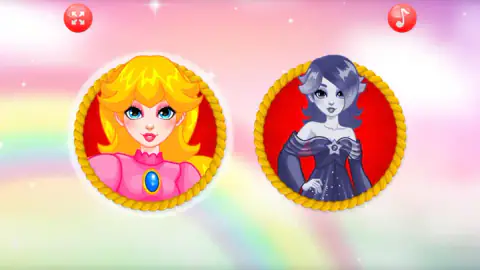
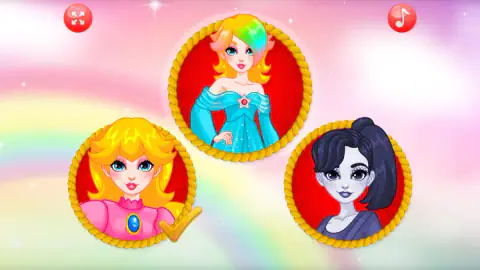
After the flags, the screen fills with a pastel sky and a rainbow, and two portraits hang in it. Each sits on a red disc inside a frame of twisted gold rope.
On the left is a blonde girl with blue eyes, in a pink dress with a high collar and an oval blue brooch. On the right is a girl drawn entirely in grey and violet: pale skin, short wavy hair falling over one eye, and a dark off-shoulder gown with a star at the neckline. The two could not be further apart, which is the point of offering them side by side.
There is no caption under either and no start button. The portraits are the buttons. We clicked the blonde.
The game does not say who these characters are, and neither will we. Its title tells you the costumes are video game themed, and that is all the explanation it gives.
The lipstick room, and a tick that waits for you
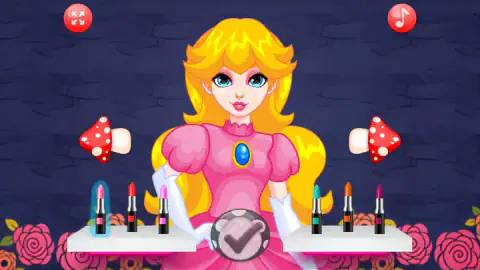
The make-up room is a wall of dark blue stone with roses growing in the bottom corners. The doll stands in the middle, seen from the waist up, already in the pink dress and long white gloves.
In front of her are six lipsticks on two white shelves. On the left: light pink, red and bright pink. On the right: teal, orange and plum. The light pink one carries the blue glow, because it is the one she starts with.
Here we lost about half a minute. We pressed the tick, and pressed it again, four times in all. The room did not change. Then we clicked the red lipstick, her lips turned red, and the next press of the tick took us out of the room.
Our reading is that the game wants you to make a choice before it lets you leave, even if the choice is to change the colour and change it back. It never says so. If you have played DL-Studio's other makeover games you may know the habit already; if not, it looks like a broken button.
Lipstick was the only kind of make-up we saw. The toadstool arrows at her shoulders suggest there are other shelves to turn to, but we did not turn to them, so we cannot list them.
Three portraits, then a room with toadstools
Leaving the make-up room brought up the sky again, this time with three portraits. The blonde was at the lower left with a gold tick on her frame. Top centre was a new face: a blonde with a rainbow streak through her fringe and a turquoise dress with a star at the neckline. At the lower right was a pale grey girl with a dark side ponytail.
We cannot tell you exactly what this screen is. The gold tick says the blonde's make-up is done. We clicked the portrait in the middle, and what opened next was a dressing room with the blonde princess in it. So either our click did not land or the screen works in a way we did not grasp.
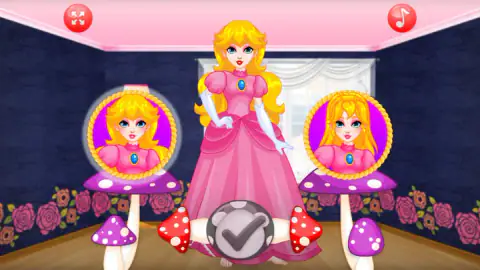
The dressing room shows her full length for the first time. It has dark blue walls, a pink ceiling, a curtained window and a wooden floor with roses along the skirting. She wears a pink gown that reaches the floor, and her lips are still the red we chose a minute earlier.
On each side of her stands a tall purple toadstool with a portrait on top. The two portraits show the same face with different hair: loose on the left, and on the right with a braid across the crown. The left one glows, and it matches the hair the doll has on. That reads like a choice of hairstyle or wig. We did not click either, so it stays a reading.
Then we repeated our earlier mistake at greater length. We pressed the tick twelve times over a minute and a half, and the room stayed exactly as it was. We had changed nothing in it, and the tick was waiting for us to.
Where the word cosplay comes from
Fans have been turning up at science-fiction conventions in costume since 1939. The word for it is much younger. Cosplay is a Japanese shortening of "costume play", coined in 1984 by a Japanese writer reporting on a convention in Los Angeles, who wanted a term for what he had seen there.
The hobby has a rule of thumb that the game follows closely. A costume is not only the dress. Cosplayers talk about the wig, the make-up and the outfit as three separate jobs, and a look fails if any one of them is off. That is the order of this game: the face first, then a room with hair on one side and the gown in the middle.
It also explains the portrait at the start. A cosplayer works from a reference picture. The game hands you yours before you touch a lipstick.
What we did not see
The greater part of the game. We saw one make-up shelf out of however many there are, and no change of dress, hair, shoes or jewellery. The doll's toes were showing under the hem of the gown, so shoes are presumably somewhere ahead.
We did not open the pale girl's rooms or the rainbow-haired girl's. We did not see a finished cosplay, a closing scene or a way to keep the picture. We did not press the music-note button, and we cannot describe the sound.
Who it is for
Younger players who like makeovers and do not want to read anything. With no text after the flag screen, a child who cannot read yet can play it alone. Nothing can be lost and nothing is timed.
If you want a big wardrobe to mix freely, be aware that each costume here starts from a set character. And if a button that does nothing would make you close the tab, remember the rule from the lipstick room: change something first.
More makeovers
Ancient Dragons Princess is by the same studio and works the same wordless way, with a throne room, shelves of eyes and a dragon to style. Pool Float Party, also by DL-Studio, makes you clean a swimming pool before anyone gets near the make-up. Paper Princess - Doll Dress Up splits a princess look into four steps with trays of thumbnails, and Magical Fairy Fashion Look is another costume job, with two girls who want to pass for fairies. The rest are under girls games.
Screenshots
Taken by opening the game ourselves and letting it run — not supplied by the publisher, and not the same picture every other site shows.
How to play Cosplay Gamer Girls
- Press the round pink play button on the title screen.
- On the flag screen, pick a flag if you want to and press the tick.
- Click one of the round portraits to choose a costume.
- In the make-up room, click a lipstick. It goes on at once. Then press the tick bubble at the bottom.
- In the dressing room, change what you want to change and press the tick again.
What four minutes taught us:
- Change something before you press the tick. The tick is drawn as a grey bubble and it looks ready from the start. It was not. It only worked for us after we had picked an item in that room.
- The blue glow is the label. Nothing on screen has a name. A soft blue glow around an item tells you it is the one she is wearing.
- A click is enough. Nothing needs to be dragged onto the doll.
- Look at the toadstools. A red toadstool with white spots lies on its side at each edge of the doll, pointing outwards like an arrow. We did not press them, and we suspect that was our mistake.
Controls
| Left click on a portrait | Chooses that costume; the portraits have no caption and no separate start button |
|---|---|
| Left click on an item (a lipstick, for example) | Puts it on the doll straight away and marks it with a blue glow |
| Tick bubble (bottom centre) | Moves on, but only after you have changed something in that room; before that it ignored us |
| Toadstool arrows (left and right of the doll) | On screen in both rooms; we did not press them |
| Four-arrow button (top left) and music-note button (top right) | On every screen after the flags; we did not press either |
| Keyboard | We tried Enter and a letter key and could not tie any change to them |
Features
- Costumes chosen from round portraits in gold rope frames, with no names and no captions
- A make-up room with six lipsticks on two white shelves, from light pink to teal and plum
- A dressing room that shows the doll full length between two portraits standing on purple toadstools
- Make-up that carries over, so the lipstick picked in the first room is still on in the second
- A screen of thirteen flags before the game starts, and no written word after it
- No score, no timer and no way to lose in the part we played
Game details
- Developer
- DL-Studio
- Release date
- September 2025
- Last updated
- August 10, 2026
- Added here
- July 2025
- Technology
- HTML5 (2D)
- Platforms
- Browser (desktop, mouse), Browser (mobile & tablet)
- Classification
- Casual , Fashion & Beauty
- Saved progress
- Saving, when available, is managed by this game. Mava cannot confirm your level.
FAQ
How do you play Cosplay Gamer Girls?
You play with clicks alone. Press the play button, confirm a flag, then click one of the round portraits to choose a costume. In each room, click an item to put it on the doll and press the tick bubble at the bottom to move on. There is no score and no clock.
Why does the tick button do nothing in Cosplay Gamer Girls?
In our session the tick ignored us until we had changed something in that room. In the make-up room we pressed it four times with the starting lipstick and nothing happened. After we clicked the red lipstick, one press moved the game on. In the dressing room we changed nothing, and twelve presses did nothing.
Which costumes are in Cosplay Gamer Girls?
We saw three, all shown as round portraits. One is a blonde princess in a pink dress with long white gloves and a blue brooch. One is a girl drawn in pale grey, with dark hair and a dark off-shoulder gown. The third has a rainbow streak in her blonde hair and a turquoise dress with a star at the neckline. We only dressed the first.
How many lipsticks are there in Cosplay Gamer Girls?
Six for the blonde princess, on two white shelves of three. The left shelf has light pink, red and bright pink. The right shelf has teal, orange and plum. A click puts the colour on her lips at once, and it is still there in the dressing room.
Can you save your cosplay as a picture?
We cannot confirm it. We did not finish a look, so we never reached whatever screen closes the makeover, and we saw no save or camera button in the rooms we visited. If the game has one, it comes later than the point we reached.
Is Cosplay Gamer Girls in English?
It hardly needs a language. Before the game starts there is a screen of thirteen flags, and after it we did not see a single written word. The portraits, the items, the arrows and the tick are all pictures. The game's listing gives the language as English.
Can you play Cosplay Gamer Girls on a phone?
It is listed for PC, Android and iOS, in landscape. We played on a desktop with a mouse, and every action was a single click, which is the kind of control that turns into a tap without changes. The phone side is still the listing's word and not ours.
Who made Cosplay Gamer Girls?
The game's listing names DL-Studio as the developer. The game was published on 2 September 2025 and its last update is dated 10 August 2026.