



About Anime Doll - DIY Cosplay Girl
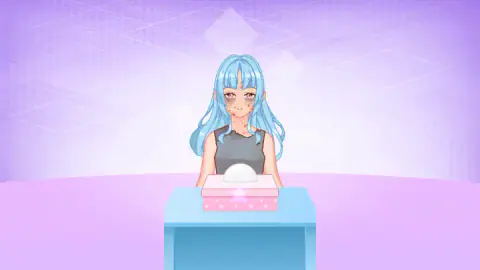
Most dress-up games hand you a pretty doll and a wardrobe and wait. Anime Doll - DIY Cosplay Girl starts from the opposite end. The first doll you meet has spots and dark circles across her face, a grey top torn at the neckline, and, once she stands up, a patched apron over a faded dress. She sits at a table with a pink box of tissues in front of her. Before you are a stylist here, you are the friend who helps her clean up.
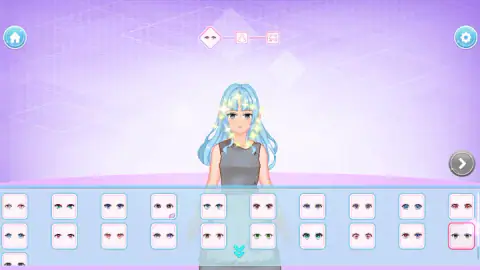
That small story is what makes it a game rather than a catalogue. You do not see every drawer at once. A bar at the top of the screen lays the makeover out as a short route, one feature per stop: eyes first, then the dress, then the hair. Each stop is a grid of thumbnails, and the doll changes the instant you tap one, with a quick burst of sparkles around her.
It comes from Bravestars. This one was published on 27 October 2026.
The opening scene: we could not find the move
We will be honest about this part, because it is the first thing you see. The doll waits behind the tissue box and nothing on screen tells you what to do. In our run we clicked the box, the tissue sticking out of it, the doll's face and the table, held the button down for up to two seconds and tried short drags from the box. For about five minutes the scene did not change.
When we reloaded the page, the game skipped ahead. It opened directly on the eye step, and the doll's face was already clear, though she was still in her grey rags. So the clean-up seems to be a one-time introduction rather than a gate you must pass every time. If you find the gesture that works, the tissue box is clearly where it starts, and a longer drag towards her face is the obvious thing we had not yet tried.
Eyes, dress, hair: what each step offers
The eye step comes first, and it runs from soft brown and pink eyes to bright blue, green and violet ones. Because anime faces are drawn with large eyes, this one choice changes her expression more than anything else.
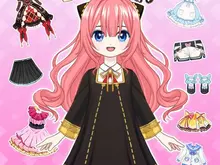
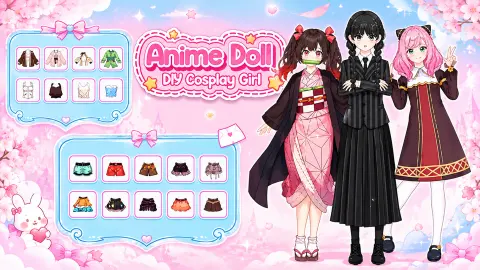
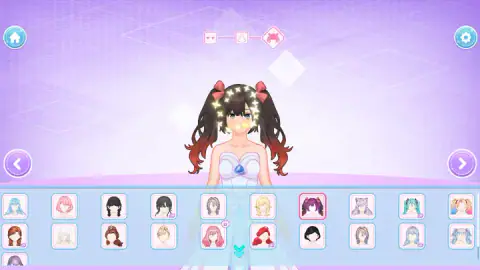
The dress step is where the ragged starting outfit disappears. The grid mixes full gowns with separate pieces: a floor-length white and pink ball gown, a black lace dress, a white shirt with a tie, short party dresses, a printed T-shirt and a few long robes in purple. We put her in the white gown with a blue gem at the chest and kept it for the rest of the session.
The hair step changes both cut and colour in one tap. Long straight blue hair, short pink bobs, braids, updos and high twin tails with bows are all there. We ended on dark twin tails fading to red at the tips, tied with pink ribbons, which is the look that earned the STEP COMPLETED banner.
The lips step opened the second trio, with a row of plain colours from nude to black and a row of open smiles. Many lip shades carry the purple tag. We stopped there, so the two steps after lips remain unseen by us; their icons on the bar look like clothing pieces.
Why "cosplay" fits the order of the steps
Cosplay, short for "costume play", means dressing up as a character, usually from anime, manga or games, and wearing the look in public at conventions. The word was coined in Japan in the 1980s and the practice has since spread worldwide, from small fan meetups to events that fill entire convention centres.
What a cosplayer actually assembles tends to follow a familiar list. Coloured contact lenses change the eyes, a costume carries the character's silhouette, and a styled wig gives the hair, since few people have the right colour and cut naturally. Makeup finishes the face.
The game's route follows almost the same list: eyes, outfit, hair, then lips. That is the useful way to think about it while you play. You are not just choosing pretty items one by one; you are building a single character from the face outwards. Pick the eyes with the hair in mind, because the hair step comes last and a pair of violet eyes will look very different under black twin tails than under pastel pink.
The tags and padlocks: what is free
Most thumbnails in every grid are free to tap from the start. A minority carry a small purple tag in the corner marked AD, and a few others show a padlock. The tag means the item is unlocked by watching a video; the padlock we could not open at all during our session, so we cannot say what it asks for.
In practice this does not stop the makeover. Every step we reached had plenty of free choices, and the arrow to continue accepts any of them. If a particular dress or lip colour matters to you, check its corner first.
What we played and what we did not
We spent about ten minutes with it on a computer. We saw the opening scene, chose eyes, a dress and hair, completed the first trio and reached the lips step of the second. We did not clean the doll's face ourselves, unlock a tagged or locked item, finish the second trio, or see any contest, judge or score, even though the game's own description mentions fashion battles. We did not try it on a phone.
Who it is for
It suits younger players and anyone who enjoys anime character creators: there is no timer, no way to lose, and every choice shows instantly on the doll. If you want a styling game that grades you against a theme, the part we played does not do that.
Bravestars has more in the same vein. Anime Couple: Avatar Maker builds two anime characters instead of one, and Idol Livestream: Doll Dress Up dresses a doll for the camera. For a gentler, decorating-first take, try Kiki World: Kawaii Doll Decor. There are many more in our dress-up and makeover games.
Screenshots
Taken by opening the game ourselves and letting it run — not supplied by the publisher, and not the same picture every other site shows.
How to play Anime Doll - DIY Cosplay Girl
- Start with the face. The opening scene puts the doll behind a table with a tissue box. The goal is to clear her skin before the styling begins.
- Pick her eyes. The first step shows two rows of ten eye styles in different colours and shapes, with more under the small down arrow. Tap one to try it.
- Press the right arrow. It appears on the right-hand side only after you have chosen something. Then do the same for the dress and the hair.
- Tap Continue. When the first trio is done, a STEP COMPLETED banner appears. Continue opens a second trio that starts with lips.
Tips from our session. Do not wait for the arrow on a fresh step: it is hidden on purpose until you pick an item, so tap something, even the look you already have. You can flick through as many options as you like before moving on, since nothing is locked in until you press the arrow, and the left arrow takes you back if you change your mind. Look closely at the corner of each thumbnail before you fall for it: a small purple tag or a padlock means that item is not free.
Controls
| Click or tap a thumbnail | Puts that item on the doll straight away, with a burst of sparkles |
|---|---|
| Down chevron under the grid | Opens the rest of the options for the current step |
| Right arrow | Moves to the next step; it only appears once you have picked something |
| Left arrow | Goes back to the previous step to change your choice |
| House and gear buttons (top corners) | Home screen and settings |
Features
- A makeover with a story: the doll starts with a blotchy face, a torn top and a patched apron, and every step undoes a little of that
- Steps come in trios on a bar at the top: eyes, dress and hair first, then a second trio that opens with lips
- Each step shows two full rows of ten choices, with more under a down arrow
- Changes apply instantly on the doll, so you can flick through every option before moving on
- A few items carry a small AD tag or a padlock; most are free to pick from the start
- There is no timer and no wrong answer: the only rule is that you must choose something to unlock the next arrow
Game details
- Developer
- Bravestars
- Release date
- October 2026
- Last updated
- October 28, 2026
- Added here
- October 2026
- Technology
- HTML5 (2D)
- Platforms
- Browser (desktop, mouse), Browser (mobile & tablet, touch)
- Classification
- Fashion & Beauty
- Download size
- 25.2 MB
- Ad requests
- 2 (few)
- Has a save
- Yes
- Saved progress
- Saving, when available, is managed by this game. Mava cannot confirm your level.
Measured by opening the game ourselves on 2026-09-11, not taken from the feed. Twelve seconds on a phone-sized screen, with ad requests counted and blocked rather than loaded.
FAQ
How do you play Anime Doll - DIY Cosplay Girl?
You restyle an anime doll one feature at a time. A bar at the top of the screen shows the current step, starting with eyes, then the dress, then the hair. Tap any thumbnail in the grid to try it on, then press the right arrow to move on.
Why can't I go to the next step in Anime Doll - DIY Cosplay Girl?
The right arrow only appears after you pick an item in the current step. Until then the screen shows just the left arrow, or no arrow at all on the first step. Tap any thumbnail, even the one you already like, and the arrow to continue will show up.
What are the steps in Anime Doll - DIY Cosplay Girl?
The first group is eyes, dress and hair. Finishing it brings up a STEP COMPLETED banner with a Continue button, and a second group of three begins with lips. We stopped at the lips step, so we cannot list everything that follows it.
What do the small tags and padlocks on some items mean?
Most thumbnails can be picked straight away. A few carry a small purple AD tag, which means the item is unlocked by watching a video, and a few others carry a padlock. We did not unlock either kind in our session, so we only used the free items.
How do you clean the doll's face at the start of Anime Doll - DIY Cosplay Girl?
The game opens with the doll at a table, her face covered in spots and dark circles, and a pink box of tissues in front of her. We clicked, held and dragged on the box for several minutes without finding the right move. After reloading the page, the game went straight to the eye step with her face already clear.
Is there a score or a winner in Anime Doll - DIY Cosplay Girl?
Not in the part we played. There is no timer, no points counter and no judge on the eye, dress, hair and lip screens; you simply choose what you like. The game description mentions fashion contests, but we did not reach one.
Who made Anime Doll - DIY Cosplay Girl?
It is by Bravestars. It was published on 27 October 2026.