










About Anime Couple: Avatar Maker
The name promises a quiet tool: two blank anime faces, a pile of hair and clothes, and all the time you want. The game that loads is not quite that. Before you touch a single swatch, a card tells you where the couple is going, and at the right edge of the screen a yellow button marked VS waits for you to finish. Anime Couple: Avatar Maker is a dress-up game with a brief and an opponent.
The brief is the part that makes it a game. Our round was a gym. A card titled Hint opened over the editor with a picture of weight racks in evening light and one line of text: "Exercise helps you maintain a strong mind and a healthy body." Under it, a row called Recommend showed three pieces of clothing, each with a yellow thumbs-up. One was a red jersey with the number 10 on it.
It comes from Bravestars, a studio with a long shelf of doll and dress-up games. It has been available since January 2026, with an update in August.
We spent a little over four minutes in it, all of them on that one gym round and all inside the editor. We changed small things on the face, ran into the diamond offers twice and never pressed VS. So this page can tell you exactly how the styling screen works, and it cannot tell you how a round is judged.
The round starts with a theme, not a blank page
Most avatar makers are sandboxes. You open them, you make a face you like and you save it. Nothing is right or wrong, because nobody asked for anything.
This one asks. The gym is not only the wallpaper behind the couple; it is the instruction. The Hint card puts the place, a sentence about it and three approved garments in front of you before the editor is even usable. That changes what the wardrobe is for. A dress you love is the wrong answer in a weight room, and the red number 10 jersey is the right one.
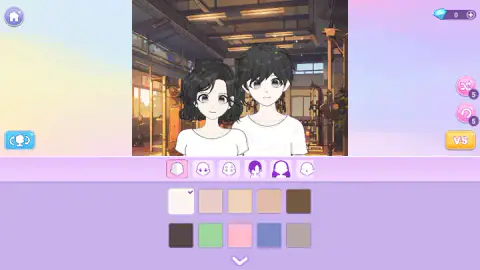
The couple arrives plain on purpose. Both have black hair, grey eyes and a white T-shirt, the girl with a wavy bob and the boy with a messy fringe, standing shoulder to shoulder in front of the racks. Everything that makes them fit the theme is left for you to add.
We only saw the gym. A round built on a theme implies other themes, but one round is what we played, so one place is what we can vouch for.
What is on the editor screen
The couple stands in a tall picture in the middle. Around it, the screen is sparse.
Top left is a home button. Top right is your diamond count, with a plus beside it. Down the right side are two round pink buttons, one with crossed arrows and one with a circular arrow, and each wears a small badge that reads 5. Crossed arrows usually mean shuffle and a circular arrow usually means undo or reset; the 5 looks like a number of uses. We did not press either, so take that as a reading of the icons and nothing more. Below them is VS. On the left edge there is one blue button showing a figure between two arrows, which we also left alone.
The first tab is the simplest. It holds ten colour squares in two rows. The top row runs from very pale to deep brown and is clearly skin. The second row has a dark brown, a green, a pink, a blue and a grey.
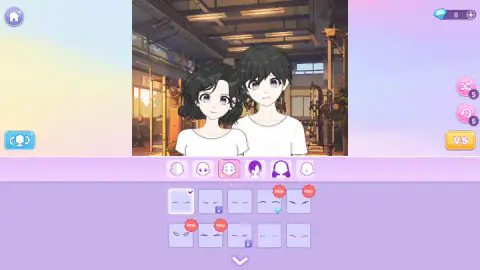
The third tab is the one we spent our time on. Its ten tiles each show a pair of fine lines, thin, thick, arched, straight, one pair in red. Changing between them moves the tick, and the difference on the faces is small enough that you have to look for it. If you want a change you can see from across the room, start with hair or clothes instead.
Free tiles, video tiles and the 200-diamond offer
On that tab, most of the ten tiles were free. Two had a small video badge in the corner. One had a diamond.
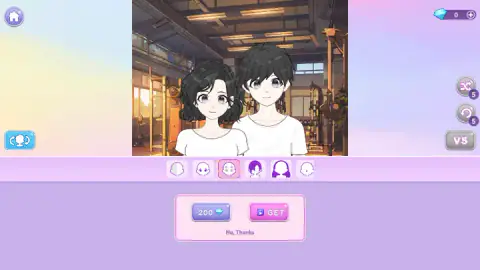
Clicking the diamond tile replaced the whole grid with a small pink panel. On the left, a button reading 200 with a diamond. On the right, a pink GET button with a video icon. Under both, a link: "No, Thanks." While the panel is open, VS and the two round buttons turn grey, so you have to answer it before you can do anything else.
Our counter read 0 the whole session, so the 200 button was never a real option. That leaves GET, which by its icon plays a video ad, or the link. We took the link both times the panel came up.
One detail is easy to miss. Several tiles wear a red NEW badge, and the diamond tile was one of them. After we clicked it and declined, its badge was gone. The badge marks what you have not looked at yet, not what you own.
Ads show up in two forms, then: the optional ones behind GET, and breaks from the platform. The slot for one of those came right at the start, between the title and the Hint card, and that time the platform passed over it with a short notice.
Where couple makers come from
Dressing a drawn figure in layers is older than the screen. Paper dolls, with flat clothes held on by folded tabs, have been printed and sold since at least the early nineteenth century. Japan has its own word for the idea: kisekae, changing clothes, as in kisekae ningyo, a dress-up doll.
The word moved to computers early. In the 1990s, Japanese hobbyists were already passing around digital paper dolls built from stacked, see-through layers, one for the body, one for the hair, one for each garment. Every avatar maker since works the same way, and so does this one. The tabs are the layers. A tile swaps one layer and leaves the rest alone, which is why changing a brow never disturbs the hair.
The couple is the newer twist. Makers for a single character are everywhere; a pair standing together turns the picture into a scene, and it is a natural fit for profile pictures that two people set side by side. Anime Couple: Avatar Maker takes that format and bolts a contest onto it: a theme going in, a VS button coming out.
How far we got
One round, a little over four minutes, editor only. We read the Hint, opened two tabs, changed tiles on the face, dismissed the diamond offer twice and stopped there.
We did not put a single piece of clothing on either character, did not press VS, and did not see a result screen or a prize. We did not test the two round buttons or the blue one. The store page talks about accessories and relaxing sound; we heard one sound as the game opened and nothing we can describe after it. We did not play on a phone.
More games by Bravestars
The studio's other dress-up games sit close to this one: Paper Doll Diary: Dress Up DIY goes back to the paper doll itself, Idol Livestream: Doll Dress Up styles a single doll for a stage, and Magic Princess is a chibi character maker. Bravestars also made Fruit Merge: Juicy Drop Game, which has nothing to do with clothes. More like this are filed under girls games.
Screenshots

Taken by opening the game ourselves and letting it run — not supplied by the publisher, and not the same picture every other site shows.
How to play Anime Couple: Avatar Maker
- Read the Hint card. It names the place and shows three recommended pieces. Close it with the red X in its corner.
- Pick a tab. A row of small icons runs under the couple. The first one, a face split in two tones, is colour. The ones after it show a face, another face, a hairstyle and a longer hairstyle.
- Click a tile. A tick moves to the one you chose and the couple updates above. A down arrow at the bottom brings up more.
- Decide what to do with locked tiles. A tile with a diamond or a small video badge is not free. Click it and an offer opens. "No, Thanks" closes it.
- Press VS when the pair looks right for the theme.
Tips from our run
- Look at the Recommend row before you close the card. We did not see a way to bring it back from the editor, and it is the only place the game tells you what it wants.
- Clicking a tile that already has the tick does nothing. We did it several times before we understood that the screen was not stuck. Pick a different one.
- Check the corner of a tile before you click. A video badge or a diamond means an offer panel, and each one costs you a moment to dismiss.
- The pair is not a still picture. With the same tile ticked, we caught the girl with her eyes shut at one moment and open the next, so a face you think you changed may just have blinked.
Controls
| Left click | Pick a tab, a colour or a style tile; the tick jumps to whatever you chose |
|---|---|
| Down arrow under the tiles | Shows more options in the current tab (seen on screen, not opened in our run) |
| VS button | Ends the styling and starts the versus round (not pressed in our run) |
| Touch | Phones and tablets are supported according to the game's listing; we did not test them |
Features
- Two characters on screen at once, a girl and a boy, styled as a pair
- Each round has a theme; ours was a gym, with a Hint card that recommends three pieces of clothing
- A row of tabs under the couple; the first one holds ten colour swatches, five of them skin tones
- Style tiles are marked three ways, free, video badge or diamond, and new ones carry a red NEW badge
- A diamond tile opens an offer of 200 diamonds or a GET button with a video icon
- Two round buttons on the right carry a 5 each, and a yellow VS button sits below them
- Made by Bravestars
Game details
- Developer
- Bravestars
- Release date
- January 2026
- Last updated
- August 10, 2026
- Added here
- November 2025
- Technology
- HTML5 (Unity WebGL)
- Platforms
- Browser (desktop, mouse), Browser (mobile & tablet, touch)
- Classification
- Fashion & Beauty
- Download size
- 26.3 MB
- Ad requests
- 2 (few)
- Has a save
- Yes
- Saved progress
- Saving, when available, is managed by this game. Mava cannot confirm your level.
Measured by opening the game ourselves on 2026-09-11, not taken from the feed. Twelve seconds on a phone-sized screen, with ad requests counted and blocked rather than loaded.
FAQ
How do you play Anime Couple: Avatar Maker?
You get a theme and two anime characters, a girl and a boy, standing side by side. Click the tabs under them to change skin colour, face details, hair and clothes, then press the yellow VS button to put the pair up against another. A Hint card at the start recommends three pieces that fit the theme.
What is the Hint card in Anime Couple: Avatar Maker?
It is a card that opens at the start of the round with a picture of the theme, one line of text and a row called Recommend. On our gym round the row showed three sports pieces, each with a thumbs-up, including a red jersey with the number 10. It reads as a clue to what the round wants from your outfit.
How do you get diamonds in Anime Couple: Avatar Maker?
We started with 0 diamonds and still had 0 after about four minutes, so nothing we did in the editor paid any. Locked tiles ask for 200 diamonds or offer a GET button with a video icon, which is the usual sign of watching an ad to unlock. There is also a plus next to the diamond counter that we did not open.
Is everything free in Anime Couple: Avatar Maker?
The game is free to play in the browser, but not every style is open from the start. Of the ten tiles on the tab we looked at, seven were free, two carried a video badge and one carried a diamond. A No, Thanks link closes the offer and leaves you with the free ones.
What does the VS button do in Anime Couple: Avatar Maker?
It sits at the right edge of the editor and is the way out of the styling screen and into the versus round. We did not press it in our session, so we cannot tell you how the two couples are judged or what you win. It turns grey while an unlock offer is open.
Who made Anime Couple: Avatar Maker?
The game has been available since January 2026, with an update in August 2026.
Can you play Anime Couple: Avatar Maker on a phone?
It is listed for PC, Android and iOS, in both landscape and portrait. We played it on a computer with the mouse, so we cannot say how the tabs and tiles feel on a small screen.