



About Magic Princess
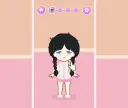
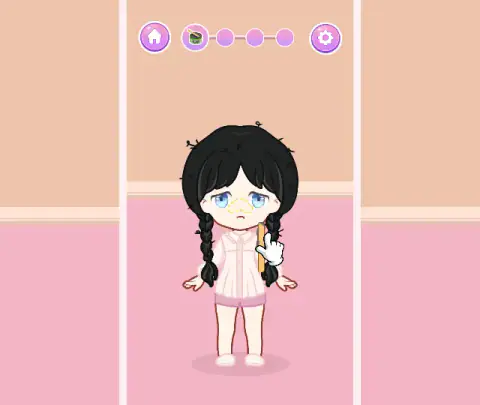
Most dress-up games open with a wardrobe. Magic Princess opens with a sad girl. She has messy black braids, pale pink pyjamas and a dotted yellow outline on her nose. The clothes come later. First you have to help her get ready.
Across the top there is a bar with a house on the left, a gear on the right and four circles in between. Each circle is a step. The one you are on is big and shows a small picture of the job. A step you have finished turns into a green tick.
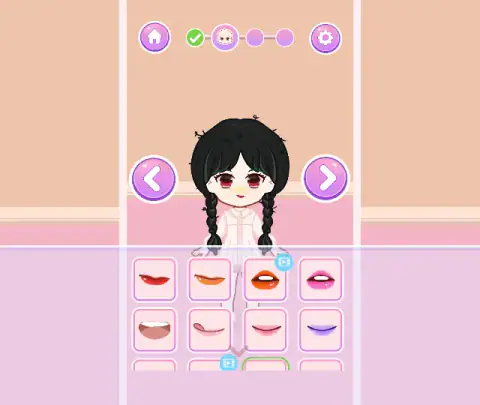
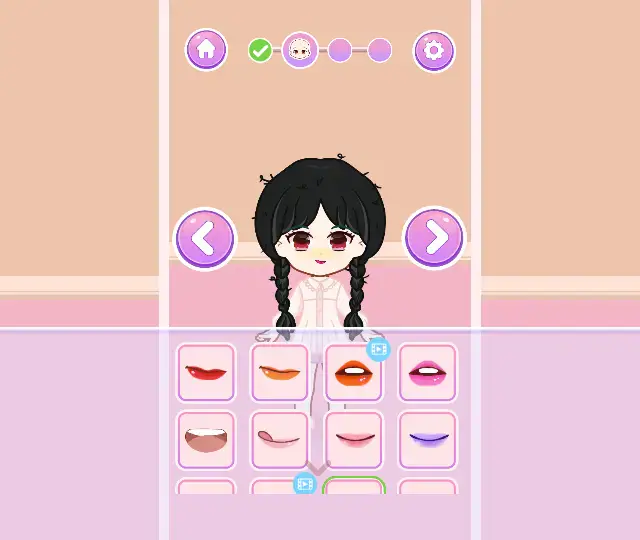
Under her, a grid of square tiles fills the bottom of the screen. Click a tile and she is wearing it at once. The tile gets a green frame. There is no score and no clock, so you cannot get it wrong.
The game is made by Bravestars and was published in January 2026. Once you press PLAY, it is a tall, upright column in the middle of the window. We played it on a computer, with a mouse.
Four circles, more grids than circles
There are four circles, but each one holds several grids. Step two alone had grids for blush, eyes, brows and lips. Step three had hairstyles, dresses and socks. The picture in the big circle changes to match the grid you are on.
So when you click tiles and the bar does not move, the game is not broken. You are still inside one step. Pick a tile, click the right arrow, and keep going. The bar only moves when the whole step is done, and the STEP COMPLETED card tells you so.
We finished the first two steps and got into the third. There, one click turned her black braids into blonde bunches with two round hair ornaments on top, one blue and one pink. Another put her in a black dress. We did not reach step four, so we cannot tell you how the game ends.
The blue video icon
Some tiles have a small blue icon of a video in one corner. We saw it in every grid from step two on: eyes, brows, lips, hair and socks. Most tiles do not have it.
In free games, an icon like this usually means the tile asks you to watch a video advert. We cannot tell you what this game gives you for watching, because no video ever played for us.
We pressed one by mistake, on an orange lip colour. A message said "Oops! No ads available right now", with a Continue playing button. We clicked it, and the lips stayed as they were. So the item did not go on that time.

You never need those tiles to move on. We finished every step we reached with tiles that had no icon, and we watched no adverts at all.
Quiet by design, and rough at the start
There is nothing to read in the game apart from a few buttons and the step card. Very little of the game depends on reading. The gear opens a pink Settings panel with music, sound and a language button. Ours showed a UK flag and the word English.
The rough part is the first step. Nothing tells you in words that you must drag. A player who drags from her hair gets no answer and may think the game is stuck. Watch for the white hand and drag the stick. Steps two and three are just clicking.
More doll games from Bravestars
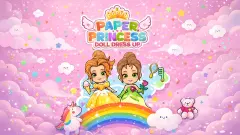
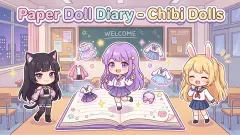
Nail Salon is the same studio's manicure game: fill a mould, file the nail, add a jewel. Little Princess Dress Up uses the same big-headed girls and adds fashion duels with a score. Paper Doll Diary - Chibi Dolls has you pull hair and clothes out of an open book. Hair Salon keeps one client and a row of tools to use in order. Paper Princess - Doll Dress Up is another step-by-step game with dresses and crowns. There are more in our dress up games and under games for girls.
Screenshots

How to play Magic Princess
The first step is the one that can stop you. This is what it looks like.
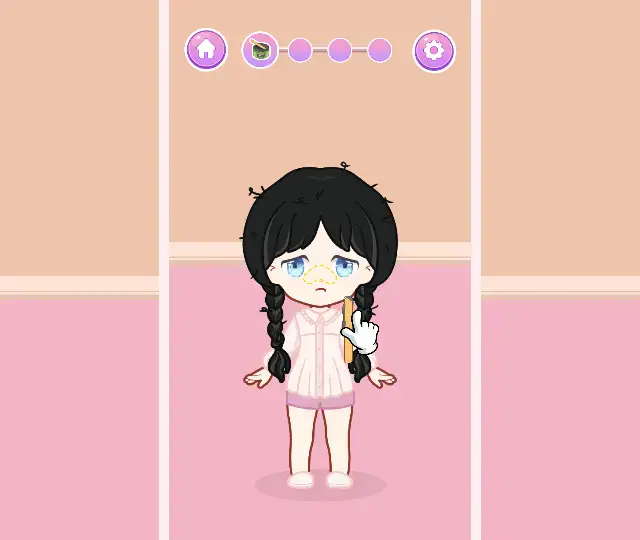
- Drag the tool in step one. Find the dotted yellow outline on her nose and the orange stick next to her. A white hand shows the move. Drag the stick onto the outline. It is the only step we saw where you drag.
- Click Continue. When a card says "STEP COMPLETED!", click CONTINUE. The first circle turns into a tick and the next one lights up.
- Pick a tile. In steps two and three, every change is one click. Click a tile and look for the green frame.
- Then click the right arrow. It appears only after you pick a tile. It takes you to the next grid: blush, then eyes, then brows, then lips.
- Finish the grids. On the last grid of a step, the right arrow brings the STEP COMPLETED card again.
What we learned while playing:
- Drag from the tool, not from her hair. For more than a minute we dragged from her hair and from empty spots, and nothing changed. When we dragged the stick up to her nose, a black strip landed on it. A few drags later, the step was done.
- No right arrow means no pick yet. Each new grid starts without the right arrow. That is not a bug. Click any tile and the right arrow shows up.
- The X closes Settings, Esc does not. Press Esc with Settings open and a WARNING window asks "Confirm back to home?" Click NO and nothing is lost.
- Scroll the grid. There are more rows than you can see. A small arrow in the grid points down. Scroll and more colours appear.
- Do not reload unless you are stuck. We reloaded right after the first STEP COMPLETED card. The game went back to the start of step one, and we had to do it again.
Controls
| Drag the tool in step 1 | Drag the stick onto the dotted yellow outline on her nose |
|---|---|
| Click a tile in the bottom grid | Puts that item on her at once and puts a green frame round the tile |
| Click the right arrow | Goes to the next grid. It only shows once you have picked a tile |
| Click Continue | Closes the step. Its circle turns into a green tick |
| Click the gear | Opens Settings, with music, sound and a language button |
| Esc | Asks if you want to go back home. It does not close Settings; the X does |
Features
- Four circles across the top, one per step. A done step turns into a green tick
- A first step you finish by dragging a tool onto a dotted yellow outline on her face
- Grids for blush, eyes, brows and lips, then hair, dresses and socks
- A right arrow that only shows up after you pick a tile
- A small blue video icon on some tiles in every grid we saw
- A Settings panel with music, sound and a language button
- No clock, no score and no way to lose
Game details
- Developer
- Bravestars
- Release date
- January 2026
- Last updated
- August 10, 2026
- Added here
- November 2025
- Technology
- HTML5
- Platforms
- Browser (desktop, mouse)
- Classification
- Casual , Fashion & Beauty
- Download size
- 23.6 MB
- Ad requests
- 2 (few)
- Has a save
- Yes
- Saved progress
- Saving, when available, is managed by this game. Mava cannot confirm your level.
Measured by opening the game ourselves on 2026-09-11, not taken from the feed. Twelve seconds on a phone-sized screen, with ad requests counted and blocked rather than loaded.
FAQ
How do you play Magic Princess?
You get a girl ready in four steps, shown as four circles at the top. In the first step you drag a tool onto a dotted outline on her face. In the next two steps you click tiles in the grid at the bottom, then the right arrow. When a step is done, a STEP COMPLETED card shows up and Continue takes you on.
How many steps does Magic Princess have?
The bar at the top shows four circles between the house and the gear. Each circle is one step, and each step can hold several grids. We finished the first two and played part of the third: hair, dresses and socks.
Why can't I get past the first step in Magic Princess?
The first step is the only one we saw where you drag. Look for the dotted yellow outline on her nose and the orange stick beside her. Drag the stick onto the outline. Dragging from her hair or from empty spots did nothing for us.
Why is there no right arrow in Magic Princess?
It only shows up after you pick a tile in the grid. Click any tile, wait for the green frame, and the arrow appears on the right. On the last grid of a step, that arrow brings the STEP COMPLETED card.
What do the small blue video icons on some tiles mean?
Those tiles ask you to watch a video advert. We pressed one by mistake, and a message said no ads were available right now. The item did not go on, so we cannot say what the video gives. The tiles without the icon were enough to finish every step we reached.
How do you close the Settings panel in Magic Princess?
Click the X in its corner. If you press Esc, a WARNING window asks Confirm back to home?, with YES and NO. Click NO and you stay where you were.
Does Magic Princess save your progress?
Not when we reloaded the page. We had just finished the first step, and after the reload the game went back to the start of that step. We did not test closing the tab and coming back later.
Who made Magic Princess?
It is made by Bravestars and was published on 14 January 2026. Once you press PLAY, the game is a tall, upright column in the middle of the window. We played it on a computer with a mouse.