

About Makeup Fruits
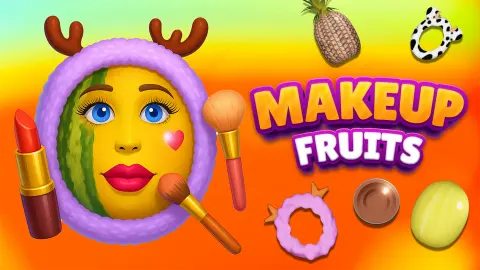
The first thing you put makeup on in Makeup Fruits is a watermelon, and the first thing it wears is a pair of antlers. There is no face on it yet. The game treats the fruit as a blank head and builds the look one layer at a time.
It is a makeover game with the usual order kept and the usual model swapped. You choose a fruit, then something for its head, then a base colour. The colour goes on by hand: you rub a sponge over the rind, and a bar under the fruit fills while you do it.
The game's listing credits a developer named Daniel. The game was published in December 2024.
This page rests on four minutes at a desktop with a mouse. In that time we dressed one watermelon with one headband and got partway through its base colour. We did not complete a fruit. Read what follows as an honest account of the opening steps and nothing past them.
Picking a colour is not painting: the sponge has to travel
This is the step where the game stopped being obvious to us. The sign says to select a colour and apply it over the fruit. We selected the first gold tile, saw the tick, and waited. Then we clicked it again. And again.
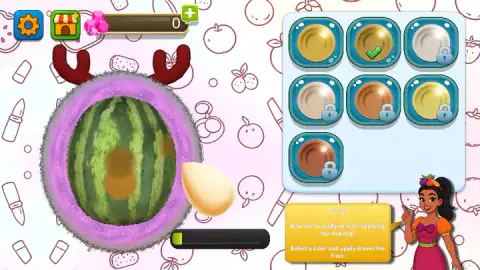
Nothing reached the watermelon, because selecting is only half of it. When a colour is chosen, a beige sponge shaped like a teardrop appears over the tile. That sponge is the tool. Hold it, carry it across to the fruit, and a soft round blot of colour stays where it passed.
The bar under the fruit confirms it. It sat empty through all our clicking and showed its first sliver of green the moment the sponge touched the rind. So the bar measures coverage, not choices.
Coverage is slow. Our first blot moved the bar about a tenth of the way. A few more passes, some with the second gold, left it at roughly a fifth when we stopped. A full bar clearly wants the sponge moved over the whole fruit, not parked in one spot. We left a brown patch in the middle of the watermelon and green rind everywhere else.
One more thing we noticed. The two free golds look almost the same on their tiles, and different on the fruit. The first left an orange-gold mark and the second a darker, browner one.
Two free choices at every step, and padlocks on the rest
Every panel we saw followed the same pattern: the first two tiles are open, the others carry a blue padlock.
| Step | Tiles in the panel | Free at the start | What the free ones are |
|---|---|---|---|
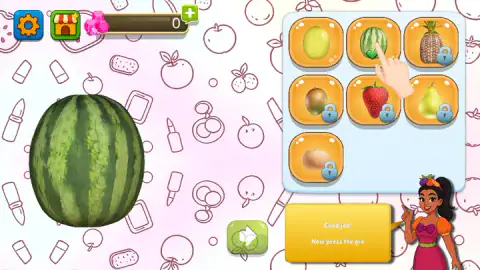
| Fruit | 7 | 2 | Watermelon and a pale melon |
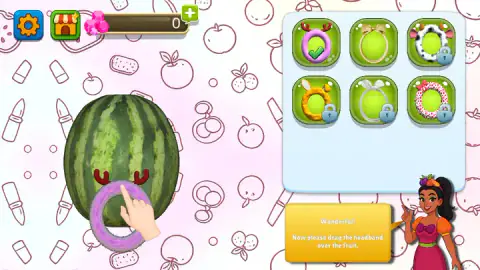
| Headband | 6 | 2 | Purple fluff with antlers, and a beige ring with a bow |
| Base colour | 7 | 2 | Two shades of gold |
The locked fruits include a pineapple, a kiwi, a strawberry and a pear. The locked headbands include a cow print with ears and horns and a pink one with polka dots.
The headband is a better joke than the tile suggests. On the tile it is a small fluffy ring. Dropped on the watermelon, it becomes a furry purple frame around the entire fruit, with dark red antlers standing above it. The fruit is all head, so the headband goes all the way round.
The green plus and the two video offers
A counter of pink gems sits at the top of the screen. Ours read 0 from the first second to the last.
Next to it is a green plus. Press it and a panel called Free Gems opens, offering 500 gems. It has two buttons, one with a video icon and one with an X. We pressed the plus twice without meaning to ask for anything, and closed the panel with the X both times.
The second offer came from a padlock. We clicked the third base colour, a silvery tile, and a panel called Unlock Item opened with its name, "Base Color Flax", and a green Free button carrying the same video icon. We closed that too, with the red X in its corner.
Here is the detail worth knowing. The padlock did not ask us for gems. It offered the item for a video straight away. What gems are spent on, and what a finished fruit pays, we did not find out. The tick did jump to the locked tile after we closed the panel, but the padlock stayed on it.
A smaller note about the guide. Her sign mentions that you can close "this panel using the settings panel". We left her on, and she was useful.
Flax is a real colour, and it is older than makeup counters
The one item the game named for us was that silvery base, Flax. It is not an invented word. Flax is the plant linen is made from, and its fibres, combed out before spinning, are a pale greyish yellow.
English has used the colour for hair for centuries. "Flaxen" is the old word for that light, dull blond. So a flax base is a pale neutral one, which fits where the tile sits: after two golds, before a pearl and a copper.
On a watermelon, a pale base would have the hardest job of the seven. The rind is dark green with darker stripes, and even our gold came out brown on top of it. We would have liked to see what flax did.
What four minutes did not reach
The end of a fruit. The bar never passed a fifth, so whatever follows a full one is unknown to us.
Any step after the base colour. The game's own listing promises lipstick, lashes, stickers and a photo of the result. We saw none of them, and we say so plainly so you do not take this page as a tour.
A gem earned or spent. The shop behind the market stall button. The second free headband on the fruit. Any fruit other than the watermelon. A phone or a tablet.
We also heard very little. One sound played as the game opened, and nothing we did after that was matched by a sound we can describe.
Who should open Makeup Fruits
Young players, first. The steps come one at a time, a sign says what to do, and nothing punishes a wrong move. There was no clock on screen in anything we played.
It also suits anyone who likes makeover games but is tired of faces. A watermelon in antlers is hard to get wrong, and it is funnier than a perfect cheekbone.
If you dislike padlocks, be warned. Most of the fruits and most of the base colours were locked when we started, five tiles in each panel, and the offer to open one comes with a video.
More makeovers with odd clients
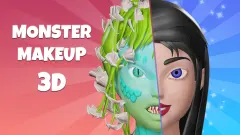
Monster Makeup 3D also starts with a sponge and a base layer on a client who is not human, and adds a portrait you are meant to match. Magic Pet Salon hands you a pony, a cat and a sloth with a job list each. Nail Salon is the closest in feel, since it also has a bar that fills while you work, and Hair Salon gives you one client and a counter of seven tools. The rest are under girls games.
Screenshots
Taken by opening the game ourselves and letting it run — not supplied by the publisher, and not the same picture every other site shows.
How to play Makeup Fruits
- Click a fruit in the right panel. A green tick marks it and the fruit appears on the left.
- Press the green arrow at the bottom of the screen to move on.
- Pick a headband and drag it over the fruit.
- Pick a base colour. A sponge appears over the tile.
- Drag the sponge across the fruit until the bar underneath fills.
What our session taught us:
- The colour tile is not a brush. Clicking it again and again does nothing to the fruit. We lost most of a minute that way.
- Read the yellow sign. The guide in the bottom right corner points at a sign that names the next step, and it was right every time.
- A padlock means a video, not a dead end. You can close the offer and carry on with the free tiles.
Controls
| Click a tile in the right panel | Picks that fruit, headband or colour; a green tick marks the choice |
|---|---|
| Drag a headband onto the fruit | Puts it on; the small ring becomes a frame around the whole fruit |
| Drag the sponge over the fruit | Leaves a blot of the chosen colour and moves the bar under the fruit |
| Green arrow (bottom of the screen) | Moves on from the fruit choice to the next step |
| Click a tile with a padlock | Opens an Unlock Item panel with a Free button that plays a video; the red X closes it |
| Green plus beside the gem counter | Opens the Free Gems offer, 500 gems for a video; the X closes it |
| Gear and market stall (top left) | Settings and shop; we did not explore either |
Features
- A watermelon and a melon free from the start, with five more fruits behind padlocks
- A step for each part of the look, starting with fruit, headband and base colour
- Six headbands, from a fluffy purple one with antlers to a cow print with horns
- Seven base colours applied by hand with a teardrop sponge
- A bar under the fruit that fills as colour goes on
- A guide in the corner whose yellow sign names the next thing to do
- No clock and no score on screen in anything we played
Game details
- Developer
- Daniel
- Release date
- December 2024
- Last updated
- August 10, 2026
- Added here
- March 2025
- Technology
- HTML5 (Unity WebGL)
- Platforms
- Browser (desktop, mouse), Browser (mobile & tablet)
- Classification
- Casual , Fashion & Beauty , Kids
- Saved progress
- Saving, when available, is managed by this game. Mava cannot confirm your level.
FAQ
How do you play Makeup Fruits?
You choose from a panel on the right and work on the fruit on the left. First you pick a fruit and press the green arrow, then you drag a headband over it, then you pick a base colour and rub it on with a sponge. A yellow sign in the corner says what the next step is.
How do you apply makeup in Makeup Fruits?
Clicking a colour only selects it. A beige sponge appears over the tile, and you have to drag that sponge across the fruit for anything to land. Each pass leaves a blot of colour and pushes the bar under the fruit a little further.
How do you unlock items in Makeup Fruits?
Clicking a padlocked tile opens a panel called Unlock Item with the name of the item and a green Free button that carries a video icon. We closed it with the red X and did not watch the video, so we cannot confirm what happens after it. The shop button at the top left is another route we did not take.
How do you get gems in Makeup Fruits?
The green plus next to the gem counter opens a Free Gems panel that offers 500 gems for watching a video. Our counter read 0 for the whole session, because we closed that panel both times and never completed a fruit. We do not know what a finished fruit pays.
Which fruits are free in Makeup Fruits?
Two of the seven tiles had no padlock when we started, the watermelon and a pale melon. Pineapple, kiwi, strawberry, pear and one more were locked. We only worked on the watermelon.
Is there a timer in Makeup Fruits?
Not in what we played. No clock and no score appeared on screen during the fruit, headband and base colour steps, and nothing we did was marked as wrong. The only meter was the bar under the fruit, which fills as you apply colour.
Can you play Makeup Fruits on a phone?
It is listed for PC, Android and iOS, in landscape. Everything we did was a click or a drag, which is how a finger works on a screen. Our own time with it was on a desktop with a mouse, so the phone side is the listing's word and not ours.
Who made Makeup Fruits?
The game's listing credits a developer named Daniel. The game was published in December 2024 and its last update is dated August 2026.