









About Ancient Dragons Princess
Most dress-up games explain themselves with labels: a row of tabs that say Hair, Dress, Shoes. Ancient Dragons Princess has none. After the opening logo we did not see one written word. The game talks in pictures only: two portraits, two racks of shelves, two arrows and a tick.
That makes it easy to start and slightly easy to misread. We spent the first half of our session dragging things that only wanted to be clicked.
The game is by DL-Studio, according to its listing, and it opens on a DL-Girls logo. It has been available since March 2025.
We sat down with it once, for about four minutes, on a computer and clicking with the mouse. It covered the opening screens and the first part of the princess's makeover: her eyes and her blush. We did not reach her clothes, the dragon or a finished picture, and this page says so wherever it matters.
Two cards, and we took the left one
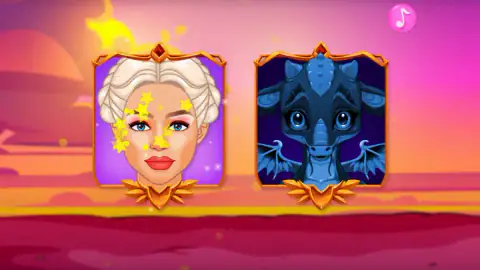
After the flags, the game shows two gold-framed cards against a sunset. On the left is a princess with silver-white hair in braids. On the right is a dark blue dragon with blue eyes and small wings, drawn more like a pet than a monster.
There is no caption and no button. The cards are the buttons. We clicked the princess, a burst of yellow stars ran over her card, and the scene changed.
We never got back to choose the dragon, so its side of the game is outside what we can describe.
The make-up room is a throne room
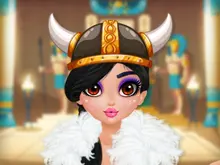
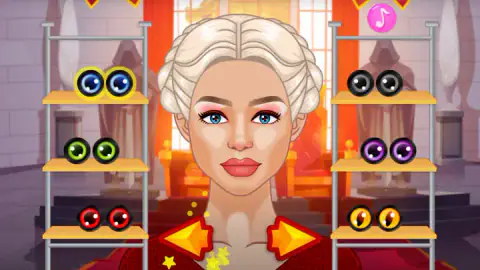
The princess's face fills the middle of the screen. Behind her is a hall with a red carpet, a golden throne and two grey hooded statues. On each side stands a metal rack with three shelves, so every kind of item comes in six choices.
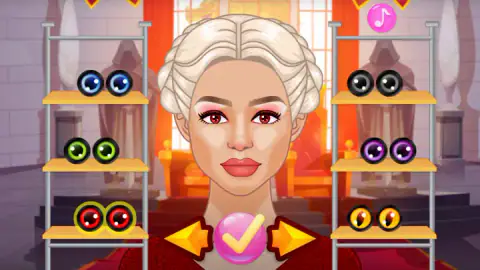
The first shelf we looked at properly holds eyes, six pairs of them sitting on the shelves like marbles. On the left are blue, green and red. On the right are black, purple and amber. The amber pair has a slit pupil, like a cat's or a lizard's, and it is the one that fits the dragon theme best.
She starts with blue eyes. We clicked the red pair and her eyes turned red on the spot.
The other shelf holds six small bowls of coloured beads: red, orange and brown on the left, gold, pale pink and magenta on the right. Nothing says what they are. We clicked the red bowl and her cheeks flushed, so the bowls are blush. A small red cross also appeared at the top of the right-hand rack. We did not press it.
What we did not see
Four minutes got us two shelves. The arrows point both ways, which suggests there are more kinds of item, but we cannot name them from what we saw. We saw no clothes, no hairstyles and no jewellery.
We also cannot tell you how a makeover ends. We pressed the pink tick once, after choosing the eyes, and did not come away with a clear view of what it leads to. A finished portrait or a way to keep the picture may be there, but we did not see either.
Sound is another gap. A pink music-note button sits in the top right corner of every screen. We left it alone.
Who it is for
It suits young players and anyone who cannot read English yet, because there is nothing to read. Every action is one click on a picture, and nothing can go wrong: no score, no clock, no wrong answer.
It is not for someone who wants a game to push back. There is no judge, no rival and no goal other than a face you like. And if you want to dress a character from a known story, this is not that; the princess and her dragon have no name on any screen we saw.
More makeovers to try
Pool Float Party comes from the same studio and uses the same bowls of beads for make-up, after a round of cleaning and decorating a pool. Magic Princess is a doll makeover in four steps, with blush and eyes picked from grids of tiles. Paper Princess - Doll Dress Up is the one to open if you came for dresses and crowns. Monster Makeup 3D turns the idea round and asks you to match a portrait. The rest are under girls games.
Screenshots

Taken by opening the game ourselves and letting it run — not supplied by the publisher, and not the same picture every other site shows.
How to play Ancient Dragons Princess
- Click the round pink play button under the logo.
- On the flag screen, click a flag if you want another language, then the tick.
- Click one of the two portrait cards: the princess on the left or the dragon on the right.
- Click an item on a shelf. It goes on her straight away, and a yellow ring marks it as the current choice.
- Use the orange arrows at her collar to change shelves, and the pink tick to confirm.
What four minutes taught us:
- Click, never drag. We pulled bowls from the shelves towards her face several times. Nothing happened. One click on the same bowl did the job.
- The yellow ring is your only label. With no text on screen, the ring around an item is how the game tells you what she is wearing now. At the start it sits on the blue eyes.
- The tick only shows up after a change. Arrive at a shelf and there are two arrows. Pick something and a pink tick appears between them.
- Nothing is lost when you browse. We gave her red eyes, went over to the blush shelf, and the red eyes were still there.
Controls
| Click the round play button | Leaves the opening logo screen |
|---|---|
| Click a flag, then the tick | The language screen; we only pressed the tick, with the flag that was already in the box |
| Click a portrait card | Chooses the princess or the dragon; we chose the princess |
| Click an item on a shelf | Puts it on her at once and rings it in yellow |
| Orange arrows at her collar | Swap the shelves for the next or previous kind of item |
| Pink tick (appears after a change) | Confirms the choice; we cannot say where it leads at the end |
| Drag an item onto her face | Did nothing for us; a plain click is what works |
| Music note (top right) | On screen throughout; we did not press it |
Features
- Two cards to choose from at the start, a silver-haired princess and a dark blue dragon
- A make-up room set in a throne room, with her face in the centre and a rack of three shelves on each side
- Six pairs of eyes, blue, green, red, black, purple and an amber pair with a slit pupil
- Six bowls of blush in red, orange, brown, gold, pale pink and magenta
- Every choice shows on her face the moment you click it, and stays while you browse other shelves
- No words, score or clock on any screen after the opening logo
Game details
- Developer
- DL-Studio
- Release date
- March 2025
- Last updated
- August 10, 2026
- Added here
- May 2025
- Technology
- HTML5 (2D)
- Platforms
- Browser (desktop, mouse), Browser (mobile & tablet)
- Classification
- Adventure , Fashion & Beauty
- Saved progress
- Saving, when available, is managed by this game. Mava cannot confirm your level.
FAQ
How do you play Ancient Dragons Princess?
Press play, get past the flag screen and click one of the two portrait cards. On the princess's side you click an item on the shelves and it appears on her face straight away. The two orange arrows at her collar change what the shelves hold, and a pink tick confirms. There is nothing to drag and nothing to win or lose.
Why does nothing happen when I drag an item in Ancient Dragons Princess?
Because the game wants a click, not a drag. We pulled bowls from the shelves to her face and neck several times and nothing changed. One plain click on the same bowl put the blush on at once.
What can you change on the princess?
In our session, her eyes and her blush. There are six pairs of eyes and six bowls of blush, three on each side of her face. The arrows suggest more kinds of item beyond those two, but we only saw those two shelves, so we cannot list the rest.
Can you dress up the dragon in Ancient Dragons Princess?
The opening choice shows a dark blue dragon on its own card next to the princess, so the game clearly has a dragon side. We chose the princess and did not get to the dragon in about four minutes, so we cannot describe what you do with it.
What is the flag screen at the start of Ancient Dragons Princess?
It is a language picker, a grid of twelve flags with the current one in a box at the bottom and a tick beside it. We pressed the tick. After that screen we did not see a single word in the game, so on the screens we reached the choice made no visible difference.
Is there a score or a timer in Ancient Dragons Princess?
No. Nothing on the make-up screen counts points, moves or seconds, and nothing told us a choice was right or wrong. You can leave it standing and change your mind as often as you like.
Can you play Ancient Dragons Princess on a phone?
It is listed for PC, Android and iOS in landscape. We played on a desktop with a mouse, so the phone side is the listing's word and not ours. Every action we used was a single click, which is a tap on a touch screen.
Who made Ancient Dragons Princess?
The game's listing names DL-Studio, and the game opens on a DL-Girls logo. It was published in March 2025 and last updated in August 2026.