







About Black Friday Dress Up Selfie
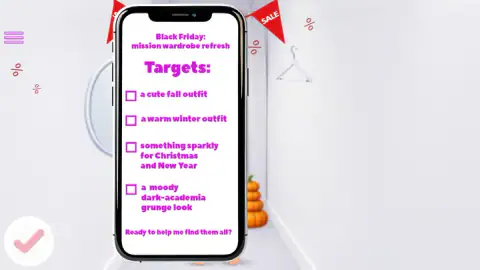
Most dress-up games open a wardrobe and leave you to it. Black Friday Dress Up Selfie hands you a shopping list first. Before any clothes appear, a phone fills the screen with a note titled "Black Friday: mission wardrobe refresh" and four targets, each with an empty checkbox: a cute fall outfit, a warm winter outfit, something sparkly for Christmas and New Year, and a moody dark-academia grunge look.
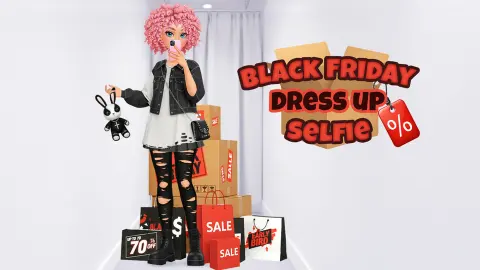
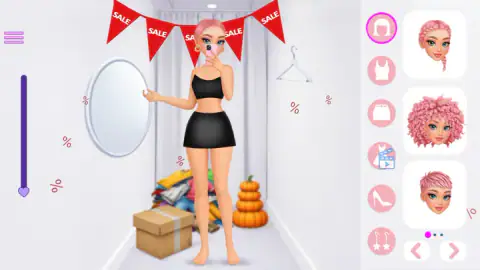
Then you are in a fitting room. Red bunting spells SALE across the ceiling, a cardboard box and a heap of clothes sit on the floor beside a stack of pumpkins, and a pink-haired doll stands by an oval mirror with her phone already raised. She keeps that pose through everything you put on her.
The game is credited to Gamerina. It was published on 25 November 2025, three days before that year's Black Friday.
We should be plain about how far we got. Our session lasted about four minutes and stayed inside the first look. We tried hairstyles, looked through the tops and changed the skirt. We did not finish the outfit, tick a target or see a selfie. This page covers what those four minutes showed and stops there.
The heart bar rewards trying things on
There is no score, clock or coin counter on the dressing screen. The heart is the only thing that answers you.
It started at the very bottom of the bar, with the doll in the outfit she arrives in: black bandeau, black mini skirt, gold hoops, bare feet. Every piece we put on lifted it a step. Three of those steps came from hair alone, one style swapped for the next, so the bar is not ticking off one category at a time. A denim mini skirt with a frayed hem took it higher again, to about two thirds of the way up.
That is where we stopped. We do not know what the game does when the heart reaches the top, or whether it cares which pieces got it there. What we can say is that the bar moved for five changes in a row and never went down.
What the first pages hold
The wardrobe we saw leans toward the first item on the list. The first page of tops held a rust jumper, a burgundy ribbed jumper and an olive cardigan. The first page of skirts held two pleated ones, dark green and burgundy, and the denim mini. Hair came as a side braid, big curls or a short crop, all in the same pink.
Each of those three categories showed three pages, so there were at least six more pieces in each that we did not reach. We did not open shoes or earrings at all.
The dress icon, fourth in the column, is the odd one out: a blue clapperboard badge with a play arrow sits on its corner, and no other icon has one. We never opened that category, so what the badge asks of you is something we cannot tell you.
Why the list has four looks
Black Friday is the day after American Thanksgiving, which falls on the fourth Thursday of November. That puts the sale at the hinge of the cold season: autumn is ending, and winter, Christmas and New Year are all still ahead. The wish list follows that calendar. Three of its four targets are the next three occasions you would shop for in late November, and the fourth is a style rather than a date.
It also explains the room. The pumpkins on the floor belong to the weeks just gone, and the sale bunting to the day itself.
Who it suits
It suits anyone who likes dress-up games with a light brief. The list gives each outfit a reason, nothing is locked behind a score in the part we played, and a wrong click costs nothing.
It suits less a player who wants to be judged. We saw no rating of the outfit and no way to fail. And the theme is seasonal: the pumpkins and sale flags will feel out of place in spring.
More from Gamerina
The studio has a second sale-day game here, Black Friday Mystery Sale, where gift boxes on a boutique floor unlock the clothes. Christmas Girls Dress Up uses the same heart bar for a gingerbread-themed look, and Back To School: Uniforms Edition lets a spinning wheel choose the outfit first. The rest are under girls games.
Screenshots
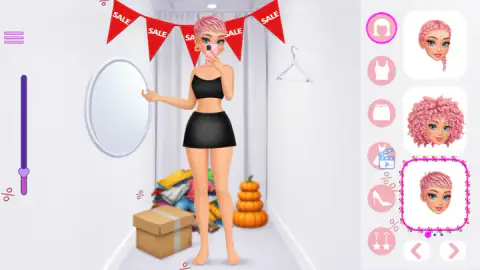
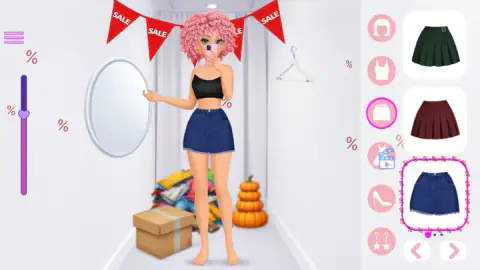
Taken by opening the game ourselves and letting it run — not supplied by the publisher, and not the same picture every other site shows.
How to play Black Friday Dress Up Selfie
- Read the list and click the pink tick. The tick sits at the bottom left of the wish-list screen. It takes you to the fitting room.
- Pick a category. Six round icons run down the right side: hair, tops, skirts, dresses, shoes and earrings. The open one gets a bright pink ring.
- Click a thumbnail. Three pieces show at a time, and the doll wears your pick at once. The worn piece gets a pink frame.
- Turn the page. Two arrows sit under the thumbnails. Three dots beside them, and a small "1/3" label, tell you there are three pages.
- Watch the heart. A tall purple bar on the left carries a heart that climbs as you dress her.
What we picked up while playing:
- Browsing is free. Opening the tops category and choosing nothing left the heart exactly where it was.
- Hair counts, and counts more than once. The heart rose when we put on a short crop, again for a side braid, and again for a head of big curls.
- A second click seemed to undo a piece. After we clicked the short crop while she was already wearing it, she was back in her starting bun.
Controls
| Click the pink tick | Accepts the wish list and opens the fitting room |
|---|---|
| Click a round icon (right) | Opens a wardrobe category (hair, tops, skirts, dresses, shoes, earrings) |
| Click a thumbnail | Puts that piece on the doll at once |
| Click the arrows under the thumbnails | Turns the page; each category we opened had three pages |
Features
- A wish list of four looks shown on a phone screen: fall, winter, Christmas and New Year sparkle, and dark-academia grunge
- Six wardrobe categories: hair, tops, skirts, dresses, shoes and earrings
- Three pieces per page and three pages in each category we opened
- A heart bar on the left that rose every time we put a piece on, and stayed still while we only browsed
- The doll holds a mirror-selfie pose the whole time, phone in front of her face
- No timer, score or coins on the dressing screen
- Made by Gamerina
Game details
- Developer
- Gamerina
- Release date
- November 2025
- Last updated
- August 10, 2026
- Added here
- September 2025
- Technology
- HTML5
- Platforms
- Browser (desktop, mouse), Browser (mobile & tablet, touch)
- Classification
- Fashion & Beauty
- Download size
- 3.8 MB
- Ad requests
- 2 (few)
- Has a save
- Yes
- Saved progress
- Saving, when available, is managed by this game. Mava cannot confirm your level.
Measured by opening the game ourselves on 2026-09-11, not taken from the feed. Twelve seconds on a phone-sized screen, with ad requests counted and blocked rather than loaded.
FAQ
How do you play Black Friday Dress Up Selfie?
Read the four-item wish list on the phone screen and click the pink tick. In the fitting room, click one of the six round icons on the right to open a category, then click a thumbnail and the doll wears it at once. Arrows under the thumbnails turn the page, and a heart bar on the left climbs as you dress her.
What are the four looks in Black Friday Dress Up Selfie?
The list on the phone asks for a cute fall outfit, a warm winter outfit, something sparkly for Christmas and New Year, and a moody dark-academia grunge look. Each has an empty checkbox beside it. We worked on the first look only and did not see a box get ticked.
What is the heart bar on the left for?
It tracks progress on the current look. In our session the heart started at the bottom and rose each time we put a piece on, including when we swapped one hairstyle for another. Opening a category without choosing anything did not move it. We stopped with it about two thirds of the way up, so we cannot say what happens at the top.
Can you lose in Black Friday Dress Up Selfie?
Nothing we saw suggests it. The dressing screen has no clock, no points and no coins, and no piece we clicked was refused. The only thing that reacts to your choices is the heart bar.
How many clothes are there in Black Friday Dress Up Selfie?
We cannot give a total. There are six categories, and the three we opened (hair, tops and skirts) each showed three pieces per page with three pages. We saw only the first page of each and did not open dresses, shoes or earrings.
Do you actually take a selfie in the game?
We did not get that far. The doll stands in a mirror-selfie pose from the first second, holding a pink phone in front of her face, but our session ended before the first look was finished, so we saw no photo and no result screen.
Who made Black Friday Dress Up Selfie?
It is credited to Gamerina. It was published on 25 November 2025, three days before that year's Black Friday. It is listed for PC, Android and iOS in landscape.