





About 3D Chess - Arcane Edition
Most chess pages that put "3D" in the title mean a different game: stacked boards, new pieces, rules you have to learn first. 3D Chess - Arcane Edition means none of that. It is ordinary chess on an ordinary eight-by-eight board, looked at from above your own pieces, and the "arcane" part is decoration: a walled garden, flower beds on both sides and pieces trimmed in gold.
What the game adds to a plain board is small and practical. Select a piece and a glowing ring appears on every square it is allowed to reach. A label in the corner says whose move it is. A menu lets you choose your colour and how strong the computer plays.
The game is credited to SB Games. It was published in July 2026.
Now the honest part. Our game was very short. We played White on Medium, made one move, saw one reply, and then spent the rest of a four-minute session trying to push a pawn that had nowhere to go. We did not capture anything, give a check or see how a game ends. This page explains the menu, the board and that one mistake, which turns out to be worth knowing about.
One move each: 1. d4 d5, and the pawn that could not move
Our first click was on the pawn standing in front of the queen. Two rings lit up, one square ahead and two squares ahead, which is the usual choice for a pawn that has not moved yet. We took the longer one.
That move has a name. Chess players write it 1. d4 and call it the Queen's Pawn Game. According to the Wikipedia article on the opening, it is the second most popular first move in chess, after pushing the king's pawn. The computer answered by pushing its own queen's pawn two squares to meet ours, written 1... d5, and the same article files that pair of moves under the label Closed Game.
Closed is a good word for what we were looking at. Two pawns stood nose to nose in the middle of the board. A pawn moves straight ahead but captures only on the diagonal, so neither of those two could touch the other, and neither could advance.
We did not think that through. We selected our advanced pawn again, saw its square turn green, and then clicked and dragged it at the black pawn for more than two minutes. The game never made the move, because the move does not exist. In our last screenshot the pawn is selected and there is not a single ring on the board.
So the game was right and we were wrong, and the lesson is useful for anyone still learning: the rings are the rulebook. If you are unsure whether a move is allowed, select the piece. The board will answer before you commit to anything.
The Spirit is, by the developer's account, Stockfish
The menu dresses the opponent up as an old mind living in the garden. The developer is more direct about it and says the computer's moves come from Stockfish, running in your browser. We cannot confirm that from one move. But it is a claim worth understanding, because it explains why the difficulty picker matters.
Stockfish is a real chess engine with a traceable history. The Wikipedia article on it says it was derived from Glaurung, an engine Tord Romstad released in 2004, and that Stockfish itself first appeared on 2 November 2008, developed by Romstad, Marco Costalba and Joona Kiiski. It is open source, which is why so many chess sites and apps can use it. The same article notes that it can run inside a web page, and that Chess.com and Lichess both offer it that way.
An engine like that is not built to give a beginner a fair game. Something has to hold it back, and here that job falls to three buttons: Easy, Medium and Hard. If you are new to chess, start on Easy and treat the level as part of the rules rather than a matter of pride. The developer says it can also be changed from the settings during a solo game.
It also explains the lightbulb. The developer describes the hint as the engine's own recommended move, limited to three per game and shown after a short ad in solo play. We did not press it.
What sits around the board
Four buttons run down the right edge: a gear, a lightbulb, a circular arrow and an exit arrow. We left all four alone. Going by the developer's notes, the gear opens settings for difficulty, move hints and sound. We do not know what the circular arrow does.
The menu has a language button, set to English for us. The developer lists 21 languages.
The view is fixed above your own side unless you change it. The developer says you can drag to turn the camera and scroll to zoom. We played the whole session from the starting angle, and on a wide screen it was clear enough: the board fills the middle and the garden fills the rest.
There is also a second mode, Play a Friend. The developer describes a private room that you share with one other person, with no account and nothing saved once both of you leave. We did not open it.
Who it is for
It suits someone who wants a plain game of chess against the computer with no sign-up, and who likes a board that looks like an object rather than a diagram. The rings make it a reasonable place to learn how each piece moves.
It is less suited to anyone who wants to study. We saw no move list, no clock and no way to review a game, though one move is too little to rule them out. And if you came looking for chess played across several stacked boards, this is not that: it is the standard game with depth added to the picture only.
More chess and board games
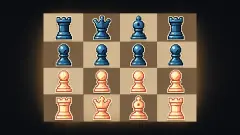
Chess Online Multiplayer is the flat-board alternative, with a move list and an undo button beside the board. Mini Chess shrinks the board to as little as four squares a side, which makes for shorter games and different rules. For something lighter, English Checkers Online Multiplayer and Ludo World are board games you can finish in a few minutes. The rest are under strategy games.
Screenshots
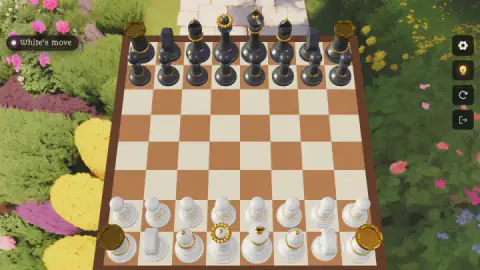
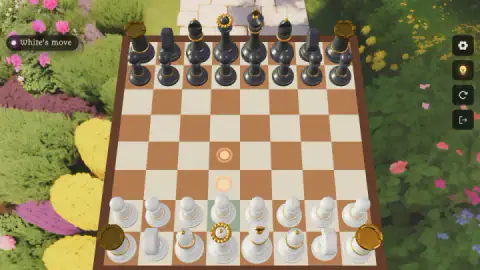
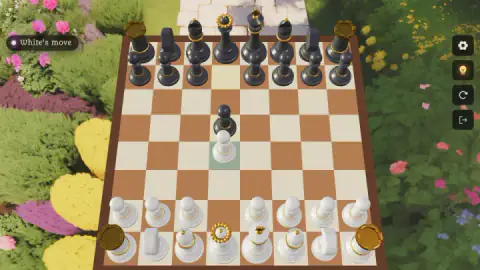
Taken by opening the game ourselves and letting it run — not supplied by the publisher, and not the same picture every other site shows.
How to play 3D Chess - Arcane Edition
- Choose Play a Spirit. That is the solo mode, against the computer. The menu calls your opponent "the garden's ancient mind".
- Pick a colour and a level. The panel offers White or Black, then Easy, Medium or Hard. White and Medium were already lit when we got there.
- Press Play Now. The board appears with your pieces at the bottom. The label in the top-left corner read "White's move".
- Click a piece. Its square turns pale green, and rings glow on the squares it can move to.
- Move it onto a ring. Our pawn went when we dragged it there. The developer's instructions say a click on the ring works too.
What our session taught us:
- No rings means no move. If you select a piece and nothing lights up, the piece is blocked. The game does not say so in words. It simply shows nothing.
- Do not keep pressing the same piece. We did, for most of our session. The answer was any other piece on the board.
- Look for the pale square. After the computer moved, the square its pawn had left was tinted, which is a quick way to see what just changed.
- Read the top of each piece. From this angle you see the pieces from above. The rooks have gold battlements and the queen a gold spiked crown; the knights are blocky shapes and the easiest to mistake.
Controls
| Click a piece | Selects it; its square turns pale green and a glowing ring appears on every square it can reach |
|---|---|
| Drag the piece onto a ring | Makes the move; this is how our pawn moved, and the developer says a click on the ring does the same |
| Drag the background / scroll | Rotates and zooms the camera according to the developer's instructions; we did not try it |
| Four buttons on the right edge | A gear, a lightbulb, a circular arrow and an exit arrow; we did not press any of them |
Features
- Standard chess on a full eight-by-eight board, drawn in 3D and seen from above your own side
- A solo mode called Play a Spirit with a choice of White or Black and three difficulty levels
- Glowing rings that mark every legal move of the piece you select
- A status label in the top-left corner that says whose move it is
- A Play a Friend mode that, according to the developer, opens a private room without an account
- A lightbulb button the developer describes as three hints per game, each behind a short ad in solo play
- Made by SB Games
Game details
- Developer
- SB Games
- Release date
- July 2026
- Last updated
- August 7, 2026
- Added here
- June 2026
- Technology
- HTML5 (3D)
- Platforms
- Browser (desktop, mouse), Browser (mobile & tablet)
- Classification
- 3D , Cards & Board , Multiplayer , Strategy , 2 Player
- Saved progress
- Saving, when available, is managed by this game. Mava cannot confirm your level.
FAQ
How do you play 3D Chess - Arcane Edition?
Choose Play a Spirit, pick White or Black and a difficulty, and press Play Now. Click one of your pieces and glowing rings show where it can go; move it onto one of them. The rules are those of ordinary chess, and the developer's instructions give the usual goal: checkmate the other king.
Why won't my piece move in 3D Chess - Arcane Edition?
If you select a piece and no glowing rings appear, that piece has no legal move. It happened to us with a pawn that had an enemy pawn directly in front of it: pawns cannot capture straight ahead, so it was stuck. Select a different piece and the rings come back.
Who is the Spirit in 3D Chess - Arcane Edition?
It is the computer opponent. The menu calls it the garden's ancient mind, and the solo mode is named Play a Spirit. The developer says the moves come from Stockfish, a well-known open-source chess engine, held back to three levels: Easy, Medium and Hard.
Can you play 3D Chess - Arcane Edition with a friend?
The developer says yes: Play a Friend creates a private room that you share, the other person joins as the other colour, and no account is needed. We only played the solo mode against the computer, so we have not tested a room ourselves.
How hard is the computer in 3D Chess - Arcane Edition?
There are three levels, Easy, Medium and Hard, and Medium was already selected when we opened the menu. Our game on Medium lasted one move for each side, which is not enough to judge its strength. The developer says the level can also be changed from the settings during a solo game.
Does 3D Chess - Arcane Edition have hints?
There is a lightbulb button at the right edge of the board. The developer describes it as up to three hints per game that show a recommended move, each behind a short ad in solo play. We did not press it, so we cannot confirm how the hint looks.
Who made 3D Chess - Arcane Edition?
It is credited to SB Games. It was published on 27 July 2026 and updated on 7 August 2026.
Can you play 3D Chess - Arcane Edition on a phone?
It is listed for PC, Android and iOS, and the developer says the board turns itself to landscape on an upright phone. We played on a desktop with a mouse and did not test a phone or tablet.