



About Chess Online Multiplayer
A browser chess game can get almost everything right and still leave you squinting, because it skips the one thing a wooden board does for free: it turns to face whoever sat down. We have now played Chess Online Multiplayer twice, three weeks apart, with a different colour each time. Both times the board had already turned.
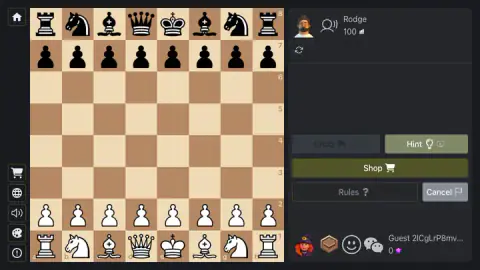
In our latest session we had White: letters running a to h from left to right, our back rank along the bottom, the black pieces facing us from the top. Three weeks earlier we had Black, and the board was drawn the other way about, letters running h to a and rank one at the top. Nothing asked us which we preferred.
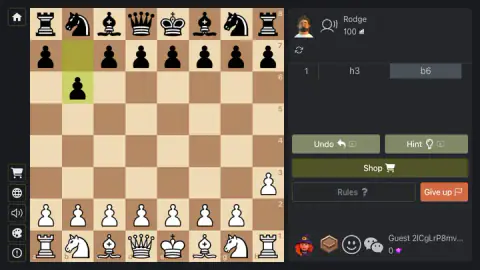
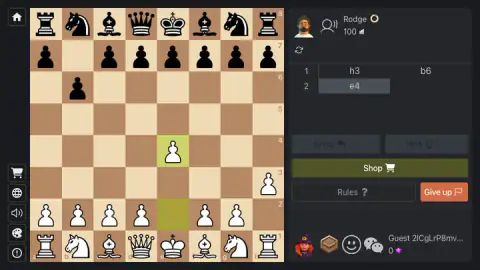
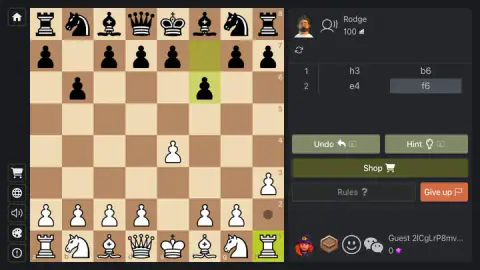
Our opponent was listed as Rodge: a cartoon portrait, the number 100, a small bar icon. We were a guest, a long string of letters for a name and a score of zero. What came out of it was short and a little odd — 1. h3 b6 2. e4 f6 — and it never got past the opening. No capture, no check, no result.
The game is by Smartberry. It went up in September 2025.
The board always turns to your side
Two sessions, two colours, and the board was the right way round both times. That matters more than it sounds: the usual browser compromise draws the board from White's side whatever you are playing, leaving anyone with Black reading the position upside down all game.
The colour changes because it is a setting. The panel before an online game has a Choose a side row with three icons: white, random, black. Take the middle one and you get what we got — a different colour each session, with the board quietly turning to match.
What sits around the board
The screen splits down the middle: board on the left, a dark panel on the right.
Your opponent sits at the top of that panel: a portrait, a head-and-soundwaves icon, a name and a rating, with a circular-arrows button underneath. You sit at the bottom, with your name, your score beside a purple star, and three small icons — a wooden box, a smiley and speech bubbles, which look like the cartoon reactions the description promises.
The move list runs between the two of you, in the notation chess books use: a numbered row per pair of moves, White's on the left, Black's on the right, the most recent boxed in grey.
Under the list sit Undo and Hint, each carrying a small video icon — the mark browser games use for help you pay for with a clip, not a coin. We pressed neither. Shop runs full width in olive below them, with Rules and the resign button on the bottom row. Down the far left edge is a narrow column of icons: a house, a cart, a globe, a speaker, a paint palette and an exclamation mark.
Cancel, Give up, and the card that asks first
At the start the bottom-right button reads Cancel. Once there are moves on the board it turns red and reads Give up.
Neither fires on the first press. Before our game got going, a dark card asked Cancel the game? with a No and a Yes; later, with the game running, the same corner asked Finish the game? instead. Two questions for two exits, and the position behind the card blurs while you decide.
That split is a habit of online chess: on the big sites a game called off in its first few moves usually vanishes without a result, while resigning later counts as a loss. We answered No both times, so we cannot tell you what either costs here.
Choosing who you play: a ladder from 100 to 3000
Play online opens a window headed Choice of opponent, the most interesting screen in the game: a grid of cartoon portraits, each with a name and a number under it. The numbers climb in steps from one hundred to three thousand, so you are not matched with anybody. You look down a ladder and point at a rung.
Pick a portrait and its own panel opens, with three switches — Enable Veto, Apply a handicap and Prevent opponent giving up — then the Choose a side row and a green Start. That third switch gives the game away as something built for arguing over a kitchen table: somebody wanted a way to stop the other player walking off when the position turns bad.
The names are ordinary ones: kristopher on 100, Williamson on 300, rxanne laney on 2550.
Is your opponent a person or the computer
This is the question the title raises, and we cannot answer it.
Rodge had a name, a face and a rating. We were an unnamed guest on zero, and nothing on screen said which of us was human. The ladder itself sits between the two readings: neat steps from 100 to 3000 look like difficulty settings, while the portraits and lower-case names look like people who signed up.
What we can describe is how Rodge played: two quiet pawn moves, b6 and f6, neither fighting for the centre. The second is the one every beginners' book warns about, because pushing the f-pawn opens a line straight at your own king. That is how a nervous beginner plays, and also how a computer on its easiest setting plays. It settles nothing.
Two pawn moves on the edge, two names in the books
Our own first move was h3. In the session before, our opponent opened with a3. Both look like a wasted turn, and both have a name.
1. h3 is the Clemenz Opening, after Hermann Clemenz, a player from Dorpat — the town now called Tartu, in Estonia — who used it in a blindfold display in St Petersburg in 1873; the English master Michael Basman revived it a century later. 1. a3 is Anderssen's Opening, after Adolf Anderssen, who tried it three times with White against Paul Morphy in their 1858 match in Paris.
What the two have in common is that they do nothing on purpose. A pawn shuffles one square on the edge, nothing is committed, and the middle of the board is left on the table. That is also the weakness: against anyone who knows what to do with a free centre, the answer to either is to take it at once, with a pawn to d5 or e5.
Rodge did not take it: it answered h3 with b6, another edge pawn, so we helped ourselves next move with the e-pawn two squares forward. Meet a quiet opening and that is the reply.
What the game says it has, and what we have seen
Behind the board is a menu headed Chess Free, much bigger than the game we played: two columns of buttons — Continue playing, Play with computer, Play online, Play online with friends and Play together on one side; Shop, Bonuses, Rules, Profile, Leaders, Design and Chat on the other.
The provider's description adds 21 computer levels from Beginner to World Champion, time controls from Bullet to Classic, handicaps, a review that points out your mistakes afterwards, and cartoon emotions to send your opponent.
We have not been inside any of them. Across two sessions we have seen the menu, the ladder, the setup panel, the board and its buttons, and neither game reached a capture, a check or a result. When one does, this page will say so.
More games by Smartberry
The studio's other table games share the same idea: English Checkers for draughts against the computer or a friend, Domino Online Multiplayer for dominoes and Sudoku Online for a solo puzzle. For a chess variant where dice decide which piece moves, try Mini Dice Chess. The rest are in our multiplayer games.
Screenshots
How to play Chess Online Multiplayer
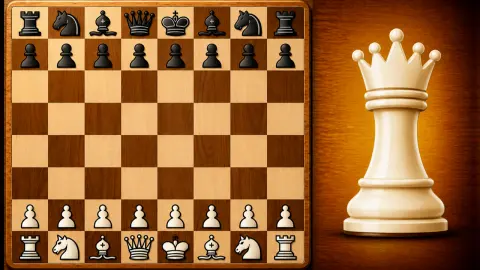
- Open the game. A Warming Up bar runs, then a card with a board and a large white queen, and then you are playing.
- Read the panel on the right first: it names your opponent and their rating. Your own pieces are the ones along the bottom.
- Click a piece. Its square turns green and a grey circle appears on every square it can legally reach.
- Click one of those circles, or drag the piece onto it. The move goes into the list on the right and both of its squares stay lit in olive.
- Keep going until a king is checkmated, the game is drawn, or someone presses Give up.
Tips from our sessions
- The circles are a legality check, not advice. Our rook on h1 and our king on e1 each offered exactly one circle, and both times it was the square one of our own pawns had just left. Move a pawn here and you also decide what the piece behind it may do.
- Watch the olive squares rather than the pieces. Both ends of the last move stay coloured, which is the only reason we noticed Black answering h3 with a pawn to b6 right across the board.
- Undo and Hint only wake up on your turn: between our second move and Black's reply both went grey again, with a small ring beside the opponent's name.
- Do not bother with the keyboard: arrow keys and Enter left the position exactly as it was.
Controls
| Click a piece | Turns its square green and marks every square it can legally reach with a grey circle |
|---|---|
| Click a circle, or drag the piece onto it | Plays the move, writes it into the list on the right and leaves both of its squares lit in olive |
| Undo / Hint buttons | Take a move back or ask for a suggestion. Both are grey until it is your turn, and both carry a small video icon |
| Cancel / Give up button | Reads Cancel until the game is under way and then turns red and reads Give up. Either way a card asks first |
| Keyboard | Nothing. Arrow keys and Enter left the board exactly as it was; the whole game is played with the mouse |
Features
- The board turns to whichever side you are given, so your own pieces always sit along the bottom edge
- Click a piece and grey circles appear on every square it can legally reach, so an illegal move is never on offer
- Both squares of the last move stay lit in olive, which is how you spot a quiet pawn move on the far edge
- A move list on the right keeps the score in standard notation, one numbered row per pair of moves
- Opponents are picked off a grid of portraits whose ratings climb from 100 to 3000
- Before an online game you can set a veto, a handicap, a lock on the other side resigning, and your colour
- Undo and Hint each carry a small video icon, and both go grey again while you wait for the other side to move
- Made by Smartberry, who also make English Checkers, Domino Online Multiplayer and Sudoku Online
Game details
- Developer
- Smartberry
- Release date
- September 2025
- Last updated
- September 29, 2026
- Added here
- August 2025
- Technology
- HTML5 (2D)
- Platforms
- Browser (desktop, mouse), Browser (mobile & tablet, touch)
- Classification
- Multiplayer , Strategy
- Saved progress
- Saving, when available, is managed by this game. Mava cannot confirm your level.
FAQ
How do you move a piece in Chess Online Multiplayer?
Click the piece you want to move. Its square turns green and a grey circle appears on every square it can legally reach. Click one of those circles, or drag the piece onto it, and the move is played, written into the list on the right and left lit in olive on both of its squares.
Which colour do you play in Chess Online Multiplayer?
Either, and the board turns to match. We have played it twice and been given White once and Black once; both times our own pieces were along the bottom and the letters along the edge ran the way they would from our chair. Before an online game there is a Choose a side row with three options: white, random or black.
How do you pick an opponent in Chess Online Multiplayer?
Play online opens a window headed Choice of opponent, a grid of cartoon portraits with a name and a number under each one. The numbers run from 100 up to 3000. Choosing a portrait opens its own panel, with switches for a veto, a handicap and stopping the other side from giving up, a choice of colour, and a Start button.
Is the opponent in Chess Online Multiplayer a real person or the computer?
We could not tell. Our opponent had a name, Rodge, a cartoon portrait and a rating of 100, and we played as a guest without signing in. The game's own description mentions both online players and a computer opponent, and nothing on our screen said which one we had.
What does the Give up button do in Chess Online Multiplayer?
It resigns the game. At the very start the same button reads Cancel, and once moves are on the board it turns red and reads Give up. Pressing it brings up a card asking Finish the game? with No and Yes, so it never happens by accident. We answered No, so we cannot say what giving up costs you here.
Can you undo a move in Chess Online Multiplayer?
There is an Undo button under the move list. It is greyed out before you have moved and it goes grey again while you are waiting for the other side, so it only works on your own turn. Undo and Hint both carry a small video icon, the mark browser games use for help you pay for by watching something. We did not press either.
Who made Chess Online Multiplayer?
It is by Smartberry, the studio named as its author. The same studio has made online versions of dominoes, English checkers, backgammon and sudoku.
Can you play Chess Online Multiplayer on a phone?
It is listed for phones and tablets as well as computers. Both of our sessions were on a computer with a mouse, and we have not tried it on a touch screen ourselves, so we cannot tell you how the panel beside the board behaves on a narrow screen.