



About Penalty Challenge
A penalty game usually hands you the ball and counts how many you score. Penalty Challenge counts something less comfortable: how many you score compared with someone who kicks straight back. Every match is a complete shoot-out, and after each of your kicks the view moves behind the net and you are the goalkeeper.
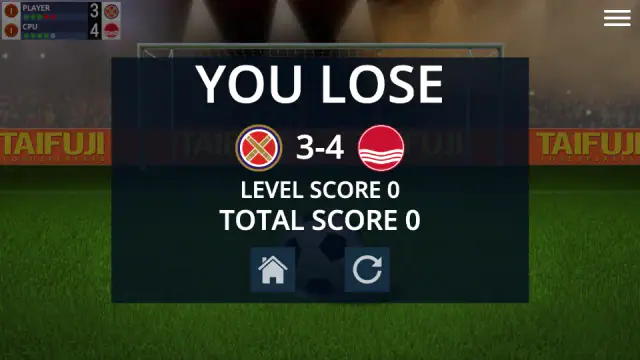
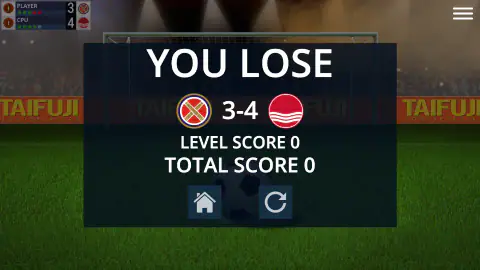
That second half is what makes it a contest. You can be accurate from the spot and still lose, because the opponent gets the same five chances. We know this first hand. Our one match ended 3-4 to the CPU, with the words YOU LOSE over the pitch.
The game is credited to CodeThisLab, and the studio does not hide: its name runs along the boards behind the goal. It was published on 20 November 2024.
We played one shoot-out against the AI, start to finish, in about four minutes. We did not win it, we did not play online, and the sound was off. Anything beyond that is marked as not seen.
Five kicks each, and it can end before the tenth
Our shoot-out went like this. We scored, the CPU scored. We scored again, so did the CPU, and a card reading "GOAL!" showed the two crests with 2-2 between them. Our third went in for 3-2. The CPU levelled. Then we missed, the CPU did not, and at 3-4 we stood over our last kick needing a goal just to stay alive. It missed.
The result card came up at once, and the scoreboard behind it explains why. Our row showed five dots, three green and two red. The CPU's row showed four green and one still grey: the fifth CPU kick was never taken. With our kicks used up and the CPU ahead, there was nothing left to play for, so the game stopped. Our reading of the colours comes from matching the dots to the score at six different moments, and they agreed every time.
Two things follow for you. First, a match can be shorter than ten kicks, in either direction. Second, we kicked first in every pair, so in a close match it is your miss that puts the pressure on, not theirs. We never reached a draw after five kicks each, so we cannot say what the game does then.
The card also read LEVEL SCORE 0 and TOTAL SCORE 0. A defeat is worth nothing. What a win is worth, we did not see.
The goalkeeper's turn is the part we did not solve
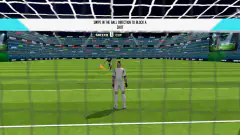
On the opponent's kick the camera sits inside the goal, looking out through the net. A kicker in blue waits by the ball, and a pair of gloves hangs at the top of the picture. Those gloves are you. The kick does not come until you click, so you can take a breath first. Any click will do. In our match, a click on the scoreboard in the top corner brought the kick at 2-1 and again at 3-3.
Here our account runs out. The gloves were in a different place in two of our photos, so they do move. But we did not work out the rule well enough to save anything. All four CPU kicks went past us. If you find the keeper's half hard at first, that matches our experience, and it is the half that decided our match.
Ten matches, one of them open
Before the first kick, the YOUR TEAM screen sets out the road. There are ten cards, Match 1 to Match 10. Each one pairs your crest with a different opponent, so pick a crest you are happy to keep. Nine of them are dark and carry a padlock. The natural reading is that a win opens the next one. We lost, so we cannot confirm it. The result card offered only two buttons. The house took us back to the menu, and the round arrow looks like a retry; we did not press it.
The team screen deserves a note of its own. No club is named. Each team is a round crest with no text. The crests are filed under five flags, and England's was the one selected when we arrived. A second heading, Europe, sits beside Clubs; the game's own description speaks of European national teams, and we did not open it. Read the crests as the game's own designs, not as real teams.
What the side panel holds
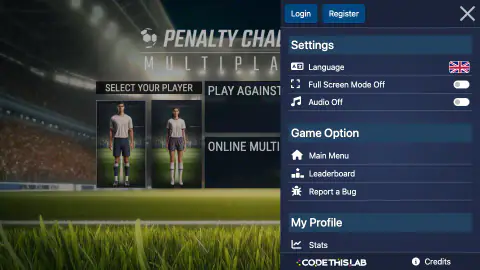
The three bars in the corner open a side panel. At the top are Login and Register. We used neither and played the whole match without them.
Below come three settings: Language, Full Screen Mode and Audio. Both switches were off in our session, so we have nothing to tell you about the crowd or the whistle. If you want sound, this is where to look.
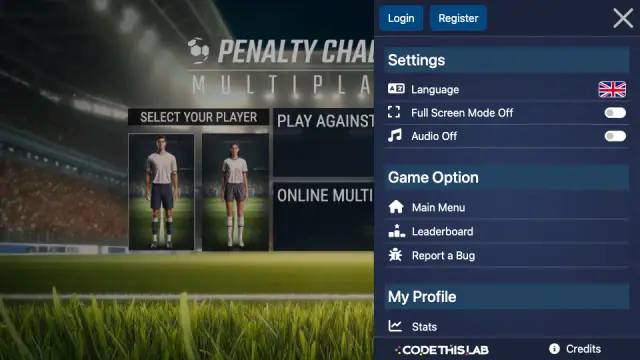
Further down are Main Menu, Leaderboard, Report a Bug, Stats and Credits. We opened none of them. The large X at the top closes the panel. Do that before your next swipe, because the kick waits behind it. The game's own description says the leaderboard is global and fed by experience points.
The shoot-out only dates from 1970
The format this game copies feels as old as football. It is not. The penalty shoot-out was adopted on 27 June 1970 by the International Football Association Board. That is the body that keeps the laws of the game. Before that, a drawn knockout match could be settled by drawing lots. According to Wikipedia's history of the shoot-out, Italy reached the final of the 1968 European Championship that way. Its semi-final against the Soviet Union had ended with no winner on the pitch.
Who had the idea is still argued over. The same source credits both Yosef Dagan, from Israel, and Karl Wald, a German referee. The first one in professional football came that same year, in a cup semi-final in Hull. George Best took the opening kick, and Denis Law was the first player to miss.
The rule they wrote is the one you play here. Each side takes five kicks, in turn, and the kicks stop once one side cannot be caught. That last clause is exactly what ended our match a kick early. Researchers still argue about whether going first helps, so do not lean on it.
Is Penalty Challenge for you?
It is if you want the tension of a shoot-out and nothing around it: no dribbling and no ninety minutes. It suits you less if you only want to shoot, because half of every match is spent in goal.
More football games
Penalty Shooter is a different penalty game, with its own way of saving. For another game built on a swipe, Soccer Dash has you curl the ball past defenders. Ragdoll Football and Dummies Football 2026 go the other way, with floppy players and short matches. Soccer Random is the one to share a keyboard with a friend. The rest are under soccer games, and more games you play with just a mouse are in mouse only games.
Screenshots
How to play Penalty Challenge
- Pick a figure and a mode. The menu shows two players under SELECT YOUR PLAYER, a man and a woman, and two large buttons: PLAY AGAINST AI and ONLINE MULTIPLAYER. We took the first.
- Choose a crest. The team screen has five flags along the top and twenty round crests under the one that is selected.
- Open Match 1. A screen headed YOUR TEAM lists ten matches. Only the first is lit.
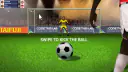
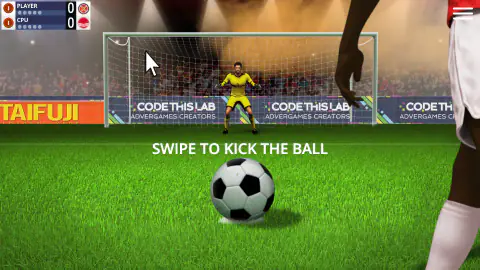
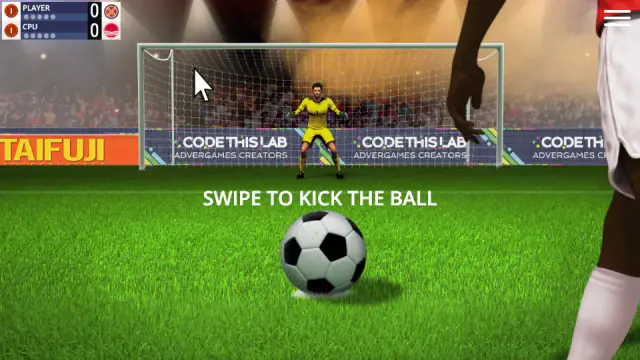
- Swipe to kick. The ball sits in front of you with the line SWIPE TO KICK THE BALL. With a mouse that means press on the ball, drag towards the goal and let go.
- Stand in goal. The view jumps behind the net and the screen reads TAP THE SCREEN TO LET THE OPPONENT KICK. Click when you are ready, and the kick comes.
What one lost shoot-out taught us:
- Read the dots, not just the score. Under each name on the scoreboard sit five small dots. They turn green for a goal and red for a miss, in order. One glance tells you how many kicks each side has left.
- The start is not where it is lost. We scored our first three and led twice. Our fourth and fifth kicks both missed, and that was the match.
- In goal, any click starts the kick. It does not have to be on the ball. Twice a click up in the scoreboard corner set the CPU off. So keep your hand still until you are ready.
- Do not count on the opponent to miss. The CPU took four kicks at us and scored four. Whatever you plan to do in goal, plan to score yours as well.
- The menu icon is live during a kick. The three bars in the top corner open a panel that covers nearly half the screen. The kick waits behind it. If the ball seems to ignore you, look for an X up there and close it. We did, and our next swipe carried on the shoot-out.
Controls
| Swipe from the ball (press, drag and release with a mouse) | Takes your penalty; the game prompts it with "SWIPE TO KICK THE BALL" |
|---|---|
| Click anywhere on the keeper's turn | Lets the opponent take the kick. The prompt reads "TAP THE SCREEN TO LET THE OPPONENT KICK", and a click on the scoreboard counts too |
| Three-bar icon (top right) | Opens a side panel with language, full screen, audio, Main Menu and Leaderboard; it covers the kick until you close it with the X |
| House and round-arrow buttons (result card) | The house takes you back to the menu; the round arrow should replay the match (we did not press it) |
Features
- A full shoot-out per match, five kicks each, with you kicking and keeping goal in turn
- A scoreboard that keeps a dot for every kick, green for a goal and red for a miss
- A ladder of ten matches for the crest you pick; only the first is open at the start
- Five flags on the Clubs tab, with twenty round crests under the one we opened, plus a separate Europe tab
- Two modes on the menu, PLAY AGAINST AI and ONLINE MULTIPLAYER, and two player figures to choose from
- Language, full screen and audio switches in a side panel you can open in the middle of a kick
- Made by CodeThisLab
Game details
- Developer
- CodeThisLab
- Release date
- November 2024
- Last updated
- August 10, 2026
- Added here
- March 2025
- Technology
- HTML5 (CreateJS)
- Platforms
- Browser (desktop, mouse)
- Saved progress
- Saving, when available, is managed by this game. Mava cannot confirm your level.
FAQ
How do you play Penalty Challenge?
Choose PLAY AGAINST AI, pick a club crest and open Match 1. When the screen says SWIPE TO KICK THE BALL, drag from the ball towards the goal and let go. After each of your kicks the view moves behind the net and you stand in goal for the opponent's kick.
How do you win a match in Penalty Challenge?
Score more penalties than the opponent in a shoot-out of five kicks each. The match stops as soon as one side cannot be caught. That is how ours ended: we lost 3-4, and the CPU never needed its fifth kick.
How do you save a penalty in Penalty Challenge?
On your turn in goal the view moves inside the net and the kick waits until you click. Any click starts it, even one on the scoreboard. A pair of gloves at the top of the picture is you, and they were in different places on different kicks. We did not save any of the four kicks we faced, so we cannot give a method.
Do you play as the striker or the goalkeeper in Penalty Challenge?
Both, in the same match. In our shoot-out we took a kick, then faced one, and so on until the end. We always kicked first in each pair.
How many matches are there in Penalty Challenge?
The screen for your team shows ten, numbered Match 1 to Match 10, each against a different crest. Only Match 1 is open at the start and the other nine carry padlocks. We lost Match 1, so we did not see what opens the second.
Does Penalty Challenge have real clubs?
No club is named anywhere we looked. Teams are round crests without text, filed under five national flags. The one we opened, England's, held twenty. Treat them as the game's own designs.
Can you play Penalty Challenge online against other people?
The menu has an ONLINE MULTIPLAYER button next to PLAY AGAINST AI. We played against the AI only, so we cannot tell you how quickly an online opponent turns up or how those matches run.
Is Penalty Challenge the board game?
No. A card-and-dice board game shares the name. This Penalty Challenge is a browser game by CodeThisLab, and the menu logo reads PENALTY CHALLENGE MULTIPLAYER. You swipe with the mouse to shoot and click to face each kick.
Who made Penalty Challenge?
It is credited to CodeThisLab, and the studio's name is on the boards behind the goal. It was published on 20 November 2024 and last updated on 10 August 2026.
Do you need an account to play Penalty Challenge?
No. A side panel has Login and Register buttons, but we played a whole match without touching either. The game's own description ties the global leaderboard to experience points; we did not look into what an account adds.