

About Football - Soccer
Most browser football games shrink the sport to one moment: a penalty, a free kick, two players and a ball. Football - Soccer does the opposite. It puts two full national teams on a full pitch and hands you one player at a time.
What it shrinks is the clock. The scoreboard counts to 45:00 twice, like a real match, but it runs about thirty times faster than a watch. A half lasts about a minute and a half of real time.
We played one friendly, Mexico against Portugal, and lost the only part of it that had a goal in it. This page says what that match showed, and where it stopped showing.
The game's listing credits the game to 3S Games. It has been available since April 2026.
Three keys, six jobs: how the controls change with the ball
The right-hand corner of the screen holds three buttons, each drawn with an arrow and a word. The words are not fixed. They follow the ball.
| Key | Your team has the ball | The other team has it |
|---|---|---|
| Up arrow | SHOOT | TACKLE |
| Left arrow | PASS | CHANGE |
| Right arrow | RUN | PRESS |
That is the whole control scheme, and it is a sensible one. Each key keeps the same kind of job on both sides of the ball. Up is the decisive action. Left involves a team-mate: you pass to him or you become him. Right is about speed, running with the ball or closing down the man who has it.
The ring under your player follows the same switch. It was blue whenever we were defending. With the ball it was white in most of our pictures and red in one.
Movement is separate. Four key caps in the left corner show W, A, S and D with an arrow on each. Because the game draws all seven keys on screen, you never have to remember the layout, only to glance down.
This is where our match went wrong, and it is worth saying plainly. We played it almost entirely on the three action keys. A player who shoots without first running toward the other goal is shooting from wherever he happens to stand, and ours was usually standing a long way back.
A 45-minute half that lasts a minute and a half
The top left corner holds a small scoreboard: two flags, the score, and a clock with a little 1 or 2 above it for the half.
The clock is the part that surprised us. Between two looks at it some forty seconds apart, it had moved on by almost twenty-one minutes. We checked again in the second half and found the same pace.
So a full match is about three minutes of play. That changes how you should treat it. A goal conceded in the first half minute costs you a third of the first half, and there is no time for a slow build-up from the back.
It also means a lost match is cheap. Ours ended up 0-1 at every look, from the fourteenth minute of the first half to the forty-first of the second, and replaying it would have cost less time than reading this page.
We did not see the final whistle or whatever screen follows it. Our session stopped a few minutes of game clock short of full time.
What the screen tells you during play
A minimap sits at the bottom of the screen, between the two sets of keys. It shows the whole pitch with one team as yellow dots and the other as light blue ones. The main camera only covers a slice of the field, so the minimap is the only place where you can see a free team-mate before you pass.
Name labels float over the players nearest the ball, on both teams. The pre-match screen lists your eleven under the team name. Some of those names will sound familiar to anyone who follows international football, mostly with a letter or two out of place. Nothing on screen or on the listing claims any link to real players or federations, and we are not repeating the names here.
In the second half the labels did us a favour. Three of our pictures, each ten minutes of game clock apart, show the same goal on the left of the screen, with a goalkeeper whose name tops Mexico's team sheet. That was our goal. The buttons read SHOOT in all three, and we were pressing it from our own penalty area.
The half-time card is plain: HALF TIME, the two flags, the score, and a CONTINUE button. We pressed it and the second half began.
The real rule behind the clock
The 45 on the scoreboard comes straight from the Laws of the Game, the rulebook football is played under. A match is two equal halves of 45 minutes, with a break between them that may not last more than 15. After the break the teams swap ends.
Football - Soccer keeps the numbers and drops the waiting. The halves still stop at 45:00, and there is still a half-time, but the break is a card you dismiss yourself. What we could not confirm is the swap of ends: we never worked out which way Mexico attacked in each half, which says more about our match than about the game.
What we did not get to
The first screen has two buttons we cannot describe from experience. QUICK MATCH and INTER LEAGUE sit in the middle of it, and the half-time card carried the words INTER LEAGUE under the score. The listing speaks of championships and tournaments. We played a single friendly and cannot tell you how a league is laid out.
The same goes for CHANGE KIT under your team's player, and for the strips of flags at the bottom of that screen, where Turkey, Uruguay and Argentina were visible. They look like the way to pick other teams. We started with the pair the game offered.
We also saw no goal being scored, no foul, no card and no corner, so we cannot say how the game handles any of them.
Who it is for
Someone who wants a whole match, with passing and defending, in the time a penalty game takes. The controls fit on seven keys and the game shows all of them.
It is less suited to a player who wants to be taught. Nothing we saw explained which way to attack or why the labels change, and the opponent does not wait while you find out.
More football to play
For the opposite scale, Penalty Shooter is only the spot kick, taken and saved in turns, and Freekick Hero is only the free kick over a wall. Power ball soccer is another match seen from above, with special moves, and Soccer Random plays the sport with a single key. The rest are under soccer games.
Screenshots
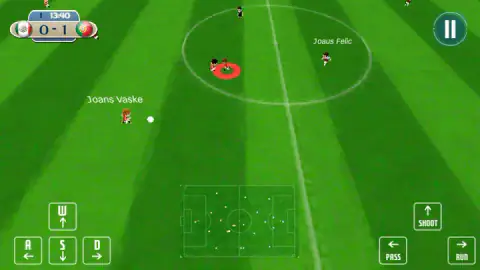
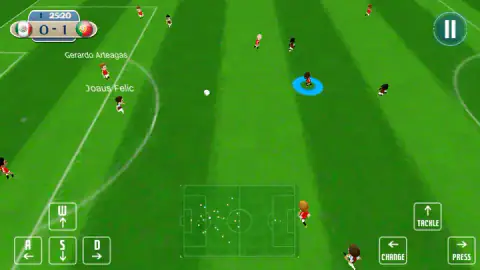
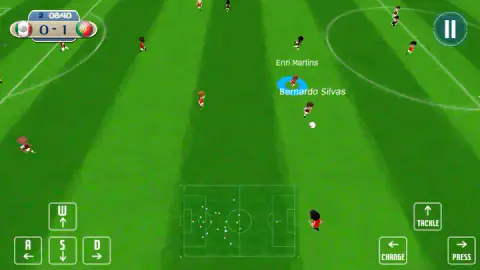
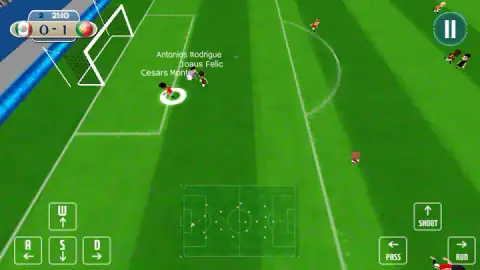
Taken by opening the game ourselves and letting it run — not supplied by the publisher, and not the same picture every other site shows.
How to play Football - Soccer
- The first screen is already a fixture: a FRIENDLY MATCH, your team on the left and the opponent on the right. Press START MATCH.
- Move the player with the ring under his feet using W, A, S and D.
- When your team has the ball, the up arrow is SHOOT, the left arrow is PASS and the right arrow is RUN.
- When the other team has it, the same three keys read TACKLE, CHANGE and PRESS.
- At 45:00 a HALF TIME card shows the score. Press CONTINUE for the second half.
What one match taught us:
- Be ready at kick-off. We let the opening seconds go by without touching a key. The first time we looked at the scoreboard it read 13:40 and Portugal were already a goal up.
- Read the labels before you press. The up arrow shoots or tackles depending on who has the ball. Pressed a moment late, your shot becomes a lunge at an opponent.
- Shooting is not steering. We pressed the up arrow a dozen times and hardly used the movement keys. The score did not change. The arrows act; only W, A, S and D take you anywhere.
- Know which goal is yours. The goalkeeper's name is the first one on your team sheet before the match. If you see that name on screen, you are in your own half.
Controls
| W / A / S / D | Move the player with the ring under his feet, as the key caps drawn on screen show |
|---|---|
| Up arrow | SHOOT when your team has the ball, TACKLE when it does not |
| Left arrow | PASS when your team has the ball, CHANGE to another player when it does not |
| Right arrow | RUN when your team has the ball, PRESS when it does not |
| START MATCH | Kicks off the fixture shown on the first screen |
| CONTINUE | Leaves the HALF TIME card and starts the second half |
Features
- Full-pitch football between national teams, seen from a high camera behind the touchline
- Three action keys whose labels switch between SHOOT, PASS, RUN and TACKLE, CHANGE, PRESS
- A 45-minute clock per half that runs in about a minute and a half of real time
- A minimap at the bottom of the screen with both teams as coloured dots
- Name labels over the players nearest the ball, and a team sheet on the pre-match screen
- QUICK MATCH and INTER LEAGUE on the first screen, plus a CHANGE KIT button
Game details
- Developer
- 3S Games
- Release date
- April 2026
- Added here
- March 2026
- Technology
- HTML5
- Platforms
- Browser (desktop)
- Classification
- Simulation , Soccer , Sports
- Saved progress
- Saving, when available, is managed by this game. Mava cannot confirm your level.
FAQ
How do you play Football - Soccer on a keyboard?
Move with W, A, S and D, and use three arrow keys for actions. With the ball, up shoots, left passes and right runs. Without it, the same keys tackle, change player and press. The labels are drawn on screen and switch as possession changes.
How long is a match in Football - Soccer?
The clock counts two halves of 45 minutes, but it runs fast. In our match each half took about a minute and a half of real time, so a whole game is over in roughly three minutes plus the half-time card.
Which teams are in Football - Soccer?
National teams, shown as round flags. Our match was Mexico against Portugal, and the pre-match screen also showed the flags of Turkey, Uruguay and Argentina. We did not scroll the whole list, so we cannot give a total.
What do TACKLE, CHANGE and PRESS do in Football - Soccer?
They are the defending actions, and they take the place of SHOOT, PASS and RUN when the other team has the ball. TACKLE is on the up arrow, CHANGE on the left arrow and PRESS on the right arrow. CHANGE hands you another player; a blue ring shows which one you control.
Does Football - Soccer use real players?
The players carry name labels, and some will sound familiar to people who follow international football, usually with a letter or two changed. Nothing we saw in the game or on its listing claims a licence or any link to real players, teams or federations.
Can you play Football - Soccer on a phone?
It is listed for PC, Android and iOS, in landscape. We played on a desktop only. The desktop version already draws its keys on screen as buttons, but we did not test touch.
Who made Football - Soccer?
The game's listing credits 3S Games. The game was published in April 2026.