



About Hex Mine 3D
Most 3D versions of an old puzzle use the extra dimension as decoration. Hex Mine 3D mostly does too, at least at the start, and it is better for it. On the first two levels the whole board sits on the side of the globe that faces you, so you are playing a compact little Minesweeper that happens to be curved. What changes the game is not the sphere. It is the shape of the tiles.
Each hexagon touches six others instead of eight, so every number is a smaller, sharper clue. The first level has 21 tiles and two mines, the second has 23 and three, and the numbers we met were only ever ones and twos. That makes it one of the gentler ways into this kind of logic puzzle.
Our run stopped early: we cleared level 1, reached level 2 and did not clear it, so this page covers the opening and the rules, not the whole game. Lucas Entertainment Studio published it in June 2026.
You can win without placing a single flag
This is the thing we did not expect. The game's description tells you to flag every mine, and the top of the screen keeps a flag counter as if that were the goal. But our level 1 win came with no flags at all. We restarted, tapped the middle of the globe once while the tiles were still appearing, and about six seconds later Level Complete was on screen. Behind the panel, the flag counter still read 0/2.
The likely reason is that the board only cares about safe tiles. If one tap on an empty area spreads far enough to open all of them, the job is done, and there is nothing left to mark. We cannot rule out that later levels ask for more, but on the boards we saw, flags are notes to yourself. You lose nothing by skipping them when the logic is obvious.
There is also no flag button on screen, and the in-game table does not say how to place one. The cover screen says long press or right click. We never tried it.
Six neighbours instead of eight: what the hexagons change
Minesweeper as most people know it reached Windows users through the 1990 Windows Entertainment Pack, credited to Robert Donner and Curt Johnson, though it had earlier relatives such as Mined-Out in 1983. On its square grid, a number counts mines above, below, beside and on the diagonals: eight tiles in all.
Hexagons have no diagonals, and that has a practical effect. A hex tile has six neighbours, so a 2 tells you more than it would on a square grid: two of six, rather than two of eight. Two touching tiles also share just 2 neighbours between them, where two side-by-side squares share 4. So when you compare two numbers, there are fewer tiles in the overlap to reason about, and each clue pins things down sooner.
The board's edge helps too. A tile on the rim has fewer than six neighbours, so a number there can leave only one or two candidates. Start your thinking at the rim, not in the middle.
Why the board is a patch and not a whole planet
You might expect hexagons to wrap all the way around the globe, but they cannot do it alone. It follows from Euler's polyhedron formula: a closed ball made of hexagons needs exactly 12 pentagons somewhere in it, which is why a classic football has black five-sided panels among its white six-sided ones. Mathematicians call these shapes Goldberg polyhedra, after a 1937 paper by Michael Goldberg.
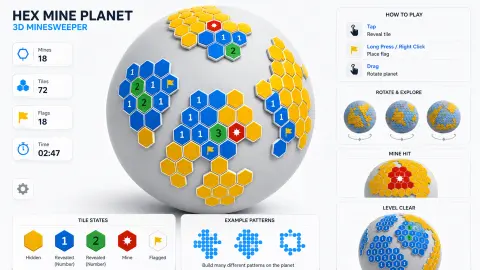
Hex Mine 3D dodges the problem on the levels we played by using one patch of tiles and leaving the rest of the globe bare white. The cover art shows several islands of tiles spread around the sphere, which would work the same way and would finally give the dragging a purpose. For you, the useful part is simple: every tile we saw had the normal hex shape, so the six-neighbour logic holds everywhere we looked.
What we did not get to see
We did not reach level 3, so we cannot tell you how many levels there are or when the islands on the cover appear. That cover shows 72 tiles and 18 mines, far beyond the 23 tiles we met, and it is promotional art, not a screenshot of our game. We never spent a hint or placed a flag. We also saw a break screen with a Continue Playing button just before the Mine Hit panel, so expect a pause there. The arrow keys are not in the instructions and gave us no clear response.
More like this
The same studio's Hex Mine 2D keeps the orange hexagons and numbered clues on a flat board, and CrossTile is its word puzzle. For the same deduction with a lighter theme, try MonkeySweeper: Mines puzzles. If you just like the hex shape, Hexa Master 3D: Sort Puzzle is colour sorting instead of logic. There are more in our puzzle games.
Screenshots
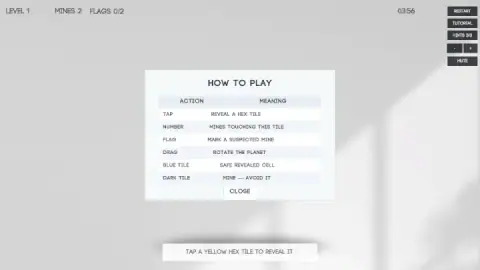
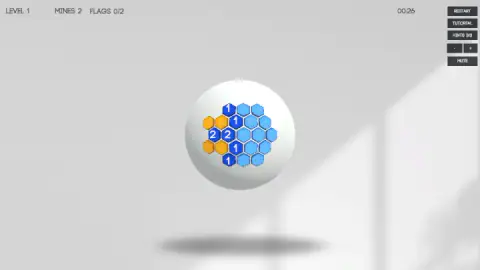
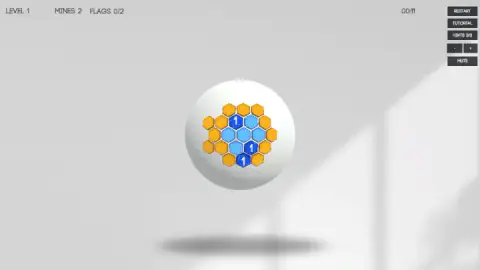
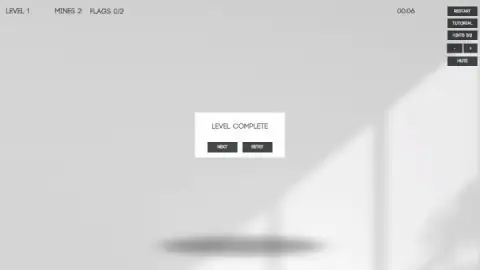
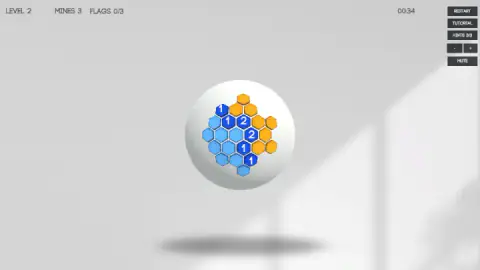
Taken by opening the game ourselves and letting it run — not supplied by the publisher, and not the same picture every other site shows.
How to play Hex Mine 3D
- Close the How to Play table. It lists every rule in six lines. The clock is already running behind it, so do not feel you have lost anything: nothing we saw punishes a slow time.
- Tap an orange tile. The game calls them yellow, but they are the hidden ones. Your first tap opens a patch of the board.
- Read the numbers. Pale blue tiles are empty. Darker blue tiles carry a number: how many mines touch that tile.
- Open everything that must be safe. If a number is already explained by mines you have worked out, its other hidden neighbours are safe.
- Finish the board. A Level Complete panel offers Next and Retry. Hit a mine instead and you get Mine Hit and only Retry.
Tips from our run:
- Do not bother memorising. After Retry or Restart the mines move. The same tap in the centre of level 1 opened four different shapes on four fresh boards.
- Take the first tap without worrying. On at least eight new boards it opened a patch every time and never a mine. That is what we saw, not a promise from the game.
- Do not tap the centre of the globe hoping to spin it. It does nothing to the view, and on a live board it reveals a tile. Rotation is a drag, and our short drags only turned it a little.
- Hints wait for you. Press Hints on an untouched board and the banner says: reveal one tile first, then use hints. The counter stays at 3/3, so a press too early costs nothing.
- Watch the Restart button. It sits at the top of a tight column, right above Tutorial and Hints, and it wipes the board with no question asked. We hit it by accident more than once.
Controls
| Click or tap a tile | Reveals it. An empty tile also opens the tiles around it |
|---|---|
| Drag on the globe | Rotates the planet |
| Right click or long press | Places a flag, according to the cover screen; we did not try it |
| Hints button | Uses one of three hints, which the game's listing says shows a safe tile. It refuses until you have revealed a tile |
| Minus and plus buttons | Change the size of the globe on screen |
| Restart, Tutorial and Mute buttons | Deal a fresh board, reopen the How to Play table, and silence the game |
Features
- Minesweeper rules on hexagons: each number counts mines among up to six touching tiles, not eight
- The first level has 21 tiles and two mines; the second has 23 tiles and three
- The first tap on a new board opened a patch of tiles every time we tried it, at least eight boards in a row
- The mines move: the same centre tap on level 1 opened a different shape on four fresh boards
- One wrong tap ends the attempt, with a Mine Hit panel and a single Retry button
- Three hints shown at the top right, and the Hints button refuses to work on an untouched board
- A running clock, which keeps counting behind the How to Play table
Game details
- Developer
- Lucas Entertainment Studio
- Release date
- June 2026
- Last updated
- October 29, 2026
- Added here
- April 2026
- Technology
- HTML5 (3D)
- Platforms
- Browser (desktop, mouse), Browser (mobile & tablet, touch, landscape or portrait)
- Saved progress
- Saving, when available, is managed by this game. Mava cannot confirm your level.
FAQ
How do you play Hex Mine 3D?
Tap an orange hex tile on the globe to reveal it. Blue tiles are safe, a number shows how many mines touch that tile, and a dark tile is a mine that ends the attempt. Use the numbers to work out which hidden tiles are safe, and keep opening them until the Level Complete panel appears.
Do you have to flag the mines to win Hex Mine 3D?
On level 1, no. We finished it with no flags placed, and the counter still read 0/2 behind the Level Complete panel. The game's description says to flag every mine, so flags may matter more later, but on the levels we saw they work as notes to yourself.
How do you place a flag in Hex Mine 3D?
The in-game table only says that a flag marks a suspected mine, and there is no flag button on screen. The cover screen says long press or right click. We did not place one ourselves, so that part comes from the distributor and not from our session.
What do the hints do in Hex Mine 3D?
You start with three, shown as Hints 3/3. Press the button before you have opened a tile and the game answers: reveal one tile first, then use hints. The game's listing says a hint shows one safe tile. We never spent one, so we cannot confirm that.
What happens when you hit a mine in Hex Mine 3D?
The mines turn dark, the tiles fly off the globe and a Mine Hit panel appears with one button, Retry. Retry puts you back at the start of the same level with the clock at zero and the mines in new places, so remembering where they were does not help.
How many levels does Hex Mine 3D have?
We do not know. We cleared level 1 and got partway through level 2. The cover art shows a much larger globe with 72 tiles and 18 mines, which hints at where it goes, but we did not see a board like that in play.
Who made Hex Mine 3D and when did it come out?
Hex Mine 3D is by Lucas Entertainment Studio. It was published in June 2026 and last updated in October 2026. When we checked, and it is in English only.
Can you play Hex Mine 3D on a phone?
It is listed for Android and iOS as well as PC, in both landscape and portrait, and its instructions use the word tap. We played with a mouse on a computer, so we have not tried dragging the globe with a finger.