











About My Phone Store
Most shop tycoons start you behind a counter with a few coins and a customer already walking in. My Phone Store starts with neither. You get an empty shop floor, a price painted on it and a cash counter that reads 0. In our ten minutes with it, that counter never moved.
That is the honest headline, and it is useful. My Phone Store is not a clicker where you tap a button and watch money climb. It is a walk-around tycoon: you steer a small shopkeeper on foot, and money appears when you go to the right place, not when you click on things. If you miss the first step, nothing else happens.
The game describes the arc it is aiming for. You make smartphones, laptops and tablets, sell them to customers, improve production and turn a small store into an electronics business. We saw none of that part. What we did see was the opening: the empty shop, the first job, the money waiting on the floor and the boost button that shows up a minute in.
The game is credited to Dmitriy Kurylev, who has made several shop-builders on the same pattern. It was listed in March 2026, updated in late October.
The first desk costs $50, and you start with nothing
Every shop in this kind of game opens the same way: one price on the floor and less money than it asks. In My Phone Store the price is $50 and you have 0, so the whole first minute is about getting from one to the other.
The loop behind it is a common one on phones, sometimes called an idle arcade game. You walk over cash to pick it up, then stand on a priced square on the floor and the money drains into it until the object is built. Later, staff and machines do the walking for you. The game does not explain any of this. It just shows you a price, an arrow and a pile of notes, and expects you to connect them.
It is worth comparing with My Bakery, the same developer's bakery on the same pattern. There the first counter cost 5 and we had 1 to spend. Here the gap is bigger, and the pile on the floor is the only money in sight.
What the empty shop shows you
The view looks down on the store from above at an angle and slides along as the character moves, so you see part of the shop at a time.
Inside, the floor is white tiles with cream walls. The front of the shop has two blue glass windows with posters in them, either side of the doorway, and a potted plant at each window. On the left is a separate area with a purple floor and more red rope posts. To the right of the shop lies a large green area that looks like space for later.
Outside, a line of posts with red rope runs along the grey pavement. It is the kind of queue barrier you see outside phone shops on launch days, set up before there is anything to sell. In our session nobody stood in it but us.
The screen itself stays simple. The task label sits at the top centre with a small magnifier icon. The cash counter and a settings gear sit at the top right, and later the x2Boost button joins them. There was no timer, no customer count and no level number.
What the game promises and we did not see
The game's own description talks about building smartphones, laptops and tablets, improving production, selling to customers and expanding the shop. That is three product lines and a production side, which is more than a simple sell-from-a-shelf tycoon.
We cannot confirm any of it. In our session no desk was built, no customer came in, no device appeared on screen and no upgrade was offered. We do not know how many products there are, how big the shop gets, or whether the game has an end. We also played only on a computer, not on the phones and tablets it is listed for.
Who it is for
My Phone Store suits players who like slow growth with no clock and no opponent: a shop that fills up step by step while you walk it. Nothing in our session threatened to end the game.
The catch is the start. You get one label, one arrow and one pile of money, and no words on how they fit. If you want a game that tells you which button does what, expect to spend a minute working out the first step. Once you know the money is on the floor, it should be quick.
More shop-builders from Dmitriy Kurylev
My Bakery runs the same opening with cakes instead of phones. Gas Station Simulator builds a business from fuel pumps and passing cars, and Trash Master turns the idea into a recycling plant. For tycoons where the money climbs on its own, browse our idle and clicker shelf.
Screenshots
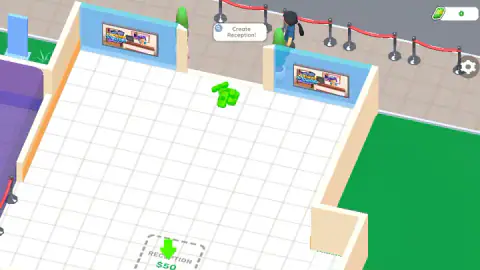
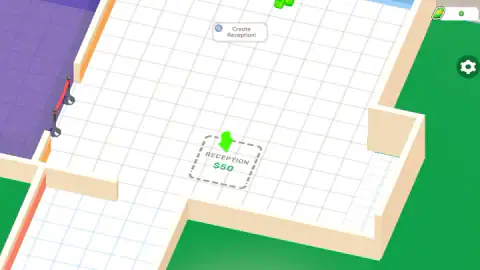
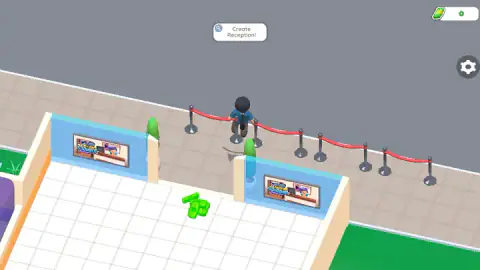
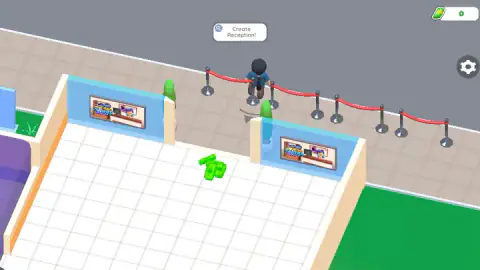
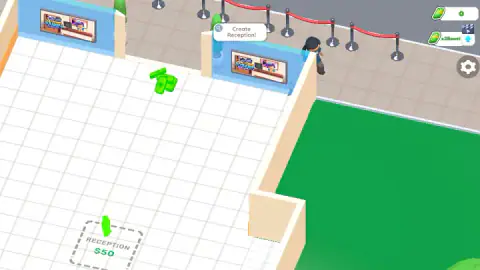
Taken by opening the game ourselves and letting it run — not supplied by the publisher, and not the same picture every other site shows.
How to play My Phone Store
- Click into the game. After the opening screens you are already standing at the shop's doorway, in control of your character.
- Move the shopkeeper. The instructions say WASD or the mouse on a computer, and your finger on a phone.
- Read the label at the top. It names your current job. At the start it says Create Reception! and it stays there until that job is done.
- Find the dashed square. A green arrow bobs over a dashed square on the white floor marked RECEPTION and $50. That is where your first desk goes.
- Pay and grow. Once you have the money and stand on the square, the desk should go up. According to the game, customers, devices and upgrades follow.
What our ten minutes taught us:
- The money is on the floor. A glowing stack of green banknotes lies a few steps inside the door, between the two shop windows. It was there from the first second to the last, and so was our 0. Walk through it before anything else.
- Stay inside. Our shopkeeper drifted out of the door and along the rope queue on the pavement, and spent most of the session there. Nothing outside the shop paid anything.
- The square is out of sight. The reception square sits in the far corner of the floor, often off screen. The green arrow over it is the thing to look for when the view slides around.
- The boost can wait. An x2Boost button with a film-clapper icon appears under the cash after about a minute. The clapper usually means a video advert. You do not need it to start.
Controls
| WASD keys or the mouse | Walk your shopkeeper around the store, according to the game's instructions |
|---|---|
| Click and drag | What we used on a computer; the character ended up walking along the queue outside the shop |
| Touch (phone or tablet) | Walks the character with your finger, according to the game's instructions |
| Create Reception! label | The task label at the top of the screen that names your next job |
Features
- An empty phone shop seen from above at an angle: white tiled floor, blue glass shop windows with posters, potted plants and a rope queue line outside
- The first job is a reception desk, marked on the floor as a dashed square with the price $50 and a green arrow over it
- A glowing pile of green banknotes lies just inside the shop door from the very first second
- Your cash sits in the top-right corner and starts at 0
- An x2Boost button with a film-clapper icon appears under the cash after about a minute
- The game says you go on to make smartphones, laptops and tablets, sell them to customers and reinvest the money
Game details
- Developer
- Dmitriy Kurylev
- Release date
- March 2026
- Last updated
- October 29, 2026
- Added here
- December 2025
- Technology
- HTML5 (3D)
- Platforms
- Browser (desktop, mouse or keyboard), Browser (mobile & tablet, touch)
- Classification
- Clicker , Simulation , Strategy
- Saved progress
- Saving, when available, is managed by this game. Mava cannot confirm your level.
FAQ
How do you play My Phone Store?
You walk a shopkeeper around an empty phone shop, with WASD or the mouse on a computer and your finger on a phone. A label at the top of the screen names your next job, which at the start is Create Reception!, and a green arrow points at a dashed square on the floor where the reception desk goes. The game says that afterwards you make smartphones, laptops and tablets, sell them and spend the money on a bigger store.
How much does the reception desk cost in My Phone Store?
The dashed square for the first reception desk reads $50. You start with 0 in the cash counter at the top right, so you have to find money before you can build anything.
Why is my money stuck at 0 in My Phone Store?
It stayed at 0 for our whole ten-minute session too. The only money we saw was a glowing pile of green banknotes on the floor just inside the shop door, and our character never walked across it. Go to that pile first, then to the dashed $50 square.
What does the x2Boost button do in My Phone Store?
It appears under the cash counter after about a minute of play and carries a small film-clapper icon. In browser games that icon usually means you watch a video advert to get the bonus, and the name suggests it doubles your earnings for a while. We did not press it, so we cannot confirm what it gives or for how long.
Who made My Phone Store?
The game is credited to Dmitriy Kurylev, who also made My Bakery, Gas Station Simulator and Trash Master. My Phone Store was published in March 2026 and last updated in October 2026.
Can you play My Phone Store on a phone?
It is listed for PC, Android and iOS, in both landscape and portrait, and the instructions say to control it with your finger on a phone. We played it on a computer, so we cannot tell you how it feels on a small screen.
Do you make the phones yourself in My Phone Store?
The game's own description says you build smartphones, laptops and tablets, improve production and sell them to customers. We never got that far: in our session the shop had no desk, no stock and no customers, so we cannot describe how the making works.