










About Juice Tycoon
Most tycoon games start you with a menu: buy a stand, set a price, press a button and watch the money tick up. Juice Tycoon starts you with a single orange tree and a pair of legs. Nothing in the opening is clicked. You walk to the fruit, you carry it, you walk it to the machine, and the business only grows as fast as you do.
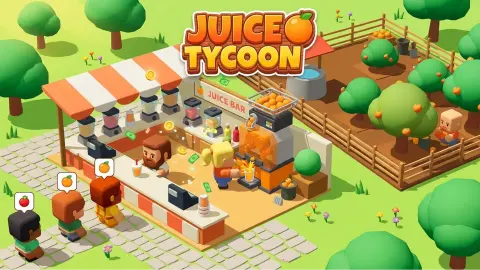
The game is seen from above in soft, rounded 3D. On the left stands a small Juice Bar with a shelf of bottles in several colours and a striped awning over the counter. A queue of blocky customers waits in front of it, and each one has a little orange in a speech bubble. On the right is a fenced patch of dirt with one orange tree in it, a stone well, a crate of oranges by a dark barrel, and a green circle with a sign that reads Orange Tree $50.
It is made by SilentStorm313. It was published on 20 July 2026 and updated a day later. We played the opening on 29 September and got exactly as far as the second instruction, which turned out to be the instructive part.
Four oranges and a long walk
In our run the tracker read 2 of 13 in the first seconds and 4 of 13 a minute later. Then it stayed there for the rest of the session. Our character had four oranges stacked on its back, the green banner was telling us to bring fruit to its machine, and we spent the next three minutes walking around the orchard without handing a single orange over.
Looking back at the screens, the orchard is full of rings that look like drop zones: one by the well, one by the crate and the barrel in the far corner. We hung around that corner longest and nothing happened. The station we never reached is on the other side of the fence, on the bar's counter, with the same orange drawn above it that the customers have in their speech bubbles. We cannot promise it is the one the banner means, because we never got there. But it is the match the screen points to: the fruit on your back, the fruit over the machine, the fruit in the bubble.
So the coin counter never left zero for us, and neither did the star counter, which reads 0 of 16 from the first second. We never saw what fills it. We did not serve a customer, buy the $50 tree, see a second kind of fruit, or reach the staff and machine upgrades that the game's description promises. What we can describe from experience is the first minutes, which is where everyone starts and where the game teaches with one green banner and nothing else.
Why you walk everywhere: the arcade idle formula
Juice Tycoon belongs to a family of games usually called arcade idle. They mix two older kinds of game. From idle games they take the slow climb, where money buys things that make more money. From arcade games they take a character you steer by hand, so the money only comes in while you are moving.
The trick that holds the genre together is the ring on the floor. Instead of menus, every action is a place: stand here to pick, stand there to drop, walk onto the green plot to buy a tree. That is why the game's instructions talk about walking into areas rather than pressing anything, and why our clicks on the fruit did nothing. It also explains the stack on your back. Carrying is the work, and the height of the pile shows you how much work you are doing.
The second half of the formula is what the coins are for. In these games the first purchases are almost always more of the same, a second tree or a second counter, and later ones are helpers that do the walking for you. When the game's description says you can hire staff, that is the point where an arcade idle game starts to play itself and you become the manager instead of the runner.
Who it is for
Juice Tycoon suits players who like tidy, quiet loops: pick, carry, drop, and watch a number grow. In what we played there was no timer and no way to lose, and the customers waited patiently in their queue.
It is not a cooking game in the usual sense. You do not chop, mix or follow a recipe; a machine makes the juice. If you want an orchard you plan rather than walk, this is not it. And if the slow start puts you off, know that the opening is the part of the game where you do everything by hand, and the description promises help later.
More management games to try
Capy Cafe uses the same idea with drinks and a capybara: walk up to a station and your character gets to work, then hire helpers. Trash Master swaps the orchard for a scrap yard and your legs for a truck, with a machine that presses the load into blocks. Gas Station Simulator grows a fuel station from one pump, and Chef Tycoon runs a restaurant against the clock. More kitchen and food games are in the cooking category.
Screenshots
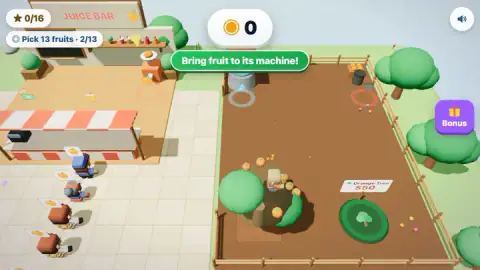
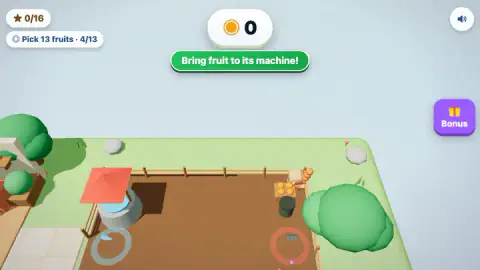
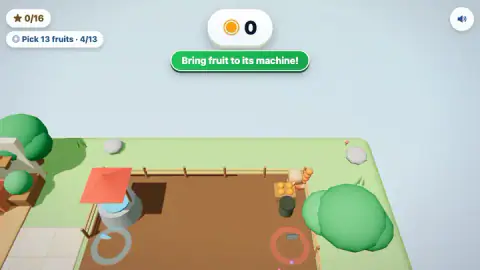
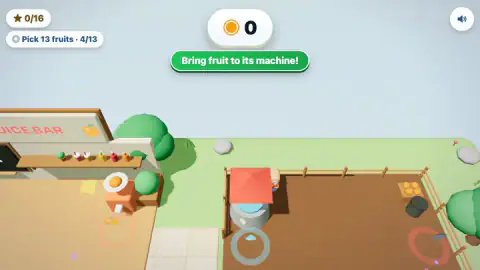
Taken by opening the game ourselves and letting it run — not supplied by the publisher, and not the same picture every other site shows.
How to play Juice Tycoon
- Move your character with the arrow keys or WASD on a computer. On a phone, drag anywhere on the screen and a virtual joystick appears.
- Walk around the orange tree. Fruit falls, and the Pick 13 fruits tracker in the top left corner goes up as you collect it. The oranges pile up on your character's back.
- When the green banner says Bring fruit to its machine!, carry the oranges to the machine for that fruit and walk into the ring on the floor in front of it. The station on the bar's counter has an orange icon above it.
- Juice goes to the customers in the queue, and selling it fills the coin counter at the top of the screen.
- Spend the coins on the plots around the orchard, starting with the second orange tree for $50.
Tips from our run:
- There is no action button. We clicked on the oranges several times and pressed Enter, and the tracker did not move. Everything in this game is done by walking: into the tree's reach to pick, into a ring to drop off.
- Read the rings, not the objects. Every station has a ring painted on the floor: pale red in front of the juicer, grey with a water drop by the well, red with a grate by the crate. The ring is the button.
- "Its machine" means the fruit's own machine. The station at the bar carries an orange icon. The shelf behind it holds bottles in other colours, which suggests each new fruit will get a machine of its own.
- Stop picking and start carrying. The fruit tracker only counts picking. Once we had four oranges on our back it stayed at 4 of 13 for the rest of our run, and the coin counter stayed at zero, because none of that fruit reached a machine.
Controls
| Arrow keys or WASD | Walk your character around the orchard and the juice bar |
|---|---|
| Mouse (click and drag) | According to the game's instructions, another way to walk on a computer; single clicks on fruit did nothing in our run |
| Finger (phone or tablet) | According to the game's instructions, touch and drag anywhere to use a virtual joystick |
| Walking into a ring on the floor | Interacts with what stands there, such as a machine, a crate or a plot for sale; there is no action button |
Features
- A small juice bar and a fenced orchard side by side, seen from above in soft, rounded 3D
- Oranges are picked by walking around the tree, and they stack up on your character's back as you carry them
- A task tracker in the top left corner, starting with "Pick 13 fruits", and a star counter out of 16 above it
- Customers queue at the counter with the fruit they want shown in a speech bubble; in the opening every bubble was an orange
- A second orange tree is for sale on a green plot marked $50, the first thing your coins can buy
- Bottles in several colours on the bar's shelf hint at the fruits still to come
- Made by SilentStorm313, listed in July 2026
Game details
- Developer
- SilentStorm313
- Release date
- July 2026
- Last updated
- July 21, 2026
- Added here
- June 2026
- Technology
- HTML5 (3D)
- Platforms
- Browser (desktop, keyboard & mouse), Browser (mobile & tablet, touch)
- Saved progress
- Saving, when available, is managed by this game. Mava cannot confirm your level.
FAQ
How do you play Juice Tycoon?
You walk a small character around a fenced orchard, pick the oranges that fall from the tree, and carry them to the juicer on the counter of your juice bar. Customers queue in front of the bar with the fruit they want in a speech bubble. Selling juice earns coins, which buy more trees and, according to the game's description, staff and faster machines.
What are the controls in Juice Tycoon?
On a computer you walk with the arrow keys or WASD, and the game's instructions say clicking and dragging the mouse also works. On a phone or tablet you drag anywhere on the screen to use a virtual joystick. There is no button to pick or drop fruit; you walk into the ring on the floor in front of each object.
What does "Bring fruit to its machine" mean in Juice Tycoon?
It is the second step of the tutorial, shown in a green banner once you are carrying fruit. The game wants the fruit on your back taken to the machine for that fruit, and you hand it over by walking into the ring on the floor in front of the machine. In our run the station marked with an orange icon stood on the counter of the juice bar, outside the orchard fence.
How much does a new tree cost in Juice Tycoon?
The first one on offer is a second orange tree, for sale on a green plot inside the orchard with a sign that reads $50. Coins come from selling juice, so you need to serve a few customers before you can buy it. The coin counter sits at the top of the screen.
Who made Juice Tycoon?
Juice Tycoon is by SilentStorm313. It was published on 20 July 2026 and updated the next day.
Is this Juice Tycoon the same as Fruit Juice Tycoon on Roblox?
No. Fruit Juice Tycoon is a separate game on Roblox. This Juice Tycoon is a browser game you play on our page with no download, sign-in or Roblox account, built around one character carrying fruit by hand between an orchard and a juice bar.
Can you play Juice Tycoon on a phone?
Yes. The game is listed for desktop, mobile and tablet, and on a touch screen you steer with a virtual joystick by dragging anywhere. The whole orchard and the bar fit on one screen, so you rarely need to look for where to go next.