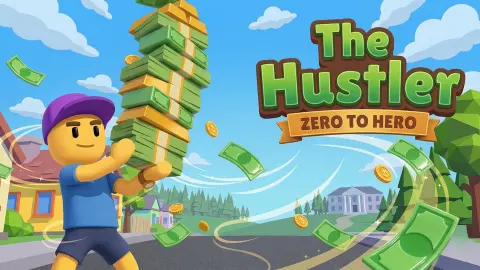










About The Hustler
Most tycoon games hand you a counter that climbs from the first second, so you always feel something is happening. The Hustler made us earn the first coin, and we never did. In ten minutes of walking around its little suburban block, our cash counter read 50 from the first second to the last.
That is worth knowing before you start, because it says what kind of game this is. The Hustler is not a clicker where you tap a button for money. It is one of the walk-around tycoons: you steer a small character on foot through a 3D street, and the money comes from being in the right place, not from clicking.
The game describes the arc it is aiming for: you start with nothing, stack supplies, keep queues of customers moving, and spend what you collect on walking faster, carrying more and opening new shops, until you have workers doing the running for you. We saw none of that part. What we did see was the opening block, the arrows that guide you through it, and a fair number of adverts.
It is made by shamaa games. It was published in July 2026 and updated in October 2026.
Reading the screen before you run
The Hustler shows a lot of small symbols from the first second, and none of them are explained. Here is what each one is, from what we saw.
Top left is your money: a green banknote and the number, 50 at the start. Under it sits an orange x2 with a banknote behind it, and under that a green recycle symbol. Each has a tiny film clapperboard beside it. In browser games that clapperboard is the sign for a rewarded advert, a video you choose to watch in exchange for a bonus. So these two read as boosters paid for with a video, not with cash. We did not press them.
On the street you will find two kinds of marker. The blue arrow with a person outline marks the white square where you should stand. A round green badge with a white rim and a drawing of a brush or swatter sits on the road further along. We never found out what task it starts.
At your feet, the blue chevron points the way. It is easy to mistake for part of the character at first, since it moves with them, but it changes direction as your goal changes.
Top right is a speaker button for the sound.
What the game promises after the first shop
Games like this one, often called stack and carry tycoons on phones, all share a loop. You physically walk stock from a supply point to a counter, customers buy it, and the cash they leave stacks up on the floor until you walk over it. Every upgrade either makes the walk shorter, the stack taller or the character faster. Later, workers take over the walking, and your job turns into choosing what to build next.
The Hustler describes exactly that loop: supplies to stack, queues to keep moving, cash to collect, and speed, carrying capacity and new shops to buy. It also mentions managing workers. The original instructions even talk about moving around the restaurant, which hints at the first business. We cannot confirm any of it, since we never got past the opening square.
What we can say is that the setting is not a shop floor but a whole street: two brick houses with white roller garage doors, a road with a yellow centre line, lawns and a yard of orange flagstones. Whatever you build, you will be walking between buildings, not around a single room.
How the adverts work
The Hustler leans on adverts more than most tycoons we have played. Besides the two video boosters and the cash pile with a clapperboard, there is the AD after counter in the bottom left. We saw it count down from as high as 9, and when it ran out, the screen dimmed.
In our session that happened four times. Once a full advert screen appeared, and three times a note appeared saying it had skipped the ad this time, with a purple Continue playing button. Either way you lose a few seconds. If the counter is on 1, finish what you are doing before you start a long walk.
Is this The Hustler with Paul Newman?
No. Search for the name and most results are the 1961 film about a pool player, starring Paul Newman. This game has nothing to do with pool. It uses hustler in its everyday sense, someone who works long hours on the side to get ahead, and the whole game is about that grind.
More tycoons to run on foot
If you like the walk-around kind of tycoon, Park Tycoon has you walking around a park you grow, and Juice Tycoon builds a business from picking fruit to selling juice. Animal Care Tycoon puts you on foot looking after animals. For the menu-driven version of a shop empire, there is Idle Supermarket Tycoon. There are more in our clicker and idle games.
Screenshots
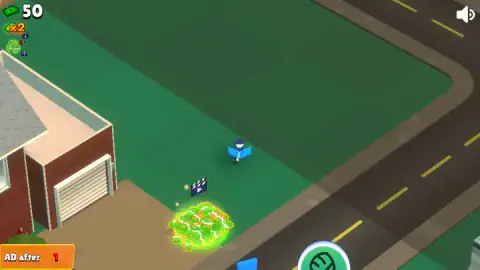
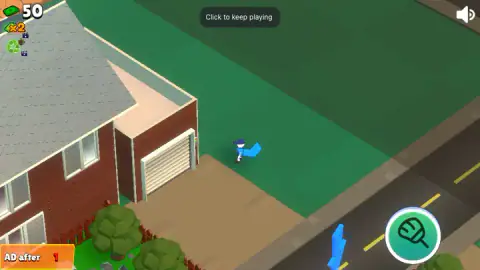
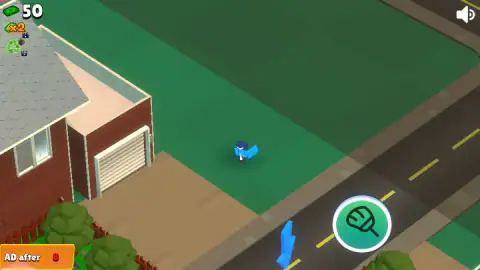
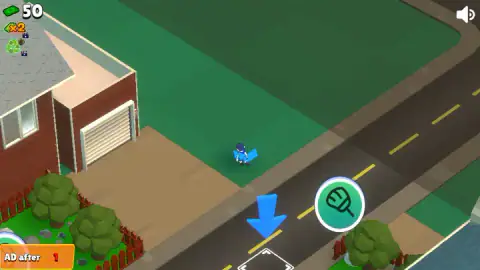
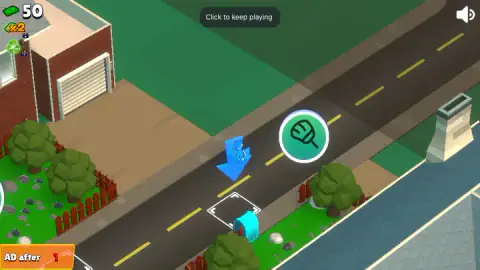
Taken by opening the game ourselves and letting it run — not supplied by the publisher, and not the same picture every other site shows.
How to play The Hustler
- Walk by dragging. Hold the mouse button down and drag in the direction you want to go. The game also lists WASD and the arrow keys, and swiping on a phone. On a computer, dragging is what moved our character.
- Follow the chevron. A blue arrowhead sits at your character's feet and turns as you move. It points at your next goal.
- Stand on the marked square. On the road in front of the first house, a big blue arrow with a person outline inside points down at a white square beside a cyan mailbox. That square is where the game wants you.
- Collect and spend. The game says cash from customers piles up near your shops, and you walk over it to pick it up, then spend it on upgrades and new shops.
- Let the business grow. The longer goal, according to the game, is to hire workers and expand until the hustle runs without you.
Tips from our run:
- Go to the square first. We spent most of our session exploring lawns, a flagstone yard and the space under a roof. None of it moved the counter. The arrows all point at one spot for a reason.
- The roofs do not block you. Walk under a house and its roof turns see-through, so you can keep track of the character. You will not get stuck behind a building.
- Do not chase the glowing pile. The bright green heap of cash on the lawn has a film clapperboard floating over it. We walked right past it twice and our cash did not change.
- Watch the bottom left corner. The orange AD after number counts down to the next advert. When it is on 1, expect the screen to dim soon.
- Click once if it goes quiet. A small Click to keep playing note appeared at the top several times. One click on the game and it carried on.
Controls
| Hold and drag the mouse | Walks the character in the direction you drag (this is how we moved) |
|---|---|
| WASD or arrow keys | Also listed for walking by the game's instructions; we did not get a clear response from them |
| Swipe (phone or tablet) | Walks the character, according to the game's instructions |
| Click the game | Clears the Click to keep playing note when it appears at the top |
Features
- A small 3D suburban block seen from above at an angle: brick houses, a road with a yellow centre line, lawns and a flagstone yard
- A blue chevron at your character's feet turns to point at the next place you should go
- A big blue arrow with a person outline inside marks a square on the road where you are meant to stand
- Your cash sits in the top left corner, with x2 and recycle boosters next to it, each marked with a video clapperboard
- Roofs turn see-through when you walk under them, so you never lose sight of the character
- An orange AD after counter in the bottom left counts down to the next advert
- The game says you grow from nothing to several shops with workers, buying speed and carrying capacity on the way
Game details
- Developer
- shamaa games
- Release date
- July 2026
- Last updated
- October 1, 2026
- Added here
- June 2026
- Technology
- HTML5 (3D)
- Platforms
- Browser (desktop, mouse or keyboard), Browser (mobile & tablet, touch)
- Classification
- Clicker , Simulation , Strategy
- Saved progress
- Saving, when available, is managed by this game. Mava cannot confirm your level.
FAQ
How do you play The Hustler?
You walk a small character around a suburban block, on a computer by dragging the mouse and on a phone by swiping. A blue chevron at your feet points to the next goal, and a big blue arrow marks a square on the road where you should stand. The game says the loop after that is stocking supplies, serving customers and collecting cash to spend on upgrades and new shops.
How do you make money in The Hustler?
According to the game, money comes from serving the customers who queue at your shops, and from collecting the piles of cash they leave. In our ten-minute run we never got the first shop going, and our cash read 50 from the first second to the last. The glowing green cash pile on the lawn has a video clapperboard above it, which usually means it pays out after an advert.
Why is my money not going up in The Hustler?
That is exactly what happened to us. Wandering the block and walking past the cash pile did not change the counter. The one thing the screen keeps pointing at is the white square on the road beside the mailbox, so stand on that square before anything else and wait for something to happen there.
What do the x2 and the clapperboard icons mean in The Hustler?
Under the cash counter sit an orange x2 and a green recycle symbol, each with a small film clapperboard beside it. In browser games the clapperboard means watch an advert for a reward, so these read as boosters you buy with a video rather than with cash. We did not press them, so we cannot confirm what each one gives.
What does AD after mean in The Hustler?
It is an orange counter in the bottom left corner that counts down to the next advert. We saw it at numbers from 9 down to 1, and when it ran out the screen dimmed for an ad. In our run it happened four times, and three of those times the ad was skipped and a Continue playing button brought the game back.
Who made The Hustler?
The Hustler is by shamaa games. It was published in July 2026 and updated in October 2026. It is in English only.
Is The Hustler related to the movie The Hustler?
No. The 1961 film with Paul Newman is about pool, and so are most search results for the name. This game uses hustler in the everyday sense of someone who works hard to get rich, and there is no pool table anywhere in it.
Can you play The Hustler on a phone?
It is listed for PC, Android and iOS, in both landscape and portrait, and the instructions say to swipe to move. We played it on a computer with a mouse, so we cannot tell you how it feels on a small screen.