


About Summer Shore Hustle
Most shop games in a browser are a spreadsheet wearing a nice shirt. You click a stall, a number goes up, you click an upgrade, the number goes up faster, and the distance between the fridge and the counter never means anything, because there is no fridge and there is no counter. Summer Shore Hustle starts from the other end. The first thing it gives you is a pair of eyes, a floor, and a small ring in the middle of the screen to aim with.
That ring is the whole design in one detail. It is a crosshair, the sort of thing you expect in a shooter, and here it is pointed at a watermelon. You are not managing a beach shop from above. You are standing in it, and the stock is a set of objects lying around that somebody — you — has to walk over and pick up.
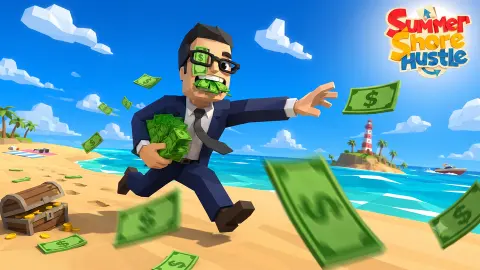
The game opens on the beach itself, a cartoon shore with palm trees, a parasol and a stall, and two buttons: Play and Setting. Press Play and a second panel offers three things: tutorial, GAME and back. Take the tutorial and the beach disappears. What replaces it is a long bare room with a green floor ruled into squares, a pale blue wall running to the horizon, and a readout in the top corner that says $100.
The game is credited to JADU GameStudio, with August 2026 given for both the release and the last update. It.
Our own session lasted about four minutes and never left that training room. We are precise about what that means further down, because a page claiming to have played a game to the end when it did not is worth nothing to you.
A shop you walk around is a different game from a shop you click
In a clicker, every part of your business is the same distance from you: zero. The grill, the till, the crate of melons and the customer are all one tap away, because none of them is anywhere. Your only real resource is money, and the only real question is which number to spend it on.
Put the shopkeeper inside the shop and a second resource appears out of nowhere: where you are standing. The melon is on the floor over there. The crate is along the wall. The customer, when there is one, is somewhere else again. Suddenly the question is not only what to buy but what order to do things in, and the answer is measured in steps.
You can see that decision in the controls before you ever meet a customer. Picking something up and putting it down are two different keys, which means your hands are the inventory. A clicker would never need a drop key, because nothing in a clicker is ever held. Here a thing is either on the floor, on a crate, or in your hands, and getting it from the first state to the third costs you a walk.
That is the genre this belongs to — the first-person job sim, where the fun is in the choreography of a busy shift rather than the arithmetic of an upgrade tree. The provider's control list points the same way: alongside the walk keys it gives a run, a crouch, an alternate interaction and a key for calling a nearby customer over. We did not test those five and we are not confirming them. But a game that needs a key for getting someone's attention is not a game where customers are a line in a ledger.
The tutorial is a room, and that tells you what kind of game this is
Plenty of browser games open with a box of text and an arrow. This one builds you somewhere to practise.
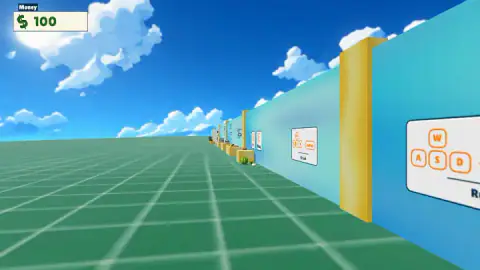
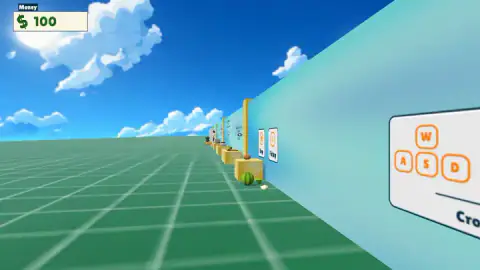
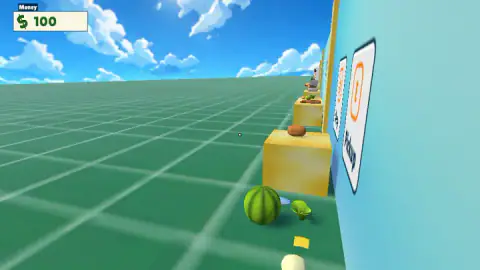
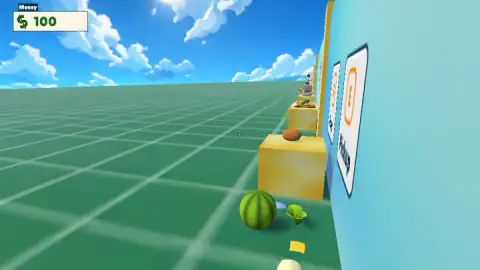
The training room is as plain as it could be made: a flat green floor ruled into big squares, running away to a horizon with nothing on it, under a sky with a sun and a few cartoon clouds. Down the right-hand side there is a pale blue wall with gold pillars set into it. No beach, no crowd, no stall. It is a corridor built out of nothing, and everything in it is there to be read.
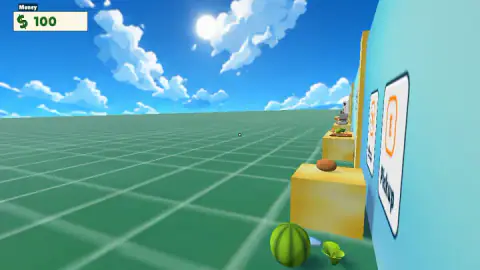
Fixed to the wall are large white cards. One shows four orange keys in the familiar cross — W on top, A, S and D beneath — with a word printed under them that the edge of our screen kept cutting off. Further along, a card tilted almost sideways carries a single big orange key with PICKUP printed under it in capitals, and another card sits just behind that one.
And then there is the stock. A row of yellow cubes the height of a table runs along the wall, one carrying a brown bread roll, the next a green salad on a wooden board. On the floor in front of them lie a watermelon, a leafy green vegetable, a square of cheese and an egg, all of them loose, all of them separate things rather than part of the scenery.
Consider what that arrangement is teaching, because it is not a list of keys. It is teaching you that food here is physical — that it sits somewhere, that it can be on a surface or on the ground, and that moving it is a thing you do with your body. A pop-up box could give you the pick-up key in one line. It could not tell you that.
What four minutes bought us, and what they did not
We played one session of about four minutes. We clicked through the beach screen, opened the panel, chose the tutorial and walked the length of the training room, from the far end where the crates are distant specks to the point where one of them fills a third of the view. We read the cards. We stood over the loose food, tried to pick it up and failed. The money readout said $100 in our first picture and $100 in our last.
What we never reached: the GAME option on that panel, the beach shop, a counter, a customer, a cooking station, a sale. We do not know what the food sells for, what you can cook, or what happens when you run the $100 down. Nobody should take a sentence from this page as a description of any of that, because there isn't one.
What we can tell you is the part most pages skip: how the game asks to be held. It is first person, it is keyboard, it rewards standing in the right place, and it thinks the way you move around your shop is worth a whole room of teaching. For a free browser game about selling melons on a beach, that is a more ambitious answer than the genre usually gives.
More management on Mava Games
If what appeals here is being responsible for a small business rather than watching a counter tick, Animal Care Tycoon runs a vet's practice in three dimensions. Machine Eater is management of a harder kind, with resources to balance and something coming for you. And Jurassic Merge: Dino Evolution trades the shop floor for a merge board if you would rather plan than walk. We have not played those three as far as we would like, so treat them as signposts. The rest of the shelf is in strategy games.
Screenshots
How to play Summer Shore Hustle
- From the beach screen, press Play. A second panel appears with three options: tutorial, GAME and back.
- Take the tutorial first. It puts you in a training room with the keys printed on cards along the wall, and nothing in there can go wrong.
- Walk with W, A, S and D. There is no character on screen and no hands in front of you — the view simply travels, and that is you moving.
- Keep the crosshair on what you want. The ring in the middle of the screen is the only pointer the game gives you, and the cards on the wall are about things you stand next to, not things you click.
- Walk up to the loose food by the crates and use the pick up key the wall card shows you. Putting something down again is a second, separate key.
What we only learned by being there:
- Clicking is wasted effort. We spent eleven clicks on a watermelon, a lettuce and a row of crates and the game answered none of them. If you are used to browser shop games, this habit will cost you your first minute.
- We could not make the pick-up work, and we are not going to pretend otherwise. We stood over the food beside the sign that says PICKUP and pressed the key, and the melon stayed where it was. Our best guess is standing closer or aiming the crosshair properly, which is itself the lesson: here, position is an input.
- The tutorial is free. The readout said $100 when we arrived in the training room and $100 when we left. Nothing in there spends and nothing in there earns, so there is no reason to rush it.
- Read the wall as you go. The cards are spread down the length of the room, so walking past them is how you read them and walking back is how you re-read one you missed.
Controls
| W, A, S and D | Walk. We held W and D and the view travelled down the training room, from the far end to the crates. This is how you get anywhere in the game |
|---|---|
| The crosshair in the middle of the screen | A small ring sits dead centre of every frame. It is the aiming point you line up on things, and besides the money readout it is the only thing drawn over the world |
| The key on the Pickup card | Picks things up, according to the sign on the training room wall. We stood over the watermelon and pressed it and nothing left the floor, so we can show you the sign but not make it work |
| Clicking on an object | Nothing at all. We clicked on the watermelon, the lettuce and the crates eleven times across four minutes and the game never answered. This is a keyboard game |
| Shift, Ctrl, F, P and X | The provider's control list gives these as run, crouch, an alternate interaction, pause and calling a customer over. We did not test any of the five and we are not confirming them |
| Play, on the beach title screen | Opens a second panel with three choices: tutorial, GAME and back. We took the tutorial and never came back for the other one |
Features
- First person all the way through: no character on screen, no hands, just a crosshair in the middle and a money readout in the corner
- A separate training room before the shop — a plain green floor and a blue wall hung with cards that teach the keys, with nothing on the line while you learn
- The money panel reads $100 from the first second of the tutorial, and the tutorial does not charge you a penny of it
- Stock is modelled as individual things you walk up to: a watermelon, a lettuce, a slice of cheese and an egg on the floor, a bread roll and a salad on the crates
- Pick up and drop are two different keys, so what you can carry is what your hands can hold rather than a list in a menu
- Keyboard and mouse-look, not point and click: every pointer click we spent on an object was wasted
- Credited to JADU GameStudio, with the listing giving August 2026 for both the release and the last update
Game details
- Developer
- JADU GameStudio
- Release date
- August 2026
- Last updated
- October 24, 2026
- Added here
- June 2026
- Technology
- HTML5
- Platforms
- Browser (desktop), Browser (mobile & tablet, touch)
- Classification
- Strategy
- Saved progress
- Saving, when available, is managed by this game. Mava cannot confirm your level.
FAQ
What kind of game is Summer Shore Hustle?
It is a free first-person shop game set on a beach, played in a browser. Instead of running the business from a menu, you are inside it: you walk around on your own two feet, you carry the stock in your hands, and the only things drawn over the world are a small crosshair in the middle of the screen and a money readout in the top left corner. It opens on a beach scene with palm trees and a stall, and a Play button that leads to a tutorial and to the shop itself.
How do you play Summer Shore Hustle?
You move with W, A, S and D and you aim with the crosshair in the centre of the screen. Picking a thing up and putting it down are two separate keys, which the game teaches you on cards fixed to the wall of a training room before it lets you near a customer. The money counter in the corner starts at $100. We never got further than the training room, so what we can tell you about is the handling, not the trade.
Is Summer Shore Hustle played with the mouse or the keyboard?
The keyboard. We spent a good part of our session clicking directly on a watermelon, a lettuce and a row of crates, and the game ignored every single click. Nothing in it behaves like a point-and-click shop game. The movement keys are the ones drawn on the wall in the tutorial, and the mouse is there to look around and keep the crosshair on what you want.
Does Summer Shore Hustle have a tutorial?
Yes, and it is a proper one. Pressing Play opens a panel with three choices — tutorial, GAME and back — and the tutorial is not a pop-up box but a whole room: a flat green floor, a pale blue wall, large white cards showing the keys, and a row of crates with real food on them to practise on. You can skip straight to the shop instead, but the room exists because almost everything in this game is done by walking up to something.
How much money do you start with in Summer Shore Hustle?
The readout in the top left corner says $100 and it is already there in the first moments of the tutorial. It did not move once while we were learning, which is the useful part: practising in the training room costs you nothing. What that $100 is for in the shop itself, we cannot tell you, because we never reached the shop.
Who made Summer Shore Hustle and when did it come out?
It is credited to JADU GameStudio, whose page on the same platform lists this as its only game. The listing gives August 2026 both for the release and for the most recent update; only the month is printed anywhere we could find, never a day, which is why this page does not claim a precise date.
How far did you get in Summer Shore Hustle?
Not far, and we would rather say so than round it up. Our session ran about four minutes and all of it happened inside the training room. We walked the length of it, read the cards on the wall, stood over the loose food and failed to lift any of it. We never took the GAME option, never saw the beach shop, never met a customer and never watched the money change.
Can you play Summer Shore Hustle on a phone?
We played it on a desktop with a keyboard and a mouse, and every control the game showed us is a keyboard control. We did not test it on a touchscreen, so we will not promise you it works on one. If you have the choice, play it on something with W, A, S and D.