










About Farm mart
Most shop games hand you a menu. You tap Buy, a box pops up, the counter appears. Farm mart has no menu at all. Every purchase is a white outline on the ground with a price floating over it, and the only way to pay is to walk your farmer onto it and stand there while the money drains out of your pocket.
That one idea shapes the whole game. Your hands never leave the movement keys, so building the shop and running it are the same activity: walking. The farm, the shelves and the till are all places, and the skill is in the route you take between them. It is the same design as the walk-and-stack tycoon games that fill phone charts, here dressed as a little farm shop seen from above at an angle.
Farm mart is a new release from a developer listed only as mx. It arrived in October 2026, in English and Russian, and plays on a computer or a phone.
We should be clear about how far we got. In our run we bought the cashbox and paid part of the first carrot rack, which is the very start of the game. Everything below about the opening is what we saw; anything about the later shop comes from the game's own instructions and is labelled that way.
Why you pay by standing still
The stand-on-it purchase is the signature of a family of mobile games often called idle arcade or hyper-casual tycoons. The point of it is that buying never interrupts moving. There is no screen to open and close, so you never stop looking at your shop, and paying feels like work your character is doing rather than a form you are filling in.
It also explains why the money drains slowly instead of vanishing in one go. You watch the price tick down, the green fill spread through the outline, and you feel each coin leave. In our run the cashbox tile went from 100 to 80 and then to 13 over a few visits, and our cash fell by the same amount each time. Nothing is charged twice and nothing is lost on the way: when the tile hit zero, the cashbox had cost exactly its price.
The one thing the game does not explain is that the banner is not a button. Players coming from menu-driven shop games will try to click it first. That is the only real stumbling block in the opening, and once you know it, the rest follows the arrow.
What you start with, and what comes next
The opening lot is small and bare. You get a paved yard with a green fence and trees behind it, a blue bin by the gate, two empty beds edged in pink, and 350 in cash in the top left corner. A progress bar runs along the top at 0%, and a gear for the settings sits in the top right.
The first two goals are fixed:
| Goal | Price | What appears |
|---|---|---|
| Buy the cashbox | 100 | A counter with a cash register and two potted plants |
| Buy a carrot rack | 200 | A shelf for carrots (we paid part of it, down to 130) |
Buying the cashbox moved the progress bar to 3%, which tells you how much shop is still to come. The game's description talks about planting crops, looking after animals, upgrading the store and hiring staff. We did not reach any of those, so we cannot tell you what they cost or how long they take.
The instructions add one warning worth taking seriously: there is no pause button. While you are finishing one job, the next one is waiting. In a game where every action is a walk, that means the shop is really a timing puzzle about which corner of the farm to visit next.
Who Farm mart is for
It suits anyone who likes the calm, tidy growth of a tycoon game without spreadsheets. There is no reading beyond one short banner, no menus, and the controls are the four movement keys. A child can play it from the first second, which also makes it a good one to share on a tablet in portrait mode.
It is not a deep management sim. You do not set prices or choose what to stock; the game picks the next goal for you. If you want to plan an economy, look further up the list below. If you want a quiet loop of walking, paying and watching a shop fill in, this is that.
More farm and shop games
Agrarian Magnate puts the farm, the processing and the store in your hands, with more decisions than Farm mart. Busy Bites Tycoon uses the same carry-and-serve idea in a restaurant, starting from one empty counter. Harvest Rush is all fields, from the seat of a combine harvester. For another owner's story, try Sneaker Factory!, or browse the rest of our strategy games.
Screenshots
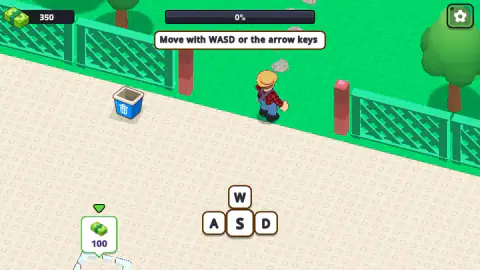
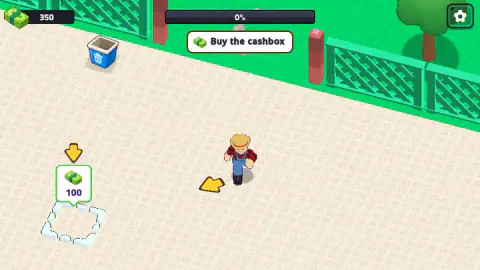
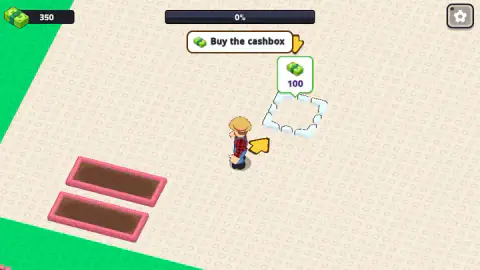
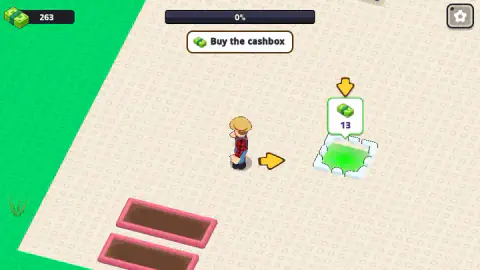
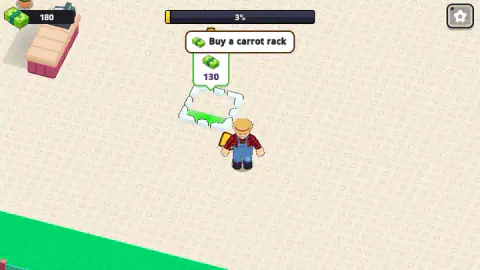
Taken by opening the game ourselves and letting it run — not supplied by the publisher, and not the same picture every other site shows.
How to play Farm mart
- Walk the farmer with WASD or the arrow keys. The first screen shows the four keys and tells you exactly that.
- Read the banner at the top. It always names one goal, starting with Buy the cashbox, and a yellow arrow points to where it is.
- Stand on the price tile. The number over it counts down as your cash goes in, and the white outline fills with green as you pay.
- Wait for zero. The cashbox appears as a pink counter with a till on it, the progress bar ticks up, and the banner moves on to Buy a carrot rack.
- Run the shop. The game's instructions describe the loop from here: collect the harvest by standing next to it, carry it to the shelves, and wait at the cashier to take the customers' money.
Tips from our run:
- Clicking the banner does nothing. Buy the cashbox looks like a button, but it is only a label. Our first attempt spent ten minutes clicking it with the cash stuck at 350. The tile on the ground is the only way in.
- Stand still on the tile. Payment only flows while you are on it. Walk across it quickly and you pay a few coins at a time; at one point we left the cashbox at 92 after a brief pass.
- Half-paid stays half-paid. You do not lose money by walking away. The tile keeps the lower price, so you can top it up later.
- Spend your starting cash in order. The cashbox costs 100 and the carrot rack 200, which leaves you just 50 for whatever comes next. Do not expect to buy ahead.
- Follow the arrow, not the scenery. Two empty planting beds sit near the start and look like the obvious first job. The banner asks for the cashbox first, so that is where the arrow points.
Controls
| W A S D or arrow keys | Walk the farmer around the farm and shop (the game shows this on its first screen) |
|---|---|
| Stand on a price tile | Pay for the counter, rack or field drawn under it, a little at a time |
| Drag with the left mouse button or a finger | Walk the farmer, according to the game's own instructions |
| Gear button (top right) | Opens the settings |
Features
- You start with 350 in cash, an empty paved lot, two bare planting beds and a farmer in a checked shirt
- Nothing is bought from a menu: you walk onto a price tile and the cost drains from your cash while you stand there
- A part payment is kept: step off a half-paid tile and its price stays lower when you come back
- The first goal is a cashbox for 100; the second is a carrot rack for 200
- A progress bar at the top tracks how much of the shop you have built; buying the cashbox moved it from 0% to 3%
- One goal at a time, shown in a banner at the top with a yellow arrow pointing to the next tile
- Plays in landscape or portrait, on a computer or a phone
Game details
- Developer
- mx
- Release date
- October 2026
- Added here
- October 2026
- Technology
- HTML5 (WebGL 3D)
- Platforms
- Browser (desktop, keyboard), Browser (mobile & tablet, touch)
- Classification
- 3D , Simulation , Strategy
- Saved progress
- Saving, when available, is managed by this game. Mava cannot confirm your level.
FAQ
How do you play Farm mart?
You walk a farmer around a small farm shop with WASD or the arrow keys, and the game gives you one goal at a time in a banner at the top. Each goal is something to buy, marked by a white tile on the ground with a price over it. You buy it by walking onto that tile and staying there until the price reaches zero.
How do you buy the cashbox in Farm mart?
Walk the farmer onto the white outlined tile with the 100 price tag, where the yellow arrow points, and stand still. The price counts down as your cash goes into it, and when it reaches zero a counter with a cash register appears. Clicking the Buy the cashbox banner at the top does nothing; it is a label, not a button.
Do you lose your money if you walk off a price tile in Farm mart?
No. In our run the cashbox tile dropped from 100 to 92, we wandered off, and it was still at a reduced price when we came back, with the money already spent kept in it. You can pay for something in several short visits instead of one long one.
What do you buy after the cashbox in Farm mart?
The next goal is a carrot rack for 200, a shelf where your harvested carrots go on sale. After buying the cashbox you have 250 left, so it is affordable straight away. The progress bar at the top moves from 0% to 3% once the cashbox is in.
How do you make money in Farm mart?
According to the game's own instructions, you collect the harvest by standing next to it, carry the products to the shelves, and wait at the cashier to take money from the customers. We only reached the start of the game, where you spend your 350 starting cash on the cashbox and the first rack, so we have not seen the selling loop ourselves yet.
Can you pause Farm mart?
The game's instructions say there is no pause button, and the only button we saw on screen was the settings gear in the top right corner. The shop keeps running while you walk from one job to the next, so plan your route rather than your breaks.
Who made Farm mart?
Farm mart is published by a developer listed as mx. It came out in October 2026 and is available in English and Russian.
Can you play Farm mart on a phone?
Yes. It is listed for PC, Android and iOS, in both landscape and portrait, and the game's instructions say you can move by dragging as well as with the keyboard. We played it on a computer with the keyboard.