






About Jurassic Digging - Tycoon
A game with "Tycoon" in the title usually opens on a screen full of buttons. Jurassic Digging - Tycoon opens on a patch of orange desert with a tent in it. The shop is the tent. To open it you do not click anything: you walk your digger onto a round pad in front of it and stand there.
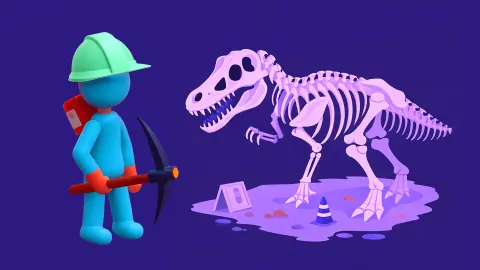
The whole camp works that way. You are a small blue figure in a mint-green helmet, with a backpack and a pickaxe, and the things you can do are places you can go. A level number sits at the top of the screen with a grid of empty bone outlines under it, and filling that grid is the job.
The game's listing credits Ermac Alex. It has been available since 7 April 2025.
We played one short session on a desktop, about four minutes, and we have to be plain about it. We walked the camp, opened the shop and found we could not afford anything in it. We did not dig up a single bone. What follows is a guide to the camp and the first decisions, and no more than that.
The camp: two tents and a fence
The ground is flat orange sand with a cactus or two. Two shelters stand close together.
The first is a green tent with a drawing on its side: three red arrows pointing up and a small blue figure among them. That is the upgrade shop. Its pad carries an arrow and three short lines.
The second is a brown awning stretched over forked wooden poles. Its drawing shows a fossil lying in a pale slab of rock with a pink brush above it. Under the awning is a wooden table with a tool on it, and on the ground beside it is a second round pad with a brush icon.
We read that awning as the place where finds get cleaned. That is a reading and not a report: we never stood on the brush pad with a bone to clean.
Past the awning, a rope fence on short posts closes off a plot of darker ground. A few pale shapes lie on it. A fenced plot next to a cleaning table looks like a dig, and we would walk there first on a second visit. On this one we did not get inside it.
Three upgrades at 60 coins each, and a counter that starts at 00
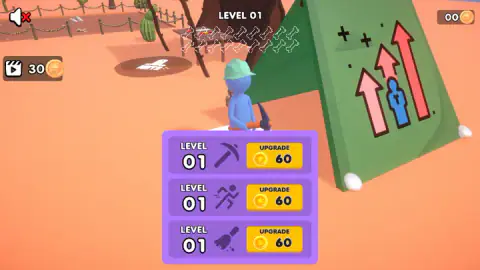
Stand on the tent's pad and a purple panel opens with three rows. Each row has an icon, a level and a yellow UPGRADE button with a price.
| Icon | Level at the start | First price |
|---|---|---|
| Pickaxe | 01 | 60 |
| Running figure | 01 | 60 |
| Brush | 01 | 60 |
The game puts no words beside the icons. A pickaxe, a runner and a brush read as digging, walking speed and cleaning, and that is as far as we can take it without having bought one.
The prices tell you something about the opening, though. Three upgrades at 60 coins each come to 180, and the counter in the top right corner reads 00. We pressed the first UPGRADE button anyway. Nothing changed that we could see, and the counter still read 00 in every picture we took afterwards.
So the first stretch of the game is played with the starting tools, however long it takes the dig to pay 60 coins. We did not get far enough to tell you how long that is.
The button with the clapperboard
In the top left corner, under the speaker icon, sits a brown button with a film clapperboard, the number 30 and a coin. A clapperboard with a play triangle is the common sign for "watch an advert, get a reward". We did not press it and cannot confirm what it pays.
If it is what it looks like, the sum is easy to weigh: 30 is half the price of one upgrade.
Why the brush gets the same billing as the pickaxe
In most digging games the tool that breaks ground is the only one that matters. This one gives a brush its own tent, its own pad and its own upgrade row at the same price as the pickaxe.
That matches the real work better than you might expect. On a real fossil dig the pick and shovel only clear the rock above the bone. Close to the bone the tools get smaller, down to awls and brushes, because fossil bone is often more fragile than the stone around it. Then the find is wrapped in a jacket of plaster and cloth and carried off, still half buried.
The slow part comes after that. Cleaning a bone out of its jacket, which museums call preparation, usually takes far longer than digging it up did. A game that splits the job into a digging tool and a cleaning tool has the shape of it right.
The 18 tidy outlines at the top of the screen are the generous part. Real skeletons almost never come out of the ground complete.
The dig itself is still ahead of us
The larger part of the game stayed out of reach. We did not find a bone, clean one or fill a single outline. We did not earn a coin or buy an upgrade, so we cannot say what a second level of anything costs or does.
We did not finish level 01, so we do not know what a full grid of bones turns into, what level 02 looks like or how many levels there are. We saw no advert in our session and heard nothing after the opening sound, with the speaker icon crossed out the whole time.
Who it is for
Players who like a game where you walk to your work. There is no timer on the screen and nothing in the camp that can hurt you, and in four minutes nothing pushed us to hurry.
If you want a tycoon game of prices, staff and graphs, this did not show us one. What it showed is one digger, one camp and a shopping list of three.
More to dig up
Dino funny digging is a fossil dig for younger players, where you click cracked ground until a bone shows. Mystery Digger goes down a tunnel with a drilling disc and a fuel gauge, and Miner, Dig It All hands you the drill itself and fifteen layers of rock. The rest are under clicker games.
Screenshots
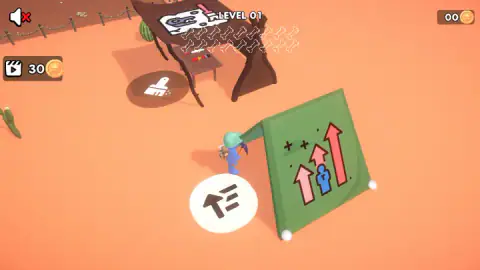
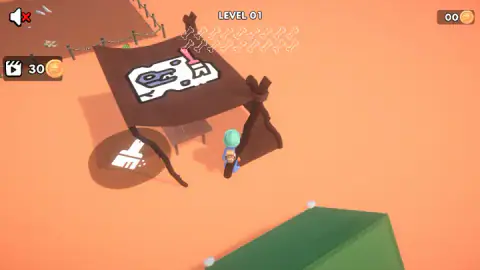
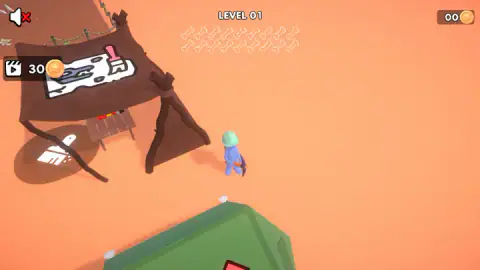
Taken by opening the game ourselves and letting it run — not supplied by the publisher, and not the same picture every other site shows.
How to play Jurassic Digging - Tycoon
- Move the digger with the arrow keys, or hold the mouse button and drag. The view follows you.
- Look at the top of the screen. LEVEL 01 has 18 bone outlines under it, all empty at the start.
- Walk onto the round pad beside the green tent to see the three upgrades and their prices.
- Step off the pad to close the panel and go and find the bones.
What our session taught us:
- Stand, do not click. We clicked on the ground and on the drawings on the tents, and nothing answered. The upgrade panel opened only once the digger was standing on its pad.
- The shop can wait. Every upgrade costs 60 coins and the counter starts at 00. A first visit to the tent is for reading prices.
- The 30 is not yours. The number in the top left corner belongs to a button. Your coins are in the top right.
- Watch the pads change. The tent's pad was white while we stood on it and dark, with a white icon, after we stepped off.
Controls
| Arrow keys | Walk the character around the camp; the view follows it |
|---|---|
| Hold the mouse button and drag | Also moved the character in our session |
| Walk onto the round pad by the green tent | Opens the upgrade panel; step off and it closes |
| UPGRADE button (in the panel) | Buys one level of that upgrade for 60 coins; with no coins it did nothing we could see |
| Clapperboard button (top left) | Shows 30 beside a coin; we did not press it |
| Speaker icon (top left) | Sound switch, crossed out during our session; we did not press it |
Features
- A camp you walk through instead of a menu, with a green upgrade tent and a brown awning marked with a fossil and a brush
- Eighteen empty bone outlines under the level number, in two rows of nine
- Three upgrades, drawn as a pickaxe, a running figure and a brush, each starting at level 01 and costing 60 coins
- A coin counter that starts at 00, so the first upgrade has to be earned
- A camera that keeps the digger in the middle of the screen
- A fenced plot of darker ground beside the camp
Game details
- Developer
- Ermac Alex
- Release date
- April 2025
- Last updated
- August 10, 2026
- Added here
- May 2025
- Technology
- HTML5 (3D)
- Platforms
- Browser (desktop, keyboard & mouse), Browser (mobile & tablet)
- Classification
- Casual , Simulation , Strategy
- Saved progress
- Saving, when available, is managed by this game. Mava cannot confirm your level.
FAQ
How do you play Jurassic Digging - Tycoon?
You walk a small blue digger around a desert camp. On a computer the arrow keys move it, and so does holding the mouse button and dragging. Things happen when you stand on the round pads on the ground, not when you click on signs. The level shows 18 empty bone outlines to fill.
How many bones are there in a level of Jurassic Digging - Tycoon?
Level 01 shows 18 bone outlines under the level number, in two rows of nine. All 18 were still empty when we stopped, after about four minutes spent in the camp. We did not reach a second level, so we cannot say whether the number changes.
How much do the upgrades cost in Jurassic Digging - Tycoon?
There are three, drawn as a pickaxe, a running figure and a brush. Each starts at level 01 and its first step costs 60 coins. You start with none, so nothing can be bought until the dig has paid something.
Where is the shop in Jurassic Digging - Tycoon?
It is the green tent with red arrows drawn on it. Walk onto the round pad in front of the tent and a purple panel opens with the three upgrades. Walk off the pad and the panel closes. There is no shop button on the screen.
What is the 30 in the top left corner?
It is a button, not your money. It shows a film clapperboard, the number 30 and a coin, which is how games usually mark a reward for watching an advert. We did not press it. Your own coins are counted in the top right corner, and ours read 00.
Can you play Jurassic Digging - Tycoon on a phone?
It is listed for PC, Android and iOS, in both landscape and portrait. Our own time with it was on a desktop with a keyboard and a mouse, so the phone side is the listing's word and not ours.
What does Jurassic mean?
The Jurassic is a stretch of the Earth's past that ran from about 201 to 145 million years ago, in the middle of the age of dinosaurs. It takes its name from the Jura Mountains, on the border between France and Switzerland, where rocks of that age were first described.
Who made Jurassic Digging - Tycoon?
The game's listing names Ermac Alex as the developer. The game was published on 7 April 2025 and its last update is dated 10 August 2026.