








About TCG Shop: Dino Adventure
Most card games in a browser open with a wall of numbers: attack in one corner, defence in another, a cost, a mana bar, maybe a keyword you are expected to already know. TCG Shop: Dino Adventure gives a card one number and leaves you to work out that the number is doing two jobs at once.
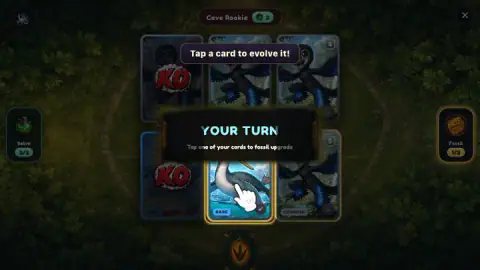
It is both the punch and the health bar. Strike an enemy card and a red minus sign pops up over it and its number falls; we watched one card drop by six in a single hit and leave the match on the spot. Run a card down to nothing and a red KO stamp covers it, and it stops being a target or an option for either side.
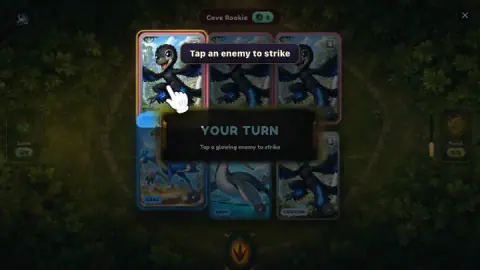
The board is two rows of three illustrated cards facing each other over a jungle background, your three along the bottom. A black banner sits in the middle and tells you whose turn it is, with exactly one instruction under it: "Tap a card to attack", then "Tap a glowing enemy to strike". That is the whole interface. There is no hand to manage, no deck to draw from mid-match, and no second stat to compare.
Golem Kin Games made it, and it was published in July 2026. Our session lasted about four minutes at a desktop. We won one league match against a rival called Cave Rookie, started a second, and never got as far as buying a pack, so read the collecting half of this page as what the game shows rather than what we played.
Fossil and Salve are the only two things you bank
Either side of the board sits a counter: a green one on the left and an amber one on the right, each with a number out of three. The green one is Salve and the amber one is Fossil, and between them they are the whole resource system.
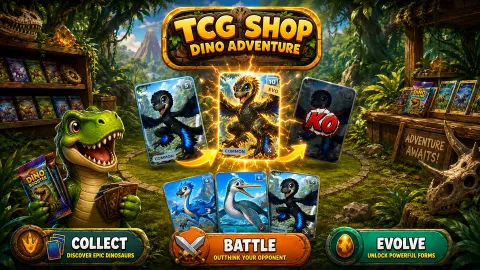
Fossils arrive as you fight. The game announces the first one plainly — "You earned a fossil! Tap Fossil to power up a card." — and then asks you to pick the card to spend it on, with the line "Tap one of your cards to fossil upgrade". The upgraded card carries an EVO mark afterwards, and its number goes up.
Salve is the repair kit. The game's own explanation is that "Salves heal or revive cards", which means the green counter covers both a card that has lost points and a card already wearing a KO stamp. Tap the counter and the banner switches to "Tap a wounded card to heal it!" with the hand pointing at the damaged card.
Both counters start a match part-filled rather than empty, and neither goes past three. That cap is what turns them into decisions: with one fossil banked you have to choose which of three cards is worth growing, and a salve spent on a scratch is a salve you do not have when a card goes down.
Half the creatures in your deck are not dinosaurs
The cards are all billed as dinosaurs, and most of the artwork we were dealt was not. Alongside the horned and clawed ones there were winged reptiles and a long-necked swimmer, which is how almost every dinosaur toy box on earth is packed too — and all three groups are genuinely different animals.
Pterosaurs, the flying ones, are not dinosaurs. The American Museum of Natural History puts their split from the dinosaur line at close to 250 million years ago, and the giveaway is in the skeleton rather than the silhouette: a dinosaur has a hole through its hip socket, and a pterosaur does not. They shared the sky above dinosaurs for most of the Mesozoic without ever being one.
The long-necked swimmers are further away still. Plesiosaurs were marine reptiles, closer to lizards than to anything with a dinosaur hip, and museums that keep one on display routinely have to explain to visitors that the famous long neck in the hall is not a dinosaur at all. The Western Australia Museum makes the ranking explicit: pterosaurs are the nearer relatives, plesiosaurs only distantly related.
None of that changes a single tap in the game, and that is rather the point. A card game that treats a pterosaur, a plesiosaur and a T-rex as three cards with three numbers is doing exactly what the toy industry has done for a century. If your child comes out of a match asking which of the three were real dinosaurs, the answer is the one with the hole in its hip.
What a win pays, and where the coins go
Win a league match and the screen turns into a red WIN! banner with confetti, a payout of 25 coins, and a line telling you where that leaves you on the ladder: ours read one win of the two needed for a promotion out of Cave Rookie. The prize is not a surprise, because the pre-match screen states it before you commit, under a character called the Mystery Trader who taunts you into the fight.
Two buttons sit under the payout. One sends you straight to the packs, the other is a plain CONTINUE back to the front screen. A smaller button offers to double the coins in exchange for a video; we left it alone, so we cannot say how long that clip runs.
The front screen is the shop itself: the game's name over a counter stacked with pack displays, a coin counter that read 125 when we arrived, a level marker at 1, and tabs along the bottom for the camp, the shop, the deck and the binder. BUY PACKS sits under the battle button with four differently coloured packs beneath it.
We did not open one, which means the second half of the loop — pulling a card, then deciding whether it is worth keeping — is the part of this game we cannot describe first-hand. What we can say is that the battle half stands on its own: the match we played had a shape, a tutorial that got out of the way, and a decision in it every turn.
More games by Golem Kin Games
Dicey Chickens is the same studio's castle defence, where the heroes roll their own dice, and Dungeon Descent is its voxel dungeon crawler. If it is the card battling you came for, Card Quest: 10 Minute Adventure is a turn-based one built to finish in a single sitting. And despite the matching name, TCG Shop: Maps, Toys and Comics is a different game by a different studio: there you run the counter instead of fighting at it. The rest are under strategy games.
Screenshots
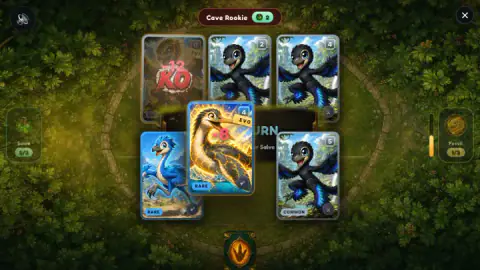
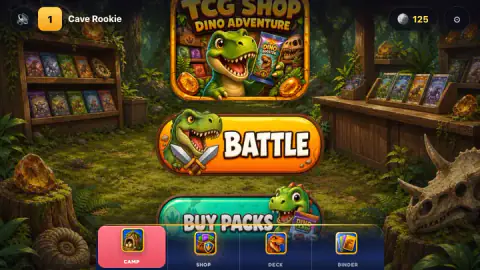
Taken by opening the game ourselves and letting it run — not supplied by the publisher, and not the same picture every other site shows.
How to play TCG Shop: Dino Adventure
- On the front screen, press BATTLE. A pre-match screen names the opponent, states the prize, and puts a large FIGHT! button at the bottom.
- Wait for the BATTLE START banner to clear. Your three cards are the bottom row.
- On your turn, tap one of your own cards to pick the attacker. The banner changes to "Tap a glowing enemy to strike".
- Tap the glowing card in the top row. That resolves the attack, and the banner hands the turn over with an ENEMY TURN card of its own.
- Repeat until all three rival cards carry a KO stamp. The win screen pays out and offers to send you to the packs.
What our session taught us:
- An attack is two taps, not a drag. We tried dragging one card onto another and nothing happened; the banner was still asking for a target afterwards.
- Only the glowing card counts. When the banner says to strike a glowing enemy, taps on the other cards in that row do nothing at all.
- Follow the pointing hand. A white hand highlights the next card or button through the whole tutorial, and several of our taps away from it landed on nothing.
- Tapping a knocked-out card is a wasted tap. A card with a KO stamp is inert on either side of the board until a salve brings it back.
- The keyboard is not wired up. Letter keys, Enter and Escape all left the board exactly as it was.
Controls
| Click or tap one of your three cards | Picks it as the attacker; the banner then asks you to choose a target |
|---|---|
| Click or tap a glowing enemy card | Strikes it, so one attack takes two taps rather than a drag |
| Fossil counter (amber, right-hand side) | Spends a fossil to upgrade one of your cards, which then carries an EVO mark |
| Salve counter (green, left-hand side) | Spends a salve to heal a wounded card or bring back a KO'd one |
| Keyboard | Nothing. We tried letter keys, Enter and Escape, and the board never moved |
Features
- Two rows of three illustrated cards facing each other over a jungle background, your three at the bottom
- One number per card, which is both what it hits for and what it can take before it is knocked out
- Two banked resources, Salve and Fossil, each capped at three and shown as a counter on either side of the board
- A black banner in the middle of the screen that says whose turn it is and gives exactly one instruction under it
- A pointing hand that highlights the next card or button for the whole of the opening tutorial
- A league ladder that starts at Cave Rookie and pays 25 coins a win, with two wins needed for the first promotion
- Available since July 2026, rated E10+
Game details
- Developer
- Golem Kin Games
- Release date
- July 2026
- Added here
- June 2026
- Technology
- HTML5 (2D)
- Platforms
- Browser (desktop, mouse), Browser (mobile & tablet)
- Saved progress
- Saving, when available, is managed by this game. Mava cannot confirm your level.
FAQ
How do you play TCG Shop: Dino Adventure?
Three of your cards face three of the rival's. On your turn, tap one of your cards to pick the attacker, then tap the glowing enemy card to strike it. Each hit knocks points off the target's number, and a card at zero gets a red KO stamp. Clear the rival's three cards and the match is yours.
What do the numbers on the cards mean in TCG Shop: Dino Adventure?
Each card has a single number and it does two jobs. It is the damage the card deals and the damage it can absorb. When a card is hit, a red minus sign pops up over it and the number drops. We saw a card lose six points in one strike and go straight out of the match.
What are Fossil and Salve in TCG Shop: Dino Adventure?
They are the only two resources you bank. Fossil, on the amber counter, upgrades one of your cards, which then carries an EVO mark. Salve, on the green counter, heals a wounded card or revives a KO'd one. Each fills up to three, and the game's own line is "Salves heal or revive cards. Tap Salve to use one."
How do you earn coins in TCG Shop: Dino Adventure?
Winning a league match pays 25 coins, and the pre-match screen tells you so before you accept. The win screen offers to double that through a video button, which we did not use. We started our session with 125 coins on the counter and finished our first match with 25 more.
Who made TCG Shop: Dino Adventure?
It is credited to Golem Kin Games. The game has been listed since July 2026.
Is TCG Shop: Dino Adventure the same game as TCG Shop: Maps, Toys and Comics?
No. They share the TCG Shop name but they are different games by different studios. Maps, Toys and Comics is a shop simulator about serving customers and restocking shelves, while Dino Adventure is a card battler in which you fight league matches and spend the winnings on packs.
Can you play TCG Shop: Dino Adventure on a phone?
It is listed for PC, Android and iOS, in both landscape and portrait. Every action is a tap, and the game's own instructions say tap rather than click, so it reads as a touch game first. We played it on a desktop with a mouse and did not test a phone.
Is TCG Shop: Dino Adventure suitable for children?
It is rated E10+. The fighting is cards on a table, and a defeated card gets red marks and a KO stamp rather than anything gory. The opening tutorial points at every button, so the hard part for a younger player is the collecting side rather than the battles.