


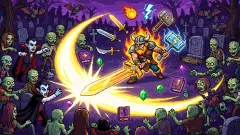







About Monster Card Shop
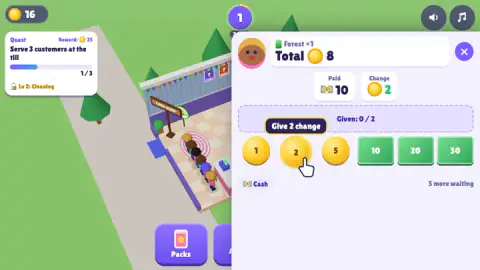
The first customer who paid us in cash put down a ten for a pack that cost eight, and the game stopped and waited. Not for a number typed into a box. For two, built by hand out of the coins laid in front of us, with a dashed tray above them keeping score — "Given: 0 / 2" — and a line of pink text ready for the moment we overshot: "Too much! Tap a coin to take it back." Most shop games ring the sale up for you. This one hands you the drawer.
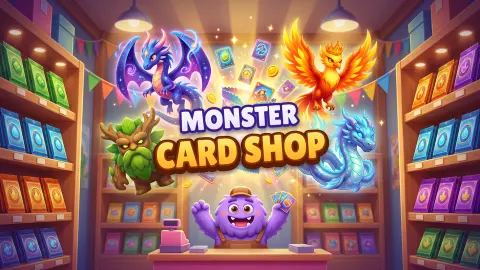
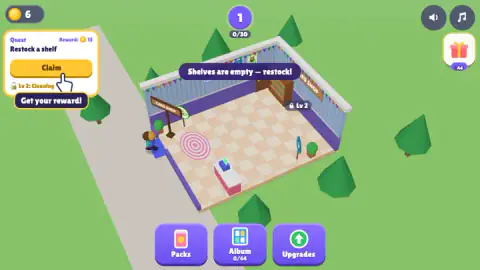
What the shop looks like takes a sentence. A small building with its roof off on a green lawn: striped walls, party bunting, a checkerboard floor, and a white counter with a pink till on it. When we arrived that counter was the only furniture, a banner across the roofline read "Shelves are empty — restock!", and a padlock sat on an empty spot by the back wall. Along the bottom, three purple buttons: Packs, Album, Upgrades.
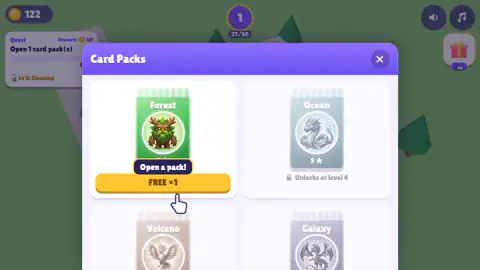
The counter under the Album button is the one to watch. It read 0/64. That is the shape of the whole thing: a shop you run so you can afford the boxes you then open yourself. The first Forest pack is free; the next is priced in the coins the customers brought.
Our session ran about ten minutes and ended with 122 coins, a level badge still reading 1 and one pack opened. We never bought an upgrade, opened the Album screen, hired anyone, expanded the shop or touched the Ocean, Volcano and Galaxy wrappers, which sat greyed out behind a lock. Where what follows is the game's own account rather than ours, it says so.
Counting up: the till trick this game makes you perform by hand
There are two ways to work out change, and shops have long preferred the slower-looking one. You can subtract — eight from ten is two — or you can count up: start at the price, and add coins until you reach what the customer handed over. Eight, nine, ten. Counting up is what cashiers are taught, because it needs no arithmetic under pressure and because it catches a mistake a register cannot: key the total in wrong and the machine's change figure is wrong too.
That is exactly the gesture this panel asks for. The game does the subtraction and prints it in the Change box, then empties a tray underneath and makes you fill it: "Given: 0 / 2", climbing with every tap. You are not solving anything; you are performing the physical half of the job, the part that goes wrong in a real shop. The game's one error message is the real shop's error too: too much money out of the drawer, and the only cure is taking a piece back.
Look at the six buttons on the counter and the imitation goes a step further. The coins are 1, 2 and 5; the notes are 10, 20 and 50. That ladder is not decoration: most real currencies are built on it, repeating 1-2-5 at every scale. It exists because it is efficient: with those three steps, any amount from one to nine takes at most three pieces. In a game about tapping that keeps a transaction down to a tap or three; in a wallet, it is why you are not carrying eight single coins.
A pack of five is a recipe, not a lottery
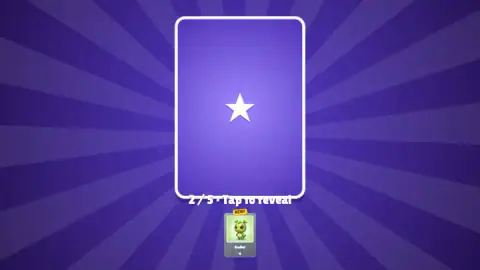
The free Forest pack does not hand you cards. It deals them one at a time, face down against a purple sunburst, each a star-backed card with its place in the run printed underneath: "2 / 5 • Tap to reveal". You tap, it flips, and a small copy drops to the bottom of the screen wearing a yellow NEW tag if you have not seen it before. Our five came up Budlet twice, then Bloomy, then Capshroom, each labelled Common with a single star — and then, in the last slot, Barkpup, labelled Rare, with two stars under it instead of one.
That the scarce card arrived last is not luck. Real booster packs are collated, which is the trade's word for assembling them to a fixed recipe rather than at random. The cards are printed on separate sheets by rarity, and each position in the pack is fed from a particular sheet: most of the slots draw from the common sheet, one is reserved for something scarcer. It is why opening a physical pack has a rhythm at all, and why a pack can promise you a rare without promising which rare.
This shop keeps that rhythm and makes it the payoff of a shift: five reveals, four of them Common, the last worth two stars. Then a summary screen counts up what the pack was worth and offers you another for 25 coins, money you do not have unless the till went well. The loop closes neatly: the customers pay for the packs, the packs fill the album, and the album, the game says, pays you back for every new card and every finished set.
What the shop wants next, and what we never saw
Between sales a quest card runs down the left side with its reward at the top: fifteen coins for restocking a shelf, twenty-five for serving three customers, thirty for opening a pack. The badge at the top holds your level over a small bar, and that bar is fed by customers rather than by time — ours read 0 of 30 when the shop opened and 27 of 30 once we had served a queue and opened the free pack. The card that appeared when it filled named cleaning, a shop sign and a new shelf slot.
The locks are generous with information. The greyed line under the quest card names the next level and what it brings; the padlock inside the shop marks the spot a fixture will stand in; on the Card Packs screen the Ocean wrapper is drained to silver with "Unlocks at level 4" under it. You can see most of the game before you can touch any of it, which is a fair trade for a shop that opens with one counter and no stock.
Everything past that point is the game talking rather than us. Its own listing says you name your shop, hire a cashier, a stocker and a cleaner, keep the floor clean, expand the store as it grows, and collect sixty-four monsters across four worlds, the rarest of them shiny legendaries. The four worlds are on screen and the sixty-four is under the Album button; the staff, the expansions and the legendaries we never reached. Adverts arrived six times in ten minutes, and the gift button in the corner wears a small Ad badge of its own.
More counters, tills and card shelves
If the change tray is the part you liked, Shop Cashier Simulator 3D is the same job with the training wheels off: scan the items, key in the total, count the change out of a drawer. Loose Change: Cashier Simulator turns coins into a sorting puzzle instead, where ten of one number stacked in a tray come back as a coin of the number above. For the cards rather than the till, TCG Shop: Dino Adventure puts a dinosaur card battle behind the counter, each card carrying one number that is both punch and health. And Idle Supermarket Tycoon grows a whole shop out of an empty unit, a fridge and a register at a time. The rest are in clicker games.
Screenshots
How to play Monster Card Shop
- Tap the round button above an empty shelf to restock it. The banner across the roof tells you when it is needed, and a shelf with nothing on it serves nobody.
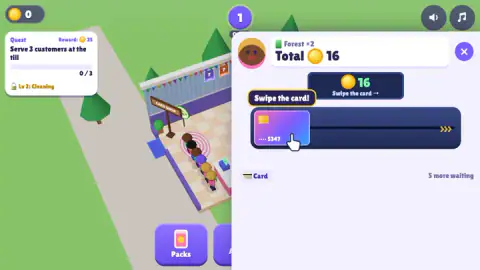
- Tap the counter when a queue forms; a prompt reading "Tap to sell!" floats over the till. The panel names what the customer came for — ours all read Forest ×1 or Forest ×2 — and prints the total under it.
- If the panel says Card, drag their bank card from the left of the dark reader all the way to the yellow chevrons at the far end. A short tug leaves it where it was.
- If it says Cash, read the two small boxes — what they paid, and what you owe back — then tap coins and notes until the tray matches. Tap a piece in the tray to pull it out again.
- Claim the quest card on the left when its bar fills, and spend what it pays in the Packs screen.
What only sitting at the till teaches:
- The corner of the panel tells you how long the night is. Ours read "5 more waiting" while we were still fumbling with the first customer's change. That number, not a clock, sets the pace.
- The change box has already done the subtraction. You are not working out ten minus eight; you are building the answer it printed.
- Overshooting is not a lost sale. The tray turns pink and the fix is one tap on the piece you should not have put in.
- Quests pay better than customers. A two-pack sale brought 16 coins; the quest for serving three paid 25, and the one for opening a pack paid 30.
- Read the greyed line under the quest card. It reads "Lv 2: Cleaning", which is the game telling you what the next level unlocks before you get there.
Controls
| Click or tap the counter | Opens the transaction panel for the customer at the front of the queue. A prompt reading "Tap to sell!" floats over the till when somebody is waiting |
|---|---|
| Drag the bank card to the right | The card payment. You pull the card from the left of the dark reader all the way to the yellow chevrons at the far end; a short tug does not register |
| Click a coin or a note | The cash payment. Each tap drops that piece into the tray and the counter above it climbs towards the figure in the Change box |
| Click a piece already in the tray | Takes it back out. This is the fix when the tray turns pink and the line "Too much! Tap a coin to take it back" appears |
| Click the round button above a shelf | Restocks that shelf with packs. The number printed on the button is what is waiting to go out |
| Packs, Album and Upgrades, along the bottom | Open the three shop screens: the four pack wrappers, the collection counter, and the things coins are spent on |
| The X in the panel corner | Closes the transaction and leaves the customer where they are. The queue does not reset |
Features
- Two different ways to take money, and they need different hands: the card is one long drag across a reader, the cash is a row of taps
- Coins come in 1, 2 and 5 and notes in 10, 20 and 50 — the same ladder real money uses, which is why no amount ever needs more than a few pieces
- The change tray counts up rather than down, and it tells you off for overpaying: the panel turns pink and reads "Too much! Tap a coin to take it back"
- The Album button carries the whole point of the shop under it as a counter, and ours read 0/64 all the way to the first pack
- Four pack wrappers sit on the Card Packs screen — Forest, Ocean, Volcano and Galaxy — and only the first was ours to open, with the Ocean one marked "Unlocks at level 4"
- A pack deals five cards one at a time behind a star-backed card that reads "2 / 5 • Tap to reveal", and each new one gets a yellow NEW tag
- Quests pay better than sales: a two-pack sale brought 16 coins, while the quest for serving three customers paid 25
Game details
- Developer
- Partner studio
- Release date
- October 2026
- Last updated
- October 25, 2026
- Added here
- October 2026
- Technology
- HTML5 (3D)
- Platforms
- Browser (desktop), Browser (mobile & tablet, touch)
- Classification
- 3D , Arcade , Cards & Board , Clicker , Simulation , Strategy
- Saved progress
- Saving, when available, is managed by this game. Mava cannot confirm your level.
FAQ
How do you play Monster Card Shop?
You run a small trading-card shop from above. You restock the shelves with booster packs, tap the counter when customers queue, and take their money yourself — either by dragging their bank card across a reader or by counting coins into a tray until the change is right. Finished quests and sold packs pay coins, and coins go into packs, the album and upgrades.
How does giving change work in Monster Card Shop?
When a customer pays in cash the panel shows three figures: the total, what they handed over, and the change you owe. A dashed tray underneath reads "Given: 0 / 2" and you tap coins and notes until it matches. If you put in too much the tray turns pink and the game tells you to tap a coin to take it back, so the mistake is yours to undo rather than a failed sale.
How many monsters are there in Monster Card Shop?
The counter under the Album button on the bottom bar reads 64 slots, and it sat at zero until we opened our first pack. The game's own listing says those 64 monsters are split across four worlds and that the rarest of them are shiny legendaries. We collected four different ones from a single pack, so we can vouch for the counter rather than for what fills it.
What are the four card packs in Monster Card Shop?
The Card Packs screen shows four wrappers: Forest, Ocean, Volcano and Galaxy. Only Forest was open to us, and it came free the first time. Ocean was greyed out with a padlock reading "Unlocks at level 4", and Volcano and Galaxy were greyed out below it. A second Forest pack was offered for 25 coins, which we did not pay.
How do you level up in Monster Card Shop?
A round badge at the top of the screen holds your level and a small counter under it — ours read 1 with 0/30 when the shop opened and 27/30 by the time we had served a queue and opened a pack. Serving customers moves it. The card that appears when the bar fills names what the new level opens; ours named cleaning, a shop sign and a new shelf slot.
Can you hire staff in Monster Card Shop?
The game's own listing says you can hire a cashier, a stocker and a cleaner, and expand the store as it grows. We never got that far: we spent our whole session at the till and in the pack screen, and we never opened the Upgrades menu, so we cannot tell you what any of them cost or how much work they take off your hands.
Is Monster Card Shop free, and does it have ads?
It is free and it runs in a browser with nothing to install. There are adverts: the screen handed over to one six times in ten minutes of play, and a gift button in the top corner carries a small Ad badge, which marks it as a reward you watch something to collect rather than one you are given.
Who made Monster Card Shop, and can you play it on a phone?
No studio is recorded for it anywhere we can check, so this sheet names none rather than guessing. It is listed as a touchscreen game and every instruction in it is written as a tap, which fits a phone well, but we played it with a mouse on a desktop and have not tested it on a handset ourselves.