









About Sea Restore
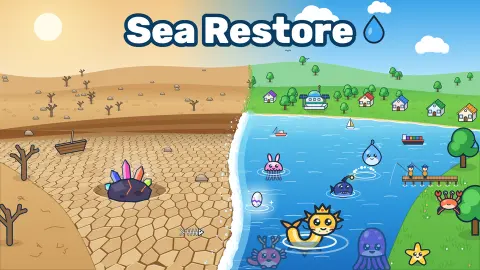
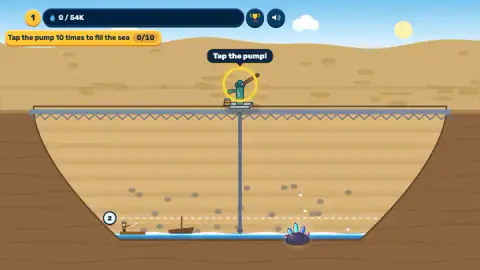
Most idle games hand you a shop and a number that goes up. Sea Restore hands you a hole. The opening screen is a dry crater under a desert sky, a hand pump on a steel walkway across the top, a pipe running to the bottom, and one line of text: "Bring the water back, and life will return."
The bottom of the crater tells the rest of the story before anyone explains it. There is a little wooden boat lying on its side in the sand, a raft with a single fisher on it, and a dark rock bristling with glowing crystals. The game's listing says a meteor made the crater, and that rock is the only thing down there that looks as if it fell from the sky.
The game is the slow job of turning that hole back into a sea. You pump, the water gets the fish going, the fish become coins, and the coins buy people who do the work without you. Sea Restore is by XD_games and was published on 26 October 2026 and updated the following day.
What one tap is worth
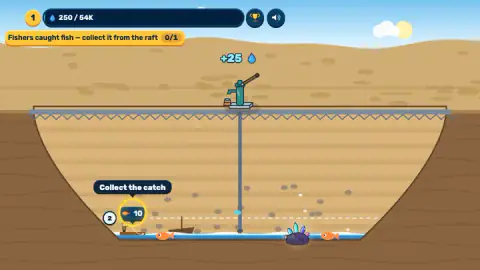
The water bar is the real goal, and it is enormous. Ten tutorial taps took it from 0 to 250. The target for the first stage reads 54K. At 25 water a tap, filling it by hand would take over two thousand taps.
That number explains the whole design. Tapping is how you start, not how you finish. The game moves you within the first minute from the pump to the raft, and from the raft to the Store, because the fishers are the ones that never stop. By the end of our session the water bar had crept only to 300, while the catch waiting on the raft had passed 250 fish.
There is also a dashed line a little above the water, marked with a 2. We never filled the crater that far, so we cannot tell you what happens when the water reaches it.
The money loop and what it costs
Sea Restore's economy is short and readable. Fish are the only goods you meet early on, and each one sold for 3 coins in every sale we made.
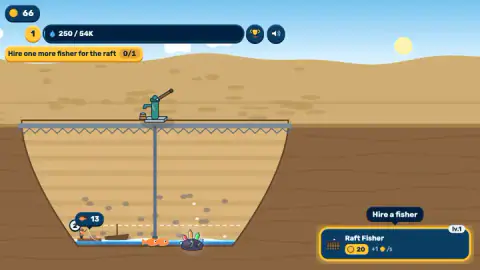
The Raft Fisher is the first thing you buy, and it gets dearer quickly. The first one costs 20 coins. By the third level the price is 52, then 82, then 132 for the fifth. Each level adds another small figure to the raft and another coin per second, so the raft fills up with people as you play.
Trade sits in the second tab, Services, and costs 50 coins. Its card says "orders will come", and that is what it does: the next goal tells you the order needs fish from the raft, and soon a wheelbarrow rolls up to the left rim with a banner saying "Wheelbarrow: new order!". The next level of Trade costs 2.5K coins, which shows how far apart the steps get.
Real craters that hold water
A crater full of water is not a fantasy. Lonar Lake in Maharashtra, India, sits in a crater left by a meteorite impact, about 1.8 km across, and is filled with salty, alkaline water. It is one of the best-known impact crater lakes on Earth and a geology site in its own right.
The idea of putting water back into a dry sea and watching fish return is not made up either. The Aral Sea in Central Asia shrank so far in the 20th century that fishing boats were left stranded on dry ground. In 2005 Kazakhstan finished the Kokaral dam, which held water in the northern part of the sea. The level rose again, the water became less salty, and fish species came back, enough for a fishing industry to restart.
That is the arc Sea Restore draws on, with the dry ground first, then the water, then the fish and the people who live off them. The stranded boat at the bottom of its crater looks like a small nod to those beached Aral ships.
Our run ended at the first wheelbarrow order
We gave Sea Restore around ten minutes at a desk, clicking with the mouse. We finished the whole tutorial: ten taps of the pump, the first catch, the first sale, hiring fishers up to the fifth level and opening trade.
The first order is where we stopped. The wheelbarrow arrived, the goal bar said to fill its order, and we clicked the wheelbarrow and its label several times without getting the order screen open. For the last four minutes our coins stayed at 36, the fish bar under the pit stopped at 364, and the raft kept filling with fish we had nowhere to send. We think the order is the way forward from there, but we cannot tell you what it asked for.
Everything past that point comes from the distributor's listing, not from us. The listing promises stations, collectors who carry goods to the store, town buildings that craft sushi, pies and gifts, a delivery truck, trash to clear from the water, eggs rising from the meteor that hatch 13 sea monsters, a tide meter, seven ages from First Drops to the Ocean Age, and a new cycle once the sea is full, with a leaderboard of all the water you have ever poured. The trophy button at the top is probably that leaderboard; we did not open it. We also did not play on a phone, although the game's listing gives Android and iOS.
Who it suits
Sea Restore is for players who like an idle game with a picture that changes as they progress, rather than a wall of numbers. It is calm, has no timer pushing you, and explains itself one goal at a time, so it works for younger players too. If you want a game that tests your reflexes, there is nothing here for you: the skill is deciding when to spend.
If you like fishing for coins, Fisher Clicker is closer to a classic clicker. Mars Colony is the same idea of making a barren place livable, on another planet, and Idle Zoo Tycoon grows a business with workers and upgrades. There are more tap-and-upgrade games in our clicker games.
Screenshots
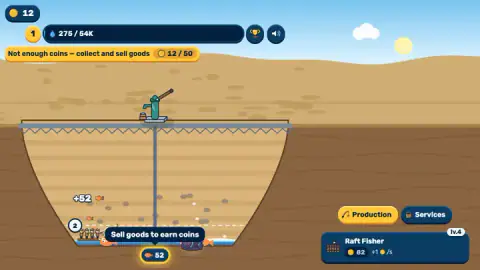
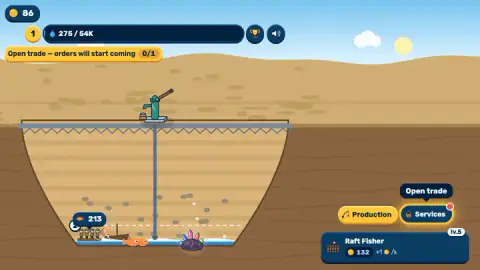
Taken by opening the game ourselves and letting it run — not supplied by the publisher, and not the same picture every other site shows.
How to play Sea Restore
- Tap the pump. Each tap adds 25 water, shown in the blue bar at the top. The tutorial asks for ten taps.
- Collect the catch. Fishers on the raft catch fish by themselves. A bubble with a number appears above the raft; tap it to take the fish.
- Sell in the Store. Tap the fish bar under the pit. A Store card opens with a wheelbarrow on it, and Sell all turns the fish into coins.
- Hire more fishers. In the Production tab, the Raft Fisher card adds another fisher for coins. Each one is worth a coin per second.
- Open trade. In the Services tab, Trade costs 50 coins. After that, customers bring orders to the rim of the crater, and filling them is the next step.
Tips from our session:
- Follow the yellow bar. The top-left bar always holds the next goal with a 0/1 counter. When you are lost, it knows where you are.
- Do not spend down to nothing. We bought fisher levels until we had 12 coins, and the game blocked us with "Not enough coins" until we sold a full load of fish.
- Sell in big batches. The Store sells everything at once. Twelve fish paid 36 coins; a load of 52 paid 156.
- Keep 50 back for Trade. It is the gate to everything after the raft, and the tutorial sends you there right after the fishers.
Controls
| Click or tap the pump | Adds 25 water to the crater per tap |
|---|---|
| Click the catch bubble on the raft | Collects the fish your fishers have caught |
| Click the fish bar under the pit | Opens the Store, where Sell all turns fish into coins |
| Production and Services tabs | Hire and level up workers, and open trade so orders start arriving |
| Click the wheelbarrow on the rim | Opens the order it has brought |
Features
- A dry crater with a hand pump on top: every tap adds 25 water towards a first target of 54,000
- A raft at the bottom where fishers work by themselves, each one adding a coin per second
- Fish sell for 3 coins each in the Store, so the first 12 fish pay 36 coins
- Raft Fisher levels that climb in price, from 20 coins for the first to 132 by the fifth
- A Trade service that costs 50 coins and makes customers turn up with orders, starting with a wheelbarrow
- A guided start with one goal at a time in a yellow bar at the top of the screen
Game details
- Developer
- XD_games
- Release date
- October 2026
- Last updated
- October 27, 2026
- Added here
- October 2026
- Technology
- HTML5 (2D)
- Platforms
- Browser (desktop, mouse), Browser (mobile & tablet, touch)
- Classification
- Arcade , Casual , Clicker , Simulation , Strategy
- Saved progress
- Saving, when available, is managed by this game. Mava cannot confirm your level.
FAQ
How do you play Sea Restore?
You start in a dry crater with a hand pump on its rim. Tap the pump to pour water in, collect the fish your fishers catch from the raft, sell them in the Store for coins and spend the coins on more workers. A yellow bar at the top always shows the one thing the game wants next.
How much water does the first stage of Sea Restore need?
The water bar reads 54K, that is 54,000, and each tap of the pump adds 25. Doing it all by hand would take more than two thousand taps, which is why the game moves you on to workers and trade so quickly. After ten minutes of play our bar stood at 300.
How do you get coins in Sea Restore?
Fishers on the raft catch fish on their own. Tap the number bubble above the raft to collect them, then tap the fish bar under the pit to open the Store and press Sell all. Each fish was worth 3 coins in our game, so 52 fish paid 156.
What should you buy first in Sea Restore?
The tutorial points you to a second Raft Fisher for 20 coins, and that is the right call: each fisher adds a coin per second without any tapping. Keep 50 coins back afterwards, because opening trade in the Services tab costs exactly that and you cannot move on without it.
What is the wheelbarrow in Sea Restore?
Once you pay to open trade, customers start coming with orders, and the first one arrives on a wheelbarrow at the left edge of the crater. The goal bar then reads A wheelbarrow arrived, fill its order, and a wheelbarrow icon with a red mark appears at the top. You open the order by clicking the wheelbarrow.
Is Sea Restore an idle game?
Partly. The pump only works when you tap it, but the fishers on the raft keep catching fish while you do nothing, and the catch on the raft kept growing during the minutes we left it alone. The game's listing also says the sea keeps working while you are away, which we did not test.
Who made Sea Restore and when did it come out?
Sea Restore is by XD_games and was published on 26 October 2026, with an update the next day. It runs in the browser, and it is listed for computers, Android and iOS.